1. Introdución
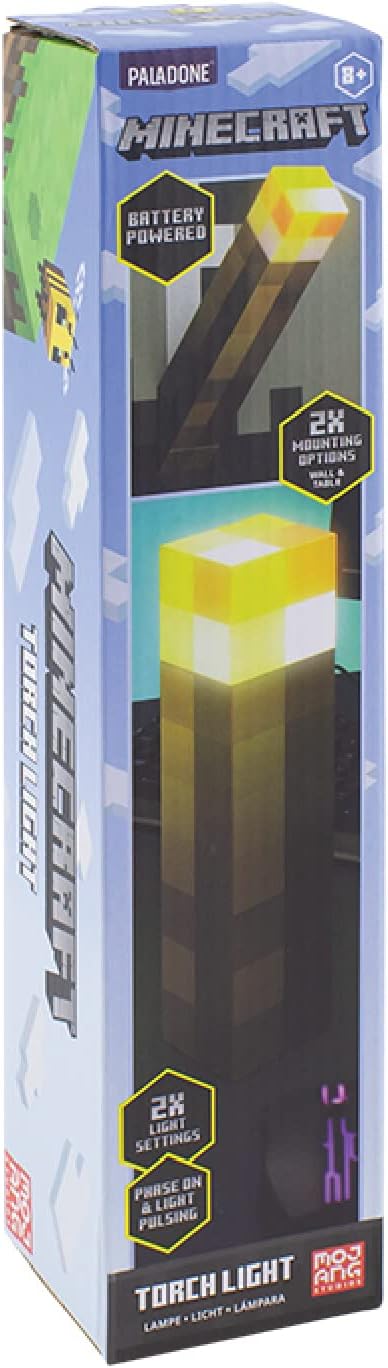
Grazas pola compraasing the Paladone Minecraft Torch Light. This officially licensed product brings the iconic Minecraft torch to life, offering two distinct light modes and versatile placement options. This manual provides essential information for the safe and effective use of your new torch light.
2. Características
- Dous modos de luz: Choose between a steady light or a pulsating effect, mimicking a real torch.
- Colocación versátil: Designed for both tabletop display and wall mounting.
- Alimentado por batería: Operates on 3x AAA batteries (not included) for portability.
- Apagado automático: Features a 20-minute auto shut-off function, ideal for use as a bedside light.
- Licenza oficial: Authentic Minecraft merchandise.
3. Contido do paquete
Asegúrate de que estean presentes todos os elementos antes de continuar coa configuración:
- 1 x Paladone Minecraft Torch Light
- Manual de instrucións
4. Configuración
4.1. Instalación da batería
- Locate the battery compartment cover on the bottom of the torch light.
- Using a small Phillips head screwdriver, unscrew the retaining screw on the battery compartment cover.
- Retire a tapa.
- Insert 3x AAA batteries (not included), ensuring correct polarity (+/-) as indicated inside the compartment.
- Coloque a tapa do compartimento da batería e fíxaa co parafuso.

4.2. Opcións de montaxe
The Minecraft Torch Light offers two ways to display it:
- Uso de mesa: Simply place the torch light on any flat, stable surface.
- Montaxe na parede: The torch light features keyhole slots on its base for wall mounting. Flip the bottom section to reveal the wall mount option. Use appropriate screws (not included) for your wall type to securely hang the torch light.


5. Funcionamento
5.1. Turning On/Off and Changing Light Modes
The torch light has a button on its side to control power and light modes.
- Para activar: Press the button once. The light will illuminate in its steady mode.
- Para cambiar o modo: Press the button a second time to switch to the pulsating light mode.
- Para desactivar: Preme o botón unha terceira vez para apagar a luz.

5.2. Auto Shut-Off Function
The torch light is equipped with a 20-minute auto shut-off feature. This conserves battery life and makes it suitable for use as a night light. After 20 minutes of continuous operation, the light will automatically turn off.
5.3. Vídeos de produtos
Vídeo 1: Unha vista de 360 graos view of the Minecraft Torch Light, showcasing its design and appearance from all angles.
Video 2: Demonstrates the two light modes (steady and pulsating) and the wall mounting feature of the Minecraft Torch Light.
6. Mantemento
- Limpeza: Wipe the torch light with a soft, dry cloth. Do not use abrasive cleaners or solvents.
- Substitución da batería: Replace batteries when the light dims or stops functioning. Always replace all three batteries at the same time with new ones.
- Almacenamento: Se o gardas durante un período prolongado, retira as baterías para evitar fugas.
7 Solución de problemas
| Problema | Causa posible | Solución |
|---|---|---|
| A luz non acende. | As baterías están agotadas ou están mal instaladas. | Comprobe a polaridade das pilas e substitúaas por pilas AAA novas. |
| A luz é tenue ou parpadea. | Batería baixa. | Replace all three AAA batteries with new ones. |
| Auto shut-off activates too soon or not at all. | Internal sensor issue or defect. | Ensure the light is not obstructed. If the issue persists, contact customer support. |
8. Especificacións
| Atributo | Detalle |
|---|---|
| Nome do modelo | RS561006 |
| Número de peza | PP9202MCF |
| Marca | Paladone |
| Dimensións do produto | 1.01" de profundidade x 2.17" de ancho x 11.02" de alto (2.57 cm de profundidade x 5.51 cm de ancho x 28 cm de alto) |
| Peso do elemento | 9.5 onzas (270 gramos) |
| Fonte de enerxía | Battery Powered (3x AAA batteries required, not included) |
| Duración da batería | Aproximadamente 8 Horas |
| Tipo de fonte de luz | LED |
| Brillo | 125 lúmenes |
| Método de control | Botón táctil |
| Material | Plástico |
| Uso interior/exterior | Interior |
| Nivel de resistencia á auga | Non resistente á auga |
9. Información de seguridade
- Este produto non é un xoguete. Manter fóra do alcance dos nenos pequenos.
- Non mesture pilas antigas e novas, nin tipos diferentes de pilas.
- Elimina as baterías usadas de forma responsable segundo a normativa local.
- Non expoña o produto á auga nin a temperaturas extremas.
- Non intente desmontar nin modificar o produto.
10. Garantía e soporte
For warranty information or technical support, please refer to the contact details provided on the product packaging or visit the official Paladone websitio. Garda o comprobante de compra para calquera reclamación de garantía.


