1. Introdución
The QUIKCELL QAIR MAX True Wireless Earbuds offer a seamless audio experience with advanced features designed for convenience and durability. This manual provides comprehensive instructions to help you get the most out of your earbuds, from initial setup to advanced operation and maintenance.
Descrición do vídeo: Este vídeo ofrece unha visión xeralview of the QUIKCELL QAIR MAX True Wireless Earbuds, highlighting key features such as wireless charging, touch controls, and sweat resistance.
2. Configuración
2.1. Desembalaxe e carga inicial
Upon unboxing, ensure all components are present: the QUIKCELL QAIR MAX earbuds, the charging case, and various ear tip sizes. Before first use, fully charge the earbuds and charging case.
- Coloque os auriculares na caixa de carga.
- Connect the charging case to a power source using the provided cable, or place it on a compatible wireless charging pad.
- The LED indicators on the charging case will illuminate to show the charging status and current power level.
- A full charge provides approximately 5 hours of playtime for the earbuds, with an additional 20 hours available from the charging case.

Descrición da imaxe: The QUIKCELL QAIR MAX earbuds are shown inside their open charging case, which is positioned on a wireless charging pad. This illustrates the magnetic charging feature and the LED power indicators on the case.
2.2. Emparellamento co teu dispositivo
The QAIR MAX earbuds feature hassle-free technology for automatic connection.
- Open the charging case. The earbuds will automatically turn on and connect to each other.
- No teu dispositivo (teléfono intelixente, tableta, etc.), activa o Bluetooth.
- Busca "QUIKCELL QAIR MAX" in the list of available Bluetooth devices and select it to pair.
- Once paired, the earbuds will automatically connect to your device whenever they are removed from the case and Bluetooth is enabled on your device.
2.3. Colocación dos auriculares
For optimal sound quality and comfort, select the correct ear tip size.
- The earbuds come with three different ear tip sizes (Small, Medium, Large).
- Try each size to find the one that provides a secure, comfortable fit and good seal in your ear canal.
- The ergonomic design ensures maximum comfort and reliability for extended periods of use.
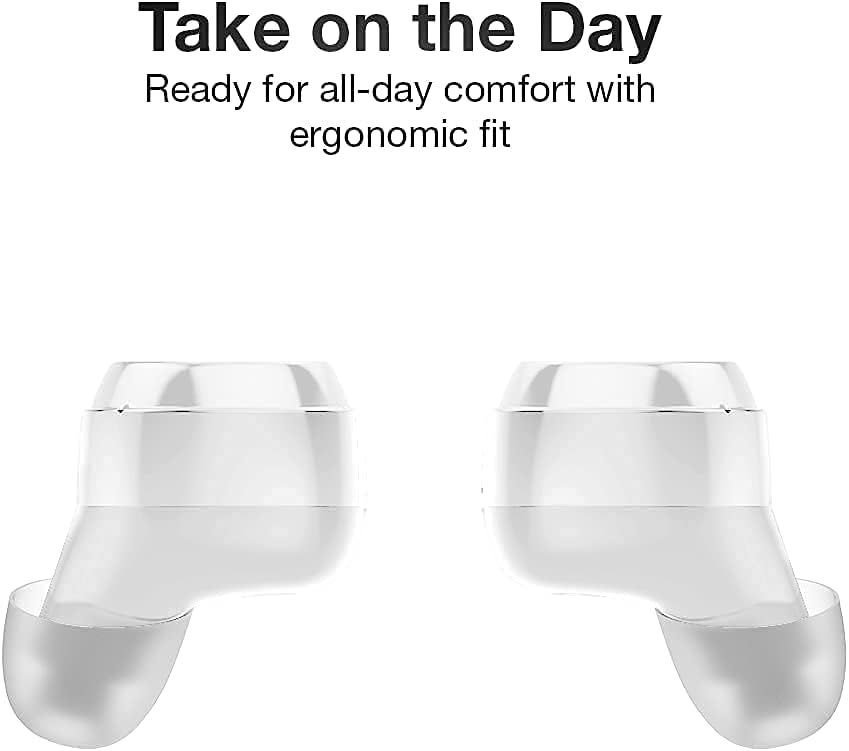
Descrición da imaxe: Un primeiro plano view of two QUIKCELL QAIR MAX earbuds, highlighting their ergonomic shape designed for comfortable and secure placement in the ear.
3. Funcionamento dos auriculares
3.1. Acendido/apagado
- Encendido: Os auriculares acéndense automaticamente ao retiralos da caixa de carga.
- Apagado: Volva colocar os auriculares na caixa de carga para que se apaguen automaticamente e comecen a cargar.
3.2. Toca Controis
The QAIR MAX earbuds feature intuitive touch controls on the outside of each earbud.
- Reproducir/Pausa: Toca unha vez en calquera dos auriculares.
- Próxima pista: Toca dúas veces o auricular dereito.
- Pista anterior: Toca dúas veces o auricular esquerdo.
- Subir volume: Toca tres veces o auricular dereito.
- Baixar volume: Toca tres veces o auricular esquerdo.
- Responder/Finalizar chamada: Toca unha vez en calquera dos auriculares durante unha chamada entrante.
- Rexeitar a chamada: Manteña premido calquera dos auriculares durante 2 segundos durante unha chamada entrante.
3.3. Activación do asistente de voz
Utilize the built-in microphone to activate your device's voice assistant.
- Activar o asistente de voz: Press and hold either earbud for 2 seconds (when not on a call). This will activate Siri, Google Assistant, or other compatible voice assistants.
3.4. Conectividade
The earbuds maintain a stable Bluetooth connection for clear audio.
- The latest wireless technology provides crystal clear sound in both ears.
- Bluetooth connectivity is effective up to a range of 10 meters (approximately 33 feet).
4. Mantemento
4.1. Limpeza dos auriculares
Unha limpeza regular axuda a manter a calidade do son e a hixiene.
- Limpe con coidado os auriculares e a funda de carga cun pano suave, seco e sen fiapos.
- Retire as almofadas dos oídos e límpeas con auga e xabón suave, logo séqueas ben antes de volvelas colocar.
- Evite o uso de materiais abrasivos ou produtos químicos agresivos.
4.2. Resistencia á auga
The QAIR MAX earbuds are designed for active lifestyles.
- The earbuds feature an IPX5 sweat resistance rating, protecting them against moisture and dirt.
- This rating means they can withstand splashes of water and sweat, making them suitable for workouts.
- Nota: The earbuds are not waterproof and should not be submerged in water. The charging case is not water-resistant.

Descrición da imaxe: Two QUIKCELL QAIR MAX earbuds are shown with visible water droplets, demonstrating their IPX5 sweat-resistant capabilities, suitable for active use.
5 Solución de problemas
5.1. Os auriculares non se emparellan
- Asegúrate de que os dous auriculares estean completamente cargados.
- Volva colocar os dous auriculares na caixa de carga, peche a tapa, agarde uns segundos e ábraa de novo.
- Desactiva e activa o Bluetooth do teu dispositivo e, a seguir, tenta emparellalo de novo.
- Se os problemas persisten, tenta esquecer o dispositivo na configuración de Bluetooth e volvelo emparellar.
5.2. Sen son ou volume baixo
- Comproba o nivel de volume tanto nos auriculares (mediante os controis táctiles) como no dispositivo conectado.
- Asegúrate de que os auriculares estean correctamente asentados nas orellas e de que as almofadas proporcionen un bo selado.
- Limpa calquera residuo dos altofalantes e das almofadas dos auriculares.
- Verifica que os auriculares estean conectados á saída de audio correcta do teu dispositivo.
5.3. Problemas de carga
- Asegúrate de que o cable de carga estea conectado correctamente tanto á carcasa como á fonte de alimentación.
- If using wireless charging, ensure the case is correctly positioned on a compatible wireless charging pad.
- Check for any debris in the charging ports of the case or on the charging contacts of the earbuds.
- Proba a usar un cable de carga ou un adaptador de alimentación diferente.
6. Especificacións
| Número de modelo | QAIRMAX-WHT |
| Tecnoloxía de conectividade | Sen fíos (Bluetooth 5.0) |
| Alcance Bluetooth | Ata 10 metros |
| Duración da batería (auriculares) | Ata 5 horas por carga |
| Tempo de reprodución total (con estuche) | Máis de 25 horas |
| Clasificación de resistencia á auga | IPX5 (resistente á suor) |
| Tipo de control | Control táctil, control por voz |
| Dispositivos compatibles | iPhone, Android, PC, Mac (with Bluetooth) |
| Dimensions (Earbuds) | 2.6 x 1.18 x 1.18 polgadas (aproximado) |
| Peso do elemento | 3.52 onzas |
| Fabricante | Alphacomm |
7. Garantía e soporte
For warranty information and customer support, please refer to the documentation included with your purchase or visit the official QUIKCELL websitio. Garda o comprobante de compra para calquera reclamación de garantía.


