1. Introdución
This manual provides essential information for the safe and effective use of your Matrix Fitness TF30 Treadmill with XIR Console. Please read this manual thoroughly before assembly, operation, or maintenance to ensure proper function and longevity of your equipment.
2. Configuración e montaxe
The Matrix Fitness TF30 Treadmill requires assembly upon delivery. It is recommended to have assistance for assembly due to the size and weight of the components. Ensure you have adequate space for both operation and storage.
2.1 Desembalaxe e comprobación de compoñentes
- Retire coidadosamente todos os compoñentes da embalaxe.
- Verify all included components are present: Treadmill Frame, Masts, Mast Boots, Console Base, Handlebar, Handlebar Sleeves, Handlebar Caps, Frame Cover Sets, Back Cover, Power Cord, Safety Key, Hardware Kit.
- Inspect all parts for any signs of damage. Contact customer support immediately if any parts are missing or damaged.
2.2 Space Requirements and Placement
The TF30 Treadmill has dimensions of 77 inches (D) x 35 inches (W) x 62 inches (H). When folded, its dimensions are 42 inches (D) x 35 inches (W) x 71 inches (H). Ensure sufficient clearance around the treadmill for safe operation and access.

Image: Dimensions of the Matrix Fitness TF30 Treadmill, showing 77 inches length, 35 inches width, and 62 inches height.
2.3 Mecanismo de pregamento
The treadmill features a near 90-degree fold for space-saving storage. Wheels are located at the front for easy movement of the folded unit.
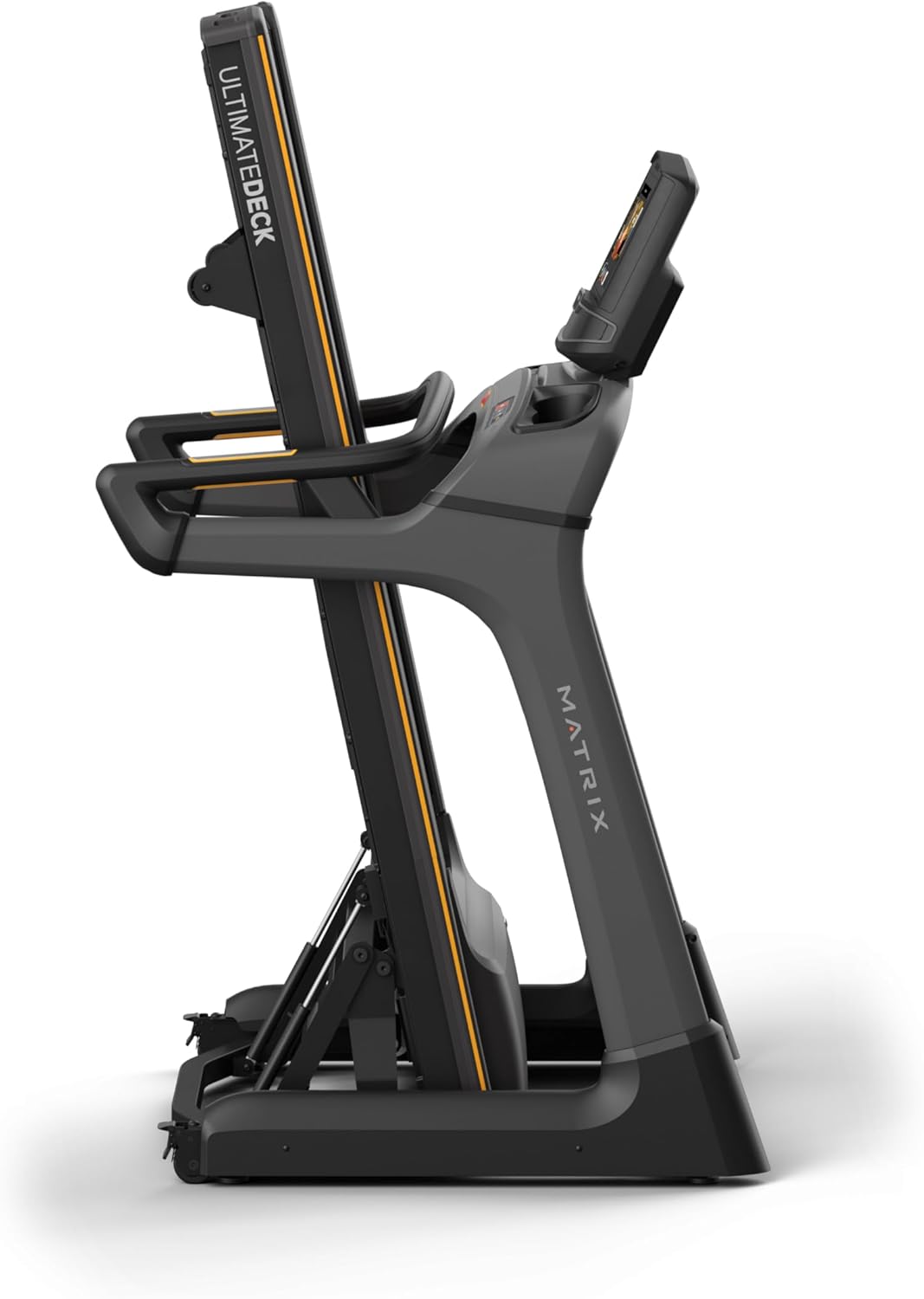
Image: Matrix Fitness TF30 Treadmill shown in its upright, folded position, demonstrating its space-saving design.
3. Instrucións de funcionamento
Familiarize yourself with the console and controls before beginning your workout.
3.1 XIR Console Overview
The 16-inch touchscreen console provides access to various workout programs, entertainment apps, and performance metrics. It features a responsive interface for easy navigation.

Image: Close-up of the XIR Console highlighting its large HD touchscreen, streaming app capabilities (Netflix, YouTube, Spotify), Virtual Active and iFIT integration, Bluetooth FTMS, integrated HDMI, 13 metric-driven programs, and Bluetooth HR connectivity.
3.2 Comezar un adestramento
- Ensure the safety key is properly attached to the console and clipped to your clothing.
- Select your desired workout program or app from the touchscreen.
- Adjust speed (0.5–12.5 mph) and incline (0–15%) using the console controls or quick-access buttons on the handlebars.
- The console measures distance and other metrics during your workout.

Image: The XIR Console displaying various application icons for entertainment and workout programs, including Netflix, Hulu, YouTube, Spotify, and iFIT.
3.3 Key Features for Enhanced Performance
- Johnson Drive System: This quiet, durable, and responsive continuous-duty drive system helps maintain a consistent rhythm during your workout.
- Ultimate Deck System: The heavy-duty frame, extra-thick deck, and industrial-grade cushions provide a comfortable and low-impact running surface, reducing stress on joints.
- iFIT and Virtual Active: Explore virtual routes and guided workouts from around the world. A 30-day iFIT membership is included.

Image: Diagram illustrating the internal components of the Johnson Drive System, emphasizing its quiet and durable design.

Image: Diagram showing the cushioning points of the Ultimate Deck System, designed for reduced impact.
4. Mantemento
Un mantemento regular garante a lonxevidade e o rendemento óptimo da súa cinta de correr.
- Limpeza: After each use, wipe down the console and running deck with a damp un pano para eliminar a suor e o po. Evite o uso de produtos de limpeza abrasivos.
- Lubricación: Refer to the specific lubrication schedule in your detailed product manual (not provided here) to maintain the running belt.
- Aliñamento e tensión da correa: Periodically check the running belt for proper alignment and tension. Adjust as needed according to detailed instructions in the full product manual.
- Inspección xeral: Regularly inspect all bolts and connections to ensure they are secure.
5 Solución de problemas
This section addresses common issues you might encounter with your Matrix Fitness TF30 Treadmill.
| Problema | Posible causa/solución |
|---|---|
| Treadmill deck catch not engaging/disengaging properly. | Ensure the release handle is fully pulled/pushed. Check for any obstructions in the folding mechanism. |
| iFIT or other console apps not functioning as expected. | Ensure the console is connected to a stable internet connection. Check for available software updates. Restart the console. |
| Bluetooth audio connection issues. | Ensure your device's Bluetooth is enabled and discoverable. Try re-pairing the device. Note that direct phone audio mirroring to built-in speakers via Bluetooth may not be supported; use the 3.5mm audio input if available. |
| Console touchscreen unresponsive or activating randomly. | Wipe the screen clean and dry. Use the 'disable touchscreen' feature if available during intense workouts to prevent accidental inputs from sweat. |
| Safety pin triggering randomly. | Ensure the safety key is securely in place and the magnet is making full contact. Inspect the safety key and its receptacle for damage. |
| Rattling noise from the deck. | Check all assembly bolts for tightness. Ensure the treadmill is on a level surface. |
| Water bottle pockets accumulating condensation. | Wipe out the pockets after each use to prevent moisture buildup. |
6. Especificacións
| Característica | Detalle |
|---|---|
| Marca | Matriz |
| Nome do modelo | Matrix Fitness TF30 Treadmill |
| Estilo | TF30 Treadmill with XIR Console |
| Dimensións do produto (LxWxH) | 77" x 35" x 62" |
| Tamaño dobrado | 42" x 35" x 71" |
| Peso do elemento | 294 libras |
| Material | Aceiro de aliaxe |
| Superficie de carreira | 20" x 55" |
| Rango de velocidade | 0.5-12.5 mph |
| Rango de inclinación | 0-15 % |
| Potencia máxima | 3.25 cabalos de potencia |
| Recomendación de peso máximo | 350 libras |
| Tipo de visualización | LCD (pantalla táctil de 16 polgadas) |
| Número de programas | 13 |
| Fonte de enerxía | Eléctrico con cable |
| Características especiais | Easy-Folding Design, Exclusive Johnson Drive System, Ultimate Deck System |
| Usos recomendados | Fitness na casa |
7. Información da garantía
Your Matrix Fitness TF30 Treadmill is covered by the manufacturer's warranty:
- Consola: 5 years parts / 1 year labor
- Marco: 5 years parts / 2 years labor
- Vida útil: Frame, motor, and cushioning
Please retain your proof of purchase for warranty claims. For detailed terms and conditions, refer to the official warranty document provided with your product or contact Matrix Fitness customer support.
8. Atención ao cliente
For any questions, technical assistance, or service requests, please contact Matrix Fitness USA customer support. You can find contact information on the official Matrix Fitness websitio web ou a través do seu vendedor.
Para máis información, visite o Matrix Store on Amazon.


