1. Introdución
This manual provides essential instructions for setting up, operating, maintaining, and troubleshooting your realme DIZO Star 300 feature phone. Please read this manual carefully to ensure proper use and to maximize the lifespan of your device.
2. Produto rematadoview
The DIZO Star 300 is a basic mobile phone designed for essential communication and entertainment. It features a compact design, a long-lasting battery, and several useful functions.
Características principais:
- Pantalla de 1.8 polgadas
- Batería de 2550 mAh
- 32 MB de RAM
- Expandable Memory up to 64 GB
- Human Interface Input: Keypad
- VGA Rear Camera
- FM Radio & MP3 Player
- Antorcha incorporada
- Large Storage for Contacts and Messages
Produto Views:
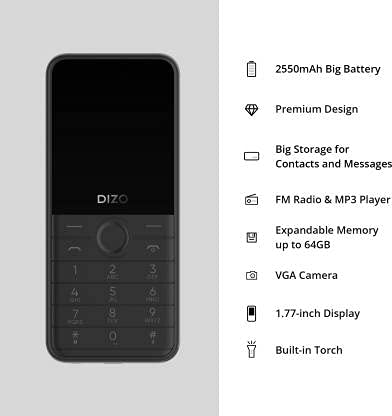
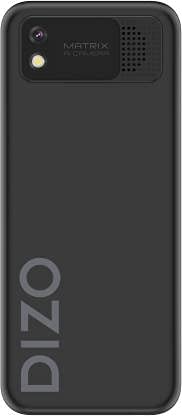

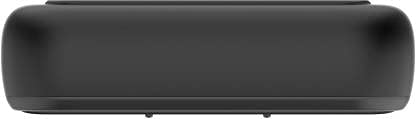
Vídeos do produto:
DIZO Star 300 Overview
Este vídeo ofrece unha visión xeralview of the DIZO Star 300 phone, highlighting its design and key features such as the 1.8-inch display, 2550 mAh battery, 32 MB RAM, and multimedia capabilities.
DIZO Star 300 User Interaction
This video demonstrates basic user interaction with the DIZO Star 300, including navigating menus and using the keypad.
3. Configuración
3.1 Installing the SIM Card and Memory Card
- Retire con coidado a tapa traseira do teléfono.
- If the battery is installed, remove it by gently lifting it from the designated slot.
- Insert your SIM card(s) into the SIM card slot(s) with the gold contacts facing down. Ensure they are securely seated.
- If using an external memory card (up to 64GB), insert it into the microSD card slot.
- Introduza a batería, aliñando os contactos correctamente.
- Volva colocar a tapa traseira ata que encaixe no seu lugar.
3.2 Carga da batería
- Conecta o cargador ao porto de carga do teu teléfono.
- Conecte o cargador a unha toma de corrente.
- O indicador da batería na pantalla mostrará o estado de carga.
- Unha vez cargado por completo, desconecta o cargador do teléfono e da toma de corrente.
3.3 Acendido/Apagado
- Para acender: manteña premido o botón de acendido/finalizar chamada ata que a pantalla se ilumine.
- To power off: Press and hold the Power/End Call button until the power-off options appear, then select 'Power off'.
4. Instrucións de funcionamento
4.1 Navegación básica
- Use the navigation keys (up, down, left, right) to move through menus.
- Press the center key (OK/Select) to confirm a selection.
- Press the 'Back' or 'Clear' key to return to the previous screen or delete characters.
4.2 Facer e recibir chamadas
- To make a call: Enter the phone number using the keypad and press the Call button (green receiver icon).
- To answer a call: Press the Call button when the phone rings.
- To end a call: Press the End Call button (red receiver icon).
4.3 Mensaxería
- Navigate to the 'Messaging' menu.
- Selecciona "Escribir mensaxe" para redactar unha nova SMS.
- Introduza o número do destinatario ou seleccione un dos contactos.
- Escriba a súa mensaxe usando o teclado.
- Prema "Enviar" para transmitir a mensaxe.
4.4 FM Radio and MP3 Player
- To use FM Radio: Connect earphones (acting as an antenna) and navigate to the 'FM Radio' application.
- To use MP3 Player: Ensure you have MP3 files stored on your memory card. Navigate to the 'MP3 Player' application to browse and play your music.
4.5 Uso da cámara
- Navigate to the 'Camera' application.
- Encadra a túa foto usando a pantalla.
- Press the center key to capture a photo.
4.6 Lanterna incorporada
- The torch function can typically be activated or deactivated through the phone's menu or by a long press on a specific key (refer to on-screen prompts).
5. Mantemento
- Limpeza: Usa un pano suave e seco para limpar a superficie do teléfono. Evita usar produtos de limpeza líquidos ou materiais abrasivos.
- Coidado da batería: Do not expose the battery to extreme temperatures. Avoid overcharging or completely draining the battery frequently to prolong its life.
- Almacenamento: Store the phone in a cool, dry place away from direct sunlight and moisture when not in use for extended periods.
- Actualizacións de software: Periodically check for any available software updates to ensure optimal performance and security.
6 Solución de problemas
If you encounter issues with your DIZO Star 300, refer to the following common solutions:
- O teléfono non se acende: Ensure the battery is charged and correctly inserted. Try connecting the charger to see if it powers on.
- Sen sinal de rede: Check if the SIM card is properly inserted. Ensure you are in an area with network coverage.
- A batería non se carga: Verify the charger is working and properly connected to both the phone and the power outlet. Check for any damage to the charging cable or port.
- O teclado non responde: Reinicia o teléfono. Se o problema persiste, ponte en contacto co servizo de atención ao cliente.
- Problemas de son: Check volume settings. Ensure the speaker is not obstructed.
For issues not covered here, please contact DIZO customer support.
7. Especificacións
| Característica | Detalle |
|---|---|
| Nome do modelo | Estrela 300 |
| Marca | realme |
| Fabricante | DIZO |
| Cor | Negro |
| Tamaño da pantalla | 1.8 polgadas |
| Capacidade da batería | 2550 mAh |
| RAM | 32 MB |
| Memoria ampliable | Ata 64 GB |
| Entrada da interface humana | Teclado |
| Cámara | VGA Rear Camera |
| Características | FM Radio, MP3 Player, Built-in Torch |
| Peso do elemento | 220 g |
| ASIN | B099MXZ3MM |
| Data de primeira dispoñibilidade | 16 de xullo de 2021 |
8. Garantía e soporte
The realme DIZO Star 300 is manufactured by DIZO. For warranty information, service, or technical support, please refer to the warranty card included with your product or visit the official DIZO or realme support websitio. Garde o recibo da compra como xustificante de compra para reclamacións de garantía.


