Introdución
The BYTECH 3-in-1 Charging Cable (Model BYOPCA103BK) is a versatile USB cable designed for charging and syncing a wide range of electronic devices. It features a standard USB Type-A connector on one end and a multi-connector head on the other, providing Lightning, USB Type-C, and Micro USB compatibility. This cable offers a convenient solution for users with multiple device types, ensuring high-speed charging and data transfer.
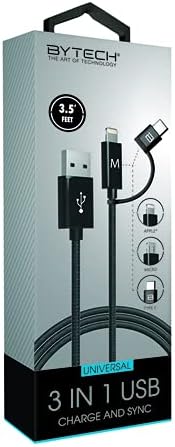
Image: The BYTECH 3-in-1 Charging Cable, showcasing its universal compatibility with various device types.
Configuración e conexión
Using the BYTECH 3-in-1 Charging Cable is straightforward. Follow these steps to connect your devices:
- Identify the USB-A End: Locate the standard USB Type-A connector. This end typically connects to a power adapter (wall charger), a computer's USB port, or a power bank.
- Conectar á fonte de alimentación/ordenador: Insert the USB Type-A end firmly into a compatible USB port on your charging device or computer.
- Select the Appropriate Device Connector: The other end of the cable features three integrated connectors:
- Lóstrego: For Apple iPhone, iPad, and iPod devices.
- USB tipo C: For newer Android smartphones, tablets, laptops, and other USB-C enabled devices.
- Micro USB: For older Android smartphones, tablets, power banks, and various other electronic gadgets.
- Conéctate ao teu dispositivo: Carefully insert the chosen connector into the charging/data port of your electronic device. Ensure it is inserted correctly to avoid damage.
- Verificar a conexión: Your device should indicate that it is charging or connected for data transfer.
Instrucións de funcionamento
This cable supports both charging and data synchronization, depending on the connected device and power source.
Cargando
- Connect the USB-A end to a compatible USB wall adapter, car charger, or power bank.
- Connect the appropriate device connector (Lightning, USB-C, or Micro USB) to your smartphone, tablet, or other compatible device.
- The cable is designed for high-speed charging, ensuring efficient power delivery to your device.
Sincronización de datos
- Connect the USB-A end to a USB port on your computer (PC or Mac).
- Connect the appropriate device connector to your smartphone or tablet.
- Your computer should recognize the connected device, allowing you to transfer files, photos, videos, and other data. Follow your device's specific instructions for data transfer.
Mantemento e coidados
To ensure the longevity and optimal performance of your BYTECH 3-in-1 Charging Cable, please follow these maintenance guidelines:
- Evita dobrar: Do not excessively bend or crimp the cable, especially near the connectors, as this can damage internal wires.
- Desconexión correcta: Tire sempre da cabeza do conector, non do cable en si, ao desconectalo dun dispositivo ou dunha fonte de alimentación.
- Manter seco: Protect the cable from moisture and liquids. Do not use it in wet environments.
- Limpar suavemente: If necessary, wipe the cable and connectors with a soft, dry cloth. Avoid using harsh chemicals or abrasive materials.
- Almacenamento: Store the cable in a cool, dry place, away from direct sunlight and extreme temperatures. Coiling it loosely can prevent tangles and damage.
- Inspeccionar regularmente: Periodically check the cable and connectors for any signs of wear, fraying, or damage. Discontinue use if damage is observed.
Resolución de problemas
If you encounter issues with your BYTECH 3-in-1 Charging Cable, try the following solutions:
- O dispositivo non se carga:
- Asegúrese de que os dous extremos do cable estean ben conectados.
- Proba cun adaptador de alimentación ou un porto USB diferente.
- Proba o cable cun dispositivo diferente para descartar un problema específico do dispositivo.
- Check if the correct connector (Lightning, USB-C, Micro USB) is being used for your device.
- Carga lenta:
- Ensure your power adapter provides sufficient output (e.g., 5V/2A or higher for faster charging).
- Avoid using the device heavily while charging.
- Close background applications on your device.
- Problemas de transferencia de datos:
- Ensure the USB-A end is connected to a computer's data-enabled USB port, not just a charging port.
- Check your device's settings to ensure it's set to "File Transfer" or "MTP" mode, not just "Charging."
- Try restarting both your device and computer.
- Danos no cable: If the cable appears frayed, bent, or damaged, discontinue use immediately and replace it.
Especificacións
| Característica | Detalle |
|---|---|
| Marca | Bytech |
| Nome do modelo | 3 en 1 |
| Número de modelo do artigo | BYOPCA103BK |
| Tipo de conector | USB Type-A, USB Type-C, Lightning |
| Tipo de cable | USB |
| Dispositivos compatibles | Portátil, Ordenador persoal, Tablet, Smartphone |
| Característica especial | Alta Velocidade |
| Usos recomendados | Carga de dispositivos electrónicos |
| Cor | Negro |
| Xénero do conector | De varón a varón |
| Forma | Plano |
| Número de pinos | 8 |
| Uso interior/exterior | Interior |
| Número de elementos | 1 |
| Tipo de paquete do cliente | coiled in protective tubing |
| Vol. Máximotage | 5 voltios |
| Material exterior | Plastic/Rubber |
| Fabricante | BYTECH |
| UPC | 805112034765 |
| Dimensións do paquete | 7 x 5 x 3 polgadas |
| Peso do elemento | 1 libras |
| ASIN | B09BBK4X64 |
| Data de primeira dispoñibilidade | 27 de xullo de 2021 |
Garantía e Soporte
For warranty information or technical support regarding your BYTECH 3-in-1 Charging Cable, please refer to the manufacturer's official websitio web ou póñase en contacto co seu departamento de atención ao cliente. Garde o recibo de compra como proba de compra para calquera reclamación de garantía.
Manufacturer: BYTECH
Para obter máis asistencia, visite www.bytechintl.com (example link, actual link not provided in input).


