1. Introdución
The BESTEK 4K 3-in-1 HDMI Switch allows you to connect up to three HDMI source devices to a single HDMI display. This device supports 4K resolution, 3D content, and deep color, providing a high-quality audio and video experience. It features an IR wireless remote control for convenient switching between connected devices.
Características principais:
- 3 entradas HDMI, 1 saída HDMI: Connect multiple devices to one display.
- Soporte de resolución 4K: Experience high-definition video up to 4K.
- Compatibilidade 3D: Supports 3D video formats.
- IR Wireless Remote Control: Switch inputs conveniently from a distance.
- Ampla compatibilidade: Works with devices such as Nintendo Switch, Blu-ray players, PS4, PS3, Xbox, HD-DVD, SKY-STB, and other audio/video equipment.
2. Contido do paquete
Comprobe o contido do paquete ao abrilo para asegurarse de que todos os elementos estean presentes e non estean danados:
- BESTEK 4K 3-in-1 HDMI Switch Unit
- IR Wireless Remote Control
- Adaptador de alimentación de CA.
- Manual de usuario (este documento)
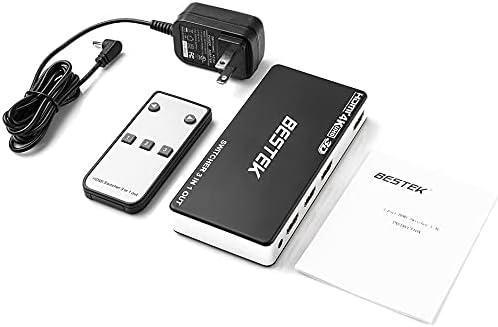
Image: Contents of the BESTEK 4K 3-in-1 HDMI Switch package, including the main unit, IR remote, power adapter, and instruction manual.
3. Produto rematadoview
Familiarize yourself with the ports and indicators on the HDMI switch:

Imaxe: Fronte view of the BESTEK HDMI switch. It features three HDMI input ports labeled 1, 2, and 3, a DC 5V power input, and a single HDMI output port.
- HDMI Input 1, 2, 3: Connect your source devices (e.g., game console, Blu-ray player).
- Saída HDMI: Connect to your display device (e.g., TV, monitor, projector).
- DC 5 V: Porto de entrada de alimentación para o adaptador de CA incluído.
- Receptor IR: Recibe sinais do mando a distancia.
- Botón de selección de entrada: Manually switch between HDMI inputs.
- Indicadores LED: Show which input is currently active.
4. Instrucións de configuración
Follow these steps to connect your BESTEK HDMI Switch:
- Conectar dispositivos de fonte HDMI: Plug up to three HDMI source devices (e.g., gaming console, DVD/Blu-ray player, cable box) into the HDMI Input ports (1, 2, or 3) on the HDMI switch using HDMI cables.
- Conectar á pantalla: Connect one end of an HDMI cable to the HDMI Output port on the switch and the other end to the HDMI input on your HDTV, monitor, or projector.
- Conectar o adaptador de alimentación: Plug the included AC power adapter into the DC 5V port on the HDMI switch, then plug the adapter into a standard electrical outlet.
- Dispositivos de encendido: Acenda os seus dispositivos de fonte HDMI e a súa pantalla.
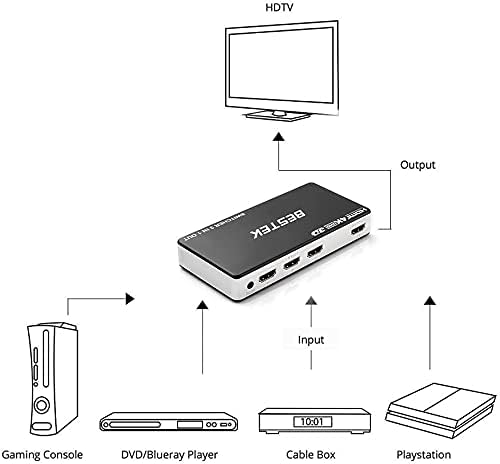
Image: Connection diagram illustrating how to connect a gaming console, DVD/Blu-ray player, and cable box to the HDMI switch's input ports, and the switch's output to an HDTV.
The HDMI switch will automatically detect the active input or you can manually select it.
5. Instrucións de funcionamento
There are two methods to switch between your connected HDMI source devices:
Using the IR Wireless Remote Control:
- Asegúrate de que o mando a distancia teña as pilas instaladas.
- Point the remote control towards the front of the HDMI switch where the IR receiver is located.
- Press the corresponding number button (1, 2, or 3) on the remote to select the desired HDMI input.
Cambio manual:
- Press the "Input Select" button on the front of the HDMI switch.
- Each press will cycle through the available HDMI inputs (1 → 2 → 3 → 1, etc.).
- The LED indicator on the switch will illuminate to show which input is currently active.
6. Mantemento
To ensure the longevity and optimal performance of your BESTEK HDMI Switch, follow these maintenance guidelines:
- Limpeza: Usa un pano suave e seco para limpar o exterior do dispositivo. Non empregues produtos de limpeza líquidos nin aerosois, xa que poden danar a unidade.
- Ventilación: Asegúrate de colocar o interruptor nunha zona ben ventilada para evitar o sobrequecemento. Non bloquees ningunha abertura de ventilación.
- Almacenamento: Cando non o use durante períodos prolongados, garde o dispositivo nun lugar fresco e seco, lonxe da luz solar directa e de temperaturas extremas.
- Potencia: Always use the provided AC power adapter. Disconnect power during electrical storms or when unused for long periods.
7 Solución de problemas
If you encounter issues with your HDMI switch, refer to the following common problems and solutions:
| Problema | Posible Solución |
|---|---|
| Sen saída de vídeo nin de son. |
|
| O control remoto non funciona. |
|
| Sinal intermitente ou parpadeo. |
|
8. Especificacións
Technical specifications for the BESTEK 4K 3-in-1 HDMI Switch:
- Modelo: B09C25BBBT
- Entradas: 3 x HDMI
- Saída: 1 x HDMI
- Resolucións admitidas: Ata 4K (3840x2160)
- Funcións compatibles: 3D, Deep Color
- Tipo de conector: HDMI
- Fonte de alimentación: DC 5V (via included AC adapter)
- Control: Manual button, IR remote control
- Dispositivos compatibles: DVD Player, Gaming Console (PS4, Xbox, Nintendo Switch), Monitor, Projector, Television
- Peso do artigo: Aproximadamente 8.4 onzas (238 gramos)
- Dimensións do paquete: 6.93 x 4.49 x 1.69 polgadas (17.6 x 11.4 x 4.3 cm)
9. Garantía e soporte
BESTEK products are designed and manufactured to the highest quality standards. This product is covered by a limited warranty from the date of purchase. Please retain your proof of purchase for warranty claims.
Información da garantía:
- A garantía cobre os defectos nos materiais e na fabricación en condicións de uso normal.
- It does not cover damage caused by misuse, accident, unauthorized modification, or external causes such as power surges.
- For specific warranty terms and conditions, please refer to the warranty card included with your product or visit the official BESTEK websitio.
Atención ao cliente:
If you require technical assistance or have questions regarding your BESTEK 4K 3-in-1 HDMI Switch, please contact our customer support team:
- Websitio: www.bestek.com (for product registration, FAQs, and support contact information)
- Correo electrónico: Consulta a sección de contacto na páxina oficial websitio.
- Teléfono: Consulta a sección de contacto na páxina oficial websitio.
Please have your product model number (B09C25BBBT) and purchase details ready when contacting support.