Introdución
Thank you for choosing the Sengled Smart Bulb. This manual provides essential information for setting up, operating, and maintaining your new smart lighting product. The Sengled Smart Bulb offers advanced features including app and voice control, 16 million colors, tunable white light, scheduling, and remote access, all without requiring a separate hub.
Guía de configuración
Follow these steps to set up your Sengled Smart Bulb:
- Download the Sengled Home App: Busca 'Sengled Home' in the App Store (iOS) or Google Play Store (Android) and install the application.
- Rexistrarse/Iniciar sesión: Abre a aplicación e segue as instrucións que aparecen na pantalla para crear unha nova conta ou iniciar sesión se xa tes unha.
- Instala a lámpada: Twist the Sengled Smart LED bulb into a standard E26 medium base socket. Ensure the power is turned off before installation.
- Encendido: Turn on the light switch to power on the bulb. The bulb should blink to indicate it's in pairing mode.
- Engadir dispositivo na aplicación: In the Sengled Home app, tap the '+' icon to add a new device. Select 'Light Bulb' and follow the in-app guide to complete the setup.
- Conectar a wifi: The bulb will connect to your home's 2.4GHz Wi-Fi network. No additional hub is required.
- Integración do asistente de voz (opcional): If you wish to use voice control, link your Sengled Home account with your Amazon Alexa or Google Assistant account through their respective apps.
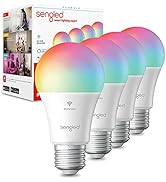
Image: Steps for setting up the Sengled Smart Bulb using the Sengled Home app.

Image: A Sengled Smart Bulb installed in a ceiling light fixture.
Instrucións de funcionamento
The Sengled Smart Bulb offers versatile control options:
Control de aplicacións
- On/Off: Activa/desactiva a lámpada directamente desde a aplicación.
- Adormecer: Axusta o brillo do 1 % ao 100 %.
- Selección de cor: Choose from 16 million colors to match your mood or decor.
- Branco axustable: Select white light temperatures from 2000K (warm white) to 6500K (cool white).
- Programación: Set timers and routines for automatic on/off times, dimming, or color changes.
- Control de grupo: Crea grupos de lámpadas para controlar varias luces simultaneamente.
- Modo escena: Apply pre-set or custom scenes for various activities or moods.
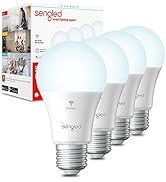
Image: A smartphone screen displaying the Sengled Home app interface for color selection.
Control de voz
Control your smart bulbs hands-free using voice commands with Amazon Alexa or Google Assistant. Examples:
- "Alexa, acende a luz da sala de estar."
- "Ok Google, acende a luz do dormitorio en azul."
- "Alexa, dim the kitchen to 50%."
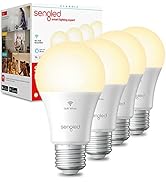
Image: A person interacting with a smart speaker to control the Sengled Smart Bulb via voice commands.
Control remoto
Manage your lighting from anywhere using the Sengled Home app on your smartphone, ensuring your home always looks occupied, even when you're away.
Wake Up to Light Feature
Program your bulbs to slowly brighten over a set period, simulating a natural sunrise to help you wake up gently.
Video: Official Sengled video demonstrating the 100-watt smart bulb's features and Alexa compatibility.
Mantemento
Sengled Smart Bulbs are designed for long-term use with a service life of 22.8 years. No specific maintenance is required beyond occasional dusting with a soft, dry cloth. Ensure the bulb is not exposed to water or excessive humidity.
Resolución de problemas
If you encounter issues with your Sengled Smart Bulb, consider the following:
- Problemas de conectividade: Ensure your Wi-Fi network is 2.4GHz (5G networks are not supported). Try restarting your router and the bulb.
- A lámpada non responde: Check if the bulb is securely screwed into the socket and if the power switch is on. Try turning the power off and on again to reset the bulb.
- Voice Command Problems: Verify that your Alexa or Google Assistant device is properly linked to your Sengled Home account and that the device names are correctly configured.
- Problemas da aplicación: Ensure your Sengled Home app is updated to the latest version. Try force-closing and reopening the app.
Para obter máis axuda, consulte a sección de soporte ou póñase en contacto co servizo de atención ao cliente.
Especificacións
| Característica | Detalle |
|---|---|
| Marca | Senglado |
| Número de modelo | W12-N15 |
| Tipo de luz | LED |
| Wattage | 100 watts equivalent (actual power consumption not specified, but typically lower for LED) |
| Brillo | 1500 lúmenes |
| Tamaño da forma do bulbo | A19 |
| Base de bulbo | E26 Medio |
| Cor clara | Multicolor (16 Million Colors) & Tunable White (2000K to 6500K) |
| Índice de reproducción da cor (CRI) | > 90 |
| Tecnoloxía de conectividade | Wi-Fi (só 2.4 GHz) |
| Tipo de controlador | Amazon Alexa, Asistente de Google, Cousas intelixentes |
| Vida de funcionamento da fonte de luz | 22.8 Anos |
| Uso interior/exterior | Interior |
| Tipo de material | Polímero sintético (PMMA) |
Garantía e Soporte
Sengled Smart Bulbs come with a 2 ano de garantía. For warranty claims or technical support, please visit the official Sengled website or contact their customer service. Live customer service is available in the U.S.
Para obter máis información e apoio, visite sengled.com.


