Introdución
This manual provides comprehensive instructions for the safe installation, operation, and maintenance of your XTRARM TiTon 100 cm TV Wall Mount. Please read this manual thoroughly before installation to ensure correct setup and to prevent damage to the product or injury.
The XTRARM TiTon wall mount is designed to securely attach medium and large televisions to a wall, offering flexibility in viewing angles through its articulated arm, tilt, swivel, and rotation capabilities.
Información de seguridade
- Capacidade de peso: Do not exceed the maximum load capacity of 60 kg (132 lbs). Exceeding this limit can result in serious injury or property damage.
- Tipo de parede: Ensure the mounting surface can safely support the combined weight of the mount and your television. Consult a professional if unsure about your wall's structural integrity.
- Instalación: Improper installation may cause serious injury. Follow all instructions carefully. If you have any doubts, contact a qualified installer.
- Ferramentas: Use appropriate tools for installation. Wear safety glasses and other protective gear as needed.
- Nenos: Manteña os nenos lonxe da zona de instalación. As pezas pequenas poden supoñer un perigo de asfixia.
- Xestión de cables Ensure all cables are routed safely and are not pinched or under tension to prevent damage and tripping hazards.
Contido do paquete
Verify that all components are present and undamaged before beginning installation. Standard mounting hardware is included.

Figura 1: Acabadoview of the XTRARM TiTon 100 cm TV Wall Mount components. This image displays the main articulated arm assembly and the TV mounting plate.
- Montaxe da placa de parede
- Brazo Articulado
- Placa de montaxe para TV
- Standard Mounting Hardware (screws, anchors, washers, spacers)
- Modelo de perforación
- Bubble Level (often included with standard hardware)
Especificacións
| Número de modelo | XTR-LA2050-600 |
| Tamaño de TV recomendado | Approximately 42-85 inches (107-191 cm) |
| Capacidade de carga máxima | 60 kg (132 lb) |
| Compatibilidade VESA (máx.) | 600 x 400 mm |
| Tipo de movemento | Articulated, Swivel, Turn, Tilt, Rotate |
| Rango de inclinación | -5° a +15° |
| Swivel/Rotation Range | 180° (depending on TV size and wall distance) |
| Wall Distance (Min/Max) | 11.4 cm / 100 cm (4.5 inches / 39.37 inches) |
| Material | Aceiro de aliaxe |
| Cor | Branco |
| Xestión de cables | Si |
| Tamaño da placa de parede | 48 x 28.8 cm |
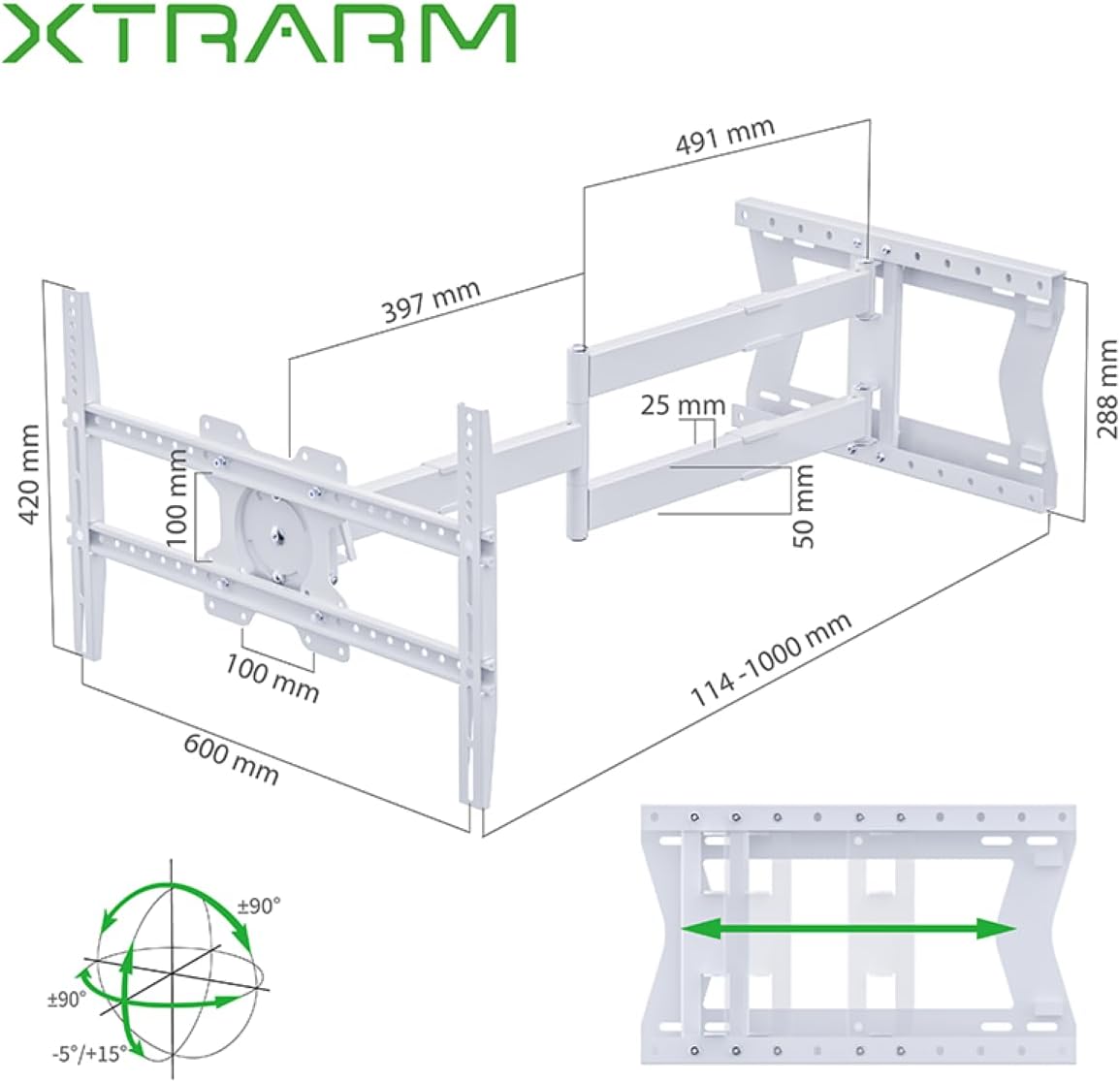
Figura 2: Detailed dimensions of the XTRARM TiTon wall mount and its range of motion, including extension, swivel, and tilt capabilities.

Figura 3: VESA compatibility chart for the XTRARM TiTon mount, indicating supported TV sizes from 42 to 85 inches and various VESA patterns.

Figura 4: The XTRARM TiTon mount is designed to safely support televisions up to 60 kilograms (132 lbs).
Configuración e instalación
Before you begin, ensure you have all necessary tools (e.g., drill, stud finder, level, screwdriver, wrench) and that your wall can support the weight. It is recommended to have two people for installation.
1. Determine Wall Type and Location
Identify if your wall is solid concrete, brick, or wood stud. Different wall types require specific anchors and drilling techniques. Use a stud finder to locate wood studs if applicable. Choose a mounting location that allows for optimal viewing angles and movement of the articulated arm.
2. Attach TV Brackets to Television
- Coloca con coidado o televisor boca abaixo sobre unha superficie suave e limpa para evitar danar a pantalla.
- Identifique os orificios de montaxe VESA na parte traseira do televisor.
- Select the appropriate screws, washers, and spacers from the provided hardware kit that fit your TV's VESA pattern.
- Attach the vertical TV brackets to the back of your television, ensuring they are securely fastened but not overtightened. The brackets should be centered horizontally on the TV.
3. Montar a placa de parede na parede
- Hold the drilling template against the wall at your desired mounting height. Use a level to ensure it is perfectly horizontal. Mark the drill hole locations.
- Drill pilot holes at the marked locations according to the recommended drill bit size for your wall type and anchors.
- Introduza ancoraxes de parede (se é necesario para o tipo de parede).
- Align the wall plate with the drilled holes and secure it to the wall using the provided lag bolts and washers. Tighten all bolts firmly.
4. Colgar a televisión nun prato de parede
- Con axuda, levante con coidado o televisor cos soportes instalados.
- Hook the TV brackets onto the wall plate assembly. Ensure the TV is securely seated on the mount.
- Engage any safety locking mechanisms on the TV brackets to prevent accidental dislodgement.

Figura 5: The XTRARM TiTon TV Wall Mount installed on a wall with a television attached, shown in a retracted position.
Instrucións de funcionamento
The XTRARM TiTon mount offers various adjustments to optimize your viewexperiencia ing.
Adjusting Extension and Retraction
Gently pull or push the television to extend or retract the articulated arm. The mount allows for a wall distance between 11.4 cm and 100 cm.
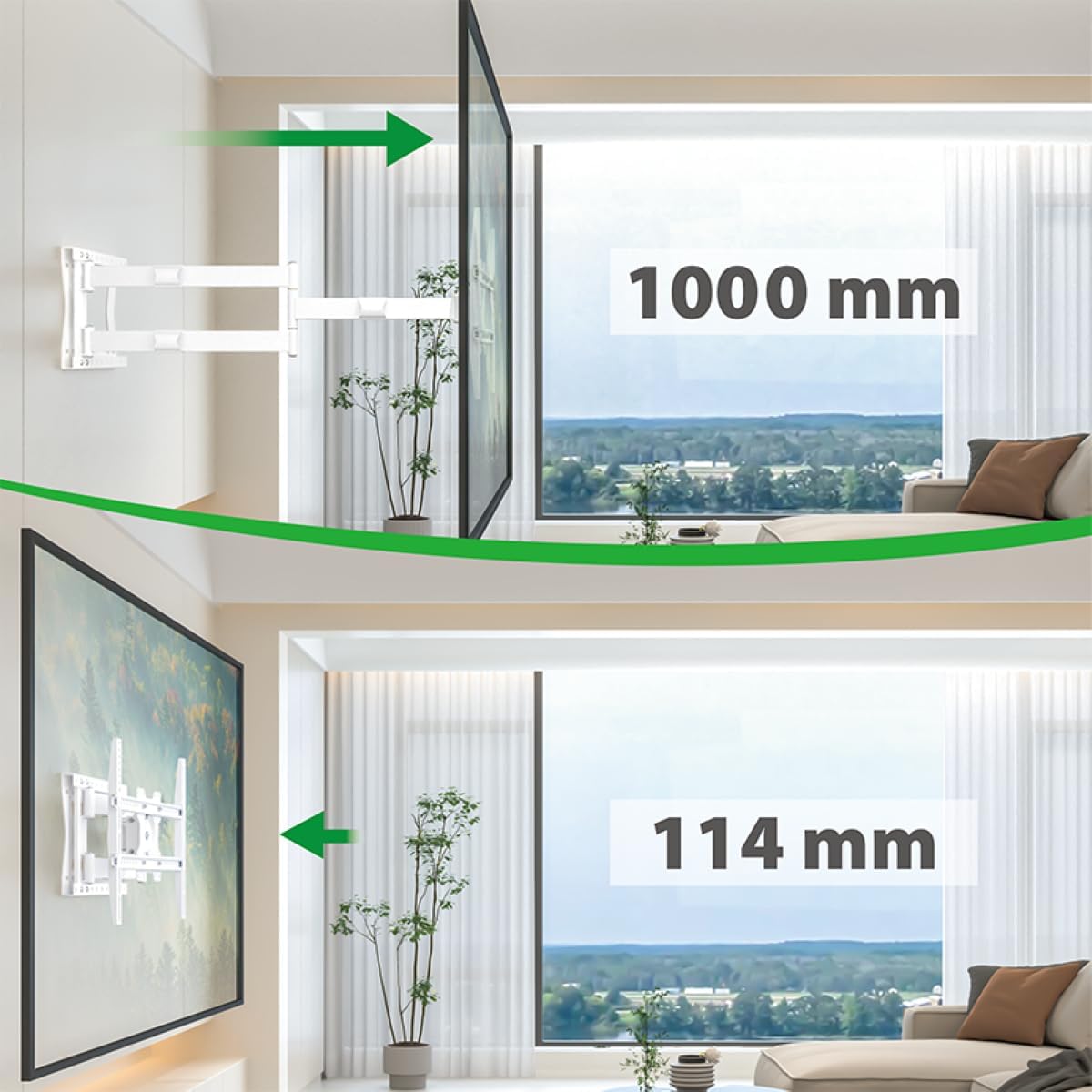
Figura 6: Illustration of the XTRARM TiTon mount's extension capabilities, showing the TV moving from a minimum distance of 114 mm to a maximum of 1000 mm from the wall.
Axuste da inclinación
The TV can be tilted downwards by 5 degrees and upwards by 15 degrees. Locate the tilt adjustment mechanism (often a lever or knob) on the TV mounting plate, adjust to the desired angle, and secure it.

Figura 7: Visual representation of the XTRARM TiTon mount's tilt range, allowing for adjustments from -5 degrees to +15 degrees.
Adjusting Swivel and Rotation
The articulated arm allows for up to 180 degrees of swivel, enabling you to turn the TV to face different areas of the room. The TV mounting plate also supports rotation for horizontal compensation or portrait viewing.

Figura 8: Example of the XTRARM TiTon mount's swivel capability, demonstrating how the TV can be angled up to 90 degrees left or right from the wall.

Figura 9: The XTRARM TiTon mount allows for a 90-degree rotation of the television, useful for specific viewing orientations or corner installations.
Mantemento
- Comprobacións periódicas: Periodically inspect the mount and all fasteners to ensure they remain secure. Retighten any loose screws or bolts.
- Limpeza: Limpa a montura cun pano suave e seco. Evita produtos de limpeza abrasivos ou solventes que poidan danar o acabado.
- Lubricación: The moving parts are designed for smooth operation. If any movement becomes stiff, a small amount of silicone-based lubricant can be applied to the joints, avoiding contact with electrical components.
Resolución de problemas
- Problema: O televisor non está nivelado despois da instalación.
- Solución: The mount features horizontal compensation. Adjust the leveling screws on the TV mounting plate to achieve a perfectly horizontal alignment. Ensure the wall plate itself was installed level using a bubble level.
- Problem: Mount feels loose or unstable.
- Solución: Immediately remove the TV from the mount. Recheck all wall mounting bolts and TV bracket screws for tightness. Ensure the wall type is appropriate and that anchors are correctly installed. If the issue persists, consult a professional installer.
- Problem: Difficulty moving the articulated arm.
- Solución: Check for any obstructions. Ensure no cables are caught in the joints. A small amount of silicone lubricant can be applied to the pivot points if movement is stiff.
Garantía e Soporte
The XTRARM TiTon TV Wall Mount comes with a 5 ano de garantía. This warranty covers manufacturing defects under normal use. Please retain your proof of purchase for warranty claims.
For technical support, missing parts, or warranty inquiries, please contact XTRARM customer service through the retailer where the product was purchased or visit the official XTRARM websitio para información de contacto.
Fabricante: usa2nl B.V.


