1. Introdución
The Cleer Audio Alpha headphones are designed to provide an immersive audio experience with advanced features for enhanced listening. This manual provides essential information for setting up, operating, and maintaining your headphones.
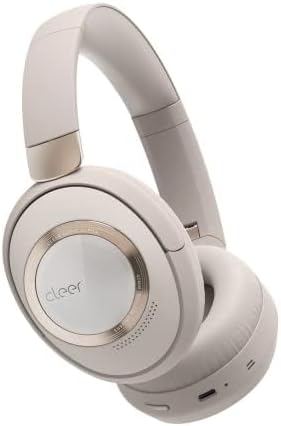
Figure 1: Cleer Audio Alpha headphones (Stone color)
2. Que hai na caixa
Your Cleer Audio Alpha headphones package includes the following items:
- Cleer Audio Alpha Headphones
- Cable de carga USB-A a USB-C
- Cable de audio de 3.5 mm
- Estuche de transporte duro
- Adaptador de avión
- Guía de inicio rápido
- Manual de usuario (este documento)
- Tarxeta de garantía

Figure 2: Included accessories with Cleer Audio Alpha headphones
3. Produto rematadoview e Deseño
The Cleer Audio Alpha headphones are designed for comfort and durability, featuring a matte finish and gold accents. The earcups are magnetically attached for easy cleaning or replacement.

Figure 3: Headband and earcup details
The headphones feature soft, memory foam earcups and a padded headband for extended wear comfort. The earcups can swivel and fold for compact storage in the provided hard carrying case.

Figure 4: Headphones stored in their travel case
4. Configuración
4.1 Carga dos auriculares
Before first use, fully charge your headphones. Connect the provided USB-C charging cable to the USB-C port on the left earcup and to a power source. A 10-minute quick charge provides an additional 4 hours of playback.

Figure 5: Battery life and quick charge capabilities
4.2 Emparejamento Bluetooth
The Alpha headphones support Bluetooth 5.1 with Qualcomm aptX Adaptive technology for high-quality wireless audio. They also feature Multipoint Connection, allowing simultaneous connection to two devices.
- Power on the headphones by sliding the power button on the right earcup.
- Activa o Bluetooth no teu dispositivo (teléfono intelixente, tableta, ordenador).
- Select "Cleer ALPHA" from the list of available Bluetooth devices.
- Unha vez emparellado, unha mensaxe de voz confirmará a conexión.

Figure 6: Multipoint connection setup
4.3 Cleer+ App Control
Download the free Cleer+ app from your device's app store to unlock the full performance and customization options of your Alpha headphones. The app allows you to:
- Adjust noise-canceling and ambient noise levels.
- Personaliza a configuración do ecualizador.
- Manage device controls.
- Recibir actualizacións de firmware.

Figure 7: Cleer+ App interface for customization
5. Instrucións de funcionamento
5.1 Adaptive Noise Cancellation and Ambient Mode
The Alpha headphones feature adaptive noise cancellation to block out distractions. Use Ambient mode to allow external sounds to pass through, enabling conversations without removing your headphones.
- Toggle between Noise Cancellation, Ambient Mode, and Off using the dedicated ANC button on the left earcup.
- Smart Noise Cancellation automatically adjusts levels based on your environment.

Figure 8: Adaptive Noise Cancellation in action

Figure 9: Ambient Sound Control
5.2 Controis táctiles intuitivos
The right earcup features touch controls for various functions:
- Pase o dedo cara arriba/abaixo: Axustar o volume.
- Swipe Forward/Backward: Saltar pistas.
- Toca dúas veces: Reproducir/pausar música, responder/finalizar chamadas.
- Palm over earcup: Temporarily reduces volume and noise cancellation for quick conversations.

Figure 10: Intuitive Touch Controls
5.3 Smart Wear Detection
The headphones automatically play or pause audio when you put them on or take them off, ensuring a seamless listening experience.

Figure 11: Smart Wear Detection
5.4 Dirac Virtuo Spatial Audio
Experience an expanded soundstage and immersive audio with Dirac Virtuo spatial audio technology. This feature works with all content and does not require specially encoded tracks.

Figure 12: Dirac Virtuo Spatial Audio
5.5 conexión por cable
For situations where wireless connectivity is not preferred or available, you can connect the headphones using the provided 3.5mm audio cable. This allows for continued listening even if the battery is depleted.
6. Calidade do audio
The Alpha headphones are equipped with 40mm ironless drivers, delivering high-resolution audio with accurate bass for an immersive sound experience. They support Hi-Res and Lossless Audio formats.

Figure 13: 40mm Ironless Driver technology

Figure 14: Hi-Res & Lossless Audio support
7. Mantemento
The earcups are magnetically attached, allowing for easy removal for cleaning or replacement. Regularly wipe the headphones with a soft, dry cloth to maintain their appearance.
8 Solución de problemas
If you encounter any issues with your Cleer Audio Alpha headphones, please refer to the following general troubleshooting tips:
- Sen enerxía: Asegúrate de que os auriculares estean completamente cargados.
- Non se pode emparellar: Ensure Bluetooth is enabled on your device and the headphones are in pairing mode. Try restarting both devices.
- Mala calidade de audio: Check the audio source. Ensure the headphones are within Bluetooth range. If using a wired connection, check the cable.
- ANC non funciona: Ensure ANC is enabled and not in Ambient mode.
- Os controis táctiles non responden: Ensure the headphones are powered on and connected. Try restarting the headphones.
For more detailed troubleshooting or persistent issues, please contact Cleer Audio customer support.
9. Especificacións
| Característica | Especificación |
|---|---|
| Nome do modelo | Alfa |
| Tecnoloxía de conectividade | Bluetooth 5.1 |
| Tecnoloxía de comunicación sen fíos | Bluetooth |
| Control de ruído | Cancelación activa de ruído |
| Tipo de controlador de audio | Dynamic Driver (40mm Ironless) |
| Resposta en frecuencia | 20 Hz - 20 kHz |
| Duración da batería | Ata 35 horas |
| Charging Time (Quick Charge) | 10 minutos para 4 horas de reprodución |
| Método de control | Toca |
| Micrófono | Dual-Microphone with Qualcomm cVc technology |
| Peso do elemento | 11.4 onzas (323 gramos) |
| Dimensións do produto | 8.78 x 7.13 x 2.72 polgadas |
| Material | Plástico |
10. Garantía e soporte
For warranty information and customer support, please refer to the warranty card included in your product packaging or visit the official Cleer Audio website. Ensure you register your product for any applicable warranty benefits.


