Introdución
This manual provides comprehensive instructions for the safe and efficient use of your Coby True Wireless Earbuds (Model CETW535). Please read this manual thoroughly before using the product and retain it for future reference.
The Coby True Wireless Earbuds offer a seamless audio experience with Bluetooth 5.3 technology, a smart battery display, and intuitive controls for music and calls. They are designed for comfort and convenience, featuring a built-in microphone for hands-free communication.
Contido do paquete
- Auriculares sen fíos Coby (esquerdo e dereito)
- Charging Case with Smart Battery Display
- Cable de carga USB
- Manual de usuario (este documento)
Configuración
1. Carga inicial
Before first use, fully charge the earbuds and the charging case. Connect the charging case to a USB power source using the provided USB cable. The digital display on the case will indicate the charging status and battery level.

Image: The Coby True Wireless Earbuds are shown inside their open charging case, which displays "100%" on its digital screen, indicating a full charge. The earbuds are black and fit snugly into their respective slots.
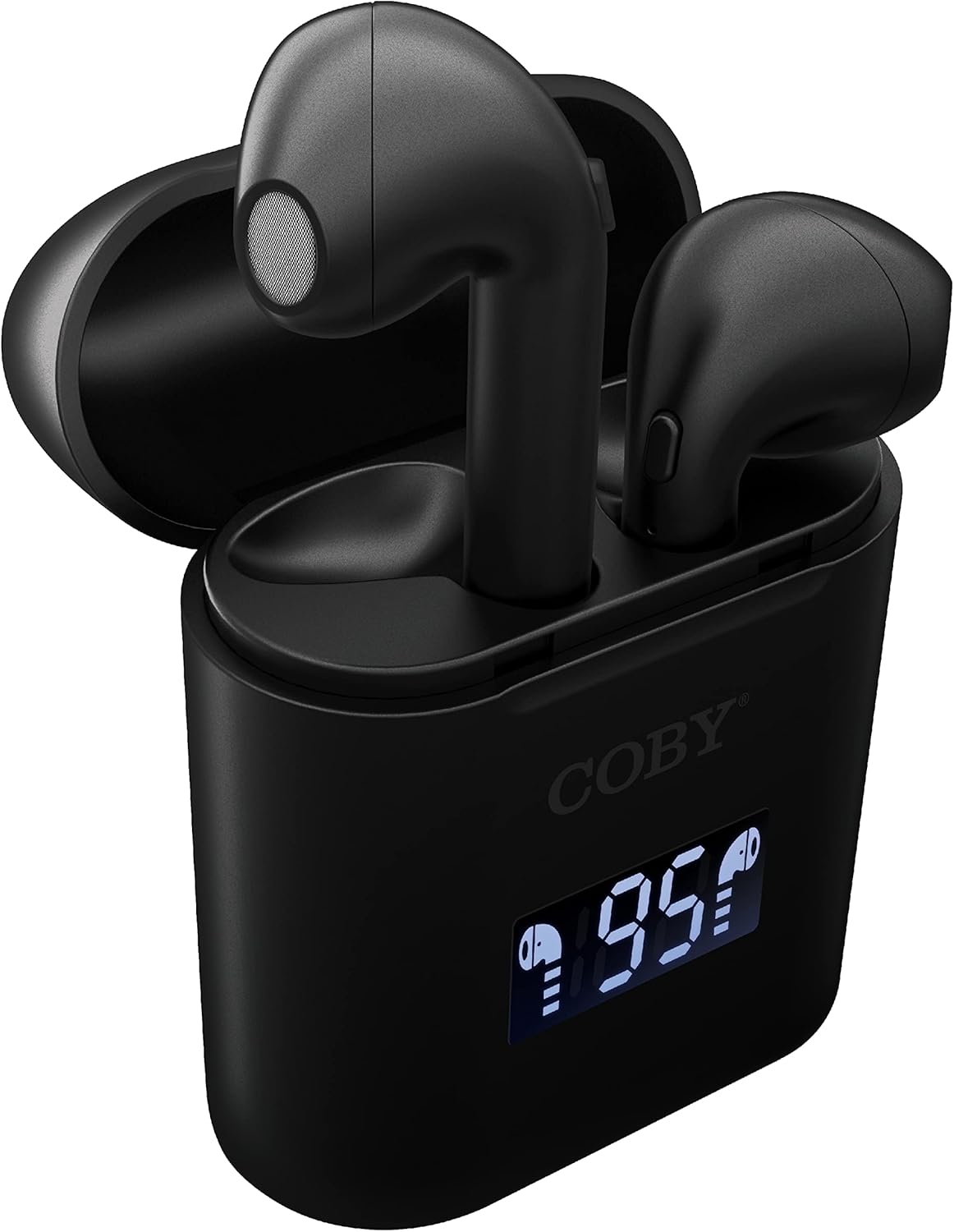
Imaxe: Primeiro plano view of the Coby True Wireless Earbuds resting in their open charging case. The case features a digital display showing "95%", indicating the current battery level of the case. The black earbuds are visible, with their microphones facing upwards.
2. Emparejamento cun dispositivo Bluetooth
- Asegúrate de que os auriculares estean cargados e dentro da caixa de carga.
- Abre a caixa de carga. Os auriculares acenderanse automaticamente e entrarán no modo de emparellamento.
- No teu dispositivo (teléfono intelixente, tableta, etc.), activa o Bluetooth.
- Busca "CETW535" or "Coby Earbuds" in the list of available Bluetooth devices.
- Selecciona o nome do dispositivo ao que te conectarás. Unha vez conectado, escoitarás un ton de confirmación.
- The earbuds will automatically re-pair with the last connected device when removed from the case, if Bluetooth is enabled on the device.
3. Colocación dos auriculares
Gently insert each earbud into the corresponding ear (L for left, R for right). Adjust them slightly until they feel secure and comfortable. A proper fit ensures optimal sound quality and comfort.

Image: A woman is shown smiling while wearing a black Coby True Wireless Earbud in her right ear, demonstrating a comfortable and secure fit.
Instrucións de funcionamento
Encendido/apagado
- Encendido: Open the charging case, or press and hold the touch control area on each earbud for 3 seconds.
- Apagado: Place the earbuds back into the charging case and close the lid, or press and hold the touch control area on each earbud for 5 seconds.
Controis musicais
The earbuds feature touch-sensitive controls for easy management of your audio playback.
- Reproducir/Pausa: Toca calquera dos auriculares unha vez.
- Próxima pista: Toca dúas veces o auricular dereito.
- Pista anterior: Toca dúas veces o auricular esquerdo.
- Subir volume: Toca tres veces o auricular dereito.
- Baixar volume: Toca tres veces o auricular esquerdo.

Image: A man is shown wearing a Coby True Wireless Earbud in his right ear, taking a drink from a water bottle, illustrating the earbuds' use during active moments.
Controis de chamadas
Manage your calls effortlessly with the built-in microphone and touch controls.
- Responder/Finalizar chamada: Toca calquera dos auriculares unha vez.
- Rexeitar a chamada: Mantén premido calquera dos auriculares durante 2 segundos.

Image: A man is depicted wearing a Coby True Wireless Earbud in his left ear while concentrating on a laptop screen, highlighting the earbuds' suitability for work or study environments.
Activación do Asistente de voz
Activate your device's voice assistant (Siri or Google Assistant) for hands-free commands.
- Activar o asistente de voz: Press and hold either earbud for 3 seconds (after powering on, before powering off gesture).
Intelligent Digital Battery Display
The charging case features a digital display that shows the remaining battery percentage of the case and individual charging status of the earbuds.
- The large number indicates the charging case's battery percentage.
- Small icons next to the percentage indicate the charging status of the left and right earbuds.

Image: The Coby True Wireless Earbuds are shown in their open charging case, with the digital display indicating "95%" battery life for the case. The black earbuds are visible, ready for use or charging.
Mantemento
- Limpeza: Usa un pano suave, seco e sen pelusa para limpar os auriculares e a funda de carga. Non empregues produtos químicos agresivos nin materiais abrasivos.
- Almacenamento: Cando non estean en uso, garde os auriculares no seu estoxo de carga para protexelos e mantelos cargados. Garde nun lugar fresco e seco, lonxe de temperaturas extremas.
- Cargando: To prolong battery life, avoid fully discharging the battery frequently. Charge the case and earbuds regularly, even if not in constant use.
Resolución de problemas
| Problema | Posible Solución |
|---|---|
| Os auriculares non se emparellan co dispositivo. |
|
| Só un auricular está a reproducir son. |
|
| A caixa de carga non carga. |
|
| Mala calidade de son ou desconexións. |
|
Especificacións
| Característica | Detalle |
|---|---|
| Marca | Coby |
| Nome do modelo | Audífonos verdadeiros sen fíos |
| Número de modelo | CETW535 |
| Tecnoloxía de conectividade | Bluetooth 5.3 |
| Cor | Negro |
| Tempo de reprodución de auriculares | Ata 6.5 horas (cunha carga completa) |
| Tempo de reprodución total (con estuche) | Ata 22 horas |
| Micrófono | Integrado |
| Soporte de asistente de voz | Siri, Asistente de Google |
| Dimensións (L x W x H) | 0.99 x 1.85 x 2.44 polgadas (estuche de carga) |
| Peso do elemento | 6.1 onzas |
| UPC | 643620020982 |
| Fabricante | Summit Electronics, LLC |
Garantía e Soporte
Specific warranty information for the Coby True Wireless Earbuds (Model CETW535) is not provided within this manual. For details regarding warranty coverage, terms, and conditions, please refer to the warranty card included with your product packaging or visit the official Coby websitio.
For technical support or further assistance, please contact Coby customer service through the contact information provided on their official websitio ou embalaxe do produto.


