1. Introdución
This manual provides essential instructions for the safe and efficient operation of your Crosley CR6252A-YS Portfolio 3-Speed Bluetooth Turntable. Please read this manual thoroughly before using the product and retain it for future reference.
The Crosley Portfolio turntable is designed to play vinyl records at three speeds and features built-in speakers, Bluetooth connectivity for wireless audio streaming, and a moving magnetic cartridge for audio reproduction.

Figure 1.1: Crosley CR6252A-YS Portfolio Turntable (Open View)
2. Instrucións de seguridade
- Le todas as instrucións antes de usar.
- Manteña o produto lonxe da auga ou da humidade.
- Non o coloque preto de fontes de calor como radiadores, reixas de calor, estufas ou outros aparellos que produzan calor.
- Limpar só cun pano seco.
- Use só anexos/accesorios especificados polo fabricante.
- Desenchufe este aparello durante tormentas eléctricas ou cando non se use durante longos períodos de tempo.
- Encargue toda a reparación a persoal de servizo cualificado. O mantemento é necesario cando o aparello resultou danado dalgún xeito, como o cable de alimentación ou o enchufe está danado, se derrama líquido ou caen obxectos no aparello, o aparello estivo exposto á choiva ou á humidade, non funciona normalmente. , ou foi abandonado.
3. Contido do paquete
Verifique que todos os elementos que se indican a continuación estean incluídos no seu paquete:
- Crosley CR6252A-YS Portfolio Turntable
- Adaptador de alimentación
- Manual de usuario (este documento)
4. Características e compoñentes do produto
The Crosley CR6252A-YS Portfolio Turntable includes the following key features and components:
- Tocadiscos de 3 velocidades: Admite discos de 33 1/3, 45 e 78 RPM.
- Built-in Bluetooth Receiver: Permite a transmisión sen fíos desde dispositivos compatibles.
- Control de ton axustable: Fine-tune record speed.
- Moving Magnetic Cartridge: Pre-mounted for optimal sound.
- Entrada auxiliar: Conecta fontes de son externas.
- USB Enabled: For PC connection.
- Altofalantes incorporados: Saída de audio integrada.

Figure 4.1: Turntable Mechanism and Controls
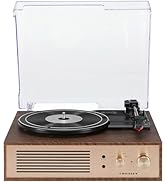
Figura 4.2: Detalle do panel de control

Figura 4.3: Conexións do panel traseiro
5. Configuración
5.1 Colocación inicial
Place the turntable on a flat, stable surface away from direct sunlight, heat sources, and excessive dust or vibrations.
5.2 Conexión de alimentación
- Connect the power adapter to the DC 12V input jack on the rear of the turntable.
- Conecta o adaptador de corrente a unha toma de corrente axeitada.
5.3 Turntable Preparation
- Carefully remove any protective packaging materials from the turntable platter and tonearm.
- Ensure the tonearm is unlocked from its rest.
6. Instrucións de funcionamento
6.1 Playing Records
- Xire o ON/OFF botón no sentido das agullas do reloxo para acender a unidade.
- Select the desired speed (33 1/3, 45, or 78 RPM) using the speed selector switch. Note: A 78 RPM stylus (not included) is required for 78 RPM records.
- Place a record on the turntable platter. If playing a 45 RPM single, place the 45 RPM adapter (if included) over the spindle.
- Lift the tonearm using the cueing lever and position it over the desired track on the record.
- Baixa o brazo lentamente sobre o disco usando a palanca de sinalización. O disco comezará a reproducirse.
- Axuste o volume empregando o VOLUME botón.
- Usa o PAZ control knob to fine-tune the playback speed if necessary.
- To stop playing, lift the tonearm, return it to its rest, and turn the ON/OFF pomo en sentido antihorario.
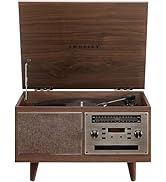
Figure 6.1: Stylus on Record
6.2 Funcionamento Bluetooth
- Xire o ON/OFF botón no sentido das agullas do reloxo para acender a unidade.
- Slide the function switch to the Bluetooth position. The indicator light will flash, indicating pairing mode.
- Enable Bluetooth on your external device (e.g., smartphone, tablet) and search for "Crosley Portfolio".
- Select "Crosley Portfolio" from the list of available devices to pair. Once paired, the indicator light will stop flashing and remain solid.
- You can now stream audio wirelessly from your device to the turntable's built-in speakers.
- Axuste o volume empregando o VOLUME o botón do tocadiscos e/ou do dispositivo externo.
6.3 Entrada auxiliar (AUX IN)
- Xire o ON/OFF botón no sentido das agullas do reloxo para acender a unidade.
- Connect an external audio device (e.g., MP3 player, CD player) to the AUX IN port using a 3.5mm audio cable (not included).
- O tocadiscos cambiará automaticamente ao modo AUX IN.
- Axuste o volume empregando o VOLUME o botón do tocadiscos e/ou do dispositivo externo.
Conectividade USB 6.4
The turntable features a PC-USB port for connecting to a computer. This allows for digital conversion of your vinyl records using appropriate software (not included). Refer to your chosen software's instructions for recording procedures.
7. Mantemento
7.1 Limpeza do prato xiratorio
- Desconecte sempre o prato xiratorio da toma de corrente antes de limpalo.
- Use a soft, dry cloth to wipe the exterior surfaces. Do not use abrasive cleaners or solvents.
- Gently brush the stylus with a soft brush designed for stylus cleaning, moving from back to front.
7.2 Substitución do punteiro
The stylus (needle) is a consumable part and will wear out over time. A worn stylus can damage your records and degrade sound quality. Replace the stylus after approximately 200-300 hours of playback. Consult your retailer or Crosley support for compatible replacement styli.
8 Solución de problemas
| Problema | Causa posible | Solución |
|---|---|---|
| Sen poder | O adaptador de corrente non está conectado ou a toma de corrente está defectuosa. | Asegúrate de que o adaptador de corrente estea conectado correctamente e que a toma de corrente funcione. |
| Non hai son dos altofalantes | Volume too low; function switch in wrong position; Bluetooth not paired. | Increase volume; ensure function switch is set to PHONO or Bluetooth is correctly paired. |
| Salto de rexistro | Record is dirty or damaged; stylus is worn; turntable not level. | Clean record; replace stylus; ensure turntable is on a level surface. |
| O dispositivo Bluetooth non se emparella | Turntable not in pairing mode; device too far; device already paired to another unit. | Ensure turntable is in Bluetooth pairing mode; move device closer; disconnect from other Bluetooth devices. |
9. Especificacións
- Dimensións do produto: 12.4 x 15.28 x 6.5 polgadas
- Peso do artigo: 13 libras
- Número de modelo do artigo: CR6252A-YS
- Marca: Crosley
- Compoñentes incluídos: CR6252A-YS Portfolio Turntable
- Estilo: Vintage
- Cor: Yellow Submarine
- Formato do sinal: Analóxico
- Fonte de enerxía: Eléctrico con cable
- UPC: 710244246569
10. Garantía e soporte
For warranty information and technical support, please refer to the warranty card included with your product or visit the official Crosley websitio. Garde o recibo da compra como proba de compra para calquera reclamación de garantía.
Fabricante: Crosley
Data de primeira dispoñibilidade: 30 de novembro de 2021


