Introdución
Grazas pola compraasing the Northpoint NP-TL LED Desk Lamp. This modern and versatile desk lamp is designed to provide optimal lighting for your workspace while offering convenient features such as QI wireless charging and an integrated display for time and temperature. Please read this manual carefully before use to ensure proper operation and to maximize the lifespan of your product.
Instrucións de seguridade
- Ensure the power adapter is compatible with your local power supply before connecting.
- Non desmonte, repare nin modifique o lamp yourself. Contact qualified service personnel for assistance.
- Evite colocar o lamp in high-temperature, humid, or dusty environments.
- Manteña o lamp lonxe da auga e outros líquidos.
- Do not look directly into the LED light source for extended periods to prevent eye strain.
- Desenchufe o lamp from the power outlet before cleaning or when not in use for a long time.
- Este produto está deseñado só para uso en interiores.
Contido do paquete
Comprobe se o paquete contén os seguintes elementos:
- Northpoint NP-TL LED Desk Lamp
- Adaptador de alimentación de 12V
- Manual de usuario
Produto rematadoview
Familiarize yourself with the components of your Northpoint NP-TL LED Desk Lamp.

Imaxe 1: Fronte view of the Northpoint NP-TL LED Desk Lamp, showing the adjustable light head, flexible arm, integrated display, and QI wireless charging base with mood lighting.

Imaxe 2: Lateral view of the Northpoint NP-TL LED Desk Lamp, highlighting the flexible arm design and the integrated display on the lampo corpo de.

Image 3: The Northpoint NP-TL LED Desk Lamp in a typical desk environment, demonstrating its compact size and ambient lighting capabilities.
- Adjustable LED Head: Provides directional lighting.
- Brazo flexible: Allows for easy positioning of the light.
- Pantalla integrada: Shows time, date, and ambient temperature.
- Panel de control táctil: For adjusting light settings and display functions.
- QI Wireless Charging Pad: Located on the base for compatible devices.
- Mood Light Base: Provides ambient RGB lighting.
Configuración
- Desempaquetar: Retire coidadosamente todos os compoñentes da embalaxe.
- Posición: Coloque o lamp nunha superficie plana e estable.
- Conectar enerxía: Insert the DC plug of the 12V power adapter into the power input port on the back of the lamp base. Plug the adapter into a standard wall outlet.
- Initial Display Setup: Upon first power-on, the display will illuminate. You may need to set the time and date using the touch controls (refer to "Operating Instructions - Display Settings").
Instrucións de funcionamento
Funcións de luz
- Encendido/apagado: Toca o Botón de acendido (
 ) on the touch control panel to turn the lamp on ou off.
 - Brightness Adjustment (Dimmable): Mentres o lamp is on, press and hold the Botón de brillo (often represented by a sun icon or +/-) to smoothly adjust the light intensity. Release when the desired brightness is reached.
- Axuste da temperatura da cor: Toca o Mode/Color Temperature button (often represented by a 'M' or color spectrum icon) to cycle through different color temperatures: Warm White, Neutral White, and Cool White.
Carga sen fíos QI
- Place your QI-compatible smartphone or device directly onto the wireless charging pad located on the lampa base.
- Asegúrate de que o dispositivo estea centrado na base de carga para unha carga óptima.
- A charging indicator (if available on your device) will confirm that charging has begun.
- Remove any metallic objects or thick cases from your device that may interfere with wireless charging.
Integrated Display Settings (Time, Date, Temperature)
The integrated LCD displays time, date, and ambient temperature. Specific buttons for setting these functions are usually located near the display or on the touch panel.
- Axuste da hora/data: Look for buttons labeled "SET", "MODE", or similar. Typically, you press "SET" to enter setting mode, then use arrow buttons or +/- to adjust values, and "SET" again to confirm and move to the next setting (e.g., hour, minute, year, month, day).
- Visualización da temperatura: O lamp automatically detects and displays the ambient temperature. No manual setting is required for this function.
Iluminación Ambiental
- O lamp features an integrated mood light base. Look for a dedicated Botón Mood Light (often a color wheel or RGB icon).
- Tap the button to cycle through different static colors or activate a color-changing mode.
- Press and hold the button to turn the mood light off.
Mantemento
- Limpeza: Desconecte a alimentación antes de limpar. Use un pano suave e seco para limpar a lamp. Do not use abrasive cleaners, solvents, or harsh chemicals.
- Almacenamento: Se almacena o lamp for an extended period, unplug it and store it in a cool, dry place.
- Fonte de luz LED: A fonte de luz LED está integrada e non a pode substituír o usuario.
Resolución de problemas
| Problema | Causa posible | Solución |
|---|---|---|
| Lamp non acende. | Sen conexión de alimentación. Adaptador de alimentación defectuoso. | Asegúrate de que o adaptador de alimentación estea ben conectado tanto a lamp e a toma de corrente na parede. Try a different outlet. If the issue persists, contact customer support. |
| A carga sen fíos non funciona. | Device not QI-compatible. Dispositivo non aliñado correctamente. Obstruction (e.g., thick case, metallic object). | Verify your device supports QI wireless charging. Reposition your device on the charging pad. Remove any cases or metallic objects. |
| Display shows incorrect time/date. | Time/date not set or reset after power interruption. | Refer to "Operating Instructions - Display Settings" to manually set the time and date. |
| A luz parpadea ou é inestable. | Fonte de alimentación inestable. Problema de compoñentes internos. | Proba a conectar o lamp into a different power outlet. If the problem continues, discontinue use and contact customer support. |
Especificacións
| Marca | Northpoint |
| Número de modelo | NP-TL |
| Dimensións do produto (L x W x H) | 16.6 x 6 x 33.5 cm |
| Material | Coiro sintético |
| Tipo de acabado | Leather look |
| Tipo de fonte de luz | LED |
| Poder | 18 vatios |
| Fluxo luminoso | 480 lm |
| Índice de reproducción da cor (CRI) | 80.00 |
| Características especiais | Dimmable, QI Wireless Charging, Temperature Display, Mood Lighting |
| Cambiar de estilo | Toca |
| Clasificación IP | IP20 |
| Voltage | 12 voltios |
| Compoñentes incluídos | QI Charging Station, 12V Power Adapter |

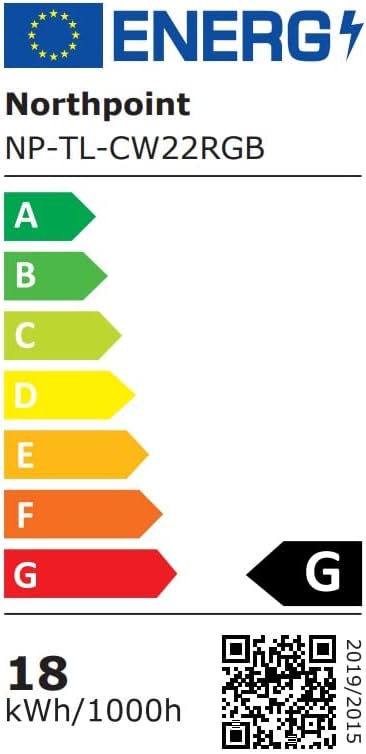
Image 4: Energy efficiency label for the Northpoint NP-TL LED Desk Lamp, indicating energy class G and 18 kWh/1000h consumption.
Garantía e Soporte
Northpoint products are manufactured to high-quality standards. For warranty information or technical support, please refer to the contact details provided with your purchase documentation or visit the official Northpoint websitio. Garde o comprobante de compra para calquera reclamación de garantía.
Note: Information regarding spare parts availability and software updates is not available at the time of printing.


