Produto rematadoview
The One For All URC 3661 is a universal remote control designed to consolidate multiple remote controls into a single, easy-to-use device. It is compatible with a wide range of electronic devices, including televisions, set-top boxes, audio systems, DVD players, and Blu-ray players. This remote features backlit keys for improved visibility in low-light conditions and includes a learning function to copy commands from original remotes.

Figura 1: En ángulo view of the URC 3661 Universal Remote Control.
Configuración
1. Instalación da batería
The URC 3661 remote control requires two (2) AA batteries for operation. Follow these steps to install them:
- Localice o compartimento da batería na parte traseira do control remoto.
- Slide the battery cover downwards and lift it off.
- Insert two AA batteries, ensuring the positive (+) and negative (-) terminals align with the markings inside the compartment.
- Volva colocar a tapa da batería deslizándoa de volta ao seu lugar ata que faga clic de forma segura.
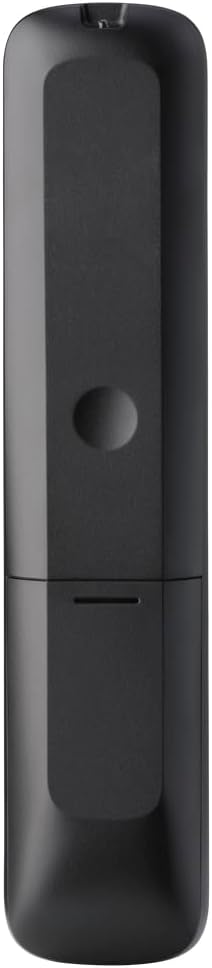
Figura 2: Atrás view of the remote, highlighting the battery compartment.
2. Programación do control remoto
The URC 3661 can be programmed using direct code entry, auto code search, or the learning function. It is recommended to try direct code entry first.
Entrada de código directo:
- Acenda o dispositivo que desexa controlar (por exemplo, o televisor, o reprodutor de DVD).
- Manteña premido o CONFIGURACIÓN button until the LED light under the device key (e.g., TV, DVD) blinks twice and stays lit.
- Press the device key you want to program (e.g., TV). The LED will remain lit.
- Enter the 4-digit or 5-digit setup code for your brand and device. Refer to the code list provided with your remote or visit the One For All website for the most up-to-date codes.
- After entering the code, the LED will blink twice and turn off if the code is valid. If it blinks once and stays lit, the code is invalid; re-enter the code.
- Proba o mando a distancia premendo o botón POTENCIA button. If the device turns off, try other functions like volume or channel. If it works, programming is complete. If not, try the next code for your brand or use the Auto Code Search.
Busca automática de códigos:
- Acende o dispositivo que desexas controlar.
- Manteña premido o CONFIGURACIÓN button until the LED blinks twice and stays lit.
- Press the device key you want to program.
- Apunte o mando a distancia ao dispositivo e prema o botón POTENCIA botón repetidamente (aproximadamente cada 3 segundos) ata que o dispositivo se apague.
- Unha vez que o dispositivo se apague, prema inmediatamente o botón CONFIGURACIÓN button to save the code. The LED will blink twice and turn off.
- Test the remote. If it doesn't work correctly, repeat the process.
Función de aprendizaxe:
The learning function allows the URC 3661 to copy functions directly from your original remote control, which is useful for commands not available via direct code entry or auto search.
- Place the URC 3661 and your original remote on a flat surface, facing each other, about 1-2 inches apart.
- Manteña premido o CONFIGURACIÓN button until the LED blinks twice and stays lit.
- Press the button on the URC 3661 that you want to teach a function to (e.g., a specific input button). The LED will blink rapidly.
- Press and hold the corresponding button on your original remote control until the LED on the URC 3661 blinks twice, indicating successful learning.
- Repeat for all desired buttons.
- Para saír do modo de aprendizaxe, prema a tecla CONFIGURACIÓN button. The LED will blink twice and turn off.
Operación do mando a distancia
The URC 3661 is designed for intuitive operation. Familiarize yourself with the button layout and their primary functions.

Figura 3: Fronte view of the URC 3661 with button layout.
Funcións clave:
- Device Keys (TV, STB, AUDIO, BLURAY, DVD, STREAM): Select the device you wish to control. The LED under the selected device key will illuminate.
- POTENCIA: Acende ou apaga o dispositivo seleccionado.
- VOL +/-: Axusta o volume.
- CH +/-: Cambia de canle.
- Navigation Pad (UP, DOWN, LEFT, RIGHT, OK): Úsase para a navegación e selección de menús.
- MENÚ: Opens the device's main menu.
- GUÍA: Displays the electronic program guide (if supported by the device).
- INFORMACIÓN: Mostra información sobre o programa ou a entrada actual.
- INICIO: Volve á pantalla de inicio do dispositivo.
- SAÍDA: Exits menus or applications.
- Playback Controls (PLAY, PAUSE, STOP, REWIND, FAST FORWARD, SKIP): Controla a reprodución multimedia.
- Teclas numéricas (0-9): For direct channel entry or numerical input.
- App Shortcut Keys (Netflix, Prime Video, YouTube): Acceso directo aos servizos de transmisión máis populares.
- Retroiluminación: The keys are backlit for easy use in dark environments. The backlight activates automatically when a button is pressed.
Mantemento
Limpeza do mando a distancia:
To maintain the remote's appearance and functionality, clean it regularly:
- Use un pano suave e seco para limpar a superficie do mando a distancia.
- Para a sucidade persistente, d lixeiramenteampEnxágüe o pano con auga ou un limpador suave e non abrasivo. Evite a humidade excesiva.
- Do not use harsh chemicals, solvents, or abrasive cleaning agents, as these can damage the remote's finish or internal components.
Substitución da batería:
Replace batteries when the remote's performance degrades or the LED indicator blinks unusually. Refer to the "Battery Installation" section under Setup for detailed instructions.
Resolución de problemas
If you encounter issues with your URC 3661 remote control, try the following troubleshooting steps:
| Problema | Causa posible | Solución |
|---|---|---|
| Remote does not operate the device. | Incorrect device selected. As baterías están baixas ou están inseridas incorrectamente. Código incorrecto programado. | Ensure the correct device key (TV, DVD, etc.) is pressed. Comprobe a orientación da batería e substitúaa se é necesario. Re-program the remote using a different code or the Auto Code Search/Learning function. |
| Algúns botóns non funcionan. | Incomplete programming. Device does not support the function. | Use the Learning function to copy specific commands from your original remote. Verify if the original remote has that function. |
| LED blinks once and stays lit during code entry. | Invalid code entered. | Ensure you are entering the correct 4 or 5-digit code. Try another code from the list or use Auto Code Search. |
| Remote LED does not light up. | Baterías agotadas. | Substitúa as pilas por pilas AA novas. |
For further assistance, visit the official One For All support websitio web ou consulte o manual completo en liña.
Especificacións
| Característica | Detalle |
|---|---|
| Número de modelo | 3661 |
| Marca | Un Para Todos |
| Dimensións do produto | 0.39 x 0.39 x 0.39 polgadas |
| Peso do elemento | 6.7 onzas |
| Pilas necesarias | 2 pilas AA |
| Número máximo de dispositivos compatibles | Ata 6 dispositivos |
| Dispositivos compatibles | Television, Set-top Box, Audio, Blu-ray, DVD, Streaming devices |
| Característica especial | Universal, Learning Function, Backlit Keys |

Figure 4: Product packaging indicating compatibility with up to 6 devices.
Garantía e Soporte
Warranty information for the One For All URC 3661 Universal Remote Control is typically provided with your purchase documentation. Please refer to the warranty card or leaflet included in the product packaging for details regarding coverage, terms, and conditions.
For technical support, frequently asked questions, or to find the latest programming codes, please visit the official One For All website. Contact information for customer service may also be found on the manufacturer's websitio web ou na documentación do produto.
One For All Official Websitio: www.oneforall.com