1. Introdución
Thank you for choosing the LEICKE DJ Roxxx Portable Bluetooth Speaker. This manual provides essential information for setting up, operating, and maintaining your speaker. Please read it carefully before use to ensure optimal performance and longevity of your device.
2. Instrucións de seguridade
- Non expoñas o altofalante a temperaturas extremas, luz solar directa ou humidade elevada.
- Evite deixar caer ou someter o altofalante a fortes impactos.
- Non desmontes nin intentes reparar o altofalante ti mesmo. Isto anulará a garantía.
- Keep the speaker away from water and liquids. While splashproof, it is not waterproof and should not be submerged.
- Emprega só o cable de carga incluído ou un equivalente certificado.
3. Contido do paquete
Comprobe se o paquete contén os seguintes elementos:
- LEICKE DJ Roxxx Portable Bluetooth Speaker
- Cable de carga USB
- Auxiliary Audio Cable (3.5mm Stereo Plug)
- Mosquetón
- Manual de instrucións
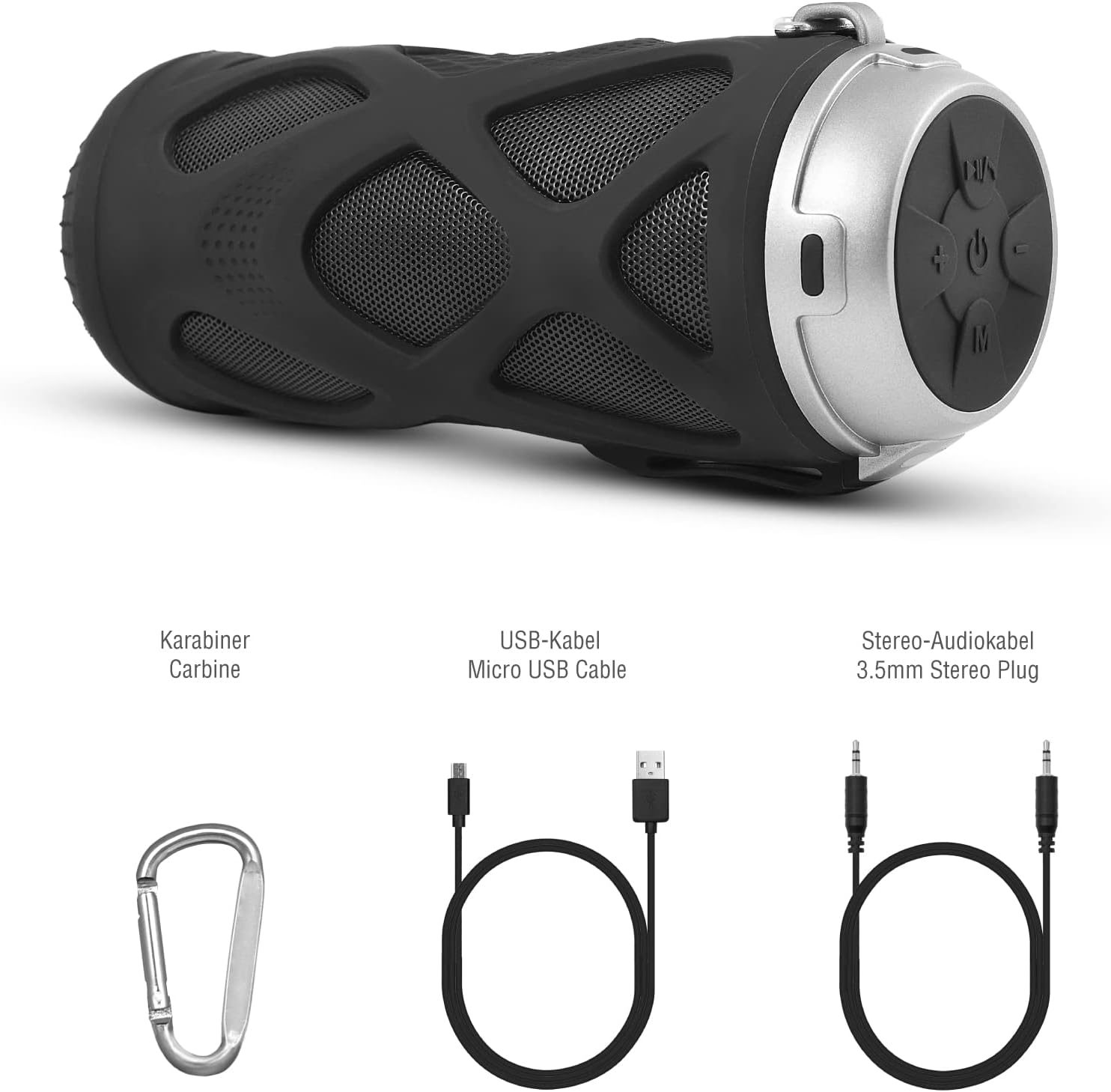
Figura 3.1: Accesorios incluídos
4. Produto rematadoview
4.1 Panel de control

Figura 4.1: Disposición do panel de control
- Botón On/Off: Acende ou apaga o altofalante.
- Play/Pause/Call/Voice Assistant Button: Controls music playback, answers/ends calls, and activates voice assistant (Siri/Google Assistant).
- Botón para baixar o volume / pista anterior: Diminúe o volume ou salta á pista anterior.
- Botón para subir o volume / seguinte canción: Aumenta o volume ou salta á seguinte pista.
- Botón de modo: Switches between Bluetooth, MicroSD/TF, Aux, and FM Radio modes.
4.2 Portos e Indicadores
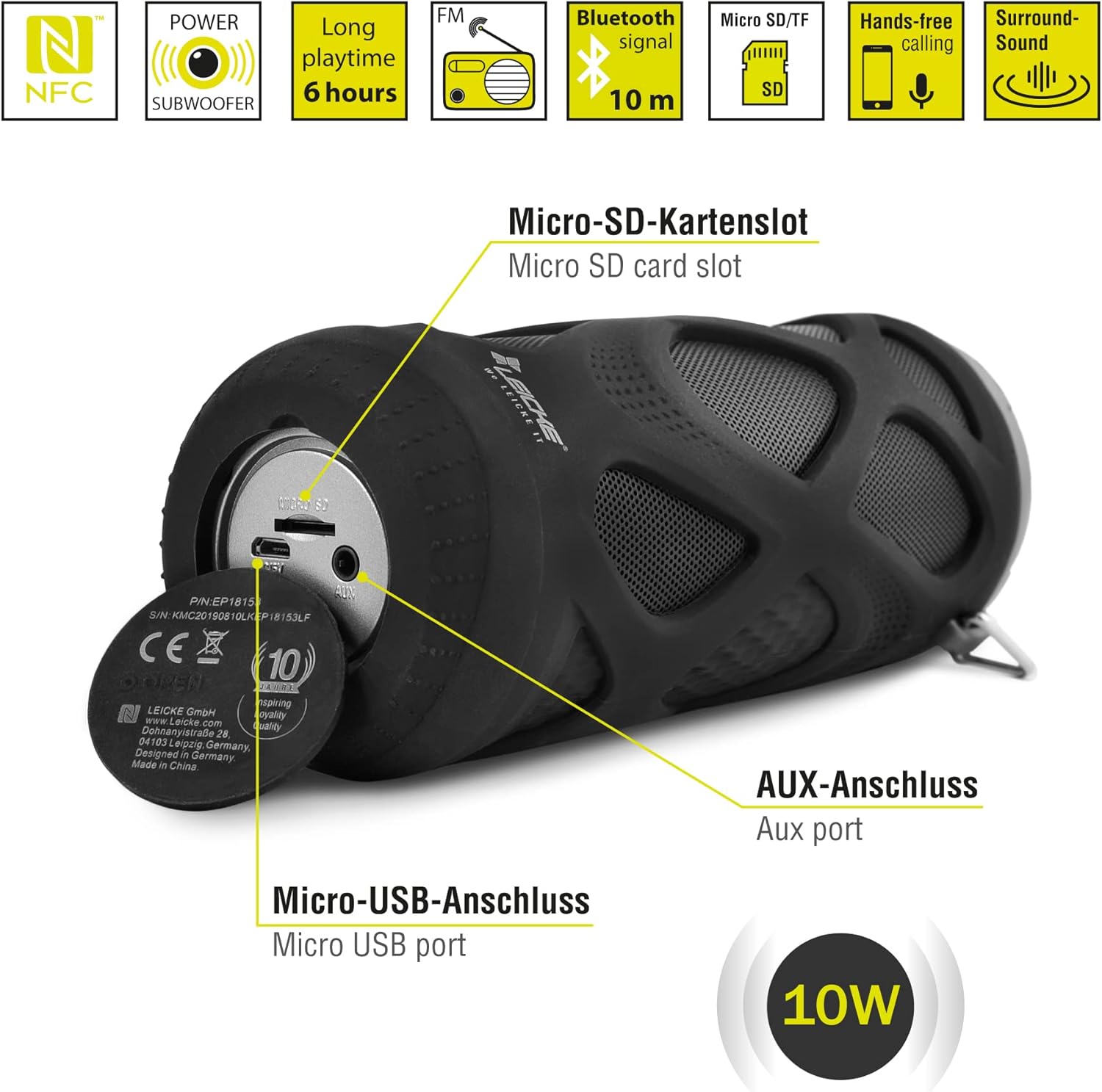
Figura 4.2: Ports Overview
- Micro SD/TF Card Slot: Insert a Micro SD or TF card for MP3 playback.
- Porto AUX: Conecte dispositivos de son externos usando o cable auxiliar de 3.5 mm.
- Porto micro USB: Úsase para cargar o altofalante.
- Indicador LED: (Typically near the charging port or control panel) Indicates power status, charging status, and Bluetooth pairing status.
5. Configuración e funcionamento
5.1 Carga do altofalante
- Connect the Micro USB end of the charging cable to the speaker's Micro USB port.
- Conecta o extremo USB-A a un adaptador de corrente USB (non incluído) ou ao porto USB dun ordenador.
- The LED indicator will typically show red while charging and turn off or change color when fully charged.
- Unha carga completa tarda aproximadamente 2-3 horas e proporciona ata 6 horas de reprodución.
5.2 Acendido/Apagado
- Para acender: Manteña premido o Botón On/Off for a few seconds until you hear an audible prompt and the LED indicator lights up.
- Para apagar: Manteña premido o Botón On/Off again for a few seconds until you hear an audible prompt and the LED indicator turns off.
5.3 Emparejamento Bluetooth
- Ensure the speaker is powered on and in Bluetooth mode (the LED indicator will typically flash blue). If not, press the Botón de modo para cambiar ao modo Bluetooth.
- No teu teléfono intelixente, tableta ou outro dispositivo compatible con Bluetooth, vai á configuración de Bluetooth.
- Busca available devices and select "LEICKE DJ Roxxx" from the list.
- Once paired, the LED indicator will stop flashing and remain solid blue, and you will hear a confirmation sound.
- O altofalante volverá conectarse automaticamente co último dispositivo emparellado ao acendelo, se o dispositivo está dentro do alcance e o Bluetooth está activado.
5.4 MicroSD/TF Card Playback
- Insert a Micro SD or TF card (pre-loaded with MP3 audio files) into the Micro SD/TF card slot.
- The speaker will automatically switch to MicroSD/TF mode and begin playing music. If not, press the Botón de modo to select MicroSD/TF mode.
- Usa o Reproducir/Pausa, Subir volume / seguinte pista, e Baixar volume / pista anterior botóns para controlar a reprodución.
5.5 Entrada AUX
- Connect one end of the 3.5mm auxiliary cable to the speaker's AUX port.
- Connect the other end to the headphone jack of your audio device (e.g., MP3 player, laptop).
- O altofalante cambiará automaticamente ao modo AUX. Se non, prema o botón Botón de modo para seleccionar o modo AUX.
- Volume can be controlled via the speaker or your connected device. Track control must be done from the connected device.
5.6 Funcionamento da radio FM
- Preme o Botón de modo repeatedly until you enter FM Radio mode.
- No modo FM, prema Botón Reproducir/Pausa once to automatically scan and save available FM stations. The speaker will then play the first saved station.
- Usa o Subir volume / seguinte pista e Baixar volume / pista anterior botóns para cambiar entre as emisoras gardadas.
Función estéreo sen fíos verdadeiro 5.7 (TWS)
The LEICKE DJ Roxxx speaker supports TWS pairing, allowing you to connect two DJ Roxxx speakers for a stereo sound experience (20W total output).

Figura 5.1: Emparejamento True Stereo Wireless (TWS)
- Ensure both DJ Roxxx speakers are powered on and in Bluetooth pairing mode (LED flashing blue).
- Nun dos altofalantes, manteña premido o botón Botón de modo for a few seconds until you hear a pairing tone. The speakers will attempt to connect to each other.
- Once successfully paired, you will hear a confirmation sound, and the LED indicator on one speaker will flash blue (master), while the other will be solid blue (slave).
- Now, connect your device to the master speaker via Bluetooth as described in section 5.3. Both speakers will play audio in stereo.
6. Instrucións de funcionamento
6.1 Reprodución de música
- Reproducir/Pausa: Preme o Botón Reproducir/Pausa unha vez.
- Próxima pista: Manteña premido o Botón Subir volume / Seguinte pista.
- Pista anterior: Manteña premido o Botón para baixar o volume / Pista anterior.
- Subir volume: Preme o Botón Subir volume / Seguinte pista brevemente.
- Baixar volume: Preme o Botón para baixar o volume / Pista anterior brevemente.
6.2 Chamadas mans libres
- Responder chamada: Cando reciba unha chamada, prema o botón Botón Reproducir/Pausa/Chamar unha vez.
- Finalizar a chamada: Durante unha chamada, prema o botón Botón Reproducir/Pausa/Chamar unha vez.
- Rexeitar a chamada: When a call comes in, press and hold the Botón Reproducir/Pausa/Chamar durante 2 segundos.
- Volver a marcar o último número: In standby mode, double-press the Botón Reproducir/Pausa/Chamar.
6.3 Activación do asistente de voz
- With one click, you can activate Siri (iOS) or Google Assistant (Android) on your connected smartphone. Press the Play/Pause/Call/Voice Assistant button unha vez para activalo.
7. Mantemento
7.1 Limpeza
- Wipe the speaker with a soft, dry, or slightly damp pano.
- Non empregues produtos de limpeza abrasivos, alcol nin solventes químicos, xa que poden danar a superficie.
- Asegúrate de que todos os portos estean secos antes de cargar ou conectar outros dispositivos.
7.2 Almacenamento
- Garde o altofalante nun lugar fresco e seco, lonxe da luz solar directa e de temperaturas extremas.
- Se a gardas durante un período prolongado, cárgaa ata aproximadamente o 50 % cada poucos meses para mantela en bo estado.
7.3 Resistencia á auga
The LEICKE DJ Roxxx speaker is designed to be splashproof, offering protection against light rain or splashes. It is non impermeable and should not be submerged in water or exposed to heavy rain. Ensure the port cover is securely closed to maintain splash resistance.

Figura 7.1: Splashproof Design for Outdoor Use
8 Solución de problemas
| Problema | Causa posible | Solución |
|---|---|---|
| O altofalante non se acende. | Batería baixa. | Cargue o altofalante durante polo menos 30 minutos. |
| Non se pode emparellar por Bluetooth. | O altofalante non está en modo de emparellamento; o Bluetooth do dispositivo está desactivado; está demasiado lonxe do dispositivo. | Ensure speaker is in Bluetooth mode (flashing blue LED). Turn on Bluetooth on your device. Move speaker closer to device (within 10m). Forget previous pairings on your device and try again. |
| Sen son. | Volume demasiado baixo; modo incorrecto; o dispositivo non está a reproducirse. | Increase speaker and device volume. Ensure correct mode (Bluetooth, AUX, MicroSD). Check if audio is playing on your source device. |
| Mala recepción de radio FM. | Sinal débil; interferencias. | Move the speaker to a different location. Re-scan for stations. |
| Tarxeta MicroSD non recoñecida. | Card not inserted correctly; unsupported format; corrupted files. | Reinsert the card. Ensure files are in MP3 format. Try a different MicroSD card. |
9. Especificacións
| Nome do modelo | DJ Roxxx |
| Número de modelo | B09P4Z5MN5 |
| Marca | LEICKE |
| Tecnoloxía de conectividade | Bluetooth |
| Tecnoloxía de comunicación sen fíos | Bluetooth |
| Tipo de altofalante | Altavoz Bluetooth portátil |
| Potencia máxima de saída do altofalante | 10 vatios |
| Método de control | Tactile Buttons |
| Características especiais | Integrated Microphone, Portable Wireless, MicroSD/TF Player, Aux Input, FM Radio, Hands-Free Calling, Voice Assistant Support, TWS Function, Splashproof |
| Fonte de enerxía | Cable Electric (Rechargeable Battery) |
| Dimensións do produto (L x W x H) | 7 x 7 x 18 cm |
| Peso do elemento | 400 gramos |
| Usos recomendados | Para teléfono intelixente ou tableta |
| Dispositivos compatibles | Portátil, Smartphone |
| É Impermeable | False (Splashproof only) |
10. Garantía e soporte
LEICKE products come with a standard manufacturer's warranty. For detailed warranty information, please refer to the warranty card included in your package or visit the official LEICKE websitio.
If you encounter any issues or have questions regarding your LEICKE DJ Roxxx speaker, please contact LEICKE customer support:
- Fabricante: LEICKE
- Vendedor: LEICKE - Leipzig (as per Amazon listing)
- Soporte: Refer to the official LEICKE website or contact information provided with your purchase for the most up-to-date support channels.


