1. Introdución
Thank you for choosing the E-ACE 11.26-inch Mirror Dash Cam. This device is designed to enhance your driving safety and provide comprehensive recording capabilities. It features a large, full-screen display, GPS functionality, and advanced monitoring features. This manual provides detailed instructions for installation, operation, and maintenance.
Características principais:
- 3-Channel Simultaneous Recording: Records front, internal, and rear views concurrently.
- 11.26-inch Full Touch Screen: Provides a clear and intuitive interface for easy operation and display switching.
- GPS integrado: Records driving speed, direction, and route for playback.
- Visión nocturna avanzada: Equipped with a 2-megapixel CMOS sensor and STARVIS technology for clear night recordings.
- Essential Recording Functions: Includes loop recording, emergency recording (G-sensor), and 24-hour parking monitoring.
- Fácil instalación: Designed for simple attachment over your vehicle's existing rearview espello.
2. Contido do paquete
Verifique que todos os elementos que se indican a continuación estean incluídos no seu paquete:
- 1x E-ACE 11.26-inch Mirror Dash Cam (Main Unit)
- 1x Built-in Internal Camera with Infrared Light
- 1x Cámara traseira
- 2x Rubber Bands for Fixing
- 1x Rear Camera Mounting Sticker
- 1x English Instruction Manual
- 1x Rear Camera Cable (approx. 6 meters)
- 1x GPS Antenna (1 meter)
- 1x Cigarette Lighter Power Cord (approx. 3 meters)
- 1x Micro SD Card (32GB/CLASS10)

Image: All components included in the E-ACE Mirror Dash Cam package.
3. Configuración e instalación
Follow these steps to install your E-ACE Mirror Dash Cam:
- Montar a unidade principal: Secure the main dash cam unit over your vehicle's existing rearview mirror using the provided rubber bands. Ensure it is firmly attached and does not obstruct your view.
- Conectar enerxía: Insert the cigarette lighter power cord into your vehicle's cigarette lighter socket. Connect the other end to the Mini USB port on the main dash cam unit. Route the cable neatly to avoid interference with driving.
- Instalar a cámara traseira:
- Choose a suitable location on the rear of your vehicle, typically above the license plate or on the rear window.
- Use the provided double-sided tape for attachment. If a more permanent fixture is desired, use the screws (drilling may be required).
- Connect the rear camera cable to the main unit and route it carefully through the vehicle's interior.
- Instalar a antena GPS: Attach the GPS antenna to a location on your dashboard or windshield with a clear view of the sky. Connect the GPS antenna cable to the designated GPS port on the main unit.
- Insira tarxeta micro SD: Insert the included 32GB Micro SD card into the designated slot on the main unit. Ensure it is inserted correctly until it clicks into place.
- Parking Monitoring (Optional): For 24-hour parking monitoring functionality, a separate step-down cable (not included) is required. This cable connects directly to your car's fuse box to provide continuous power.

Image: E-ACE Mirror Dash Cam and its primary accessories.
4. Instrucións de funcionamento
This section details the primary functions and how to operate your dash cam.
4.1 Funcionamento básico
- Encendido/apagado: The device will automatically power on and begin recording when your vehicle's engine starts. It will power off automatically when the engine is turned off.
- Control de pantalla: The 11.26-inch display is a full touch screen. Swipe the screen up, down, left, or right to adjust the camera view or switch between different display modes (front, internal, rear camera views).
- Cambio de cámara Views: On the display, touch the car icon once to cycle through front, internal, and rear camera views.
4.2 Funcións de gravación
- Gravación en bucle: The dash cam continuously records video in segments (1, 2, or 3 minutes). When the SD card is full, the oldest unlocked files están sobreescritas.
- Gravación de emerxencia (sensor G): En caso de impacto ou colisión repentina, o sensor G integrado detecta automaticamente o evento e bloquea o segmento de vídeo actual, evitando que se sobrescriba coa gravación en bucle.
- Vixilancia de estacionamento as 24 horas: With a connected step-down cable, the dash cam can monitor your vehicle even when parked. It will automatically start recording if an impact is detected.
- Gravación Time-Lapse: This feature records video at a lower frame rate, compressing long periods into shorter video files, useful for extended parking monitoring.
- Gravación de voz: The built-in microphone allows for audio recording during driving. This can be enabled or disabled via the settings.

Image: Display showing simultaneous recording from front, internal, and rear cameras.

Image: Explanation of 24-hour parking monitoring and GPS functionality.

Image: Features like G-sensor, voice recording, and reverse assist.
5. Mantemento
Un mantemento axeitado garante a lonxevidade e o rendemento óptimo da túa cámara de salpicadero.
- Cleaning the Lenses and Screen: Use a soft, lint-free cloth to gently wipe the camera lenses and the display screen. Avoid using abrasive cleaners or solvents that could damage the surfaces.
- Xestión da tarxeta SD: Periodically format the Micro SD card (at least once a month) to prevent data corruption and ensure smooth recording. Back up any important files antes de formatar.
- Actualizacións de firmware: Check the E-ACE official website for any available firmware updates. Follow the instructions carefully to update the device.
- Consideracións de temperatura: Avoid exposing the dash cam to extreme temperatures for extended periods, as this can affect battery life and electronic components.
6 Solución de problemas
If you encounter any issues with your E-ACE Mirror Dash Cam, refer to the following common problems and solutions:
| Problema | Posible causa/solución |
|---|---|
| O dispositivo non se acende. | Ensure the cigarette lighter power cord is securely connected and the vehicle's power outlet is functioning. Check the fuse in the cigarette lighter plug. |
| Screen flickers or device stops working. | This could indicate a hardware issue. Please contact customer support for assistance. |
| GPS signal is weak or slow to acquire. | Asegúrese de que a antena GPS estea montada nun lugar con clara view of the sky, away from obstructions. Environmental factors (e.g., tunnels, dense urban areas) can affect signal strength. |
| Loop recording is not smooth or freezes. | Format the Micro SD card regularly. Ensure you are using a high-speed (Class 10 or higher) SD card. If the issue persists, the SD card may be faulty and require replacement. |
| Rear camera image is not displayed. | Check the connection of the rear camera cable to both the rear camera and the main unit. Ensure the cable is not damaged. |
7. Especificacións
| Característica | Especificación |
|---|---|
| Marca | E-ACE |
| Modelo | B09Q2RT7S3 |
| Tamaño da pantalla | 11.26 inches (LCD Touch Screen) |
| Resolución de captura de vídeo | 1080p (Front, Internal, Rear) |
| Ángulo da cámara frontal | 170° |
| Internal Camera Angle | 330° |
| Ángulo da cámara traseira | 150° |
| Tecnoloxía de sensores ópticos | CMOS |
| Características especiais | Built-in GPS, Night Vision, G-Sensor, Loop Recording, Parking Monitor, WDR, HDR |
| Tipo de montaxe | Clip-on (over rearview espello) |
| Compoñentes incluídos | User Manual, GPS Antenna, 32GB Micro SD Card |
| Dimensións do produto | 29 cm (ancho) x 7 cm (alto) x 1.5 cm (fondo) |
| Dimensións do paquete | 33.4 x 11.4 x 5.9 cm; 920 g |
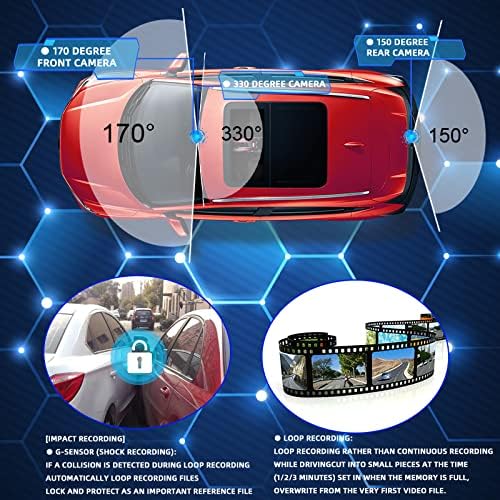
Image: Camera viewing angles for comprehensive coverage.
8. Garantía e soporte
E-ACE stands behind the quality of its products. Your Mirror Dash Cam comes with the following:
- Garantía de calidade de 2 ano: We provide a 2-year warranty covering manufacturing defects.
- 1-Month Full Refund/Exchange: If you are not satisfied with your purchase within one month, you are eligible for a full refund or exchange.
For any questions, technical support, or warranty claims, please contact our customer service team. We are committed to providing prompt assistance.


