1. Introdución
The CGSULIT SC530 is a professional full-system diagnostic scan tool designed primarily for Chevy/GMC vehicles (including Chevrolet, GMC, Buick, Cadillac, etc.) and offers comprehensive OBD2 functions for all car brands. This device provides OE-level diagnostics, covering all major vehicle systems such as Engine, Transmission, ABS, Airbag, Immobilizer, Fuel Injection Module, Body Module, HVAC, Seat Module, and Theft Deterrent. It also includes over 30 special functions and maintenance services, along with bi-directional control capabilities to assist in troubleshooting and component relearning.

Figure 1: CGSULIT SC530 OBD2 Scanner Main Unit
The SC530 is a powerful and user-friendly tool, suitable for both DIY enthusiasts and professional mechanics, offering a cost-effective solution for vehicle maintenance and repair.
2. Que hai na caixa
- SC530 OBD2 Scanner x1
- OBD Cable x1
- USB x1 Cabo
- Manual de usuario x1
- Bolsa de almacenamento x1
3. Configuración e uso inicial
- Encendido: Connect the SC530 scanner to your vehicle's OBD2 port. The device will power on automatically.
- Selección do idioma: Navigate to the 'Settings' menu to select your preferred language (English is default).
- Conexión do vehículo: Once powered on, the scanner will automatically detect your vehicle's VIN (Vehicle Identification Number) for quick and accurate diagnosis.
- Actualizacións de software: The SC530 offers lifetime free software updates. Connect the device to a computer via the provided USB cable and visit the CGSULIT official websitio para descargar a ferramenta de actualización e o software máis recente.

Figure 2: Connecting the SC530 to your vehicle's OBD2 port
4. Funcionamento do dispositivo
4.1 Full System Diagnosis (GM Series)
The SC530 is specifically designed for comprehensive diagnosis of GM series vehicles (Chevy, GMC, Buick, Cadillac, etc.). It can access and diagnose all electronic control modules within the vehicle, including:
- Módulo de control do motor (ECM)
- Módulo de control de transmisión (TCM)
- Sistema de freos antibloqueo (ABS)
- Sistema de suxeición suplementario (SRS/Airbag)
- Freo de estacionamento electrónico (EPB)
- Módulo de control corporal (BCM)
- Módulo de control HVAC
- E moitos máis...
This allows for reading and clearing fault codes, viewing live data streams, and performing active tests across all supported systems.

Figura 3: Máisview of Full System Diagnosis Capabilities
4.2 Special Functions & Maintenance Services
The SC530 offers over 30 special functions to assist in various maintenance and reset procedures. These functions help reset system statuses after repairs, saving time and costs associated with dealership visits. Key functions include:
- Oil Reset: Resets the Engine Oil Life system after an oil change.
- EPB Reset: Resets the electronic parking brake system.
- SAS Calibration: Calibrates the steering angle sensor.
- ABS Bleeding: Performs ABS brake bleeding.
- Battery Registration: Registers a new battery with the vehicle's system.
- Injector Coding: Codes new injector numbers to the ECU.
- TPMS Reset: Resets the Tire Pressure Monitoring System.
- Crankshaft Position (CKP) Variation Learn: Performs crankshaft relearn after sensor replacement.

Figura 4: Examples of 30+ Special Functions
4.3 Control bidireccional / Proba activa
This advanced feature allows the SC530 to send commands to vehicle components and monitor their operation, helping to identify hardware failures. Exampos inclúen:
- Controlling windows/doors
- Activating wipers
- Testing fuel pump operation
- Performing throttle body relearn
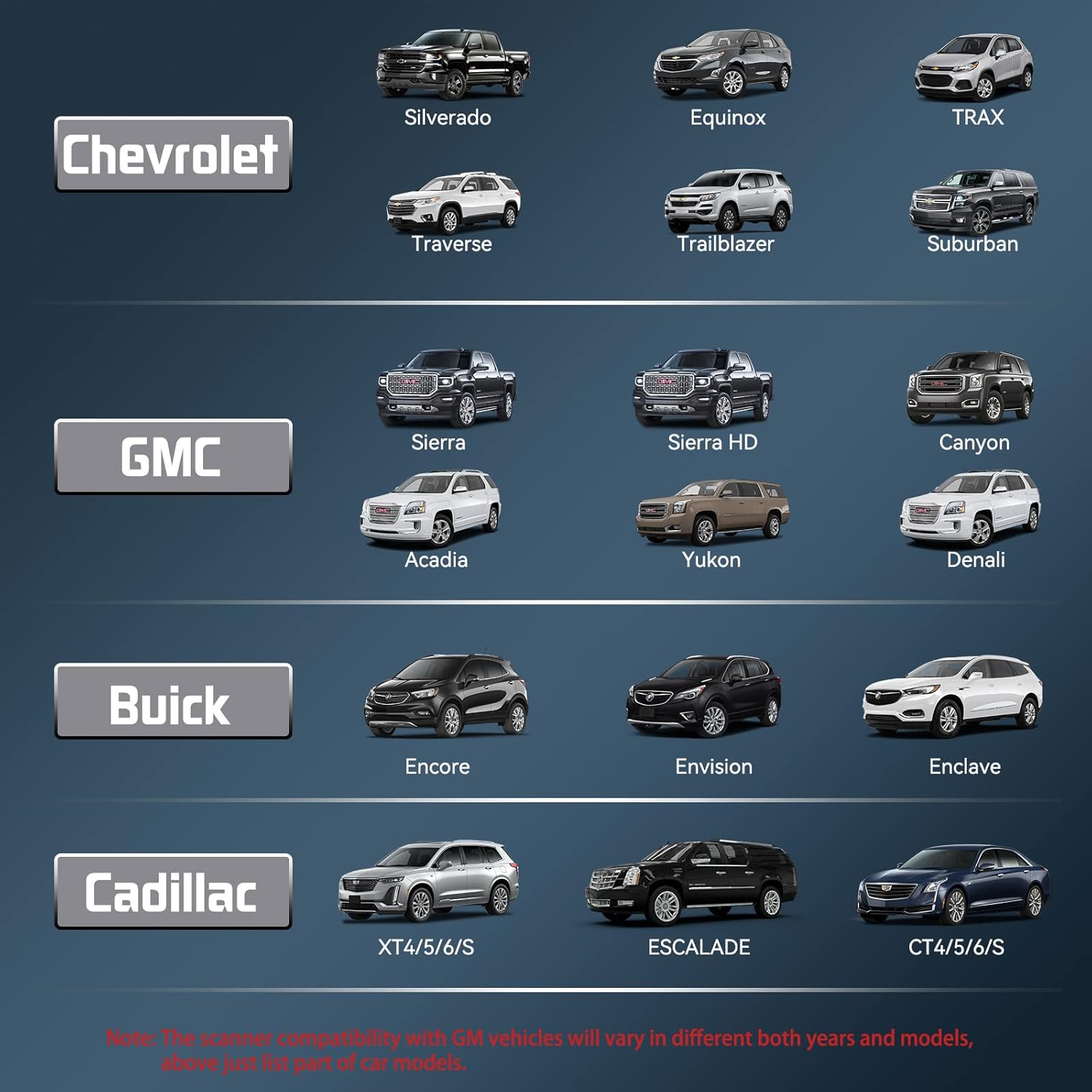
Figure 5: Bi-Directional Control Capabilities
4.4 Full OBD2 Functions (for All Cars)
Beyond GM-specific diagnostics, the SC530 provides standard OBD2 functions compatible with all vehicles manufactured after 1996. These include:
- Ler códigos: Displays Diagnostic Trouble Codes (DTCs) from all available systems.
- Borrar códigos: Clears DTCs after a malfunction has been repaired.
- Datos en directo: Views and records real-time PID data from various modules.
- Conxelar marco: Shows vehicle parameters recorded by the ECU when a fault occurs.
- Dispoñibilidade I / M: Checks if the vehicle is ready for emissions testing.
- Proba do monitor de O2: Recupera e mostra os resultados da proba do monitor do sensor de O2.
- Proba do monitor a bordo: Reads results of onboard diagnostic monitoring for specific systems.
- Proba de compoñentes: Recupera e viewResultados da proba do monitor do sensor de O2.
- Información do vehículo: Displays vehicle year, model, and VIN information.
- Busca de DTC: Built-in DTC library for detailed code explanations.

Figure 6: Full OBD2 Functionality

Figure 7: Live Data Stream Display
5. Mantemento
The CGSULIT SC530 is designed for durability and ease of use. To ensure optimal performance:
- Manteña o dispositivo limpo e libre de po e humidade.
- Store in the provided storage bag when not in use.
- Regularly check for and install software updates via the CGSULIT website to ensure compatibility with the latest vehicle models and access to new functions. All function updates are lifetime free.

Figure 8: Lifetime Free Use and Updates
6 Solución de problemas
If you encounter issues with your CGSULIT SC530, consider the following common troubleshooting steps:
- Sen enerxía: Ensure the OBD cable is securely connected to both the scanner and the vehicle's OBD2 port. Check the vehicle's battery status.
- Erro de comunicación: Verify the vehicle's ignition is on. Ensure the OBD2 port is functioning correctly. Try connecting to a different vehicle to rule out scanner issues.
- Incorrect Vehicle Selected: If the scanner displays 'Possible wrong vehicle selected', return to the main menu and ensure the correct vehicle make/model is chosen, or use the SmartVIN feature for automatic detection.
- Función non funciona: Not all functions are compatible with all vehicle models or years. Refer to the product compatibility list or contact customer support for specific function availability for your vehicle.
- Problemas de actualización de software: Ensure a stable internet connection and that the update tool is running with administrator privileges on your computer.
For persistent issues, refer to the 'Warranty & Support' section for contact information.
7. Especificacións
| Característica | Detalle |
|---|---|
| Modelo | SC530 |
| Marca | CGSULIT |
| Peso do elemento | 1.48 libras |
| Dimensións do produto | 3 x 1 x 7 polgadas |
| Sistema Operativo | Windows 7 (for PC software) |
| Linguaxe | English (and other supported languages) |
8. Garantía e soporte
CGSULIT is committed to providing quality products and excellent customer service. The SC530 comes with lifetime free use of all functions and updates, ensuring your device remains current and effective.
For any product support or inquiries, please do not hesitate to contact CGSULIT customer service. They aim to reply within 24 hours and provide timely solutions.
Contact information can typically be found on the official CGSULIT websitio web ou a través da túa plataforma de compra.


