Produto rematadoview
The FLEXISPOT Enhanced Standing Desk is an electric, motorized, height-adjustable desk designed to promote a healthy work-life balance. It features a robust dual-motor system and a three-section leg design, offering a wide height adjustment range from 62 cm to 127 cm. This desk is suitable for users ranging from 110 cm to 203 cm in height.
As características principais inclúen:
- Wide Height Adjustment: From 62 cm to 127 cm, accommodating various user heights.
- Powerful Dual Motor System: Ensures smooth and quick height transitions with a lifting speed of 3.5 cm/s.
- Alta capacidade de carga: Supports up to 160 kg, ideal for multiple monitors and heavy equipment.
- Panel de control intelixente: Features three programmable memory height presets and a timed reminder function for regular movement.
- Sistema anticolisión: Automatically stops and retracts when an obstacle is detected, preventing damage and injury.
- Durable and Certified Materials: FSC-certified desktop meeting E0 environmental standards, ensuring safety and sustainability.

Figure 1: FLEXISPOT Enhanced Standing Desk, highlighting its robust design and 160kg load capacity.
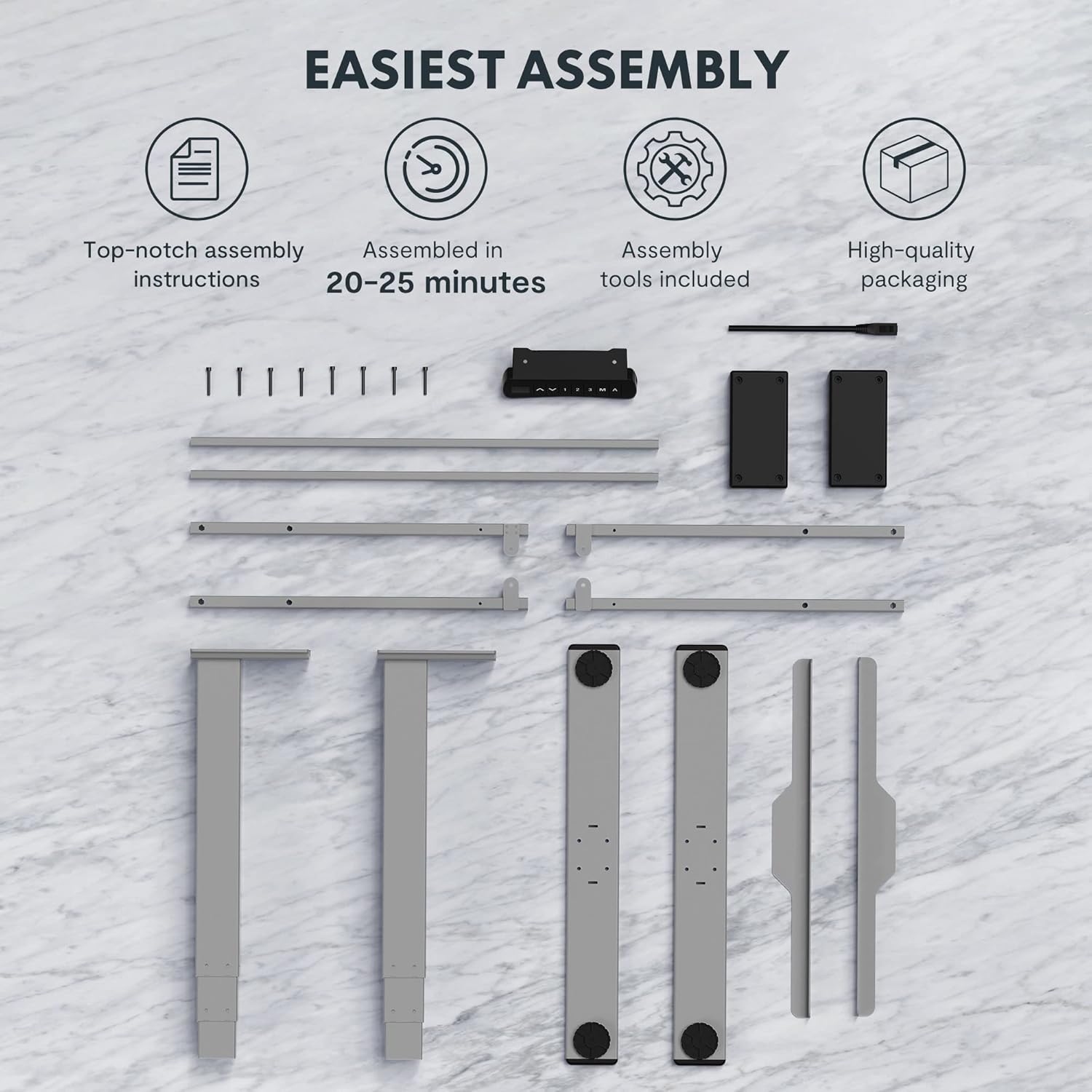
Figure 2: Available desktop options and material certifications, including FSC-certified wood.
Avisos de seguridade
Please read and understand all safety warnings before operating the desk to prevent injury or damage to the product.
- Collision Protection: The desk is equipped with an anti-collision system. If an obstacle is detected during movement, the tabletop will stop and retract slightly. Do not intentionally obstruct the desk's movement.
- Aviso de sobrecarga: Do not exceed the maximum load capacity of 160 kg. Overloading can damage the motor and frame.
- Nenos e animais: Keep children and pets away from the desk during operation. Moving parts can cause injury.
- Fonte de alimentación: Ensure the power cord is properly connected and not damaged. Do not operate the desk with a damaged cord or plug.
- Superficie nivelada: Always operate the desk on a stable and level surface to prevent tipping.
- Liquidación: Ensure there is adequate clearance around the desk when adjusting height to avoid pinching or crushing objects or body parts.
Configuración e montaxe
The FLEXISPOT Enhanced Standing Desk is designed for easy assembly. All necessary tools and detailed instructions are included in the packaging. Typical assembly time is approximately 20-25 minutes.
- Desempaquetar compoñentes: Retire con coidado todas as pezas da embalaxe. Comprobe que estean presentes todos os compoñentes listados nas instrucións de montaxe.
- Montaxe do cadro: Follow the step-by-step instructions to assemble the desk frame, including the three-section lifting columns and crossbars.
- Adxuntar escritorio: Securely attach the desktop to the assembled frame using the provided screws.
- Connect Control Panel and Power: Connect the control panel and power supply according to the wiring diagram in the instructions.
- Xestión de cables Use the included cable management accessories to organize and secure all cables.

Figure 3: Desk components laid out for assembly, illustrating the ease of setup with included tools and clear instructions.

Figure 4: Illustration of the desk's stable and durable design, featuring three lifting columns and a wide height adjustment range.
Instrucións de funcionamento
The smart control panel allows for easy and precise height adjustments and includes convenient memory functions.

Figure 5: The smart control panel, featuring a digital display, height adjustment buttons, and memory presets.
- Axuste de altura: Usa o Arriba (▲) e Abaixo (▼) arrow buttons on the control panel to raise or lower the desk to your desired height. The current height will be displayed on the digital screen.
- Configuración de predefinicións de memoria:
- Adjust the desk to your preferred height (e.g., sitting height).
- Preme o "M" button. The display will show "S-".
- Press one of the numbered memory buttons ("1", "2", ou "3") en 3 segundos. A altura agora está gardada nesa predefinición.
- Recuperación de predefinicións de memoria: Press the desired numbered memory button ("1", "2", ou "3"). The desk will automatically move to the saved height.
- Timed Reminder Function: The control panel includes a reminder function to prompt you to change positions. Refer to the detailed assembly manual for instructions on how to activate and set the reminder interval.
- Función anticolisión: The desk will automatically stop and reverse slightly if it encounters an obstruction during height adjustment. This feature is designed for safety and cannot be disabled.
Mantemento
Regular maintenance ensures the longevity and optimal performance of your FLEXISPOT standing desk.
- Limpeza: Limpa a superficie e a estrutura do escritorio cun pano suave eamp pano. Evite o uso de produtos químicos agresivos ou produtos de limpeza abrasivos que poidan danar o acabado.
- Xestión de cables Periodically check that all cables are securely routed and not pinched or tangled.
- Fixadores: Occasionally check all screws and bolts to ensure they are tight. Retighten if necessary.
- Motor and Frame: Keep the motor and lifting columns free from dust and debris. Do not lubricate the lifting columns unless specifically instructed by FLEXISPOT support.
Resolución de problemas
If you encounter any issues with your desk, refer to the following common troubleshooting steps:
| Problema | Causa posible | Solución |
|---|---|---|
| O escritorio non se move. | Power cord disconnected, motor error, or overload. | Check power connection. Unplug and replug the desk. Reduce weight on the desk. Refer to the full manual for error codes. |
| O escritorio móvese de xeito irregular. | Uneven load, loose connections, or calibration issue. | Distribute weight evenly. Check all frame connections. Perform a reset/calibration as per the detailed manual. |
| Anti-collision activates frequently. | Obstruction in path, or sensitivity setting. | Ensure clear path for desk movement. Check the detailed manual for anti-collision sensitivity adjustment (if available). |
For more complex issues or error codes not listed, please consult the comprehensive user manual provided with your product or contact FLEXISPOT customer support.
Especificacións
Detailed technical specifications for the FLEXISPOT Enhanced Standing Desk (Model: EC5S-FR+PR1808-Black).
| Característica | Detalle |
|---|---|
| Marca | FLEXISPOT |
| Número de modelo | EC5S-FR+PR1808-Black |
| Cor | Gris + Negro |
| Material | Metal (estrutura), madeira sintética (parte superior) |
| Deseño de escritorio | Escritorio de pé |
| Forma | Rectangular |
| Rango de axuste de altura | 62 centímetros - 127 centímetros |
| Columnas de elevación | 3 Seccións |
| Tipo de motor | Motor dual |
| Capacidade de carga máxima | 160 kg |
| Velocidade de elevación | 3.5 cm/s |
| Características especiais | Electric, Adjustable, Memory Presets, Reminder Function, Anti-Collision |
| Certificacións | IGR, CE, TÜV, FSC (for desktop) |
| Frame Width Compatibility | 110-170 cm |
| Tabletop Compatibility (Width x Depth) | 120-200 cm x 60-80 cm |

Figure 6: Adjustable frame range and compatible tabletop dimensions.

Figure 7: Illustration of the upgraded load capacity, now supporting up to 160 kg.
Garantía e Soporte
FLEXISPOT is committed to providing high-quality products. This desk has undergone extensive testing, including over 20,000 stress tests, and holds European certifications such as IGR, CE, and TÜV, ensuring its safety and durability.
For warranty information, technical support, or any inquiries, please contact FLEXISPOT customer service through their official website or the retailer where you purchased the product. Please have your model number (EC5S-FR+PR1808-Black) and purchase details ready when contacting support.


