Introdución
Thank you for choosing the iJoy Ultra Wireless Over-Ear Bluetooth Headphones. These headphones are designed to provide a versatile audio experience with multiple connectivity options and comfortable wear. This manual will guide you through the features, setup, and operation of your new headphones.

Image: iJoy Ultra Wireless Over-Ear Bluetooth Headphones, showcasing the sleek design and over-ear cushions.
O que hai na caixa
Asegúrate de que todos os artigos estean presentes no teu paquete:
- iJoy Ultra Wireless Over-Ear Bluetooth Headphones
- Cable de carga USB tipo C.
- Cable auxiliar (3.5 mm)
Produto rematadoview
Familiarize yourself with the headphone controls and ports:

Imaxe: Lateral view of the headphone ear cup, highlighting the control buttons for volume, track skipping, and power/play/pause/call management.
- Volume + / Skip Song: Hold for Volume Up, Press for Next Song.
- Power / Play / Pause / Answer/Reject Calls: Press to Play/Pause or Answer/Reject Calls. Hold to Power On/Off.
- Volume - / Previous Song: Hold for Volume Down, Press for Previous Song.
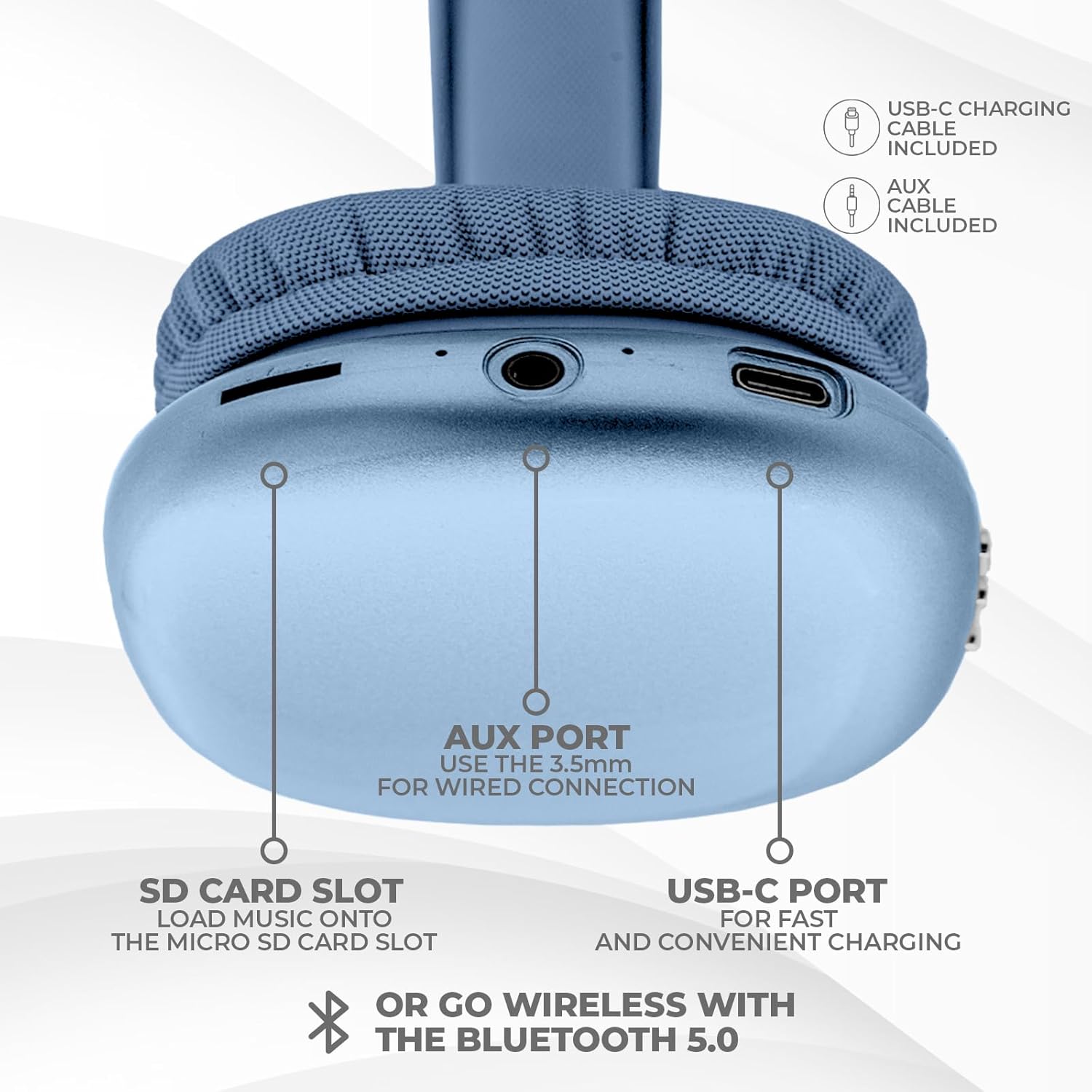
Imaxe: Parte inferior view of the headphone ear cup, showing the USB-C charging port, AUX port, and SD card slot.
- Porto USB-C: Para cargar os auriculares.
- AUX Port (3.5mm): Para conexión de audio con cable.
- Ranura para tarxetas SD: For direct audio playback from a Micro SD card.
Configuración
1. Carga dos auriculares
Antes do primeiro uso, carga completamente os auriculares. Unha carga completa tarda aproximadamente 2 horas.
- Connect the provided USB Type C charging cable to the USB-C port on the headphone.
- Conecta o outro extremo do cable USB a unha fonte de alimentación USB compatible (por exemplo, un adaptador de parede, un porto USB do ordenador).
- The LED indicator will show charging status and turn off or change color when fully charged.
2. Emparellamento Bluetooth
To connect your headphones wirelessly:
- Asegúrate de que os auriculares estean cargados e apagados.
- Manteña premido o botón de acendido/apagado ata que o indicador LED parpadee, indicando o modo de emparellamento.
- No teu dispositivo (teléfono intelixente, tableta, portátil), activa o Bluetooth e busca os dispositivos dispoñibles.
- Select "iJoy Ultra" from the list of devices.
- Once connected, the LED indicator will typically show a solid light or slow flash.
Note: The Bluetooth range is approximately 10 meters (33 feet).
3. Conexión con cable (AUX)
For a non-wireless connection or when the battery is low:
- Connect one end of the provided 3.5mm AUX cable to the AUX port on the headphone.
- Connect the other end of the AUX cable to the 3.5mm audio jack on your device.
- Os auriculares cambiarán automaticamente ao modo con fío.
4. Reprodución de tarxeta SD
Para reproducir música directamente desde unha tarxeta Micro SD:
- Insert a Micro SD card (with music files) into the SD card slot on the headphone.
- The headphones will automatically detect the card and begin playing music.
- Use the track control buttons to navigate your music.
Instrucións de funcionamento
Encendido/apagado
- Encendido: Manteña premido o botón de acendido/apagado durante aproximadamente 3 segundos.
- Apagado: Manteña premido o botón de acendido/apagado durante aproximadamente 3 segundos.
Reprodución de música
- Reproducir/Pausa: Preme o botón de acendido unha vez.
- Próxima pista: Press the Volume + button once.
- Pista anterior: Press the Volume - button once.
- Subir volume: Hold the Volume + button.
- Baixar volume: Hold the Volume - button.
Xestión de chamadas
When connected via Bluetooth:
- Responder chamada: Preme o botón de acendido unha vez.
- Finalizar a chamada: Press the Power button once during a call.
- Rexeitar a chamada: Manteña premido o botón de acendido/apagado durante aproximadamente 2 segundos.
Duración da batería
The headphones offer up to 10 hours of wireless playtime on a single charge.

Image: Visual representation of the headphones' battery life, indicating up to 10 hours of wireless playtime.
Mantemento
To ensure the longevity and optimal performance of your iJoy Ultra headphones:
- Limpa os auriculares regularmente cun pano suave e seco.
- Evite expoñer os auriculares a temperaturas extremas, humidade ou luz solar directa.
- Non use produtos de limpeza ou disolventes abrasivos.
- Garda os auriculares nun lugar fresco e seco cando non estes en uso.
- Evite deixar caer os auriculares nin someterlos a impactos fortes.
Resolución de problemas
Se tes problemas cos teus auriculares, consulta as seguintes solucións habituais:
| Problema | Solución |
|---|---|
| Os auriculares non se acenden. | Asegúrate de que os auriculares estean completamente cargados. Conéctaos a unha fonte de alimentación mediante o cable USB-C. |
| Non se pode emparellar por Bluetooth. | Make sure the headphones are in pairing mode (flashing LED). Turn off and on Bluetooth on your device. Ensure no other devices are currently connected to the headphones. Try 'forgetting' the device on your phone and re-pairing. |
| No sound or choppy audio. | Check volume levels on both headphones and your device. Ensure Bluetooth connection is stable or try a wired AUX connection. If using an SD card, ensure it is properly inserted and the files son compatibles. |
| Headphones are uncomfortable or too tight. | Adjust the headband for a better fit. The over-ear cushions are designed for comfort, but individual fit may vary. |
| Cannot connect to multiple devices simultaneously. | These headphones typically support connection to one device at a time. Disconnect from the current device before attempting to connect to another. |
Especificacións
| Característica | Detalle |
|---|---|
| Nome do modelo | Ultra |
| Número de modelo do artigo | IJHP21 |
| Tecnoloxía de conectividade | Sen fíos (Bluetooth), con cable (AUX de 3.5 mm) |
| Tecnoloxía de comunicación sen fíos | Bluetooth |
| Alcance Bluetooth | 10 metros (33 pés) |
| Jack para auriculares | Jack de 3.5 mm |
| Características especiais | SD Card Slot, Soft Cushion Padding, USB Type C |
| Duración da batería | Ata 10 horas |
| Tempo de carga | 2 horas |
| Tipo de control | Volume Control, Track Management, Call Management |
| Colocación do oído | Sobre orella |
| Material | Plástico |
| Peso do elemento | 8 onzas |
| Dimensións do produto | 7 x 3 x 8 polgadas |
| UPC | 842700193053 |
Vídeo oficial do produto
Vídeo: Un vídeo oficial do produto da presentación de iJoy Electronicsasing the features and design of the iJoy Ultra Bluetooth Over-Ear Headphones.
Garantía e Soporte
For warranty information or technical support, please refer to the documentation included with your product or contact iJoy customer service directly. Keep your proof of purchase for any warranty claims.


