1. Introdución
Grazas pola compraasing the ZEBRONICS Sound Bomb 7 True Wireless Stereo (TWS) Earbuds. This manual provides detailed instructions for setting up, operating, and maintaining your earbuds to ensure optimal performance and longevity. Please read this manual carefully before use.
2. Contido do paquete
O paquete inclúe os seguintes elementos:
- Earbuds - 2 Units (Left and Right)
- Charging Case - 1 Unit
- Eartips - 4 Units (various sizes)
- Type-C Charging Cable - 1 Unit
- QR User Guide (digital access)
3. Produto rematadoview
The ZEBRONICS Sound Bomb 7 earbuds are designed for a comfortable fit and high-quality audio experience. They feature touch controls, a portable charging case, and support for voice assistants.

Image: The ZEBRONICS Sound Bomb 7 TWS earbuds shown with their open charging case.

Image: A collage highlighting key features: Touch Control, 13mm Drivers, Splash Proof design, Portable Charging Case, Voice Assistant support, and Bluetooth v5.2 with Flash Connect.
4. Configuración
4.1 Carga inicial
Before first use, ensure both the earbuds and the charging case are fully charged. Remove any protective stickers from the earbud charging contacts.
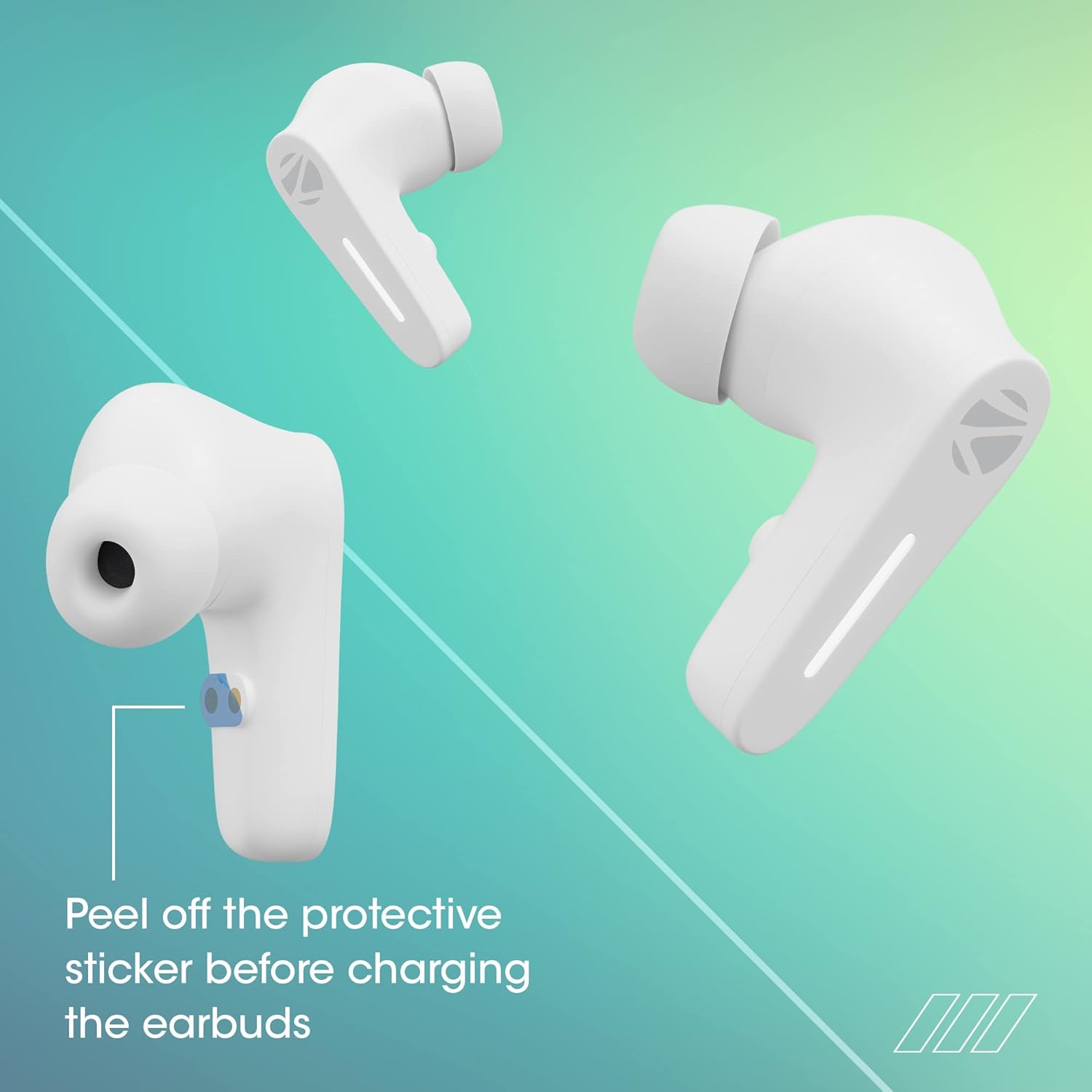
Image: Illustration showing the protective sticker on the earbud charging contacts that needs to be removed before charging.
- Coloque os dous auriculares no estoxo de carga.
- Conecta o cable de carga tipo C ao porto de carga da carcasa e a unha fonte de alimentación USB.
- Os indicadores LED da caixa mostrarán o estado de carga.
- A full charge typically takes approximately 1 hour for the case and earbuds.
The Sound Bomb 7 features Carga rápida, providing up to 180 minutes of playback with just 10 minutes of charging.

Image: A visual representation of the rapid charge feature and the Type-C charging port on the earbud case.
4.2 Emparejamento Bluetooth
Emparella os teus auriculares co teu dispositivo para obter audio sen fíos.
- Open the charging case. The earbuds will automatically power on and enter pairing mode (Flash Connect feature).
- No teu teléfono intelixente ou dispositivo con Bluetooth, vai á configuración de Bluetooth.
- Busca available devices and select "ZEB-SOUND BOMB 7" from the list.
- Unha vez conectado, escoitarás un ton de confirmación.
- Os auriculares volverán conectarse automaticamente ao último dispositivo emparellado ao sacalos da funda, se o Bluetooth está activado no dispositivo.

Image: An illustration demonstrating the Flash Connect feature, where opening the case initiates quick pairing with a smartphone.
5. Instrucións de funcionamento
5.1 Controis táctiles
Os auriculares inclúen controis táctiles intuitivos para varias funcións:
- Toca simple: Reproducir/pausar música, responder/finalizar chamadas.
- Toca dúas veces (auricular esquerdo): Pista anterior.
- Toca dúas veces (auricular dereito): Próxima pista.
- Triplo toque (auricular esquerdo/dereito): Activa o asistente de voz.
- Long Press (Left/Right Earbud for 2 seconds): Rexeitar a chamada entrante.
- Long Press (Left/Right Earbud for 3 seconds): Toggle Gaming Mode (Low Latency).
Modo de xogo 5.2 (latencia baixa)
Activate Gaming Mode for a low-latency audio experience, ideal for gaming. Long press either earbud for 3 seconds to toggle this mode on or off.

Image: A visual depicting the earbuds in Gaming Mode, emphasizing low latency and the 13mm audio drivers.
5.3 Asistente de voz
Access your smartphone's voice assistant (Siri or Google Assistant) by triple-tapping either earbud. This allows for hands-free control of your device.

Image: Icons for "Hey Siri" and "Google Assistant" indicating support for voice assistant functionality.
5.4 Cancelación de ruído ambiental (ENC)
The earbuds feature Environmental Noise Cancellation (ENC) for clearer call quality by reducing ambient noise during conversations.

Image: A graphic illustrating the Environmental Noise Cancellation feature, showing sound waves being reduced around an earbud.
6. Mantemento
Proper care ensures the longevity of your earbuds.
- Limpeza: Usa un pano suave e seco para limpar os auriculares e a funda de carga. Non empregues produtos químicos agresivos nin materiais abrasivos.
- Resistencia á auga: The earbuds are splash-proof/sweat-proof. Avoid submerging them in water or exposing them to heavy rain.
- Almacenamento: Cando non estean en uso, garde os auriculares no seu estoxo de carga para protexelos e mantelos cargados.
- Temperatura: Evita expoñer os auriculares a temperaturas extremas (calor ou frío).

Image: An earbud being splashed with water, illustrating its splash-proof design.
7 Solución de problemas
Se atopas problemas, proba as seguintes solucións:
| Problema | Solución |
|---|---|
| Os auriculares non se emparejan |
|
| Só funciona un auricular |
|
| Volume baixo ou mala calidade de son |
|
| O estuche de carga non se está cargando |
|
8. Especificacións
| Característica | Detalle |
|---|---|
| Nome do modelo | BOMBA SONORA ZEB 7 |
| Tecnoloxía de conectividade | Bluetooth 5.2 |
| Tecnoloxía de comunicación sen fíos | Bluetooth |
| Colocación do oído | En Orella |
| Factor de forma | En Orella |
| Tipo de control | Control por voz, control táctil |
| Método de control | Toca |
| Control de ruído | Cancelación de ruído ambiental (ENC) |
| Tamaño do controlador | 13 mm |
| Tempo de carga | Approx. 1 hour (earbuds & case) |
| Hora de xogo | Ata 60 horas (con caixa de carga, ao 50 % de volume) |
| Carga rápida | 10 min charge for 180 min use |
| Modo de xogo | 50 ms de baixa latencia |
| Nivel de resistencia á auga | Water Resistant (Splash Proof/Sweat Proof) |
| Conector | USB tipo C |
| Peso do elemento | 47 gramos |
| Dimensións do produto | 5.5 x 5.5 x 3.2 cm |
| Dispositivos compatibles | Laptops, Mobile Phones, Tablets, PC, Smart TVs, All Bluetooth Devices, iOS, Android |
9. Garantía e soporte
Your ZEBRONICS Sound Bomb 7 TWS Earbuds come with a 1 ano de garantía desde a data de compra. Esta garantía cobre defectos de fabricación en condicións de uso normal.
For warranty claims, technical support, or any product-related inquiries, please contact ZEBRONICS customer service. Keep your purchase receipt as proof of purchase.
You can find more information and support on the official ZEBRONICS websitio: www.zebronics.com


