Introdución
This manual provides essential information for the safe and efficient operation of your Crosley Montero Portable Rechargeable Bluetooth Speaker. Please read this manual thoroughly before using the device and retain it for future reference.
Información de seguridade
- Non expoñas o altofalante á auga nin a humidade excesiva. Este produto non é impermeable.
- Evite colocar o altofalante preto de fontes de calor como radiadores, rexistros de calor, estufas ou outros aparellos (incluídos amplificadores) que producen calor.
- Use só accesorios/accesorios especificados polo fabricante.
- Desenchufe este aparello durante tormentas eléctricas ou cando non se use durante longos períodos de tempo.
- Remita todo o servizo a persoal de servizo cualificado. O mantemento é necesario cando o aparello sufriu algún dano.
O que hai na caixa
- Crosley Montero Portable Rechargeable Bluetooth Speaker
- Cable micro-USB
- Cable de entrada auxiliar de 3.5 mm
Produto rematadoview
The Crosley Montero speaker features a classic design with modern connectivity options. It includes controls for mode selection, track navigation, and volume adjustment on the top panel. The rear panel houses the input/output ports.
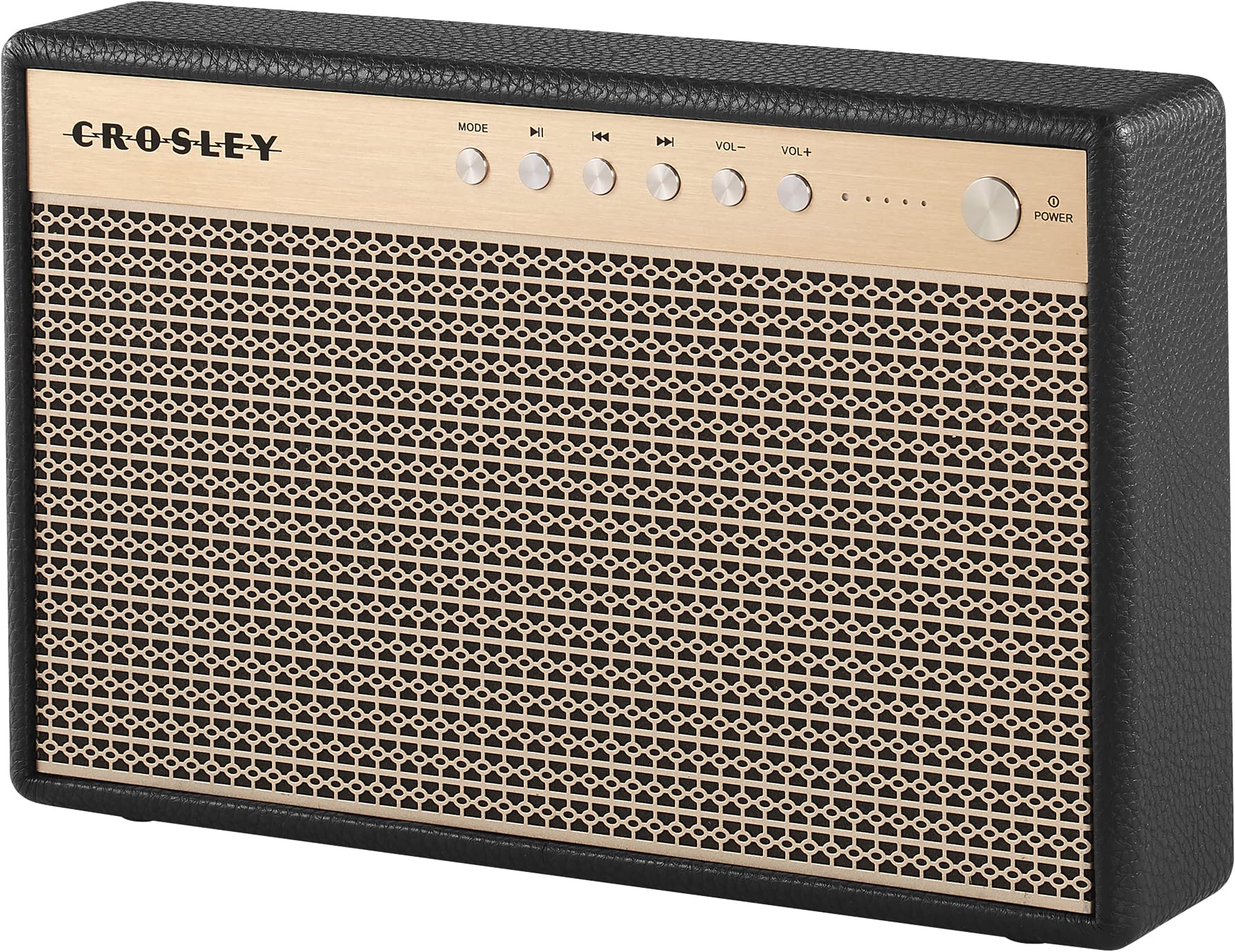
Figura 1: Fronte view of the Crosley Montero speaker, showing the speaker grille and control panel.

Figura 2: Traseira view of the Crosley Montero speaker, highlighting the AUX input, USB OTG (input port), Phone Charging (output: 5V 1A), and DC 5V power input ports.
Configuración
Cargando o altofalante
Before initial use, fully charge the speaker using the provided Micro-USB cable. Connect the Micro-USB cable to the DC 5V port on the rear of the speaker and the other end to a compatible USB power adapter (not included). The charging indicator lights will illuminate during charging and turn off when fully charged.
Encendido/apagado
- To power on: Press and hold the Power button on the control panel.
- To power off: Press and hold the Power button. The speaker must be disconnected from external power before shutting off.
Instrucións de funcionamento
Emparejamento Bluetooth
- Power on the speaker. The Bluetooth indicator light will flash, indicating it is in pairing mode.
- No teu dispositivo con Bluetooth (teléfono intelixente, tableta, etc.), activa Bluetooth e busca os dispositivos dispoñibles.
- Select "Crosley Montero" from the list of devices.
- Once paired, the Bluetooth indicator light on the speaker will remain solid. You can now stream audio from your device.
Entrada auxiliar
Para conectar un dispositivo a través da entrada auxiliar:
- Connect one end of the 3.5mm Aux In cable to the AUX port on the rear of the speaker.
- Conecta o outro extremo do cable á toma de auriculares ou á saída de audio do teu dispositivo externo.
- Press the "MODE" button on the speaker's control panel until the AUX mode is selected.
- Adjust the volume on both the speaker and your external device.
Carga de teléfono USB
The speaker features a USB port for charging external devices. Connect your phone's USB charging cable to the "Phone Charging (Output: 5V 1A)" port on the rear of the speaker. This feature allows you to charge your phone while the speaker is in use or on standby.
Controis básicos
- MODO: Prema para alternar entre os modos de entrada Bluetooth e AUX.
- Reproducir/Pausa: Press to play or pause audio during Bluetooth playback.
- Pista anterior: Press to go to the beginning of the current track or the previous track during Bluetooth playback.
- Próxima pista: Press to skip to the next track during Bluetooth playback.
- VOL-: Prema para baixar o volume.
- VOL+: Prema para aumentar o volume.
Vídeo 1: An official video demonstrating the features and operation of the Crosley Montero Portable Rechargeable Bluetooth Speaker.
Vídeo 2: A concise official video showcasing the Crosley Montero Portable Rechargeable Bluetooth Speaker.
Mantemento
- Clean the speaker with a soft, dry cloth. Do not use liquid cleaners or aerosol sprays.
- Keep the speaker away from dust and direct sunlight.
- Garde o altofalante nun lugar fresco e seco cando non o use durante períodos prolongados.
Resolución de problemas
| Problema | Solución |
|---|---|
| O altofalante non se acende. | Ensure the speaker is charged. Connect it to a power source using the Micro-USB cable. |
| Non hai son do altofalante. | Check volume levels on both the speaker and the connected device. Ensure the correct mode (Bluetooth/AUX) is selected. |
| O dispositivo Bluetooth non se pode emparellar. | Ensure the speaker is in pairing mode (flashing Bluetooth indicator). Turn off and on Bluetooth on your device. Move the device closer to the speaker. |
| Phone not charging via USB. | Verify the USB cable is securely connected to the "Phone Charging" port and your phone. Ensure the speaker has sufficient battery charge. |
Especificacións

Figura 3: Overall dimensions of the Crosley Montero speaker: 10.25" W x 6.5" H x 2.25" D.
- Nome do modelo: Montero
- Tipo de altofalante: Altofalante portátil
- Tecnoloxía de conectividade: Bluetooth, USB
- Tecnoloxía de comunicación sen fíos: Bluetooth
- Potencia de saída máxima do altofalante: 30 vatios
- Resposta en frecuencia: 18 kHz
- Fonte de enerxía: Alimentado por batería (1 batería de iones de litio incluída)
- Dimensións do produto: 10.25" D x 6.5" W x 2.25" H
- Peso do artigo: 2.8 Pounds (approximately 2.76 pounds)
- Material: Plástico
- Compoñentes incluídos: Speaker, Micro-USB Cable, 3.5mm Aux In Cable
Garantía e Soporte
This Crosley product comes with a limited warranty. For specific warranty details, please refer to the warranty card included with your purchase or visit the official Crosley website. For technical support or customer service, please contact Crosley's USA-based customer support.


