1. Introdución
Thank you for choosing the ASLONG 4K Backup Camera 4CH Dash Cam System. This advanced system is designed to provide enhanced visibility and recording capabilities for a wide range of vehicles, including RVs, semi-trailers, trucks, and vans. With its 10.36-inch quad split touchscreen monitor and four high-definition cameras, you can achieve a 360-degree view around your vehicle, significantly reducing blind spots and improving driving safety. This manual will guide you through the installation, operation, and maintenance of your new system.
2. Produto rematadoview
The ASLONG 4K Backup Camera System is a comprehensive solution for vehicle monitoring. It features a large, responsive touchscreen display and four durable, waterproof cameras. The system supports quad-view display, allowing simultaneous monitoring of all four camera feeds. Its built-in DVR function ensures continuous recording, providing a reliable record of your journeys.

Figure 2.1: ASLONG 4K Backup Camera 4CH Dash Cam System components.
Características principais:
- 10.36" ISP HD Touchscreen Monitor: Wide screen with high pixel density, offering intuitive touch operation and multiple display modes (quad split, single view).
- 4 Channel Waterproof Cameras: High-definition glass lenses with F2.0 large aperture, providing transparent imaging, super night vision, and a 170° wide viewángulo de ing.
- Built-in DVR Recording Function: Supports default boot recording, smart segmented storage, and seamless loop recording to a 128GB TF card (max).
- Encendido automático: System powers on automatically with vehicle ignition.
- Flexible Vehicle Compatibility: Operates on 9-36V DC power, suitable for RVs, trucks, trailers, buses, and other heavy-duty vehicles.
- Funcións adicionais: Includes phone connectivity for calls, multi-angle adjustable bracket, music/video playback, trigger display for automatic camera switching, adjustable reversing lines, and parking monitoring.
Produto rematadoview Vídeo:
Vídeo 2.1: Un breve resumoview of the ASLONG 4K Backup Camera System and its main features.
3. Contido do paquete
Verifique que todos os elementos estean incluídos no seu paquete:
- Monitor de 10.36 polgadas x1
- Cámara x4
- Cable de extensión para cámara x4
- Cable de alimentación x1
- Soporte x1
- Tarxeta TF de 128 GB x1
4. Configuración e instalación
Proper installation is crucial for optimal performance. The system is designed for wired connection to ensure stable signal transmission.
4.1 Conexión de alimentación
The system is powered directly by your vehicle's electrical system. Ensure your vehicle's FUSE BOX is rated at 20A ou superior for the power supply. The power cord includes three main wires for connection:
- Fío negro: Conéctate ao terminal negativo (-). of the battery or a reliable ground point on the vehicle chassis.
- Fío amarelo: Conectar a a constant positive (+) power source (e.g., directly to the battery positive terminal or a fuse that is always live). This ensures continuous power for DVR recording even when the ignition is off.
- Cable vermello (ACC): Conectar a un ignition-controlled positive (+) power source (e.g., a fuse that is only live when the ignition is on). This allows the system to power on/off with your vehicle's ignition.
If you prefer constant power for the monitor (always on), connect both the Red (ACC) and Yellow wires to the constant positive (+) power source.
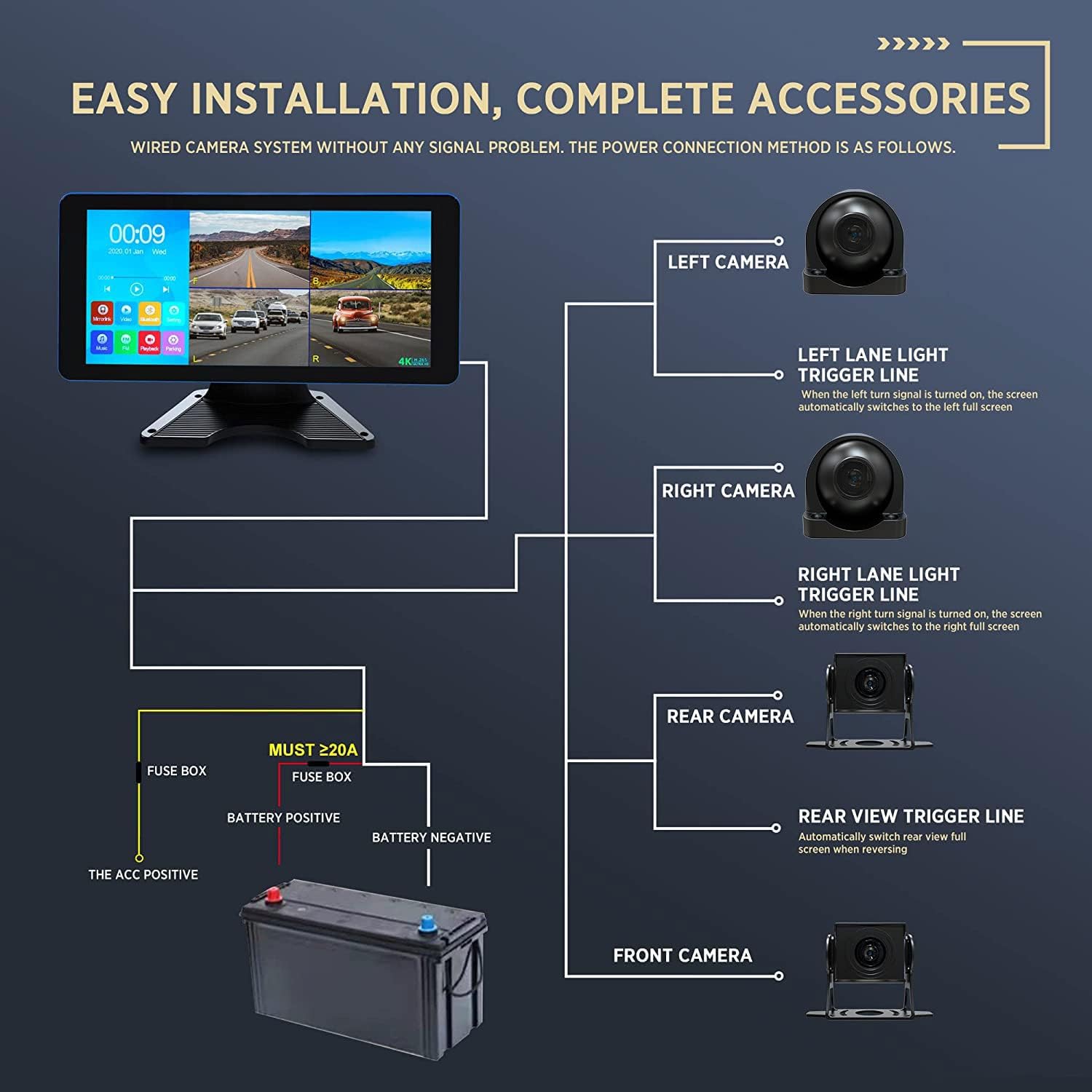
Figure 4.1: Easy Installation and Complete Accessories Wiring Diagram.
4.2 Conexión da cámara
Connect each of the four cameras to the monitor using the provided extension cables. The system supports specific trigger lines for automatic view conmutación:
- Left Lane Light Trigger Line: Connect to the left turn signal light. When the left turn signal is activated, the screen automatically switches to the left full screen view.
- Right Lane Light Trigger Line: Connect to the right turn signal light. When the right turn signal is activated, the screen automatically switches to the right full screen view.
- Traseira View Trigger Line: Connect to the reversing lights. The screen will automatically switch to the rear view full screen when reversing.
The cameras are designed to be waterproof and provide a 170° wide viewing angle, helping to eliminate blind spots around your vehicle.

Figura 4.2: Ancha Viewing Angle to Avoid Blind Spots.
4.3 Trigger Line Connection Method Video:
Video 4.1: Detailed instructions on connecting the trigger lines for the 4CH Dash Cam Backup Camera System.
5. Instrucións de funcionamento
The 10.36-inch touchscreen monitor provides easy access to all system functions.

Figure 5.1: 10.36" ISP HD Touchscreen Monitor Interface.
5.1 Modos de visualización
The monitor supports various display modes, including quad split screen, and individual camera views. You can switch between these modes via the touchscreen interface to suit your viewnecesidades de ing.

Figure 5.2: Available 9 Channel Display Modes.
5.2 DVR Recording
The system automatically begins recording upon power-on. Recordings are saved to the included 128GB TF card. The DVR features smart segmented storage and seamless loop recording, ensuring that your storage never fills up and older fileos s son sobrescritos por outros novos.
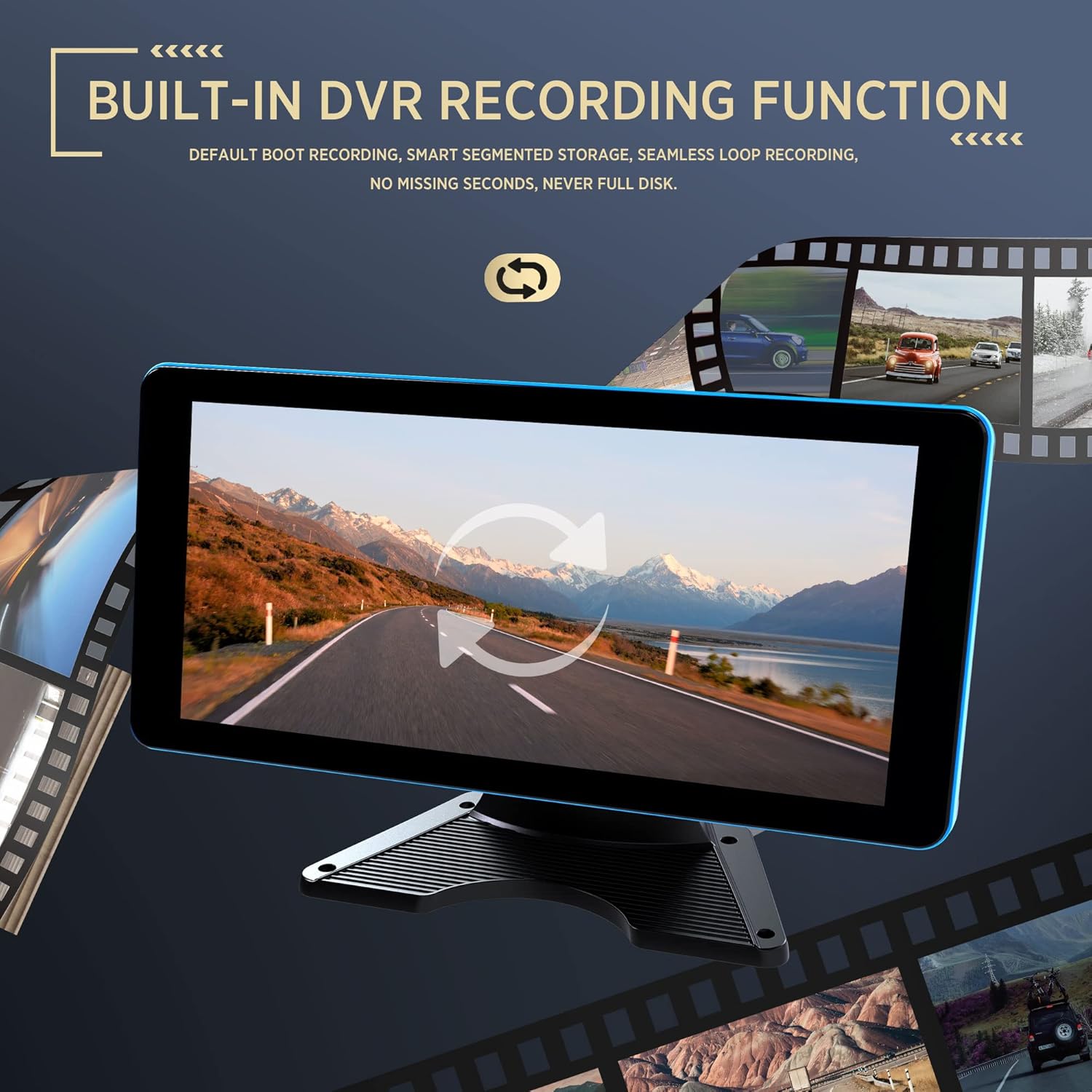
Figure 5.3: Built-in DVR Recording Function.
5.3 Media Playback & Connectivity
The monitor supports local playback of recorded videos. Additionally, it can play music and videos for entertainment. You can also connect your phone to the monitor for calls, enhancing convenience during your travels.
5.4 Vixilancia do aparcamento
Utilize the parking monitoring function to keep your vehicle safe when parked. This feature provides continuous surveillance, acting as a deterrent against potential incidents.
6. Mantemento
To ensure the longevity and optimal performance of your ASLONG 4K Backup Camera System, follow these maintenance guidelines:
- Limpeza regular: Gently wipe the monitor screen and camera lenses with a soft, damp cloth. Avoid using abrasive cleaners or solvents that could damage the surfaces.
- Inspección de cables: Periodically check all cables and connections for any signs of wear, fraying, or loose connections. Secure any loose connections immediately.
- Xestión de tarxetas TF: While the system supports loop recording, it is recommended to periodically back up important footage and format the TF card to maintain optimal recording performance.
- Rango de temperatura: The system is designed to operate in temperatures from -20℃ to 60℃. Avoid exposing the unit to extreme temperatures outside this range for prolonged periods.
7 Solución de problemas
If you encounter any issues with your ASLONG 4K Backup Camera System, please refer to the following common troubleshooting steps:
7.1 No Power / System Not Turning On
- Comproba as conexións de alimentación: Ensure the black (negative), yellow (constant positive), and red (ACC ignition) wires are securely connected to their respective power sources.
- Verify Fuse Box Ampera: Confirm that the fuse box connected to the power cord is rated at 20A or higher. An insufficient amperage rating can prevent the system from powering on or cause intermittent issues.
- Test Power Sources: Use a test light or multimeter to verify that power is present at the connection points for the yellow and red wires.

Figure 7.1: Troubleshooting Power Connection Issues.
7.2 No Camera Signal / Blank Screen
- Check Camera Connections: Ensure all camera extension cables are firmly connected to both the cameras and the monitor.
- Inspeccionar os cables para detectar danos: Look for any visible damage to the camera cables or connectors.
- Verify Camera Power: Ensure the cameras are receiving power through the extension cables.
7.3 DVR Recording Issues
- TF Card Check: Ensure the 128GB TF card is properly inserted into the monitor. Try removing and reinserting it.
- Formatear tarxeta TF: If recording issues persist, format the TF card through the monitor's settings menu. This will erase all data, so back up important files primeiro.
- Fonte de alimentación: Confirm the yellow wire is connected to a constant power source to ensure continuous recording even when the ignition is off.
For further assistance, please contact ASLONG customer support.
8. Especificacións
| Característica | Detalle |
|---|---|
| Dimensións do produto | 16.54 x 11.02 x 4.13 polgadas |
| Peso do elemento | 7 libras |
| Número de modelo | 674260, T033s-001, 18650, E240426 |
| Marca | TANTO |
| Tecnoloxía de visualización | LED |
| Cor | Negro |
| Resolución de captura de vídeo | 4K |
| Características especiais | Low Light, Wide-Angle View Lente |
| Tecnoloxía de conectividade | USB |
| Tipo de montaxe | Montaxe do parabrisas |
| Temperatura de funcionamento | -20℃ a 60℃ |
9. Garantía e soporte
ASLONG is confident in the quality of this product. Your purchase includes a one-year warranty service desde a data de compra.
9.1 Cobertura da garantía
The warranty covers defects in materials and workmanship under normal use. It does not cover damage caused by improper installation, accident, misuse, abuse, neglect, unauthorized modification, or natural disasters.
9.2 Atención ao cliente
If you have any questions, concerns, or require technical assistance, please do not hesitate to contact ASLONG customer support. Our team is available to help you with any product-related inquiries.
Please refer to your purchase documentation or the ASLONG official websitio para obter a información de contacto máis actualizada.


