1. Produto rematadoview
The FLEXISPOT E6 Essential Electric Standing Desk is designed to provide a versatile and ergonomic workspace. Featuring a robust dual-motor system and a 3-stage lift mechanism, it offers smooth and quiet height adjustments to suit various user needs and preferences.

Figure 1: FLEXISPOT E6 Essential Standing Desk (White Frame + Mahogany Desktop)
Características principais:
- Cozy & Ergonomic Whole-Piece Workspace: Spacious 47.5” x 29.5” desktop provides ample room for multiple monitors and accessories.
- 3-Stage Lift System: Offers a wide lifting range from 23.6” to 48.8”, accommodating users of various heights.
- Quiet & Smooth Dual Motors: Operates with less than 50 dB of sound, supporting up to 220 lbs with minimal noise.
- Controlador programable: Features a convenient control panel with four memory buttons for effortless height adjustments.
- Construción duradeira: Built with a strong steel structure for stability and longevity.
2. Configuración e montaxe
The FLEXISPOT E6 Essential desk is designed for straightforward assembly. While the manual suggests a two-person job, it can be managed by one individual with basic tools.
2.1 Desembalaxe e preparación
- Carefully unpack all components from the two packages (frame and desktop usually ship separately).
- Verify all parts are present against the packing list provided in the instruction manual.
- Clear a spacious area for assembly to ensure ease of movement and prevent damage.
2.2 Pasos de montaxe
Follow the detailed instructions provided in the included assembly manual. A screwdriver is the primary tool required. Ensure all screws are tightened securely for stability.

Figure 2: Intelligent Keypad and Height Ranges
The desk frame offers three different positions depending on your tabletop size. For the 48"x30" desktop, align the frame accordingly. Some pre-drilled holes may not perfectly align, requiring new pilot holes to be drilled for optimal fit and stability.
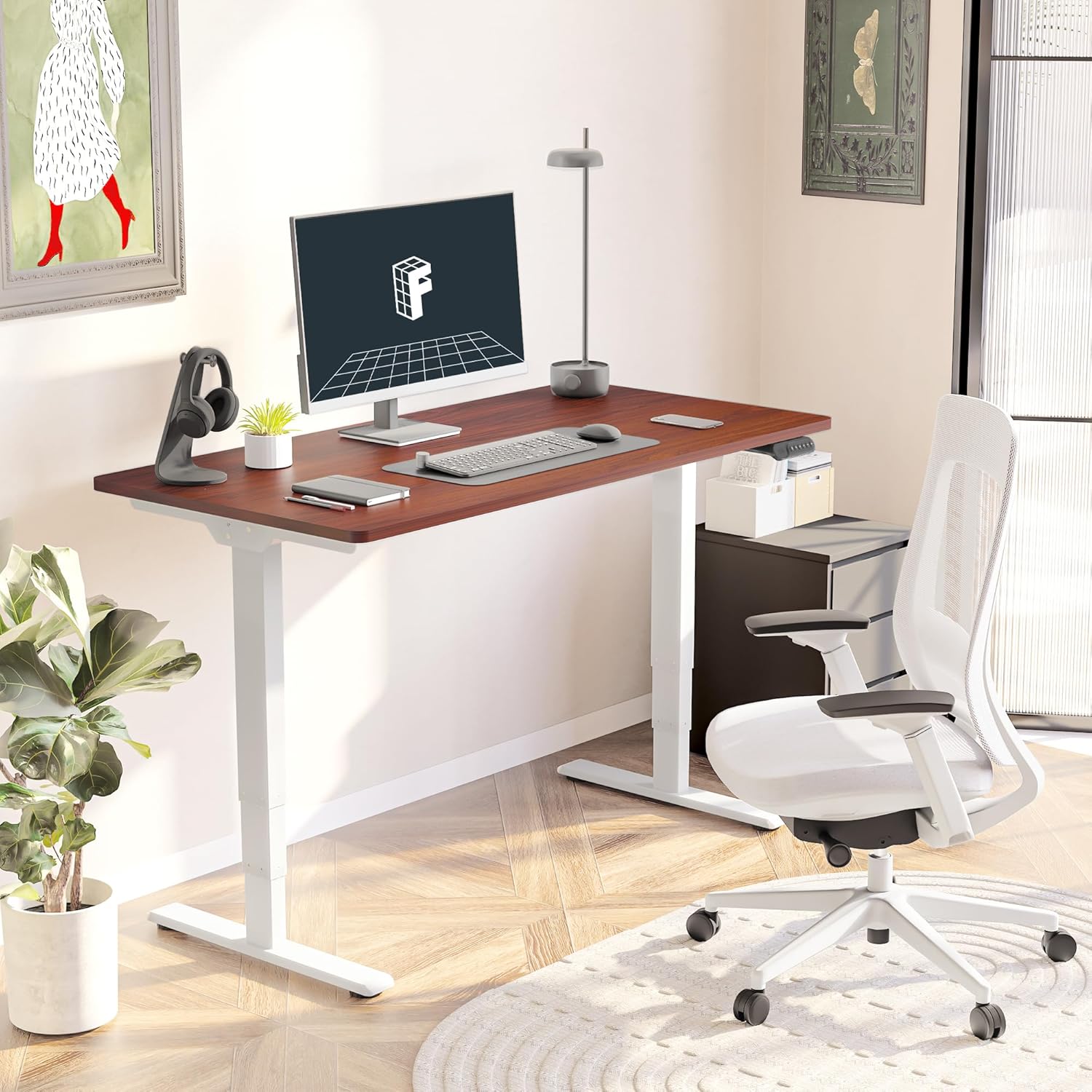
Figure 3: Assembled Desk in a Home Office
2.3 Optional Wheels
The desk feet are equipped with wheels that can be locked into position for mobility or replaced with pads for a stationary setup. Both options are provided to suit your preference.
3. Instrucións de funcionamento
The intelligent keypad provides intuitive control over your standing desk's height and settings.
3.1 Funcións do panel de control

Figure 4: Intelligent Keypad
- Panel de visualización LED: Mostra a altura actual do escritorio en polgadas.
- Frechas cara arriba/abaixo: Use these buttons to manually adjust the desk height.
- Predefinicións de memoria (1, 2, 3, 4): Program up to four preferred height settings (e.g., sitting height, standing height, child height, extra tall height). To save a height, adjust the desk to the desired position, then press and hold a numbered memory button until the display confirms the setting.
- Min/Max Adjustment: The desk can be adjusted from a minimum height of 23.6” to a maximum height of 48.8”.
3.2 Sistema anticolisión
The desk is equipped with an anti-collision system that detects obstacles during height adjustment and automatically stops to prevent damage to the desk or surrounding objects. This feature enhances safety during operation.
4. Mantemento
Proper maintenance ensures the longevity and optimal performance of your FLEXISPOT E6 Essential desk.
4.1 Limpeza
- The desktop surface is water-resistant. For general cleaning, wipe with a soft, damp pano.
- Evita o uso de produtos químicos agresivos ou produtos de limpeza abrasivos que poidan danar o acabado.
- Ensure no liquids seep into the control panel or motor components.
4.2 Comprobacións periódicas
- Comprobe periodicamente todos os parafusos e bulóns para asegurarse de que seguen axustados. Volva a apertalos se é necesario.
- Inspect power cables for any signs of wear or damage.
5 Solución de problemas
If you encounter any issues with your FLEXISPOT E6 Essential desk, refer to the following common troubleshooting tips. For more complex problems, please contact customer support.
5.1 O escritorio non axusta a altura
- Comprobe se o cable de alimentación está conectado correctamente tanto ao escritorio como á toma de corrente.
- Ensure there are no obstructions preventing movement (e.g., objects under the desk, cables caught).
- Perform a reset procedure as outlined in the full manual (if applicable).
5.2 Desk Wobbles
- Verify that all assembly screws are tightly secured.
- Ensure the desk is on a flat, stable surface. Adjust leveling glides on the feet if necessary.
- Avoid exceeding the maximum weight recommendation of 220 lbs.
5.3 Control Panel Not Responding
- Unplug the desk from the power outlet for 30 seconds, then plug it back in.
- Check the connection of the control panel cable to the motor unit.
6. Especificacións
| Atributo | Detalle |
|---|---|
| Marca | FLEXISPOT |
| Número de modelo | ET365 |
| Dimensións do produto (P x A x A) | 47.5" D x 29.5" W x 23.6" H |
| Tamaño do escritorio | 48"x30" Whole-piece |
| Cor | White Frame + Mahogany Top |
| Altura mínima | 23.6 polgadas |
| Altura máxima | 48.8 polgadas |
| Recomendación de peso máximo | 220 libras |
| Tipo de motor | Motor dual |
| Lift System Stages | 3-Stage |
| Nivel de ruído | Menos de 50 dB |
| Panel de control | Programmable with 4 memory settings |
| Tipo de material superior | Madeira de enxeñería |
| Material base | Metal |
| Montaxe necesaria | Si (Recomendado 2 persoas) |

Figura 5: Dimensións do escritorio

Figure 6: Maximum Load Capacity
7. Garantía e soporte
7.1 Información da garantía
FLEXISPOT ofrece unha garantía completa para a súa tranquilidade:
- Cobertura de 5 anos: Aplícase á estrutura e ao motor do escritorio.
- Protección de 2 anos: Aplícase ao panel de control e á electrónica.
This warranty covers manufacturing defects and ensures the quality and durability of your product.
7.2 Atención ao cliente
For any assistance, questions, or warranty claims, please contact FLEXISPOT customer support. You can find contact information on the official FLEXISPOT websitio web ou a través da túa plataforma de compra.
7.3 Información importante de seguridade
Warning: Exceeding the maximum weight recommendation of 220 lbs or using the desk at heights outside the range of 23.6 inches to 48.8 inches may pose a risk to the stability and safety of the desk.