1. Produto rematadoview
The Nutale AirPro Key Finder Tag (Model F11XD) is a Bluetooth-enabled item locator designed to help you find misplaced items such as keys, wallets, backpacks, and tablets. It integrates seamlessly with the Apple Find My app, leveraging the global Find My network for location tracking. This device is compatible exclusively with iOS devices.

Figure 1: Nutale AirPro Key Finder Tag features and Find My App integration.
2. Instrucións de configuración
2.1. Important iOS System Requirement
To ensure proper functionality and binding of the Nutale AirPro Key Finder Tag, your iOS device must be running iOS 18.0.1 ou posterior. Please update your device's operating system if necessary before proceeding with the setup.

Figure 2: iOS system version requirement for tag encadernación.
2.2. Acender o dispositivo
- Locate the button on your Nutale AirPro Key Finder Tag.
- Manteña premido o botón durante aproximadamente 5 segundos.
- The device will emit a beep sound and a light will flash, indicating it has powered on and is ready for pairing.
2.3. Pairing with the Apple Find My App
Follow these steps to pair your Nutale AirPro Key Finder Tag with your iOS device using the Find My app:
- Abre o Buscar a miña aplicación no teu iPhone ou iPad.
- Navega ata o Elementos ficha.
- Toca o + icon (Add Item).
- Seleccione Outro elemento compatible das opcións.
- The app will search for nearby devices. Once your Nutale AirPro Tag is detected (e.g., "NUTALE-F11X"), tap Conectar.
- Siga as indicacións en pantalla para Name your item and choose an emoji to represent it.
- Acepta vincular o dispositivo ao teu ID de Apple.
- Toca Remate para completar o proceso de emparellamento.
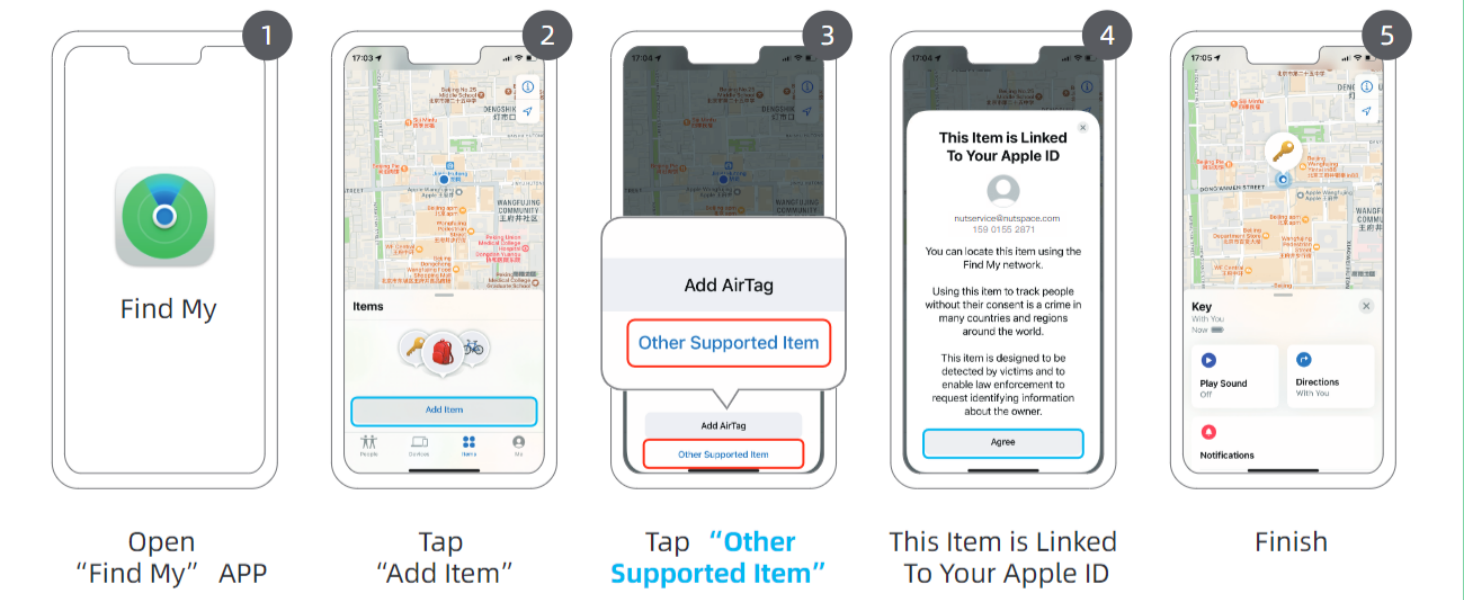
Figure 3: Visual guide for connecting your Nutale AirPro Tag á aplicación Find My.
3. Instrucións de funcionamento
3.1. Localizar o teu elemento
The Nutale AirPro Key Finder Tag utilizes the Apple Find My network to help you locate your items. This network consists of millions of Apple devices worldwide that can anonymously detect your tag and report its location to you.
- Long-Distance Locating: If your item is far away, the Find My app will display its last known location on a map, updated by the Find My network. You will receive notifications if your item is detected by other Apple devices.
- Nearby Locating (Play Sound): When your item is within Bluetooth range (approximately 20 to 50 meters), you can use the Find My app to play a sound on your Nutale AirPro Tag to pinpoint its exact location.

Figure 4: Global positioning and sound features via Find My App and Siri.
3.2. Usando Siri
You can also ask Siri to help you find your item. Simply say, "Hey Siri, find my [item name]" (e.g., "Hey Siri, find my keys"), and your Nutale AirPro Tag reproducirá un son.
3.3. Left Behind Notifications
The Find My app can alert you if you leave your Nutale AirPro Tag behind at an unfamiliar location. You can customize these notifications within the app settings.
3.4. Modo perdido
If your item is lost, you can enable Lost Mode in the Find My app. This allows you to display a message and contact information to anyone who finds your tag. When someone finds your tag and scans it with an NFC-enabled smartphone, they will see your message and contact details.
Video 1: Official demonstration of Nutale AirPro Key Finder Tag setup and functionality with iOS Find My App.
4. Mantemento
4.1. Información da batería
- The Nutale AirPro Key Finder Tag utiliza a Batería de pila de moedas CR2032.
- The battery life is approximately 10 meses en condicións de uso normais.
- O paquete do produto inclúe 4 pila CR2032 (one pre-installed, three spares).
4.2. Substitución da batería
Para substituír a batería:
- Localice o compartimento da batería na parte traseira do tag.
- Gently pry open the battery cover.
- Retire a antiga batería CR2032.
- Insira unha nova batería CR2032 co lado positivo (+) cara arriba.
- Pecha de forma segura a tapa da batería.

Figure 5: Independent battery compartment for easy replacement.
5 Solución de problemas
- Dispositivo sen emparellamento: Ensure your iOS device is updated to iOS 18.0.1 or later. Make sure Bluetooth is enabled on your device. Press and hold the tag's button for 5 seconds until it beeps to ensure it's in pairing mode.
- Sen son de tag: Comproba se o tag's battery needs replacement. Ensure the tag está dentro do alcance Bluetooth do teu dispositivo iOS.
- Localización incorrecta: Location accuracy depends on the density of Apple devices in the Find My network. In areas with fewer Apple devices, location updates may be less frequent or precise.
- O botón non responde: Apply firm pressure to the button. If the issue persists, try replacing the battery.
6. Especificacións
| Característica | Detalle |
|---|---|
| Número de modelo | F11XD |
| Dimensións | 4.24 cm x 4.24 cm x 0.79 cm (1.67 polgadas de longo x 1.67 polgadas de ancho x 0.31 polgadas de grosor) |
| Peso do elemento | 3.2 onzas (90.7 gramos) |
| Material | Acrilonitrilo butadieno estireno (ABS), plástico |
| Tipo de batería | CR2032 (incluído) |
| Número de baterías | 4 (1 pre-installed, 3 spares) |
| Duración da batería | Aproximadamente 10 meses |
| Compatibilidade | iOS devices only (iPhone, iPad) with Find My app |
7. Garantía e soporte
7.1. Garantía do produto
The Nutale AirPro Key Finder Tag ven con a 1 ano de garantía desde a data de compra. Esta garantía cobre defectos de fabricación e avarías en condicións de uso normal. Conserve o comprobante de compra para reclamacións de garantía.
7.2. Soporte técnico
Nutale offers lifetime technical support for the AirPro Key Finder Tag. If you encounter any issues or have questions regarding the product, please contact our customer care team. Contact information can typically be found on the product packaging or the official Nutale websitio.


