1. Introdución
Thank you for choosing the KAIDI KD-771 TWS Smart Touch V5.1 Wireless Earbuds. This manual provides essential information for the proper use, setup, and maintenance of your new earbuds. Please read it carefully before use and retain it for future reference.
Contido do paquete:
- 1 Pair of KAIDI KD-771 Wireless Earbuds
- 1 Estuche de carga
- 1 cable de carga USB (tipo C)
- 1 Manual de usuario

Image 1.1: KAIDI KD-771 Wireless Earbuds with their retail packaging.
2. Información de seguridade
- Do not disassemble, repair, or modify the product. This may cause fire, electronic breakdown, or complete product damage.
- Manteña o dispositivo lonxe de temperaturas extremas, luz solar directa e humidade elevada.
- Avoid exposing the earbuds to water or other liquids. While rated IPX4 for splash resistance, they are not waterproof and should not be submerged.
- Emprega só o cable de carga incluído ou un equivalente certificado.
- Do not use the earbuds at excessively high volumes for extended periods to prevent hearing damage.
- Manter fóra do alcance dos nenos.
3. Produto rematadoview
The KAIDI KD-771 earbuds feature a compact design with intuitive touch controls and a portable charging case.

Image 3.1: The KAIDI KD-771 Wireless Earbuds alongside their closed charging case.

Imaxe 3.2: Detallada view of the earbuds and charging case, highlighting the USB Type-C charging port and earbud design.
Compoñentes:
- Auriculares: Left and Right earbuds with Smart Touch sensors.
- Estuche de carga: Stores and charges the earbuds. Features a battery indicator LED and a USB Type-C charging port.
- Micrófono: Integrado en cada auricular para chamadas.
4. Configuración
4.1 Carga dos auriculares e da funda
Antes do primeiro uso, carga completamente os auriculares e a caixa de carga.
- Coloca os auriculares na caixa de carga. Asegúrate de que estean correctamente asentados.
- Connect the USB Type-C charging cable to the charging port on the case and the other end to a USB power source (e.g., wall adapter, computer).
- O indicador LED da caixa de carga acenderase para mostrar o estado da carga. Unha vez cargada completamente, o indicador pode cambiar de cor ou apagarse.
- A full charge provides approximately 4 hours of earbud usage, with additional charges available from the case.
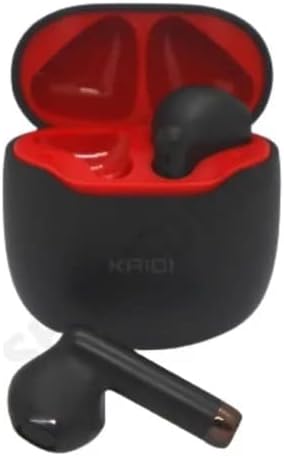
Image 4.1: Earbuds placed inside the charging case, ready for charging.
4.2 Emparejamento cun dispositivo
The earbuds use Bluetooth V5.1 for a stable and low-latency connection.
- Encendido: Open the charging case. The earbuds will automatically power on and enter pairing mode. You may hear an audible prompt.
- Activar Bluetooth: On your smartphone or other Bluetooth-enabled device, go to the Bluetooth settings and ensure Bluetooth is enabled.
- Seleccione o dispositivo: In the list of available Bluetooth devices, locate and select "KD-771".
- Confirmar conexión: Unha vez conectados, escoitarás un son de confirmación e os auriculares estarán listos para usar.
- Reconexión automática: Despois do emparellamento inicial, os auriculares conectaranse automaticamente co último dispositivo emparellado ao retiralos da funda, sempre que o Bluetooth estea activo no dispositivo.
5. Instrucións de funcionamento
The KAIDI KD-771 earbuds feature Smart Touch controls for easy management of audio and calls.
Controis táctiles intelixentes 5.1
- Reproducir/Pausa: Toca un só auricular en calquera dos auriculares.
- Próxima pista: Toca dúas veces no auricular dereito.
- Pista anterior: Toca dúas veces no auricular esquerdo.
- Responder/Finalizar chamada: Toque unha vez en calquera dos auriculares durante unha chamada entrante ou activa.
- Rexeitar a chamada: Manteña premido calquera dos auriculares durante 2 segundos durante unha chamada entrante.
- Activar o asistente de voz: Toca tres veces en calquera dos auriculares (por exemplo, Siri, Asistente de Google).
- Control de volume: Volume adjustments must be made directly on the connected device (smartphone, tablet, etc.). The earbuds do not have integrated volume controls.
5.2 Encendido/apagado
- Encendido: Open the charging case, or press and hold the touch area on both earbuds for 3 seconds if they are outside the case and off.
- Apagado: Place the earbuds back into the charging case and close the lid. Alternatively, press and hold the touch area on both earbuds for 5 seconds.
6. Mantemento
6.1 Limpeza
- Limpe os auriculares e a caixa de carga cun pano suave, seco e sen fiapos.
- Non empregue produtos de limpeza abrasivos, alcol nin disolventes químicos.
- Asegúrate de que os contactos de carga dos auriculares e da funda estean limpos e libres de residuos.
6.2 Almacenamento
- Cando non estean en uso, garde os auriculares no seu estoxo de carga para protexelos e mantelos cargados.
- Almacenar nun lugar fresco e seco, lonxe da luz solar directa e de temperaturas extremas.
6.3 Resistencia á auga
The KAIDI KD-771 earbuds are rated IPX4, meaning they are resistant to splashes of water from any direction. This makes them suitable for workouts or light rain. However, they are not designed for submersion in water, showering, or swimming. Avoid exposing them to heavy rain or direct streams of water.
7 Solución de problemas
| Problema | Causa posible | Solución |
|---|---|---|
| Os auriculares non se acenderon. | Batería baixa. | Cargue completamente os auriculares e a caixa de carga. |
| Os auriculares non se emparellan co dispositivo. | Bluetooth is off on device; earbuds not in pairing mode; device list cluttered. | Ensure Bluetooth is on. Place earbuds in case, close, then open to re-enter pairing mode. Forget "KD-771" on your device and try pairing again. |
| Non se escoita son polos auriculares. | Volume demasiado baixo; auriculares non conectados; contido multimedia en pausa. | Increase volume on your device. Check Bluetooth connection. Ensure media is playing. |
| Un auricular non ten son. | Auriculares non sincronizados correctamente; batería baixa nun auricular. | Place both earbuds back in the case, close the lid, then open again. Ensure both earbuds are charged. |
| A caixa de carga non carga. | Cable ou fonte de alimentación defectuosos. | Try a different USB Type-C cable and/or power adapter. Ensure connections are secure. |
8. Especificacións
- Nome do modelo: KD-771
- Tecnoloxía de conectividade: Sen fíos (Bluetooth V5.1)
- Tecnoloxía de comunicación sen fíos: Bluetooth
- Método de control: Toca
- Características especiais: Volume control (via device), Lightweight, Microphone included, IPX4 Splash Resistant
- Colocación do oído: In-Ear
- Material: Plástico
- Resposta en frecuencia: 20 Hz - 20 kHz (implied from 20000 Hz spec)
- Sound Responsiveness: 115 decibeis
- Impedancia: 32 ohmios
- Rango de frecuencia: 2.400 - 2.485 GHz
- Fonte de enerxía: Batería
- Average Battery Life (Earbuds): 4 horas
- Composición da batería: Ion de litio
- Porto de carga: USB tipo C
- Peso do produto: 100 g
- Certificación ANATEL: 18583-21-14467
9. Garantía e soporte
9.1 Garantía do fabricante
Este produto vén cunha garantía do fabricante de 3 meses from the date of purchase. This warranty covers manufacturing defects under normal use. It does not cover damage caused by misuse, accidents, unauthorized modifications, or normal wear and tear.
9.2 Atención ao cliente
For technical assistance, warranty claims, or further inquiries, please contact your retailer or the KAIDI customer support channel provided at the point of purchase. Please have your proof of purchase and product model number (KD-771) ready when contacting support.


