1. Introdución
The Zenwire Portable External CD/DVD Drive with SD Card Reader and USB-C Hub (Model SY885) is a versatile 4-in-1 device designed to enhance your computer's capabilities. It functions as a CD/DVD player and recorder, an SD card reader, and a USB hub. This device features USB 3.0 for fast data transfer and offers Plug & Play functionality, eliminating the need for driver installation. Its compact design makes it suitable for both stationary and mobile use, providing convenient data and multimedia management across various operating systems.
2. Contido do paquete
Verifica que todos os elementos estean presentes no paquete:
- Zenwire Portable External CD/DVD Drive (Model SY885)
- Cable USB-A a USB-C
- Cable USB-A a USB-A
- Manual de usuario
- SD Card Adapter
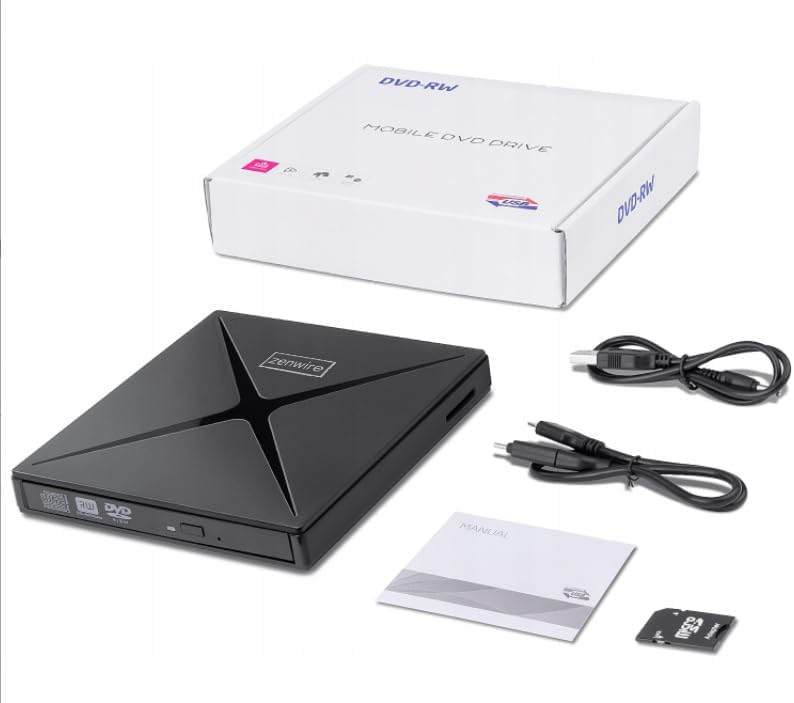
Figura 2.1: Contido do paquete
3. Produto rematadoview
The Zenwire SY885 combines multiple functionalities into one compact device. It features a CD/DVD drive, an SD card reader, and two USB ports for expanded connectivity.
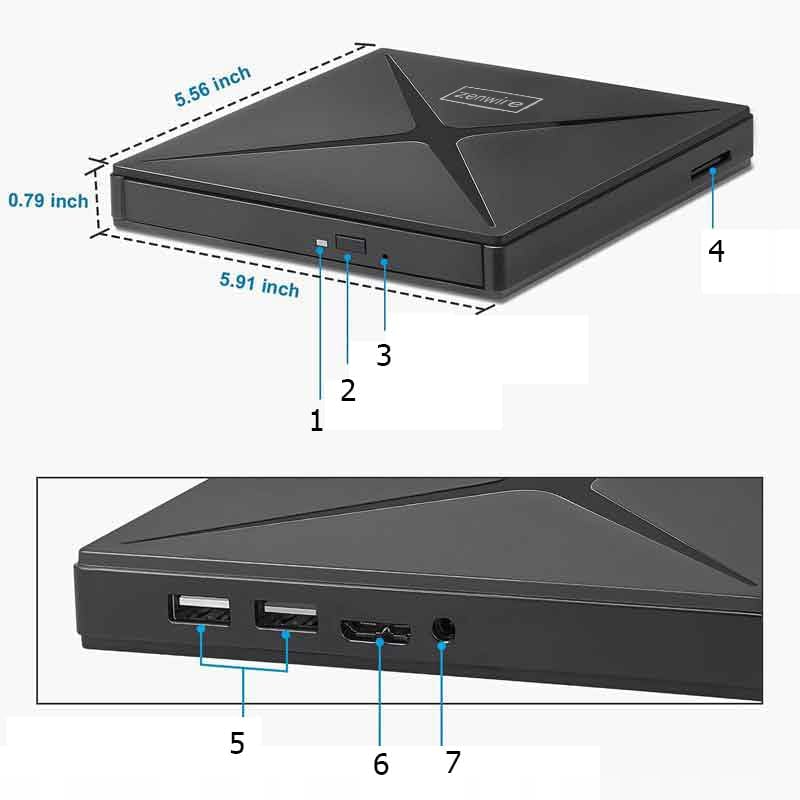
Figure 3.1: Device Ports and Features
- Botón de expulsión: Press to open the disc tray.
- Luz indicadora: Illuminates when the device is powered on or active.
- Portos USB-A (2x): Para conectar periféricos USB.
- Ranura para tarxetas SD: For inserting SD and Micro SD cards (with adapter).
- Porto USB-C: Main connection to your computer.

Figura 3.2: Dimensións do dispositivo
4. Configuración
The Zenwire SY885 features Plug & Play functionality, requiring no driver installation for most operating systems.
4.1 Conectando o dispositivo
- Connect the provided USB-C cable to the USB-C port on the Zenwire drive.
- Connect the other end of the USB-C cable to an available USB-C port on your computer. If your computer only has USB-A ports, use the provided USB-A to USB-A cable and connect it to a USB-A port on your computer.
- The indicator light on the drive will illuminate, confirming power. Your operating system should automatically detect and configure the device.

Figure 4.1: Connecting the Drive to a Laptop
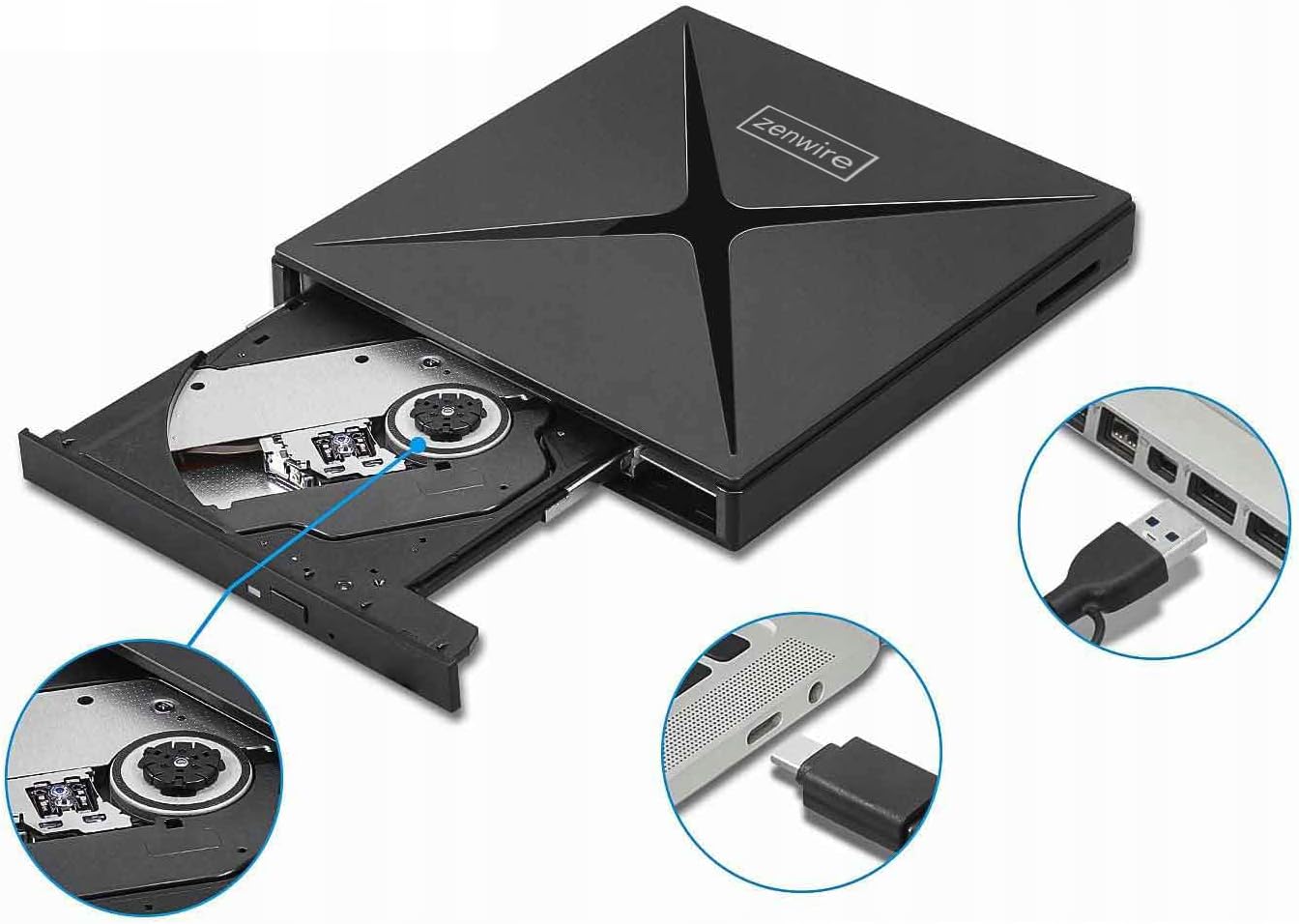
Figure 4.2: USB-A and USB-C Connection Options
5. Instrucións de funcionamento
5.1 Using the CD/DVD Drive
- Ensure the drive is connected to your computer.
- Press the Eject button on the front of the drive to open the disc tray.
- Carefully place a CD or DVD onto the tray, ensuring it is centered.
- Empurre con coidado a bandexa de volta na unidade ata que se peche cun clic.
- Your computer's operating system should detect the disc. You can then access its contents through File Explorer (Windows) ou Finder (Mac).
- To eject the disc, press the Eject button again or use the software eject function in your operating system.
5.2 Using the SD Card Reader
- Ensure the drive is connected to your computer.
- Insert an SD card directly into the SD card slot on the side of the drive. For Micro SD cards, use the provided SD card adapter.
- Empuxe a tarxeta ata que faga clic no seu lugar.
- Your computer will recognize the SD card as a removable storage device.
- To safely remove the SD card, eject it through your operating system's software function before physically pulling it out.
5.3 Using the USB Hub
- Ensure the drive is connected to your computer.
- Connect USB peripherals such as a mouse, keyboard, USB flash drive, or external hard drive to the two USB-A ports on the side of the Zenwire drive.
- The connected devices will function as if they were directly connected to your computer.

Figure 5.1: Data Transfer via the Drive
6. Compatibilidade
The Zenwire SY885 is designed for broad compatibility with various operating systems and computer types.
- Sistemas operativos: Windows 11/10/8/8.1/7/Vista/XP, Mac OS (10.14 Mojave or higher), Linux.
- Plataforma de hardware: Laptops, Desktop PCs, All-in-One PCs.

Figura 6.1: Compatibilidade do sistema operativo

Figure 6.2: Device Compatibility with Various Computers
7. Mantemento
To ensure the longevity and optimal performance of your Zenwire SY885, follow these maintenance guidelines:
- Limpeza: Use a soft, dry cloth to clean the exterior of the drive. Do not use liquid cleaners or abrasive materials. For the disc tray, use a specialized CD/DVD lens cleaner if necessary, following its instructions.
- Almacenamento: Store the drive in a cool, dry place away from direct sunlight and extreme temperatures. When not in use, keep the disc tray closed to prevent dust accumulation.
- Manexo: Handle the drive carefully to avoid physical damage. Do not drop or expose it to excessive force.
- Coidado do disco: Always use clean, scratch-free CDs and DVDs. Avoid touching the data surface of discs.
8 Solución de problemas
If you encounter issues with your Zenwire SY885, refer to the following common problems and solutions:
| Problema | Causa posible | Solución |
|---|---|---|
| Drive not detected by computer | Loose connection, insufficient power, incompatible USB port. | Ensure the USB cable is securely connected to both the drive and the computer. Try a different USB port on your computer. Ensure the USB port provides sufficient power (e.g., a direct port on the computer, not an unpowered hub). |
| Disc not reading/writing | Dirty or scratched disc, incorrect disc type, drive lens dirty. | Clean the disc with a soft cloth. Try a different disc. Ensure the disc type is supported (CD-R, CD-RW, DVD-R, DVD-RW). Consider using a CD/DVD lens cleaner. |
| Non se detectou a tarxeta SD | Card not inserted correctly, damaged card, incompatible card format. | Reinsert the SD card firmly. Try a different SD card. Ensure the card is not locked (write-protected). Check if the card format is supported by your operating system. |
| USB peripherals not working via hub | Insufficient power, faulty peripheral, drive not fully connected. | Ensure the main drive is properly connected and receiving power. Try connecting the peripheral directly to the computer. Some high-power devices may require a powered USB hub. |
| Velocidade de transferencia de datos lenta | Connected to USB 2.0 port, system overload. | Ensure the drive is connected to a USB 3.0 or USB-C port on your computer for optimal speeds. Close unnecessary applications to free up system resources. |
9. Especificacións
| Característica | Descrición |
|---|---|
| Número de modelo | SY885 |
| Marca | Zenwire |
| Interface de hardware | USB 2.0, USB Type C |
| Optical Memory Write Speed | 12x |
| Optical Memory Read Speed | DVD 8X |
| Velocidade de transferencia de datos | 60 Megabits per second (USB 3.0) |
| Plataforma | Portátil, PC de escritorio |
| Material | Drive + SD Card Reader + USB-C Hub |
| Compatibilidade do sistema operativo | Windows 11/10/8/8.1/7/Vista/XP, macOS 10.14 Mojave or higher, Linux |
| Dimensións (aprox.) | 15 cm x 14 cm x 1.8 cm (5.91 polgadas x 5.56 polgadas x 0.79 polgadas) |
10. Garantía e soporte
Zenwire products are designed for reliability and performance. For warranty information and technical support, please refer to the documentation included with your purchase or visit the official Zenwire websitio. Garda o comprobante de compra para reclamacións de garantía.


