Introdución
This manual provides instructions for the Steelcase Gesture Office Chair, designed to support a wide range of postures and interactions with technology. The chair features Era Persimmon Fabric, adjustable lumbar support, and hard floor casters, offering continuous support and comfort for extended periods.
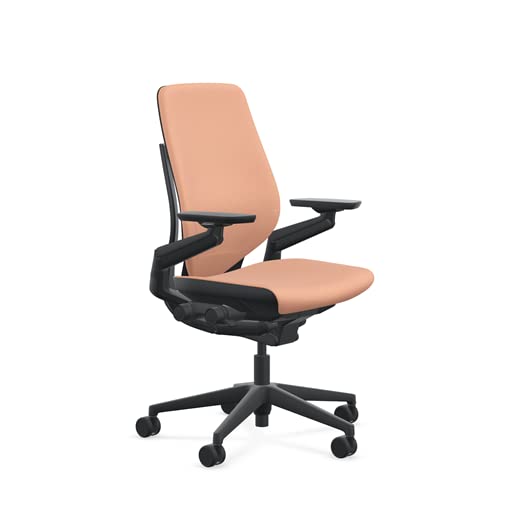
Image: Steelcase Gesture Office Chair in a modern office environment.
Configuración
The Steelcase Gesture Office Chair ships ready to assemble. Upon receiving your chair, ensure all components are present and undamaged. Place the chair on a flat, stable surface before making any adjustments. No complex assembly steps are typically required for this model.
Instrucións de funcionamento
The Gesture chair is designed for intuitive adjustments. All primary controls are located on the right side of the chair for easy access. Each control provides immediate feedback when adjusted, simplifying the learning process.
Video: Demonstrates the adjustment features of the Steelcase Gesture chair, including back tension, recline lock, lumbar support, arm adjustments, seat depth, seat height, and headrest.
Core Interface Adjustments
- Back Tension: Turn the knob located at the rear of the right-side control interface. Turn forward for more resistance and backward for less resistance. This adjusts the effort required to recline.
- Variable Back Stop (Recline Lock): Located inset of the back tension knob, this control has four settings: upright lock, full recline, and two intermediate stops. It allows users to set the limit of recline based on preference or activity.
Limb Interface Adjustments (360 Arm)
The 360 Arm is designed to support the full range of motion of the human arm.
- Altura do brazo: Lift the lever located under the armrest to adjust the arm height. Move the arm to the desired height and release the lever to lock.
- Largura do brazo: Push the armrests in or pull them out to adjust the width.
- Arm Cap Position: Grasp the arm caps and slide them in any direction (forward, backward, inward, outward) to find the optimal position for your activity.
Axustes de asento
- Profundidade do asento: Turn the knob located at the front of the right-side control interface away from you to extend the seat, and towards you to retract. Position the seat depth so there are 2 to 3 inches between the front edge of the seat and the back of your knees. This helps relieve pressure and improve circulation.
- Altura do asento: To raise the chair, lift your body weight slightly and hold the lever (located at the front of the right-side control interface) up. To lower the chair, remain seated while holding the lever up. Adjust until your knees are at approximately a 90-degree angle with your feet flat on the floor.
Optional Headrest Adjustment
For models equipped with a headrest:
- Altura do repousacabezas: Grasp the headrest pad and move it up or down to adjust its height.
- Headrest Angle: Grasp the supports and pivot the headrest pad forward or backward to adjust its angle for optimal neck support.
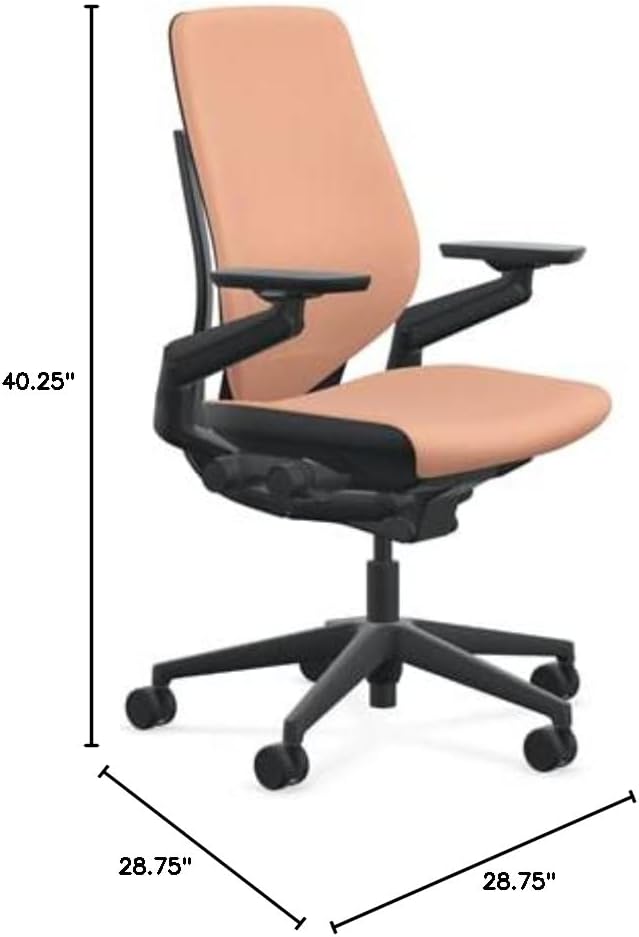
Imaxe: Lateral view of the Steelcase Gesture Office Chair with key dimensions indicated.

Imaxe: Traseira view of the Steelcase Gesture Office Chair, highlighting the shell back design.
Mantemento
To maintain the appearance and longevity of your Steelcase Gesture Office Chair:
- Coidado do tecido: The Era fabric is 100% polyester. For cleaning, spot wash only. Use a mild, water-free solvent or dry cleaning product. Always test on an inconspicuous area first.
- Limpeza xeral: Regularly wipe down hard surfaces with a soft, damp pano. Evite produtos de limpeza abrasivos ou produtos químicos agresivos.
- Mantemento de rodas: Periodically check casters for debris (hair, lint) and clean as needed to ensure smooth movement.
Especificacións
| Característica | Detalle |
|---|---|
| Marca | Steelcase |
| Nome do modelo | Xesto |
| Cor | Caqui |
| Dimensións do produto | 28.75" D x 28.75" W x 40.25" H |
| Tamaño | Standard Height Range (16" - 21") |
| Estilo de costas | Espalda Sólida |
| Características especiais | Adjustable Height, Arm Rest, Ergonomic, Seat Lock, Lumbar Support |
| Instrucións de coidado do produto | Lavado de manchas |
| Usos recomendados | Oficina |
| Recomendación de peso máximo | 400 libras |
| Material (Recheo) | Espuma |
| Material (tecido) | Era Fabric (100% Polyester) |
| Recomendación de superficie | Hard Floor (Casters) |
| Peso do elemento | 78 libras |
Resolución de problemas
If you encounter any issues with your Steelcase Gesture Office Chair, consider the following general troubleshooting steps:
- Problemas de axuste: Ensure all levers and knobs are fully engaged or disengaged as required for the adjustment. Sometimes a slight shift in body weight can help with height or recline adjustments.
- Ruídos pouco comúns: Check for any loose fasteners or obstructions around the chair's moving parts. Lubrication may be required for certain components over time.
- Problemas de estabilidade: Verify that the chair is on a level surface and that all casters are functioning correctly.
For persistent problems, refer to the official Steelcase support resources.
Garantía e Soporte
The Steelcase Gesture Office Chair comes with a 12 anos de garantía do fabricante, covering defects in materials and workmanship. For detailed warranty terms, service requests, or additional support, please visit the official Steelcase Store or contact Steelcase customer service directly.


