1. Introdución
The Belkin BoostCharge Magnetic Wireless Power Bank (Model BPD004) provides portable power for your compatible devices. Featuring MagSafe technology, a 5000 mAh battery capacity, and a built-in kickstand, it offers convenient wireless charging on the go. This manual provides essential information for safe and effective use of your power bank.
2. Contido do paquete
Asegúrate de que todos os elementos estean presentes no teu paquete:
- Belkin BoostCharge Magnetic Wireless Power Bank 5000 mAh
- 3.3ft USB-C to USB-C Charging Cable
- Manual de usuario (este documento)
3. Configuración
Carga inicial do banco de enerxía
Before first use, fully charge your Belkin BoostCharge Magnetic Wireless Power Bank.
- Connect the included USB-C to USB-C cable to the USB-C port on the power bank.
- Conecta o outro extremo do cable a un adaptador de corrente USB-C compatible (non incluído).
- As luces indicadoras LED do lateral da batería externa acenderanse para mostrar o progreso da carga. Os catro LED estarán acesos de forma fixa cando estea completamente cargado.
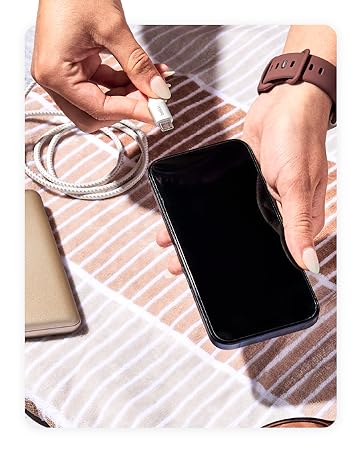
Figure 1: Connecting the USB-C cable to the power bank for charging.
4. Instrucións de funcionamento
Attaching to Your Device (MagSafe)
The power bank uses MagSafe technology for secure attachment and wireless charging.
- Ensure your device is MagSafe compatible (iPhone 12 series or newer) or has a MagSafe compatible case.
- Align the power bank with the back of your device. The magnets will automatically snap it into place.
- Wireless charging will begin automatically. The LED indicator lights on the power bank will show its remaining charge.

Figure 2: Magnetic attachment of the power bank to a compatible iPhone.
Usando o soporte incorporado
The integrated pop-up kickstand allows for hands-free viewing durante a carga.
- With the power bank attached to your device, gently pull out the kickstand from the back of the power bank.
- Position your device vertically or horizontally for optimal viewing.

Figure 3: Device standing vertically using the power bank's kickstand.

Figure 4: Device standing horizontally using the power bank's kickstand.
Carga directa
The power bank supports pass-through charging, allowing you to charge both the power bank and your device simultaneously.
- Attach the power bank to your MagSafe-compatible device.
- Connect the USB-C to USB-C cable to the power bank's USB-C port and a power source.
- Cargaranse tanto a batería externa como o dispositivo.
Video 1: Official product video demonstrating features including pass-through charging and kickstand functionality.
Luces indicadoras LED
The LED lights on the side of the power bank indicate its charge level:
- 4 Solid LEDs: 75-100% cargado
- 3 Solid LEDs: 50-75% cargado
- 2 Solid LEDs: 25-50% cargado
- 1 LED sólidos: 0-25% cargado
5. Compatibilidade
The Belkin BoostCharge Magnetic Wireless Power Bank is compatible with a wide range of devices:
- iPhones: iPhone 17, iPhone Air, iPhone 17 Pro, iPhone 17 Pro Max, iPhone 16 Pro Max, iPhone 16 Pro, iPhone 16 Plus, iPhone 16, iPhone 15 Pro Max, iPhone 15 Pro, iPhone 15 Plus, iPhone 15, iPhone 14 Pro Max, iPhone 14 Pro, iPhone 14 Plus, iPhone 14.
- Apple Accessories: AirPods Pro, AirPods.
- Google Pixel: Google Pixel 10 Pro XL, Google Pixel 10 Pro Fold, Google Pixel 10 Pro, Google Pixel 10.
- Casos: Compatible with official MagSafe cases.
6. Información de seguridade
Your Belkin BoostCharge Magnetic Wireless Power Bank is designed with multiple safety features:
- Advanced Safety Testing: Undergoes rigorous 16-point testing for hardware design, including temperature protection, overcharge protection, drop test, and plug and unplug test.
- Dual-Chip Protection: Equipped with two intelligent safety chips to prevent damage from overvoltage, overcurrent, and other faults.
- Carry-On Safe: The power bank features 18.5 Wh (watt-hours) to be fully compliant with 100 Wh-limit TSA carry-on requirements for air travel.
Figure 5: Carry-On Safe features of the power bank.
7. Mantemento
To ensure the longevity and optimal performance of your power bank:
- Manteña o dispositivo seco e lonxe da humidade.
- Evita temperaturas extremas.
- Limpa o dispositivo cun pano suave e seco. Non empregues produtos químicos agresivos nin materiais abrasivos.
- Almacenar nun lugar fresco e seco cando non estea en uso.
8 Solución de problemas
If you encounter issues with your power bank, refer to the following common solutions:
- O dispositivo non se carga sen fíos: Ensure your device is MagSafe compatible and properly aligned with the power bank. Remove any non-MagSafe cases that may interfere with the magnetic connection.
- O banco de enerxía non carga: Verify that the USB-C cable is securely connected to both the power bank and a functioning power adapter. Try a different cable or power adapter.
- Carga lenta: Ensure you are using a compatible power adapter for optimal charging speed. Wireless charging (7.5W) is generally slower than wired charging (12W via USB-C).
- Os indicadores LED non funcionan: Press the power button on the side of the power bank to activate the LED indicators. If they still do not light up, the power bank may be fully depleted or require service.
9. Especificacións
| Característica | Detalle |
|---|---|
| Número de modelo | BPD004 |
| Capacidade da batería | 5000 mAh |
| Saída de carga sen fíos | 7.5 W (compatible con MagSafe) |
| Saída/entrada de carga con cable | USB-C (up to 12W) |
| Dimensións (L x W x H) | 3.69 x 2.5 x 0.65 polgadas |
| Peso do elemento | 5.3 onzas |
| Características especiais | LED Indicator Lights, Pass-Through Charging, Wireless Charging, Built-in Kickstand |
| Cor | Branco |
10. Garantía e soporte
Belkin stands by the quality of its products. Your Belkin BoostCharge Magnetic Wireless Power Bank comes with:
- Garantía limitada de 2 ano: Cobre defectos de materiais e fabricación en condicións normais de uso.
- Garantía de equipos conectados (CEW) de 2,500 $: Provides coverage for connected electronic devices damaged by an electrical surge while properly connected to the power bank.
For detailed terms and conditions, please visit the official Belkin websitio web ou póñase en contacto co servizo de atención ao cliente de Belkin.
Figure 6: Belkin offers a range of charging solutions and accessories.


