1. Introdución
This manual provides instructions for the LogiLink ID0209 Wireless Keyboard. This keyboard is designed for comfortable, precise, and quiet typing, featuring an adjustable RGB backlight and a long-lasting battery. It connects wirelessly via 2.4 GHz radio technology and is compatible with various operating systems.

Figure 1: LogiLink ID0209 Wireless Keyboard
2. Contido do paquete
Comprobe se o paquete contén os seguintes elementos:
- LogiLink ID0209 Wireless Keyboard
- USB 2.4 GHz Receiver Dongle
- USB-A to Micro USB Charging Cable
- Manual de usuario (este documento)
3. Configuración
3.1 Carga do teclado
Before initial use, fully charge the keyboard. Connect the supplied USB-A to Micro USB cable to the keyboard's Micro USB port (located on the side) and the other end to a USB power source (e.g., computer USB port, USB wall adapter).
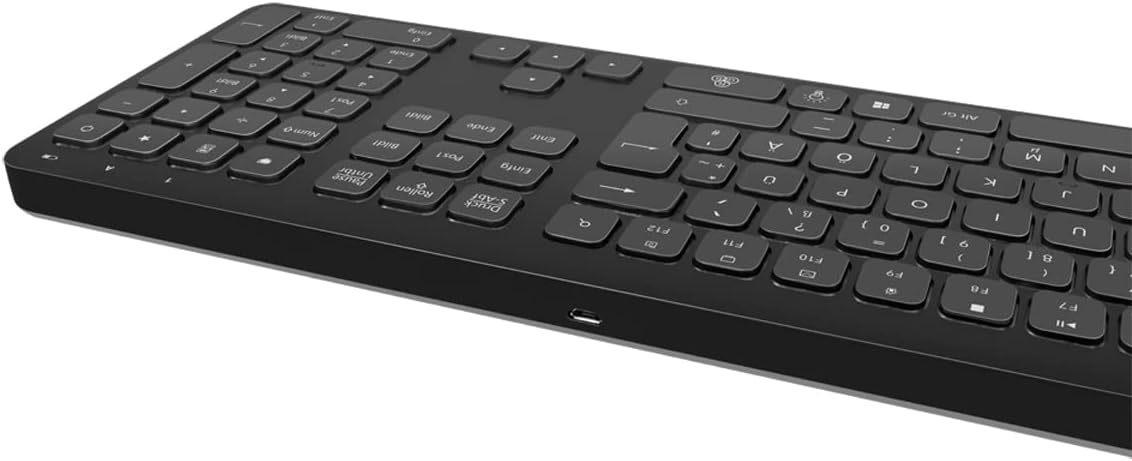
Figure 2: Keyboard side view with Micro USB charging port
3.2 Connecting the USB Receiver Dongle
Insert the 2.4 GHz USB receiver dongle into an available USB port on your computer or compatible device. The system will automatically detect and install the necessary drivers.

Figure 3: USB 2.4 GHz Receiver Dongle
3.3 Acendido/Apagado
Locate the ON/OFF switch on the back of the keyboard. Slide the switch to the 'ON' position to power on the keyboard. Slide it to 'OFF' when not in use to conserve battery life.
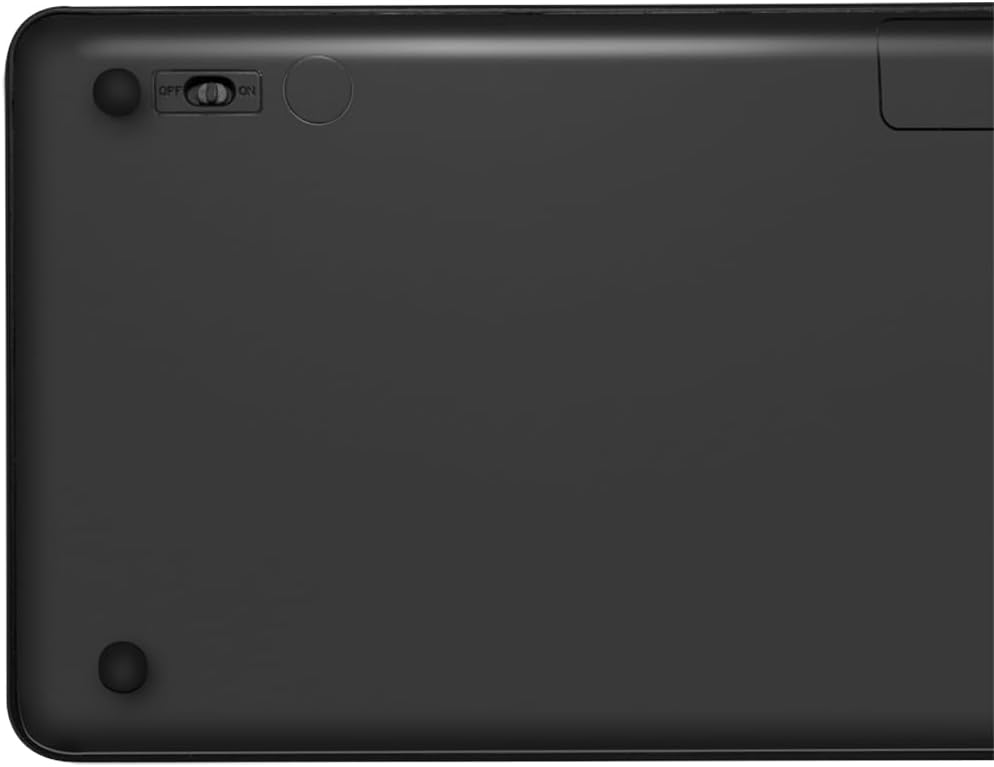
Figure 4: Keyboard back with ON/OFF switch
The keyboard should automatically connect to the USB receiver once both are powered on and within range (up to 10 meters).
4. Instrucións de funcionamento
Control de retroiluminación 4.1
The keyboard features an adjustable RGB backlight with 7 colors and 3 brightness levels, including a breathing mode.
- Cambio de cores: Preme o Fn + tecla Lámpada to cycle through the 7 available colors (green, blue, yellow, purple, cyan, white, red).
- Axuste do brillo: Preme o Fn + Up Arrow key para aumentar o brillo e Fn + Down Arrow key para diminuír o brillo. Hai 3 niveis de brillo.
- Modo de respiración: Preme o Fn + RGB Cycle key (often depicted as a swirling icon) to activate or deactivate the breathing backlight mode.

Figure 5: Keyboard with RGB backlight in use
4.2 Teclas de atallo
The keyboard includes 17 shortcut keys for quick access to various functions. Some shortcut keys are specifically designed for Windows operating systems.
To use a shortcut key, press and hold the Fn key, then press the desired function key (e.g., F1-F12, multimedia keys).
- Controis multimedia: Play/Pause, Stop, Previous Track, Next Track, Volume Up, Volume Down, Mute.
- Produtividade: Open Mail, Web Browser, My Computer, Search.
- Outros: Lock Screen, Calculator.

Figure 6: Close-up of keyboard keys, including numpad and function row
4.3 Automatic Energy-Saving Mode
The keyboard is equipped with an automatic energy-saving mode. After a period of inactivity, the keyboard will enter a sleep state to conserve battery. Press any key to wake it up.
5. Mantemento
Para garantir a lonxevidade e o rendemento óptimo do teclado, siga estas pautas de mantemento:
- Limpeza: Usa un pano suave, seco e sen fiapos para limpar a superficie do teclado. Para a sucidade persistente, lixeiramenteampEnxágüe o pano con auga ou unha solución de limpeza suave. Evite a humidade excesiva.
- Almacenamento: Garda o teclado nun lugar fresco e seco, lonxe da luz solar directa e de temperaturas extremas.
- Evitar líquidos: Do not expose the keyboard to liquids. In case of accidental spills, immediately power off the keyboard and allow it to dry completely before use.
- Manipular con coidado: Evite deixar caer o teclado ou sometelo a impactos fortes.
6 Solución de problemas
If you encounter issues with your LogiLink ID0209 keyboard, refer to the following common problems and solutions:
| Problema | Causa posible | Solución |
|---|---|---|
| O teclado non responde | O teclado está apagado Batería baixa O receptor USB non está conectado Fóra de rango | Ensure keyboard is ON Cargue o teclado Plug USB receiver firmly into a working USB port Move keyboard closer to the receiver (within 10m) |
| A luz de fondo non funciona | A luz de fondo está desactivada Batería baixa | Press Fn + Light Bulb key to turn on/cycle Cargue o teclado |
| As teclas están pegañentas ou non responden | Lixo ou restos baixo as chaves | Clean the keyboard as per maintenance instructions |
| A conexión cae con frecuencia | Interferencia Fóra de rango Batería baixa | Afastese doutros dispositivos sen fíos Move keyboard closer to the receiver Cargue o teclado |
7. Especificacións
| Característica | Detalle |
|---|---|
| Marca | LogiLink |
| Número de modelo | ID0209 |
| Tecnoloxía de conectividade | 2.4 GHz Wireless (High-frequency) |
| distancia wireless | Ata 10 metros |
| Número de chaves | 111 teclas |
| Teclas de atallo | 17 (some Windows-specific) |
| Retroiluminación | Adjustable RGB (7 colors, 3 brightness levels, breathing mode) |
| Tipo de chave | Flat keys |
| Dispositivos compatibles | Windows, Mac OS, Android, iOS, Smart TV systems |
| Características especiais | Ergonomic, Backlit, Automatic Energy-Saving Mode |
| Porto de carga | Micro USB |
| Cor | Negro |
| Material | Plástico |
| Fabricante | 2direct GmbH |
| País de Orixe | China |
8. Garantía e soporte
Para obter información sobre a garantía e asistencia técnica, consulte a documentación proporcionada coa súa compra ou visite o sitio web oficial de LogiLink. websitio. Garda o comprobante de compra para reclamacións de garantía.


