1. Introdución
Thank you for choosing the ARREGUI Forma Evolution 150080 Electronic Code and Key Safe. This safe is designed to provide robust security for your valuables, featuring a dual-locking mechanism with both an electronic keypad and a key. Please read this manual carefully before installation and use to ensure proper operation and maximum security.
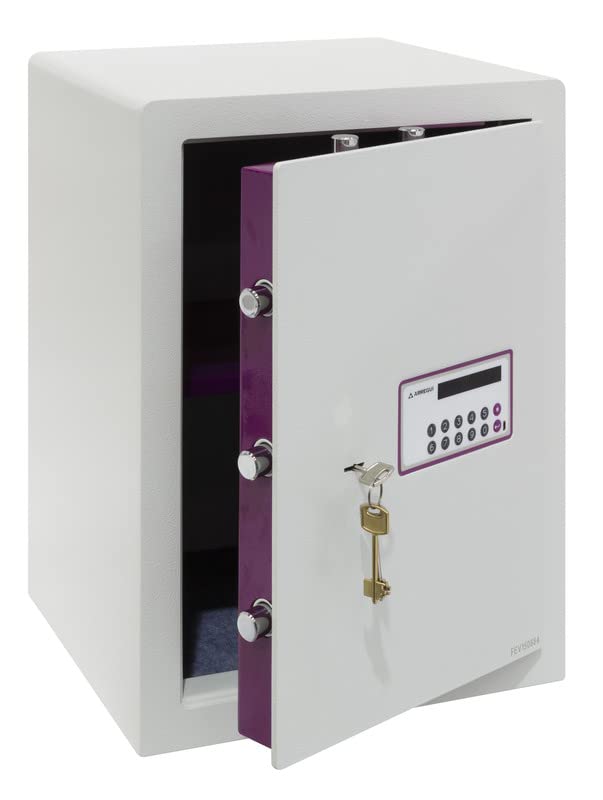
Figura 1: Fronte view of the ARREGUI Forma Evolution 150080 electronic safe.
2. Información de seguridade
- Keep the emergency keys in a secure location away from the safe and out of reach of unauthorized persons. Do not store them inside the safe.
- Asegúrate de que a caixa forte estea fixada de forma segura a unha parede ou ao chan para evitar que sexa retirada sen autorización.
- Non expoñas a caixa forte a temperaturas ou humidade extremas.
- Substitúa as pilas canto apareza o indicador de batería baixa para evitar que o dispositivo quede bloqueado.
- Do not attempt to force the safe open if you forget the code or if the batteries are completely drained. Use the emergency key or external power supply as instructed.
3. Contido do paquete
Verifica que todos os compoñentes estean presentes no paquete:
- 1 x ARREGUI Forma Evolution 150080 Safe
- 1 x manual de instrucións
- 2 x User Keys (for daily operation)
- 1 x Emergency Key (for emergency opening)
- 4 pilas AA de 1.5 V
- 1 x External Micro-USB Power Supply
- Ferramentas de montaxe (parafusos e ancoraxes)
4. Produto rematadoview
The ARREGUI Forma Evolution 150080 safe features a robust design with key components for security and ease of use.

Figure 2: Key features and dimensions of the Forma Evolution 150080 safe.
Compoñentes clave:
- Teclado electrónico: For entering your personal access code. Features an 8-digit display.
- Oco da chave: For use with the user key during normal operation and the emergency key for override.
- Parafusos de peche: 7 nickel-plated steel bolts with a diameter of 22 mm provide strong locking.
- Luz LED interna: Illuminates the safe interior for better visibility.
- Estante extraíble: Allows for organized storage of items.
- Porto de alimentación externo: Micro-USB port for connecting the external power supply in case of drained batteries.

Figure 3: Locking bolts.

Figure 4: Internal LED light.

Figure 5: Removable shelf.
5. Configuración
5.1. Instalación da batería
- Open the safe door using the emergency key (if not already open). The emergency keyhole is usually located behind a small cover near the keypad.
- Localiza o compartimento das baterías na parte interior da porta da caixa forte.
- Insira 4 pilas AA de 1.5 V, asegurándose de manter a polaridade correcta (+/-).
- Close the battery compartment cover. The safe is now powered.
5.2. Montaxe da caixa forte
The safe can be securely mounted to a wall or floor using the pre-drilled holes at the bottom and back. This is highly recommended for maximum security.
- Choose a suitable location for the safe, ensuring it is on a solid surface (e.g., concrete wall or floor, wooden stud).
- Marque os puntos de perforación a través dos orificios pretaladrados na parte traseira ou inferior da caixa forte.
- Drill holes in the wall or floor using an appropriate drill bit for the mounting surface and anchors.
- Insira as ancoraxes proporcionadas nos orificios perforados.
- Position the safe and secure it using the provided screws. Tighten firmly.
6. Instrucións de funcionamento
6.1. Configuración do seu código persoal
When you first use the safe, you will need to set your personal access code.
- With the safe door open, press the internal red or green reset button (location may vary, usually on the inside of the door near the hinge). You will hear a beep and the display will show "----" or similar.
- On the keypad, enter your desired code (3 to 8 digits).
- Press the "#" or "ENTER" button to confirm. The display will show "GOOD" and beep, indicating the code is set.
- Test the new code with the door open first to ensure it works correctly before closing the safe.

Figure 6: Digital display of the electronic keypad.
6.2. Opening the Safe (Code + Key)
The Forma Evolution safe requires both the correct code and the user key for opening.
- Enter your personal code on the electronic keypad. The display will show "OPEN" if the code is correct.
- Within 5 seconds of entering the correct code, insert one of the user keys into the keyhole and turn it clockwise (or counter-clockwise, depending on the model) to retract the bolts.
- Abre a porta.

Figure 7: Keypad and keyhole for dual security access.
6.3. Pechando a caixa forte
- Pecha a porta da caixa forte.
- Turn the user key counter-clockwise (or clockwise) to extend the bolts and lock the safe.
- Remove the key. The safe is now locked.
6.4. Changing Your Personal Code
To change your code, follow the same steps as setting the initial code:
- Abre a porta da caixa forte.
- Press the internal reset button.
- Enter your new desired code (3 to 8 digits).
- Press the "#" or "ENTER" button to confirm.
- Proba o novo código coa porta aberta antes de pechala.
6.5. Emergency Opening
In case of forgotten code or completely drained batteries, you can use the emergency key or external power supply.
Using the Emergency Key:
- Locate the emergency keyhole (often hidden behind a small removable cover on the keypad panel).
- Introduza a chave de emerxencia e xire para abrir a caixa forte.
- Abre a porta.

Figure 8: Emergency key.
Using the External Power Supply:
- Connect the external micro-USB power supply to the micro-USB port on the keypad panel.
- Once connected, the keypad will power on.
- Enter your personal code and use the user key as described in section 6.2 to open the safe.
- Substitúa as baterías internas inmediatamente despois de abrilas.

Figure 9: Connecting the external micro-USB power supply.
7. Mantemento
- Substitución da batería: Replace the 4 x 1.5V AA batteries annually or when the low battery indicator appears on the display. Always use new, high-quality alkaline batteries.
- Limpeza: Limpar o exterior da caixa forte cun pano suave eamp pano. Non use produtos de limpeza ou disolventes abrasivos.
- Lubricación: Periodically check the locking bolts and hinges for smooth operation. If necessary, apply a small amount of silicone-based lubricant.
8 Solución de problemas
| Problema | Causa posible | Solución |
|---|---|---|
| A caixa forte non abre con código. | Incorrect code entered. Batteries are low or dead. | Re-enter the code carefully. Replace batteries or use external power supply. |
| O teclado non responde. | As baterías están completamente mortas. | Use the external micro-USB power supply to power the keypad, then open with code and key. Replace internal batteries immediately. |
| Door does not open after entering code. | User key not turned within 5 seconds. Bolts are jammed. | Ensure the user key is turned immediately after the "OPEN" signal. Check for obstructions around the door or bolts. |
| Pitidos seguros continuamente. | Aviso de batería baixa. | Replace all 4 x 1.5V AA batteries. |
9. Especificacións
| Característica | Detalle |
|---|---|
| Número de modelo | Forma Evolution 150080 |
| Marca | ARREGUI |
| Dimensións externas (H x W x D) | 52 x 38.5 x 36 cm |
| Dimensións internas (H x W x D) | Approximately 51.4 x 37.9 x 30.5 cm (excluding door mechanism) |
| Capacidade | 59 litros |
| Peso | 38.5 kg |
| Material | Aceiro de aliaxe |
| Front Door Thickness | 6 mm + 3 mm reinforced steel (drill protection) |
| Mecanismo de bloqueo | Electronic Keypad (3-8 digit code) and Key |
| Pernos de bloqueo | 7 x 22 mm diameter nickel-plated steel bolts |
| Fonte de enerxía | 4 x 1.5V AA Alkaline Batteries (included) |
| Potencia de emerxencia | External Micro-USB Power Supply |
| Características especiais | Internal LED light, Removable shelf, Anti-pry system, Floor/Wall mountable |

Figura 10: Interior view with dimensions and removable shelf.
10. Apoio
If you encounter any issues not covered in this manual or require further assistance, please contact ARREGUI customer support. Refer to the contact information provided with your purchase or visit the official ARREGUI websitio para obter detalles de asistencia.


