Introdución
This manual provides detailed instructions for the setup, operation, and maintenance of your HUNSN RJ03 Micro Firewall Appliance. The RJ03 is a compact, fanless mini PC designed for network security applications, including use as a firewall, VPN router, or other network appliance. It features an Intel Celeron N5105 processor and multiple 2.5GbE LAN ports.
Lea este manual detidamente antes de usar o dispositivo para garantir unha instalación correcta e un rendemento óptimo.
Información de seguridade
- Ensure the device is placed on a stable, flat surface with adequate ventilation.
- Use only the provided power supply. Using an incorrect power supply may damage the device and void the warranty.
- Non expoñas o dispositivo á auga, á humidade nin a temperaturas extremas.
- Avoid opening the chassis unless performing authorized upgrades (RAM, SSD/HDD, WiFi module). Disconnecting internal components improperly can cause damage.
- In case of malfunction, disconnect the power supply and contact support. Do not attempt repairs yourself.
Contido do paquete
Verifica que todos os elementos estean presentes no paquete:
- HUNSN RJ03 Firewall Appliance
- Power Supply (DC12V3A)
- Cable de alimentación
- Tarxeta de garantía
Produto rematadoview
The HUNSN RJ03 is a compact, fanless mini PC designed for robust network applications. Its aluminum chassis acts as a heatsink, ensuring silent operation.
Panel frontal

Figura 1: Deseño do panel frontal
The front panel provides essential user interfaces:
- Botón de ON / OFF: Úsase para acender ou apagar o dispositivo.
- CLR CMOS Button: A small button to clear CMOS settings, often requiring a pin to press.
- Portos USB 3.0 (2x): Para conectar dispositivos USB de alta velocidade.
- Porto de tipo C: Supports display output and USB connectivity.
- Ranura para tarxetas TF: For TransFlash (MicroSD) memory cards.
- Antenna Connectors (2x): For optional WiFi antennas.
Panel traseiro
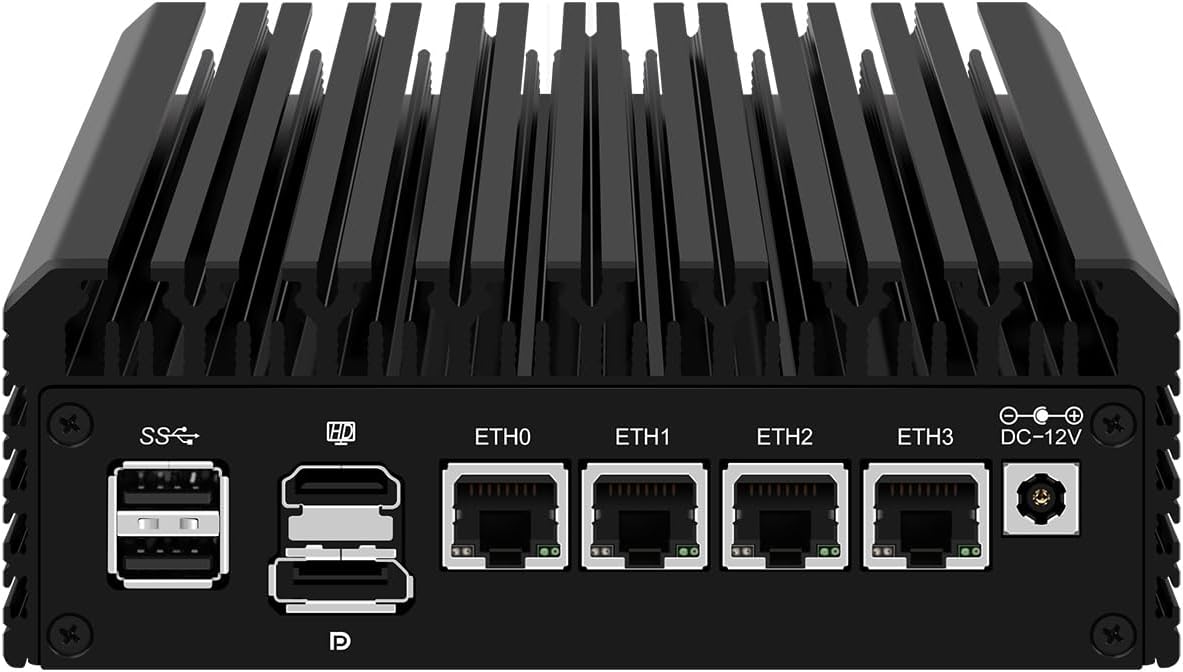
Figura 2: Disposición do panel traseiro
The rear panel houses the primary connectivity options:
- Portos USB 2.0 (2x): Para conectar dispositivos USB estándar.
- Porto HDMI: For connecting to a display.
- DisplayPort (DP): For connecting to a display.
- LAN Ports (4x 2.5GbE I226-V): Four 2.5 Gigabit Ethernet ports for network connections (ETH0, ETH1, ETH2, ETH3).
- DC_IN Port: For connecting the 12V power adapter.
Instrucións de configuración
1. Hardware Installation (Optional)
If you purchased a barebones unit or wish to upgrade, follow these steps to install RAM, SSD/HDD, or a WiFi module. Ensure the device is powered off and disconnected from the power source before proceeding.
- Abrir o chasis: Carefully remove the screws securing the bottom panel of the appliance.
- Instalar RAM: The device supports 2 x SODIMM DDR4 2933MHz, up to 32GB. Insert the RAM modules into the SODIMM slots, ensuring they are seated correctly and the clips lock them in place.
- Install Storage:
- Unidade de estado sólido (SSD) M.2 NVMe: Insert the M.2 2280 PCIe 3.0 x1 NVMe SSD into its dedicated slot and secure it with the provided screw.
- 2.5 Inch SATA SSD/HDD: Connect a 2.5-inch SATA SSD or HDD using the internal SATA data and power cables (if included). Secure the drive within the chassis.
- Install M.2 WiFi Module (Optional): If installing a WiFi 6 module, insert it into the M.2 WiFi slot and connect the antenna cables.
- Pechar o chasis: Replace the bottom panel and secure it with the screws.
2. Conexión de periféricos
- Conexión de alimentación: Connect the provided power adapter to the DC_IN port on the rear panel, then plug the power cord into an electrical outlet.
- Conexión de rede: Connect your network cables to the 2.5GbE LAN ports (ETH0-ETH3) as required for your network configuration (e.g., WAN, LAN, DMZ).
- Display and Input (Optional): For initial setup or direct interaction, connect a monitor via HDMI or DisplayPort, and a keyboard/mouse to the USB ports.
3. Initial Boot
Press the Power ON/OFF button on the front panel. The device should power on. If a display is connected, you will see the boot sequence.
Instalación do sistema operativo
The HUNSN RJ03 supports a variety of operating systems and network appliance software. It supports UEFI boot only.
- Sistemas compatibles: 5.10.x and above core-based FreeBSD router systems, Linux distributions, or Windows operating systems.
- Firewall Software: Compatible with popular open-source solutions such as pfSense and OPNsense.
- Proceso de instalación:
- Prepare a bootable USB drive with your chosen operating system or firewall software.
- Connect the USB drive to a USB port on the RJ03.
- Power on the device and enter the BIOS/UEFI setup (usually by pressing DEL or F2 during boot) to configure the boot order, prioritizing the USB drive.
- Siga as instrucións en pantalla para instalar o sistema operativo.
- Network Driver Considerations: The Intel I226-V 2.5GbE LAN ports may require specific drivers or a newer kernel version for optimal performance, especially with certain older operating systems or firewall distributions (e.g., older pfSense versions). Ensure your chosen OS version supports these NICs or be prepared to install necessary drivers.
Operación
Once the operating system is installed and configured, the HUNSN RJ03 functions as a reliable network appliance. Specific operation details will depend on the software installed (e.g., OPNsense, pfSense).
- Xestión de enerxía: The device supports hardware auto power-on (enabled by default), network wake-up (Wake-on-LAN), and system power management features. These can typically be configured in the BIOS/UEFI settings.
- Deseño sen ventilador: The fanless design ensures silent operation (0.00dB noise). The aluminum chassis acts as a large heatsink, dissipating heat efficiently.
- Xestión da temperatura: The device is designed to operate within a temperature range of 0°C to 70°C. While the chassis may feel warm to the touch, this is normal for fanless systems and indicates effective heat dissipation.
Mantemento
- Limpeza: Periodically clean the exterior of the device with a soft, dry cloth. Do not use liquid cleaners or aerosols. Ensure ventilation fins are free from dust accumulation to maintain optimal cooling.
- Refrixeración: Although fanless, ensure the device has adequate airflow around its chassis. Avoid placing it in enclosed spaces without ventilation. If operating in consistently high ambient temperatures or under heavy load, consider adding an external USB fan for additional cooling, especially if system temperatures are a concern.
- Actualizacións de firmware: Check the HUNSN support website or contact customer service for any available BIOS/UEFI firmware updates, which may improve compatibility or performance.
Resolución de problemas
| Problema | Causa posible | Solución |
|---|---|---|
| O dispositivo non se acende. | No power, faulty power supply, or internal connection issue. |
|
| Sen saída de visualización. | Incorrect display connection, monitor input, or BIOS settings. |
|
| Network interfaces (LAN ports) not working or slow. | Missing or incorrect network drivers, incompatible OS kernel. |
|
| Device runs very warm. | Normal operation for fanless design, or insufficient ventilation. |
|
Especificacións
| Número de modelo | HUNSN RJ03 |
| Chasis | Aluminum, Fanless Design |
| Procesador | Intel Celeron N5105 (4M Cache, up to 2.90 GHz) |
| AES-NI Support | Si |
| Memoria | 2 x SODIMM DDR4 2933MHz, max. 32GB (4GB installed in base model) |
| Almacenamento | 1 x M.2 2280 PCIe 3.0 x1 NVMe SSD, 1 x 2.5 Inch SATA SSD/HDD (128GB SSD installed in base model) |
| Tarxeta de rede | 4 x 2.5GbE Intel I226-V LAN |
| Interface de E/S | Power ON/OFF, CLR CMOS, 2 x USB 3.0, Type-C (Display/USB), TF Card Slot, 2 x USB 2.0, HDMI, DisplayPort, 4 x LAN, DC_IN |
| Expansión | 1 x M.2 WiFi 6 slot |
| Poder | DC100-240V AC/50-60Hz input, 12V3A output |
| Temperatura de funcionamento | 0 °C ~ 70 °C |
| Temperatura de almacenamento | -20 °C ~ 80 °C |
| Humidade relativa | 10% ~ 90% sen condensación |
| TDP | 10 W |
| Sistema de refrixeración | Fanless, supports optional 12V 4-pin 8010 fan |
| Dimensións | 145.6 x 135.6 x 53.6 mm |
| Peso | 1.5 kg (aprox. 3.3 lbs) |
| Compatibilidade do sistema | FreeBSD router systems (5.10.x+), Linux distros, Windows OS (UEFI support only) |
| Características especiais | Hardware auto power on (default), network wake-up, system power management, temperature management |
Garantía e Soporte
Your HUNSN RJ03 appliance comes with a warranty. Please refer to the included warranty card for specific terms and conditions. For technical support, troubleshooting assistance, or inquiries regarding parts and upgrades, please contact HUNSN customer service through the retailer where you purchased the product or visit the official HUNSN store online.
Para obter recursos adicionais e información sobre o produto, pode visitar o HUNSN Store on Amazon.
