1. Produto rematadoview
The BLACK+DECKER Kitchen Wand is a versatile 6-in-1 cordless kitchen multi-tool designed to assist with various food preparation tasks. This kit includes a wand base with an adjustable speed dial and battery indicator lights, along with several attachments for blending, whisking, frothing, can opening, wine opening, and spice grinding. It features a built-in rechargeable battery for cordless convenience.

Figure 1: The BLACK+DECKER Kitchen Wand 6-in-1 Multi-Tool Set, showcasing the main unit and various attachments in its packaging.
2. Información de seguridade
Lea atentamente todas as instrucións antes de usar o aparello. O incumprimento destas instrucións pode provocar descargas eléctricas, incendios ou lesións graves.
- Always ensure the appliance is switched off and unplugged (if applicable) before assembling, disassembling, or cleaning.
- Manteña as mans, o cabelo, a roupa e os utensilios lonxe das pezas móbiles durante o funcionamento para evitar lesións.
- Non mergulle a unidade motora en auga nin noutros líquidos. Límpiea con aerosol.amp só tea.
- Este aparello non está destinado ao uso por parte de persoas con capacidades físicas, sensoriais ou mentais reducidas, ou con falta de experiencia e coñecementos, a menos que reciban a supervisión ou instrucións sobre o uso do aparello por parte dunha persoa responsable da súa seguridade.
- Os nenos deben ser supervisados para asegurarse de que non xoguen co aparello.
- Use só accesorios e accesorios recomendados polo fabricante.
- Non faga funcionar ningún aparello cun cable ou enchufe danados, ou despois de que o aparello funcione mal ou se caia ou estea danado de calquera xeito.
3. Contido do paquete
Verifique que todos os elementos que se indican a continuación estean presentes no seu paquete:
- Black wand base
- Accesorio para batidora de inmersión
- Immersion Blender Guard
- Anexo de batedor
- Anexo de espumador de leite
- Wine Opener Attachment with Foil Cutter
- Spice Grinder Attachment with Lid
- Measuring Cup with Lid
- 2 Storage Cases with Tray Insert
- Charging Dock with Cord

Figure 2: The main unit of the BLACK+DECKER Kitchen Wand with the immersion blender attachment connected.
4. Configuración e carga
4.1 Cargo inicial
Before first use, fully charge the Kitchen Wand base. Place the wand base onto the charging dock and connect the power cord to an electrical outlet. The battery state-of-charge indicator lights on the wand base will illuminate to show charging progress. A full charge provides up to 30 minutes of continuous runtime.

Figure 3: The charging dock with its power adapter, used to recharge the Kitchen Wand base.
4.2 Instalación de accesorios
To attach any accessory, align the accessory with the wand base and twist until it locks securely into place. Ensure the attachment is firmly connected before operation.
5. Instrucións de funcionamento
5.1 Funcionamento xeral
The wand base features an adjustable speed dial for precise control over power. Rotate the dial to select your desired speed setting. Press and hold the power button to operate the appliance. Release the button to stop.
5.2 Immersion Blender Attachment
Attach the immersion blender to the wand base. Insert the blender into liquids or soft foods in a pot or container. Use a gentle up-and-down motion to blend ingredients until desired consistency is achieved. The immersion blender guard (Figure 4) should be used to protect the blades and prevent splashing.

Figure 4: A man is using the BLACK+DECKER Kitchen Wand with the immersion blender attachment to blend soup in a pot.
5.3 Whisk Attachment
Connect the whisk attachment to the wand base. Use for whipping cream, beating eggs, or mixing batters. Start at a low speed and gradually increase as needed.

Figure 5: A man is using the BLACK+DECKER Kitchen Wand with the whisk attachment to mix ingredients in a bowl.
5.4 Milk Frother Attachment
Attach the milk frother. Insert into milk or other beverages to create foam. Move the frother gently up and down to achieve desired frothiness.

Figure 6: A woman is using the BLACK+DECKER Kitchen Wand with the milk frother attachment to create foam in a glass.
5.5 Can Opener Attachment
Secure the can opener attachment. Place the can opener on the rim of the can, ensuring the cutting wheel is positioned correctly. Press the power button and allow the opener to rotate around the can until it completes a full circle. Lift the can opener to remove the lid.

Figure 7: A woman is shown using the BLACK+DECKER Kitchen Wand to open a can, demonstrating the can opener attachment.
5.6 Wine Opener Attachment
Attach the wine opener. Use the included foil cutter (Figure 8) to remove the foil from the wine bottle. Place the wine opener over the bottle neck, ensuring it is centered. Press the power button to extract the cork. Reverse the operation to release the cork from the opener.

Figure 8: A man is using the BLACK+DECKER Kitchen Wand with the wine opener attachment to open a wine bottle.
5.7 Spice Grinder Attachment
Attach the spice grinder. Fill the transparent chamber with whole spices like salt or pepper. Press the power button to grind. Adjust the coarseness if applicable (refer to specific grinder instructions if provided with the attachment).

Figure 9: A woman is using the BLACK+DECKER Kitchen Wand with the spice grinder attachment to season a salad.
6. Mantemento e Limpeza
Proper maintenance ensures the longevity and performance of your Kitchen Wand.
- Wand Base: Wipe the wand base with a damp pano. Non mergullo na auga.
- Anexos: Most attachments (immersion blender shaft, whisk, milk frother, measuring cup, storage cases) are dishwasher safe or can be washed by hand with warm, soapy water. Refer to individual attachment instructions for specific cleaning guidelines.
- Can Opener, Wine Opener, Spice Grinder: These attachments may have specific cleaning requirements. Generally, wipe clean with a damp cloth. Avoid immersing electrical components.
- Almacenamento: Use the provided storage cases with tray inserts (Figure 10) to keep all components organized and protected when not in use.
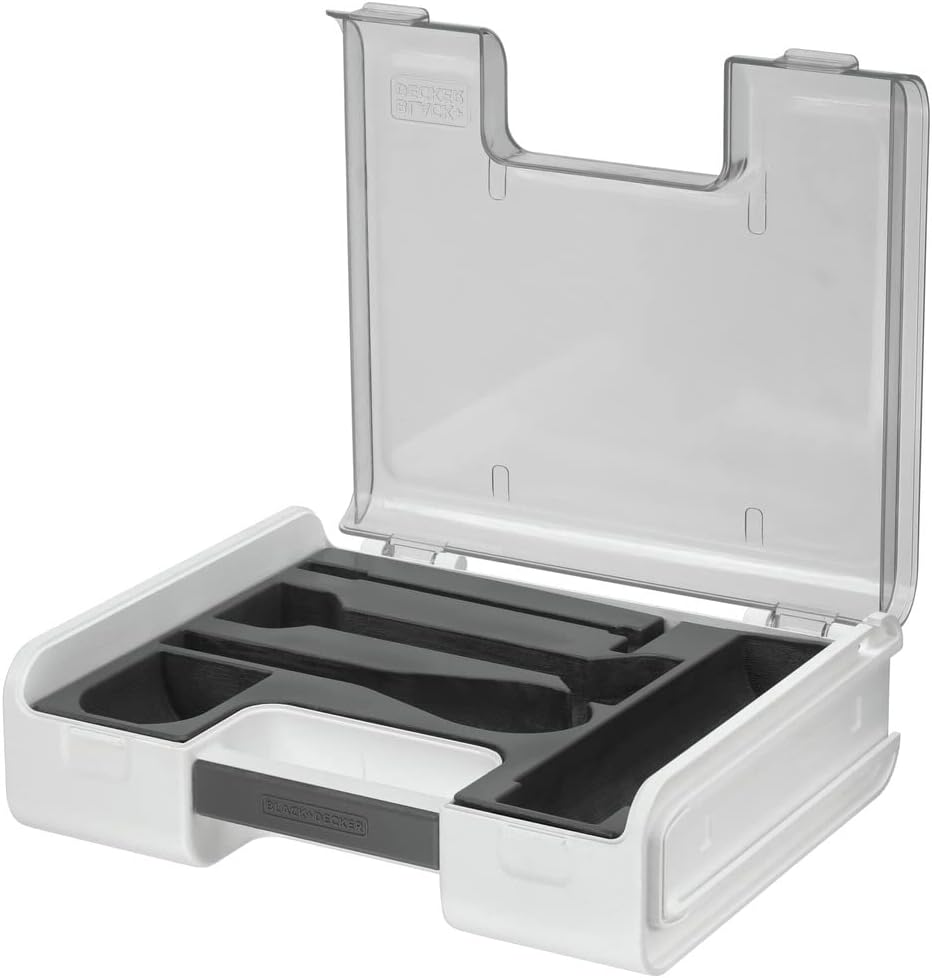
Figure 10: Two clear storage cases with custom-fit tray inserts to organize the various Kitchen Wand attachments.
7 Solución de problemas
If you encounter issues with your BLACK+DECKER Kitchen Wand, refer to the following common solutions:
- O aparello non se acende: Ensure the wand base is fully charged. Check that the attachment is securely connected to the wand base.
- Os anexos non funcionan correctamente: Verify that the attachment is correctly assembled and locked into place. Ensure the speed dial is set to an appropriate level for the task.
- A batería non se carga: Confirm the charging dock is properly connected to a working electrical outlet and the wand base is correctly seated on the dock.
- Vibración ou ruído excesivos: Discontinue use immediately. Check for any obstructions in the attachment or damage to components.
Para problemas que non se resolvan con estes pasos, póñase en contacto co servizo de atención ao cliente.
8. Especificacións
| Marca | BLACK+DECKER |
| Número de modelo | BCKM1016KS10 |
| Cor | Negro |
| Característica especial | Sen fíos |
| Capacidade (cunca medidora) | 700 mililitros |
| Dimensións do produto | 18.86" D x 11.3" W x 7.25" H |
| Fonte de enerxía | Alimentado por batería |
| Voltage | 230 voltios |
| Material da lámina | Plástico |
| Tipo de control | Marcación de velocidade variable |
| Material do recipiente | Plástico |
| Peso do elemento | 7.8 libras |
9. Garantía e soporte
9.1 Información da garantía
This BLACK+DECKER Kitchen Wand is covered by a Garantía limitada. Please refer to the warranty card included in your product packaging for specific terms, conditions, and duration of coverage. Keep your proof of purchase for warranty claims.
9.2 Atención ao cliente
For technical assistance, replacement parts, or any questions regarding your product, please visit the official BLACK+DECKER website or contact their customer service department. Contact information can typically be found in the warranty documentation or on the manufacturer's websitio.