Introdución
The Segotep T3 White Mid-Tower ATX Gaming PC Case is designed for high-performance PC builds, offering extensive cooling support, tool-free access, and a modern aesthetic. This manual provides essential information for setting up, operating, and maintaining your PC case to ensure optimal performance and longevity.
Características
- Snap Closure Front Panel: The PC Gaming Chassis features tempered glass side panels and a snap closure front panel that showcases highly configurable components and RGB lighting. 10° Smart Panel Air Ducts are designed to provide plenty of airflow.
- CPU Cooling Focus: This ATX chassis allows fans to be mounted behind the motherboard to provide precise cooling of the CPU core, optimizing thermal performance for high-power PC models.
- Dual 360mm Water Cooling Support: The chassis can accommodate dual 360mm radiators, with 360mm water cooling options on both the top and sides. It supports up to 13 fans for optimal temperature management.
- Tool-Less Disassembly: The modular design enables tool-less removal of the front panel, snap-on side panels, baffles, and compartment covers, facilitating various cooling layouts and easy access for maintenance.
- Pre-installed GPU Bracket: An adjustable graphics card bracket is pre-installed, allowing for secure positioning of your GPU. The silicone pad on the holder has a temperature resistance value up to 240℃.
- Type-C Ready: Supports Type-C interface, providing excellent charging speed and data transfer rates.
- Pre-installed ARGB/PWM Fan: Includes one pre-installed ARGB/PWM fan offering 16.8 million colors for customizable lighting and efficient cooling.
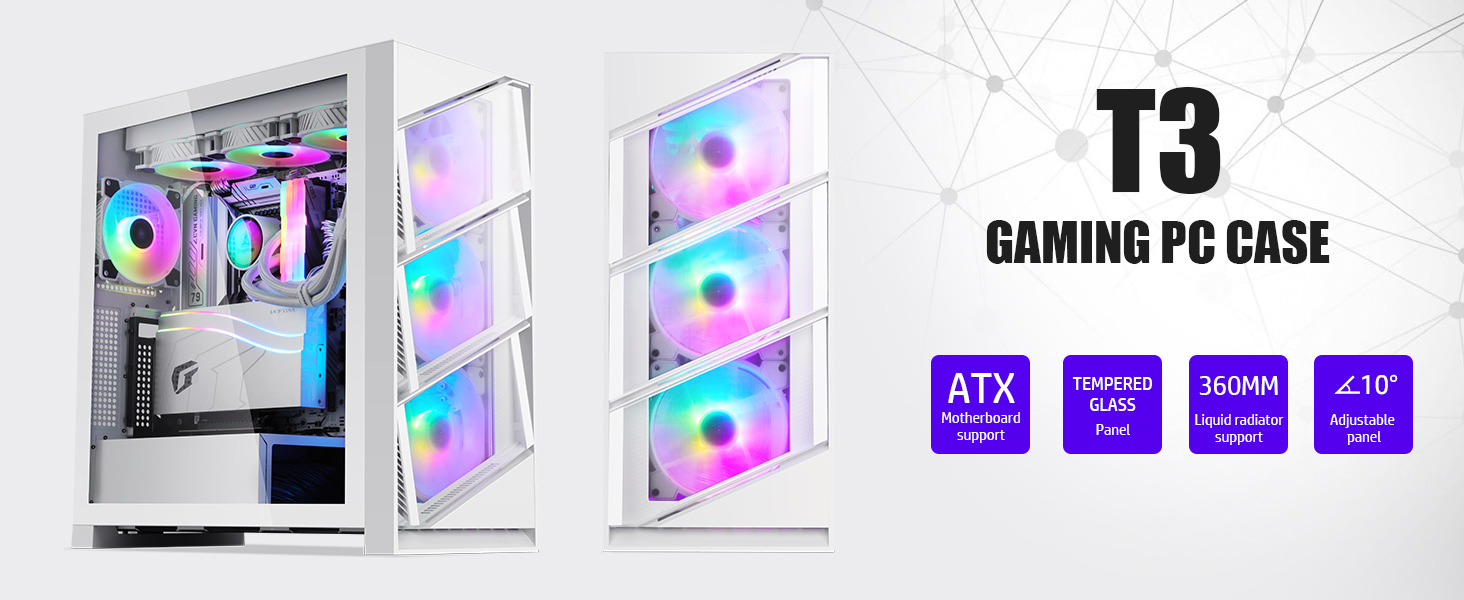


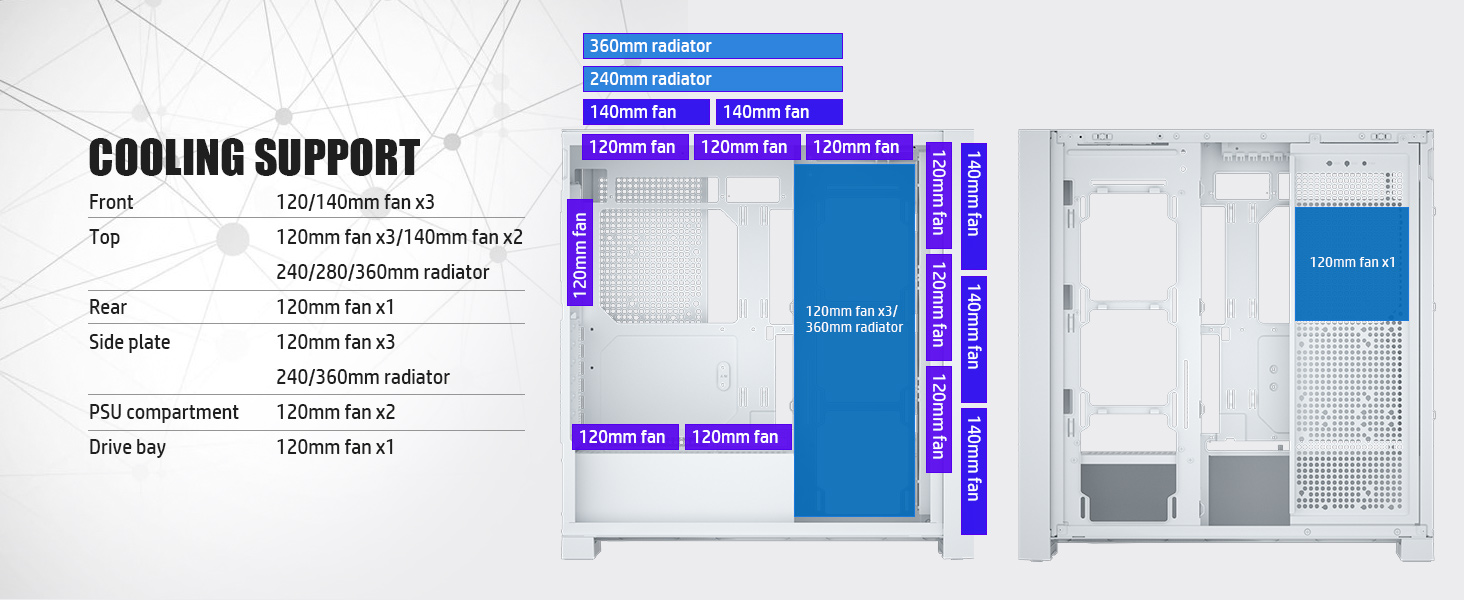


Configuración
Follow these general steps for assembling your PC within the Segotep T3 case:
- Preparar o caso: Remove the side panels and front panel using the tool-less design.
- Instalar placa base: Secure your ATX, Micro-ATX, or Mini-ITX motherboard onto the standoffs.
- Instalar o refrixerador da CPU: Mount your CPU cooler (air or liquid) according to its specific instructions. Ensure proper clearance for air coolers (max 175mm height). For liquid coolers, utilize the top or side 360mm radiator mounts.
- Instalar a tarxeta gráfica (GPU): Insert your graphics card into the PCIe slot. Use the pre-installed adjustable GPU bracket for support.
- Instalar unidades de almacenamento: Mount 2.5-inch SSDs or 3.5-inch HDDs in the designated drive bays behind the motherboard tray.
- Instalar a fonte de alimentación (PSU): Install your power supply unit in its designated compartment.
- Xestión de cables Route all cables neatly through the cutouts and use cable ties or Velcro straps to secure them, ensuring optimal airflow and a clean build.
- Install Additional Fans/Radiators: If desired, install additional fans or radiators in available mounting locations (up to 13 fans total).
- Connect Front I/O: Connect the front panel cables (USB 3.0, USB 2.0, Type-C, Audio, Power, Reset) to your motherboard.
- Pechar paneis: Reattach the side and front panels securely.
En funcionamento
The Segotep T3 case is designed for efficient operation with its advanced airflow features. Ensure all fans are properly connected and functioning to maintain optimal temperatures. The 10° Smart Panel Air Ducts on the front panel can be opened to enhance airflow when needed, and closed to prevent dust entry during idle periods.
Mantemento
Regular maintenance is crucial for prolonging the life of your PC components and ensuring consistent performance. The tool-less design of the Segotep T3 case makes maintenance straightforward.
- Limpeza do filtro de po: Periodically clean the dust filters located on the top and bottom of the case. These are designed to be easily removable for cleaning.
- Limpeza interna: With the side panels removed, use compressed air to clear dust from fans, radiators, and other components.
- Comprobación da xestión de cables: Comprobe ocasionalmente o cableado para asegurarse de que ningún cable obstrua o fluxo de aire ou o funcionamento do ventilador.
Resolución de problemas
Aquí tes algúns problemas comúns e posibles solucións:
- Sobrequecemento: Ensure all fans are spinning correctly and dust filters are clean. Verify proper installation of CPU cooler and thermal paste. Check for any cable obstructions to airflow.
- Problemas de axuste de compoñentes: If a component (e.g., large GPU, thick radiator) does not fit, double-check the case specifications for maximum dimensions. The modular design allows for some flexibility in component placement.
- E/S do panel frontal non funciona: Verify that all front panel cables are securely connected to the correct headers on your motherboard.
- Problemas de iluminación RGB: Ensure the ARGB fan is correctly connected to a compatible 3-pin 5V ARGB header on your motherboard or a dedicated controller. Use motherboard software to control lighting effects.
Especificacións
| Característica | Detalle |
|---|---|
| Marca | Segotep |
| Serie | T3 |
| Nome do modelo | T3 |
| Tipo de caso | Torre media |
| Compatibilidade da placa base | ATX |
| Material | Vidro Templado |
| Dimensións do produto (LxWxH) | 18.5 x 9.06 x 19.29 polgadas |
| Peso do elemento | 22 libras |
| Número de portos USB 3.0 | 2 |
| Número de portos USB 2.0 | 2 |
| Método de arrefriamento | Aire, Auga |
| Tamaño do ventilador | 120 Millimeters (pre-installed) |
Garantía e Soporte
Segotep offers a 5-year warranty on its power supply products, demonstrating a commitment to quality and reliability. For specific warranty details regarding the T3 PC case or for any support inquiries, please refer to the official Segotep websitio ou póñase en contacto co servizo de atención ao cliente.
You can visit the official Segotep store for more information and product support: Segotep Store
Vídeo do produto
Vídeo de presentación oficial do produtoasing the Segotep T3 Gaming PC Case features and design.


