1. Introdución
The Logicool Signature M550MGR is a silent wireless mouse designed for comfort and productivity. It features the unique SmartWheel for versatile scrolling and SilentTouch technology for reduced click noise. This mouse offers dual connectivity options: Bluetooth Low Energy and the Logi Bolt USB receiver, ensuring stable performance across various operating systems.

Image: The Logicool Signature M550MGR mouse, highlighting its ergonomic design and advanced scrolling capabilities.
2. Contido do paquete
- Logicool Signature M550MGR Wireless Mouse
- Receptor USB Logi Bolt
- 1 pila AA (preinstalada)
- Documentación do usuario (este manual)
3. Configuración
3.1. Instalación da batería
- Localiza o compartimento da batería na parte inferior do rato.
- Abra a tapa do compartimento da batería.
- Ensure the AA battery is correctly oriented according to the polarity indicators (+/-).
- Pecha a tapa do compartimento da batería.
3.2. Conectando o rato
The M550MGR offers two connection methods: Logi Bolt USB receiver or Bluetooth Low Energy.
3.2.1. Conexión do receptor USB Logi Bolt
- Remove the Logi Bolt USB receiver from the battery compartment or packaging.
- Conecta o receptor USB Logi Bolt a un porto USB dispoñible do teu ordenador.
- The mouse should automatically connect. If not, ensure the mouse is powered on.
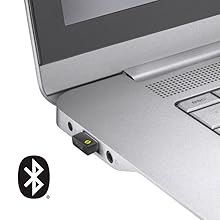
Image: The Logi Bolt USB receiver connected to a laptop, illustrating the wireless connection method.
3.2.2. Bluetooth Low Energy Connection
- Asegúrate de que o Bluetooth do teu dispositivo estea activado.
- Acende o rato.
- Press and hold the connect button on the underside of the mouse for 3 seconds until the LED indicator starts blinking rapidly.
- On your device, go to Bluetooth settings and select "Logicool M550MGR" from the list of available devices to pair.
- The LED indicator will turn solid for a few seconds, then turn off, indicating a successful connection.

Image: Visual representation of the two connectivity options: Bluetooth and the Logi Bolt USB receiver.
4. Instrucións de funcionamento
4.1. Funcións básicas
- Clic esquerdo: Acción primaria, selección.
- Clic dereito: Secondary action, context menus.
- Roda de desprazamento: Desprácese cara arriba ou cara abaixo polos documentos e web páxinas.
4.2. Desprazamento con SmartWheel
The SmartWheel automatically switches between two scrolling modes:
- Line-by-line Scrolling: For precise navigation, ideal for detailed work.
- Hyper-fast Scrolling: Spin the wheel quickly to effortlessly glide through long documents and web pages. The wheel will automatically switch to this mode when spun with momentum.

Imaxe: Primeiro plano view of the SmartWheel, demonstrating its design for efficient scrolling.
4.3. Tecnoloxía SilentTouch
The M550MGR incorporates SilentTouch technology, which reduces click noise by 90% compared to traditional mice, while maintaining the familiar click feel. This creates a quieter work environment without compromising tactile feedback.

Image: A user operating the silent mouse in a calm environment, illustrating the benefit of SilentTouch technology.
5. Características
- Roda intelixente: Automatic switching between precise line-by-line and hyper-fast scrolling.
- Tecnoloxía SilentTouch: 90% reduced click noise with retained click feel.
- Conectividade dual: Connect via Logi Bolt USB receiver or Bluetooth Low Energy.
- Deseño ergonómico: Comfortable shape with rubber side grips for extended use.
- Batería de longa duración: Ata 24 meses cunha soa pila AA.
- Compatibilidade con varios sistemas operativos: Supports Windows, macOS, Chrome OS, iPadOS, and Android.
6. Información da batería
- Tipo de batería: 1 x AA alkaline battery.
- Duración da batería: Up to 24 months, depending on usage.
- Substitución da batería: Replace the AA battery when the LED indicator on the mouse turns red or when performance degrades. Follow the installation steps in Section 3.1.
7. Compatibilidade
The Logicool Signature M550MGR mouse is compatible with the following operating systems:
- Logi Bolt Connection:
- Windows 10, 11 ou posterior
- macOS 10.10 ou posterior
- Chrome OS
- Bluetooth Low Energy Connection:
- Windows 10, 11 ou posterior
- macOS 10.15 ou posterior
- Chrome OS
- iPadOS 13.4 ou posterior
- Android 5.0 ou posterior
Note: This mouse is not compatible with Logitech Unifying receivers.
8. Mantemento
- Limpeza: Use a soft, lint-free cloth to clean the mouse surface. For stubborn dirt, slightly dampEnxágüe o pano con auga. Evite produtos químicos agresivos ou materiais abrasivos.
- Sensor: Keep the optical sensor on the underside of the mouse clean and free from dust or debris for optimal tracking performance.
- Almacenamento: When not in use for extended periods, turn off the mouse to conserve battery life. Store in a dry, cool place.
9 Solución de problemas
9.1. O rato non responde
- Asegúrese de que o rato estea acendido.
- Comprobe o nivel da batería e substitúea se é necesario.
- For Logi Bolt connection: Ensure the receiver is securely plugged into a working USB port. Try a different USB port.
- For Bluetooth connection: Ensure Bluetooth is enabled on your device and the mouse is paired. Try re-pairing the mouse (refer to Section 3.2.2).
- Reinicia o teu ordenador ou dispositivo.
9.2. Movemento errático do cursor
- Limpa o sensor óptico da parte inferior do rato.
- Asegúrate de usar o rato sobre unha superficie axeitada. Evita superficies moi reflectantes ou transparentes.
- Move the mouse closer to the Logi Bolt receiver or your Bluetooth-enabled device to reduce interference.
9.3. SmartWheel Not Switching Modes
- Ensure the wheel is spun with enough momentum to activate hyper-fast scrolling.
- Check for any debris around the scroll wheel that might impede its movement.
10. Especificacións
| Marca | Logicool |
| Número de modelo | M550MGR |
| Cor | Grafito |
| Tecnoloxía de conectividade | Bluetooth, Logi Bolt (USB) |
| Tecnoloxía de detección de movemento | Óptica |
| Características especiais | SilentTouch, Wireless |
| Dimensións do produto | 6.1 x 10.82 x 3.88 cm |
| Peso do elemento | 97.4 g |
| Tipo de batería | 1 x batería AA |
| Tempo de uso continuo | Ata 24 meses |
11. Garantía e soporte
The Logicool Signature M550MGR Wireless Mouse comes with a 2 anos de garantía do fabricante desde a data de compra.
For technical support, warranty claims, or additional information, please visit the official Logicool support websitio web ou póñase en contacto co servizo de atención ao cliente. Garde o comprobante de compra para efectos de garantía.
Official Logicool Support: www.logicool.co.jp


