Introdución
This user manual provides essential information for the proper setup, operation, and maintenance of your suevery 27-inch FHD Monitor (Model: SV270ZD). Please read this manual thoroughly before using the product to ensure optimal performance and safety.
The suevery SV270ZD is a 27-inch Full HD (1920x1080p) monitor featuring a VA panel with 99% sRGB color gamut, a 75Hz refresh rate, and a 3-sided narrow bezel design. It includes a blue light filter for eye comfort and offers versatile connectivity with HDMI and VGA ports. The monitor is also VESA mountable for flexible installation options.
Información de seguridade
- Non expoña o monitor á choiva nin á humidade para evitar incendios ou descargas eléctricas.
- Non abra o monitor casing. Non hai pezas que o usuario poida reparar no interior. Encomende calquera mantemento a persoal de servizo cualificado.
- Coloque o monitor sobre unha superficie estable e plana para evitar que caia.
- Asegúrate de que haxa unha ventilación axeitada arredor do monitor. Non bloquees as aberturas de ventilación.
- Empregue só o adaptador de corrente e os cables subministrados polo fabricante.
- Desconecte o monitor da toma de corrente durante tormentas eléctricas ou cando non o use durante períodos prolongados.
- Evite colocar obxectos pesados no cable de alimentación.
Contido do paquete
Verifica que todos os elementos estean presentes no paquete:
- suevery 27-inch FHD Monitor
- Base de soporte
- Cable HDMI
- Adaptador de alimentación
- Manual de usuario (este documento)
Configuración
1. Montaxe do soporte
Siga estes pasos para conectar o soporte ao monitor:
- Insert the stand neck into the base. Ensure it clicks securely into place.
- Attach the assembled stand to the back of the monitor. Align the stand with the mounting slot and push firmly until it locks.
- Secure the stand to the monitor using the provided screw, if applicable.

Figure 1: Stand Assembly and Cable Management. (a) Insert stand neck into base. (b) Stand assembled. (c) Secure base with screw. (d) Attach stand to monitor. (e) Install cable management clip.
2. Conectando o monitor
The monitor supports HDMI and VGA connections. Choose the appropriate cable for your device.
- Conexión HDMI: Conecta un extremo do cable HDMI ao porto HDMI do teu ordenador e o outro extremo ao porto HDMI do monitor.
- Conexión VGA: Connect one end of the VGA cable to the VGA port on your computer and the other end to the VGA port on the monitor.
- Saída de audio: If you wish to connect external speakers or headphones, use the 3.5mm audio output jack on the monitor.
- Conexión de alimentación: Connect the power adapter to the monitor's power input and then plug the adapter into a power outlet.
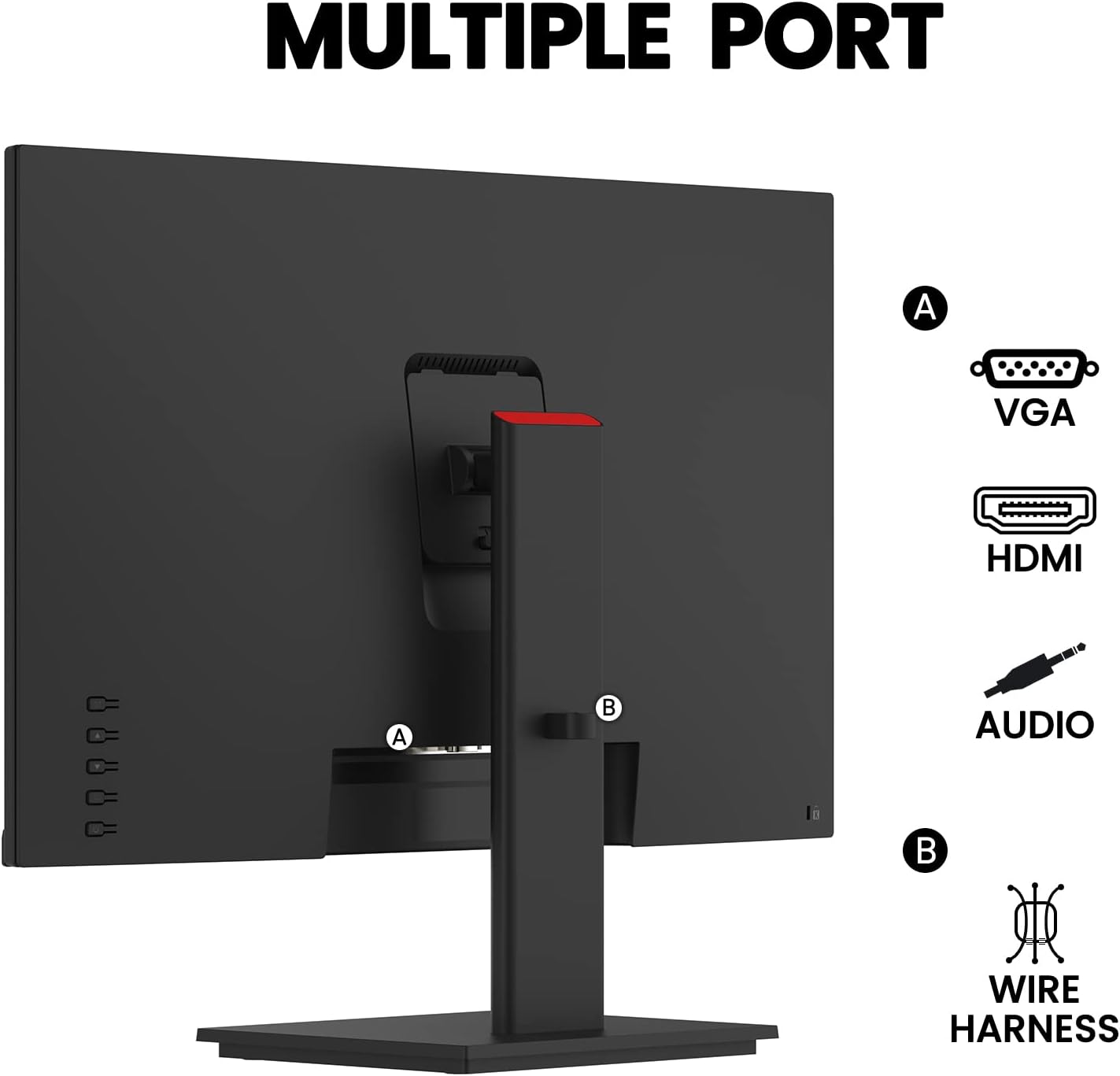
Figure 2: Monitor Ports. (A) VGA, HDMI, Audio Out. (B) Wire Harness for cable management.

Figure 3: Connectivity with Multiple Devices. The monitor is compatible with PCs, gaming devices, laptops, and TV boxes.
Instrucións de funcionamento
Encendido/apagado
Press the power button located on the monitor to turn it on or off.
Menú de visualización en pantalla (OSD).
Use the control buttons on the monitor to navigate and adjust settings in the OSD menu. Common settings include:
- Brillo/Contraste: Axusta os niveis de luminancia e contraste da pantalla.
- Configuración de cor: Modificar a temperatura da cor, o ton e a saturación.
- Selección de entrada: Cambia manualmente entre as fontes de entrada HDMI e VGA.
- Modo de imaxe: Select predefined display modes (e.g., Standard, Game, Movie, Text).
- Filtro de luz azul: Activa ou desactiva o filtro de luz azul para maior comodidade visual.
Axuste do ángulo do monitor
The monitor allows for tilt adjustment to optimize your viewing experience. Gently tilt the monitor screen forward or backward to achieve the desired angle. The tilt range is typically from -3° to 18°.

Figure 4: Monitor Tilt Adjustment. The monitor can be tilted for optimal viewing.
Mantemento
Limpeza do monitor
- Desenchufe sempre o monitor antes de limpalo.
- Use un pano suave e sen pelusa lixeiramente damplavado con auga ou cun limpador de pantallas non abrasivo.
- Non pulverices o limpador directamente sobre a pantalla.
- Evite o uso de benceno, disolvente, produtos de limpeza con base de amoníaco ou axentes de limpeza abrasivos.
Atención Xeral
- Keep the monitor away from direct sunlight, heat sources, and extreme temperatures.
- Non coloque obxectos pesados sobre o monitor nin sobre os seus cables.
- Asegúrese de que haxa unha ventilación axeitada arredor do monitor para evitar o sobrequecemento.
Resolución de problemas
| Problema | Causa posible | Solución |
|---|---|---|
| Non hai imaxe na pantalla | Monitor non acendido; cable de vídeo solto ou desconectado; fonte de entrada incorrecta seleccionada. | Ensure power cable is securely connected and monitor is turned on. Check video cable connections (HDMI/VGA) at both the monitor and computer. Press the input select button on the monitor to cycle through input sources. |
| A imaxe está borrosa ou distorsionada | Configuración de resolución incorrecta; Problema co cable de vídeo. | Set the display resolution to 1920x1080p in your computer's display settings. Try a different video cable. |
| No sound from external speakers/headphones | Cable de audio non conectado; Volume demasiado baixo; Saída de audio incorrecta seleccionada no ordenador. | Ensure audio cable is securely connected to the monitor's audio output jack. Increase volume on speakers/headphones and computer. Verify that the monitor is selected as the audio output device in your computer's sound settings. |
| Parpadea o monitor | Discordancia na taxa de actualización; cable defectuoso. | Ensure your computer's refresh rate is set to 75Hz. Try replacing the video cable. |
Especificacións
| Característica | Detalle |
|---|---|
| Número de modelo | SV270ZD |
| Tamaño da pantalla | 27 polgadas |
| Resolución | FHD (1920 x 1080p) |
| Taxa de actualización | 75 Hz |
| Tipo de panel | VA |
| Gama de cores | 99 % sRGB |
| Relación de aspecto | 16:9 |
| Brillo | 220 milliCandela |
| Viewángulo ing | 178° (horizontal/vertical) |
| Portos | HDMI, VGA, saída de son |
| Compatible con soporte VESA | Si |
| Dimensións do produto (L x W x H) | 3.54 x 24.21 x 14.29 polgadas |
| Peso do elemento | 12.17 libras |
| Fabricante | suevery |

Figure 5: Monitor Dimensions. Length: 615.7mm, Height: 363.3mm (screen), 453.22mm (with stand), Base: 209.83mm x 179.8mm.
Garantía e Soporte
For warranty information and technical support, please refer to the warranty card included with your product or visit the official suevery websitio. Garde o recibo da compra como xustificante de compra para reclamacións de garantía.
For further assistance, you may contact suevery customer service through the contact information provided on their official websitio web ou a través do seu vendedor.