1. Introdución
The AUTOPHIX 7360 is a professional full systems diagnostic scan tool designed specifically for Toyota, Lexus, and Scion vehicles manufactured after 1996. This device provides comprehensive diagnostic capabilities, allowing users to read and clear fault codes, view live data streams, and perform various special functions across all major vehicle systems. Its user-friendly interface and robust features make it an essential tool for vehicle maintenance and troubleshooting.

Image 1.1: The AUTOPHIX 7360 diagnostic scan tool, featuring its display screen, navigation buttons, and OBDII connector cable.
2. Configuración
2.1 Contido do paquete
Verifica que todos os compoñentes estean presentes no paquete:
- AUTOPHIX 7360 Diagnostic Scan Tool
- Cable OBDII (integrado)
- Manual de usuario (este documento)
- Cable USB (para actualizacións, se é o caso)
2.2 Conexión ao vehículo
- Localiza o conector de enlace de datos (DLC) de 16 pines do vehículo. Normalmente atópase debaixo do taboleiro, no lado do condutor.
- Asegúrese de que o contacto do vehículo estea na posición OFF.
- Firmly plug the AUTOPHIX 7360's OBDII cable into the vehicle's DLC.
- Turn the vehicle's ignition to the ON position (engine off). The device will power on automatically.
3. Instrucións de funcionamento
3.1 Funcións básicas de OBDII
The AUTOPHIX 7360 provides comprehensive OBDII diagnosis for all OBDII compliant vehicles (after 1996). Navigate to the 'OBDII' menu option on the device.

Image 3.1: Screen illustrating the full OBDII functions, including Read & Erase Error Codes, Data Stream, EVAP System, DTC Lookup, Vehicle Information, I/M Readiness, Turn Off MIL, and System Status.
- Read & Erase Error Codes: Retrieve Diagnostic Trouble Codes (DTCs) and clear them from the vehicle's ECU.
- Fluxo de datos en directo: View real-time sensor data from the vehicle's various systems.
- Proba de preparación I/M: Check the readiness of the emission-related monitors.
- Proba do sistema EVAP: Realizar probas no sistema de control de emisións evaporativas.
- Información do vehículo: Display the vehicle's VIN, Calibration ID, and Calibration Verification Number.
- Busca de DTC: Provides definitions for generic and manufacturer-specific trouble codes.
3.2 Advanced Diagnostic Functions (Full Systems)
This tool can access and diagnose all major systems in Toyota, Lexus, and Scion vehicles. Select the 'For Toyota' menu option to begin a full system scan.

Image 3.2: Display showing the range of full system diagnostics, including Transmission, Air Conditioner, Front Radar Sensor, Immobilizer, Central Gateway, Tire Pressure Monitor, Engine System, SRS Airbag, Navigation System, TMPS System, Audio System, Cruise Control, Active Noise Control, Theft Deterrent, Power Source Control, Steering Pad Switch, Combination Master Switch, Road Sign Assist, and Clearance Warning.
Supported systems include, but are not limited to:
- Sistema do motor
- Sistema de freos antibloqueo (ABS)
- Sistema de suxeición suplementario (SRS/Airbag)
- Sensor de ángulo de dirección (SAS)
- Sistema de xestión da batería (BMS)
- Freo de estacionamento electrónico (EPB)
- Sistema de monitorización da presión dos neumáticos (TPMS)
- Transmisión
- Aire acondicionado
- Sensor de radar frontal
- Inmovilizador
- Sistema de navegación
- Sistema de audio
- Control de crucero
- Hybrid Control (as shown in Image 3.3)
- Smart Key System (as shown in Image 3.3)

Imaxe 3.3: Ex.amples of professional diagnostic functions, including Air Bleeding, Reset Memory, Initialization, Hybrid Control, Sliding Roof, Steering Angle Adjust, Smart Key, Electronic Parking Brake, Steering Angle Learning, AFS, Sound System, and Interior Monitoring.
3.3 Funcións de servizo especiais
The AUTOPHIX 7360 supports a wide array of special functions for maintenance and service resets. Navigate to the 'Special Functions' menu.

Imaxe 3.4: Acabadoview of advanced full functions, including Service Reset, TMPS Reset, SAS Reset, Battery Registration, Throttle Learning, Airbag Reset, Oil Reset, DPF Reset, ABS Bleeding, EPB Reset, BMS Reset, SRS Reset, ETCS Reset, Injector Coding, DPF Regeneration, and CBS Reset.
- Reinicio do aceite: Reinicie a luz de servizo do aceite despois dun cambio de aceite.
- Aprendizaxe do acelerador: Volver a aprender a posición do corpo do acelerador.
- Reinicio do EPB (freo de estacionamento electrónico): Deactivate and reactivate the brake control system, assist with brake fluid control, open and close brake pads, and set brakes after disc or pad replacement.
- Reinicio do TPMS (sistema de monitorización da presión dos pneumáticos): Reset tire pressure values after tire rotation or sensor replacement.
- Injector Quantity Adjustment: Adjust injector coding after replacement.
- DPF (Diesel Particulate Filter) Reset/Regeneration: Perform DPF regeneration and reset the DPF light.
- Rexistro de baterías: Register a new battery to the vehicle's Battery Management System (BMS).
- Reinicio do airbag: Clear airbag crash data.
- Steering Angle Sensor (SAS) Learning: Calibrar o sensor do ángulo de dirección.
- Sangrado do ABS: Perform brake bleeding procedures.
- Reinicio do BMS: Reset the Battery Management System.
- Reinicio do ETCS: Electronic Throttle Control System reset.
3.4 Xestión da batería
The device offers accurate battery health checks and a professional battery registration function.

Image 3.5: Visual guide for accurate battery check, showing voltage ranges for Too Low, Normal, Slightly Low, and Too High conditions before and after starting the car.
Comprobación da batería: The tool can display the current battery status, indicating voltage levels before and after starting the vehicle to assess battery health.
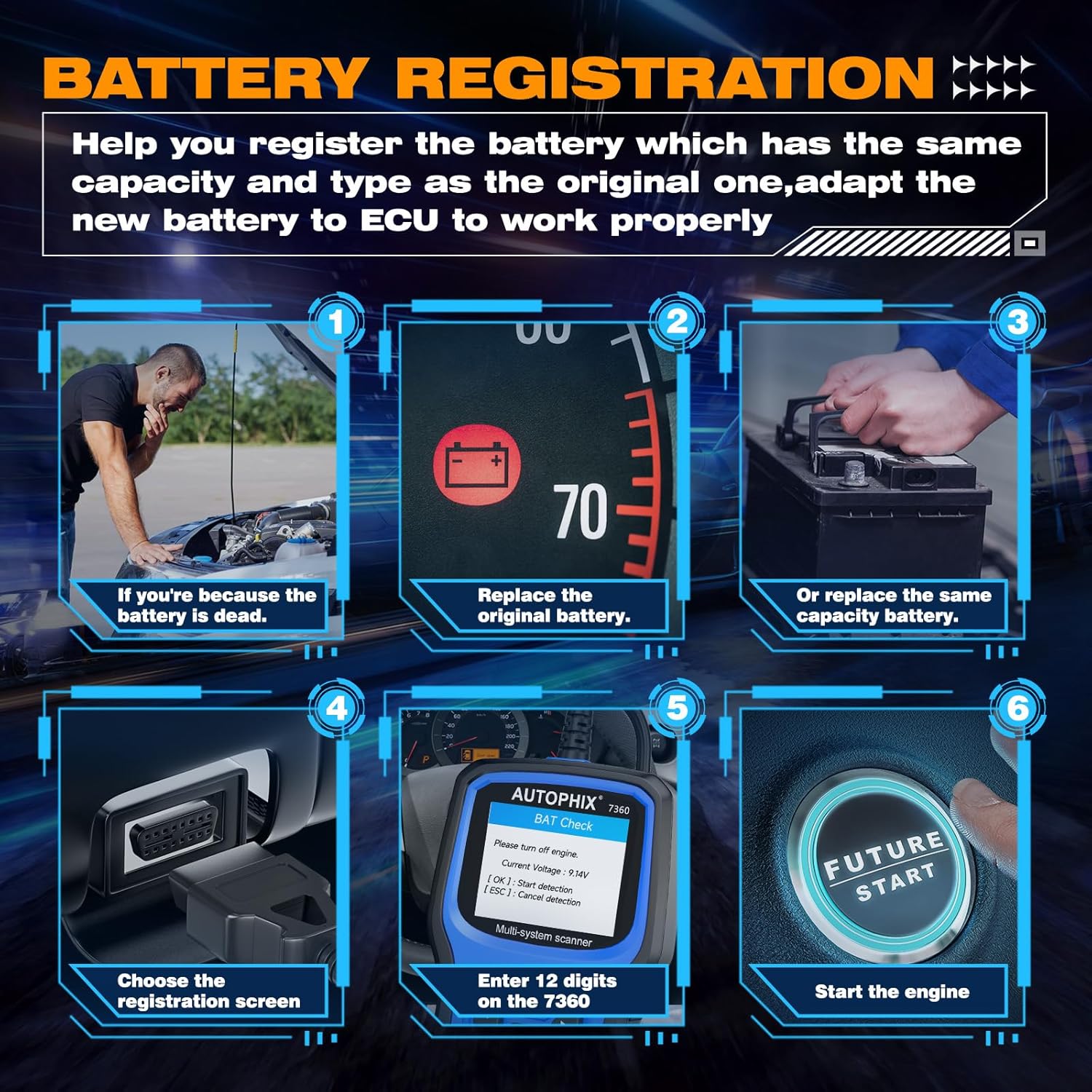
Image 3.6: Step-by-step guide for battery registration, including scenarios for dead battery, replacing original battery, replacing with same capacity battery, choosing registration screen, entering 12 digits, and starting the engine.
Rexistro de baterías: When replacing a vehicle battery, it is crucial to register the new battery with the vehicle's ECU to ensure proper charging and battery life. The 7360 allows you to:
- Store current battery and mileage readings for replacement records.
- Delete stored measurement values (charge state, current, voltage, temperatura, etc.).
- Initialize the battery management system for the new battery.
4. Compatibility and Language Support
The AUTOPHIX 7360 is designed for broad compatibility with Toyota, Lexus, and Scion vehicles from 1996 onwards.

Image 4.1: Visual representation of broad compatibility for Lexus, Toyota, and Scion models, along with flags indicating 12 supported languages.
4.1 Compatibilidade do vehículo
The tool supports a wide range of models within the Toyota, Lexus, and Scion families, including but not limited to:
- Lexus: CT, ES, GS, GX, HS, IS, LC, LFA, LM, LS, LX, NX, RC, RX, SC, UX.
- Toyota: Rav4, Camry, Corolla, 4Runner, Highlander, C-HR, Aqua, Alphard, Corolla Cross, Crown, FJ Cruiser, Avalon, Land Cruiser, Mirai, Prius, Sequoia, Sienna, Supra, Tacoma, Tundra, Venza, Yaris.
- Scion: FR-S, iA, iM, iQ, iQ EV, tC, xA, xB, xD.
4.2 Apoio lingüístico
The device supports 12 languages, allowing users from various regions to operate the tool comfortably:
- inglés
- alemán
- francés
- italiano
- castelán
- portugués
- polaco
- ruso
- noruegués
- danés
- sueco
- Finnish (Suomalainen)
5. Mantemento
5.1 Limpeza
To maintain the device's performance and appearance, clean it regularly with a soft, damp pano. Non use produtos de limpeza ou disolventes abrasivos.
5.2 Almacenamento
When not in use, store the AUTOPHIX 7360 in a dry, cool environment, away from direct sunlight and extreme temperatures. Keep it in its original packaging or a protective case to prevent damage.
5.3 Actualizacións de software
Consulta periodicamente a páxina oficial de AUTOPHIX website for software updates. Updates may include new vehicle models, bug fixes, and improved functionalities. Follow the instructions provided on the website for the update process, typically involving connecting the device to a computer via USB.
6 Solución de problemas
If you encounter issues with your AUTOPHIX 7360, refer to the following common troubleshooting steps:
- O dispositivo non se acende: Ensure the OBDII cable is securely connected to the vehicle's DLC and the vehicle's ignition is in the ON position. Check the vehicle's battery voltage.
- Erro de comunicación: Verify that the vehicle supports the OBDII protocol. Ensure the ignition is ON. Try connecting to a different vehicle to rule out a vehicle-specific issue.
- A pantalla conxélase ou o dispositivo non responde: Disconnect the device from the vehicle, wait a few seconds, and then reconnect it. If the issue persists, perform a software update.
- Incorrect readings or functions: Ensure the device software is up to date. Verify that the correct vehicle make/model is selected if prompted.
7. Especificacións
| Característica | Especificación |
|---|---|
| Marca | AUTOFIX |
| Número de modelo | 7360 |
| Dimensións do produto | 26.49 x 19.99 x 5 cm |
| Peso do elemento | 540 g |
| Cor | Azul |
| Tamaño da pantalla | 2.8 polgadas |
| Fonte de enerxía | Battery Powered (via OBDII connection) |
| Sistema Operativo | Windows XP (for PC connection/updates) |
| Primeira data dispoñible | 2 de novembro de 2022 |
8. Garantía e soporte
For warranty information and technical support, please refer to the official AUTOPHIX websitio web ou póñase en contacto directamente co servizo de atención ao cliente. Garde o recibo da compra como proba de compra para calquera reclamación de garantía.


