1. Introdución
The Maxcom MM724 is a simple mobile phone designed for ease of use, featuring straightforward software and practical functions. It is particularly suitable for users who prefer a device without complicated menus. Key features include an emergency SOS button, a built-in flashlight, and Bluetooth connectivity for hearing aid compatibility.
2. Contido do paquete
Marque a caixa para os seguintes elementos:
- 1 Maxcom MM724 Mobile Phone
- 1 Desktop Charger
- 1 Matching Cords (for charger)
- 1 Manual de usuario (este documento)
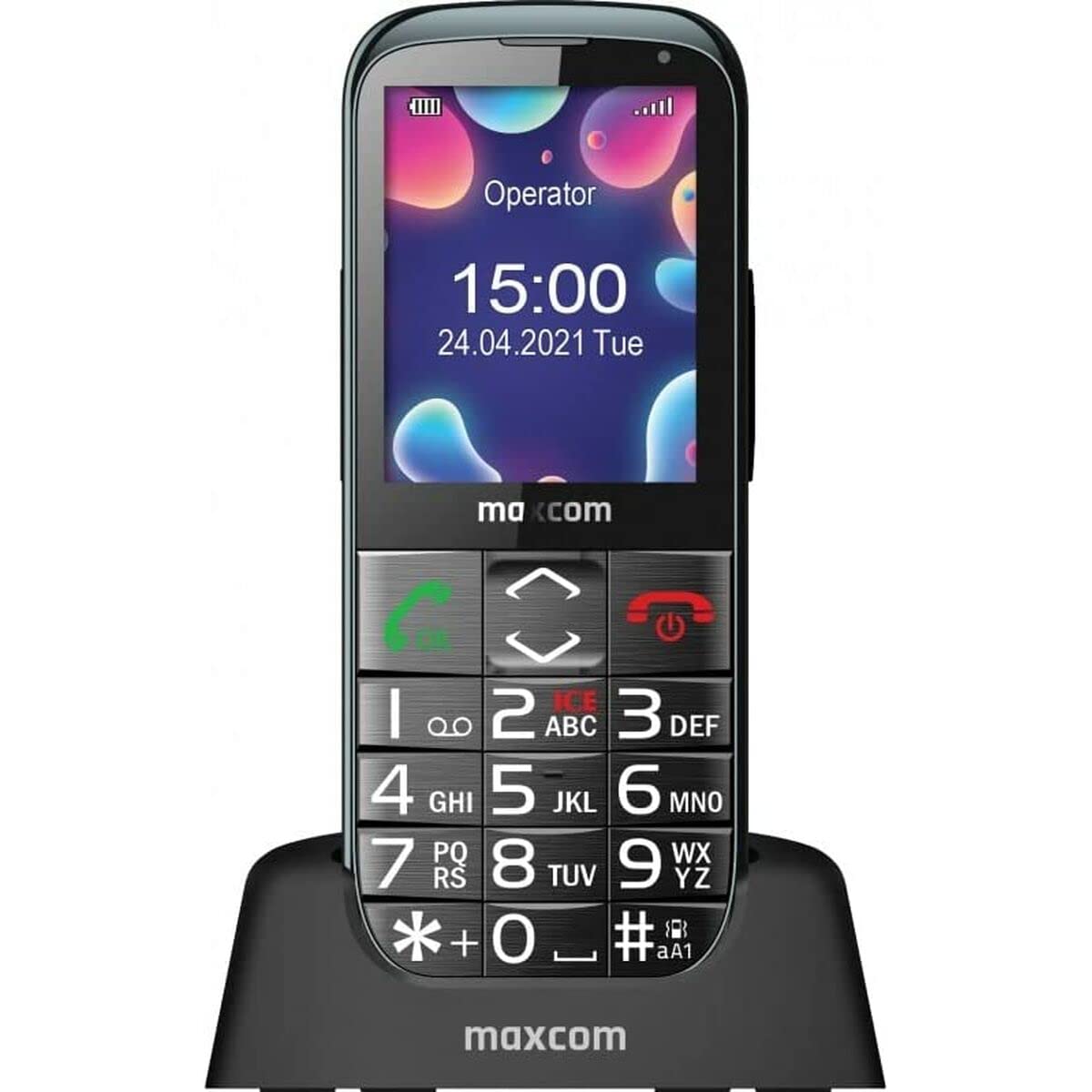
Image: The Maxcom MM724 simple mobile phone, typically black, with a clear display and large buttons.
3. Configuración
3.1. Inserción da tarxeta SIM e da batería
- Retire con coidado a tapa traseira do teléfono.
- Insira a(s) tarxeta(s) SIM na(s) ranura(s) designada(s) cos contactos dourados cara abaixo.
- Introduza a batería, asegurándose de que os contactos estean aliñados correctamente.
- Volva colocar a tapa traseira ata que encaixe firmemente no seu lugar.
3.2. Cargando o dispositivo
The Maxcom MM724 uses a convenient desktop charger. To charge your phone:
- Connect the charger cord to a power outlet.
- Place the phone upright into the desktop charging cradle.
- Ensure the charging indicator on the phone or cradle illuminates, indicating that charging has begun.
- For optimal battery life, keep the phone in the cradle when not in use to ensure it is always charged.
4. Instrucións de funcionamento
4.1. Acendido/apagado
- Para acender: Press and hold the Power/End Call button (usually red) until the screen lights up.
- Para apagar: Press and hold the Power/End Call button until the power-off options appear, then confirm.
4.2. Realización e recepción de chamadas
- Para facer unha chamada: Dial the number using the keypad and press the Call button (usually green).
- Para recibir unha chamada: Press the Call button when the phone rings. The phone is designed to ring very loudly to ensure calls are not missed.
- Para finalizar unha chamada: Press the Power/End Call button.
4.3. Envío e recepción de mensaxes
Navigate to the 'Messages' menu to compose new SMS messages or read incoming ones. Use the keypad to type your message.
4.4. Usando o botón SOS
The SOS button is located on the back of the phone and is designed for emergencies.
- Configuración: Access the phone's settings to pre-define a list of emergency contacts.
- Activación: In an emergency, press and hold the SOS button. The phone will automatically call the pre-defined contacts in sequence until one answers.
4.5. Activating the Flashlight
The phone features a dedicated button for the flashlight, making it easy to activate when needed. Refer to your phone's specific button layout for its location.
4.6. Bluetooth and Hearing Aid Compatibility
The Maxcom MM724 supports Bluetooth connectivity, allowing it to pair with compatible devices, including certain hearing aids. This enables hands-free calling.
- Emparejamento: Go to the Bluetooth settings on your phone and enable Bluetooth. Put your hearing aid into pairing mode (consult your hearing aid's manual). Select your hearing aid from the list of available devices on the phone to pair.
- Nota: Compatibility with hearing aids depends on the hearing aid's features. Consult your audiologist for specific compatibility information. The phone also features a ring line and additional gain for improved audio performance with or without hearing aids.
5. Mantemento
- Limpeza: Usa un pano suave e seco para limpar a pantalla e a carcasa do teléfono. Evita usar produtos de limpeza líquidos ou materiais abrasivos.
- Coidado da batería: Keep the battery charged regularly. Avoid extreme temperatures, which can affect battery performance and lifespan.
- Almacenamento: Garda o teléfono nun lugar fresco e seco cando non o uses durante períodos prolongados.
6 Solución de problemas
- O teléfono non se acende: Asegúrate de que a batería estea inserida e cargada correctamente. Conecta o teléfono ao cargador e inténtao de novo.
- Sen sinal de rede: Check if the SIM card is properly inserted. Move to an area with better network coverage. Contact your service provider if the issue persists.
- Non se poden facer/recibir chamadas: Verify that you have sufficient credit or an active plan. Check network signal strength.
- Problemas de emparellamento por Bluetooth: Ensure both devices are in pairing mode and within range. Try restarting both the phone and the Bluetooth device.
7. Especificacións
| Marca | Maxcom |
| Nome do modelo | MM724 |
| Sistema Operativo | Android |
| Tamaño da pantalla | 3 polgadas |
| Tecnoloxía de conectividade | Bluetooth |
| Tecnoloxía Celular | 4G |
| Tecnoloxía de redes sen fíos | GSM |
| Cor | Negro |
| Peso do elemento | 85 gramos |
| Portador sen fíos | Desbloqueado |
8. Garantía e soporte
Warranty information for the Maxcom MM724 mobile phone is typically provided with your purchase documentation or can be found on the official Maxcom website. For technical support or service inquiries, please refer to the contact information provided by your retailer or the manufacturer.


