1. Introdución
This manual provides essential instructions for the setup, operation, maintenance, and troubleshooting of your White Shark GK-2102 LEGIONNAIRE-X RGB USB Keyboard. Please read this manual thoroughly before using the product to ensure proper functionality and longevity.

Imaxe 1.1: Arriba view of the White Shark GK-2102 LEGIONNAIRE-X RGB USB Keyboard, showcasing o seu deseño completo e iluminación RGB.
2. Configuración
Follow these steps to connect your White Shark GK-2102 LEGIONNAIRE-X RGB USB Keyboard to your computer.
- Descomprimir o teclado: Carefully remove the keyboard and its USB cable from the packaging.
- Conecte o cable USB: Insert the USB connector of the keyboard into an available USB port on your computer.

Image 2.1: Close-up of the USB connector, which is used to connect the keyboard to a computer.
- Instalación de controladores: O teclado é plug-and-play. O teu sistema operativo debería detectar e instalar automaticamente os controladores necesarios. Normalmente non se require instalación de software adicional.
- Axustar as patas do teclado: For ergonomic comfort, you may extend the adjustable feet located on the underside of the keyboard.

Imaxe 2.2: View of the adjustable feet on the keyboard's underside, allowing users to modify the typing angle.
3. Instrucións de funcionamento
The White Shark GK-2102 LEGIONNAIRE-X is a standard USB keyboard with RGB lighting features. Below are general operating guidelines.
3.1 Funcións básicas do teclado
The keyboard functions as a standard QWERTY layout device. All keys perform their indicated character or function when pressed. Special function keys (F1-F12) may require the 'Fn' key to be held down simultaneously for their secondary functions, depending on your operating system and specific keyboard model configuration.
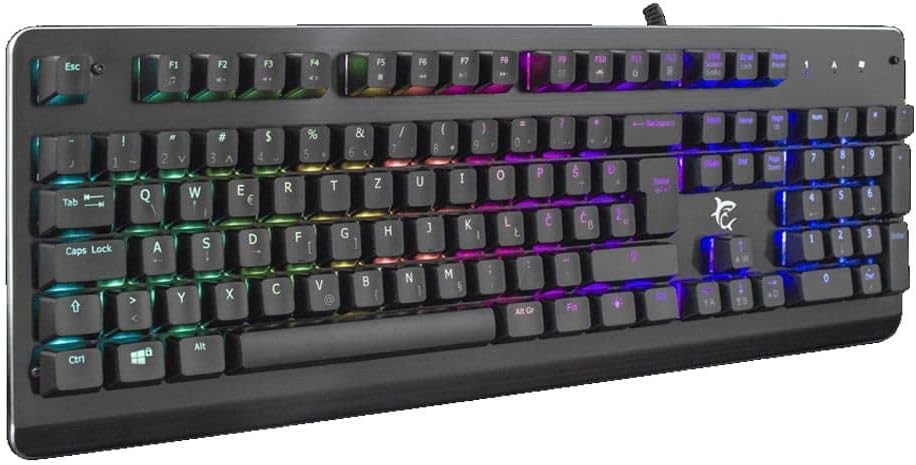
Imaxe 3.1: En ángulo view of the keyboard, highlighting the key layout and illuminated RGB backlighting.
3.2 Control de iluminación RGB
This keyboard features RGB lighting. Specific key combinations, often involving the 'Fn' key and other designated keys (e.g., arrow keys, Ins, Home, PgUp, Del, End, PgDn), are typically used to cycle through lighting modes, adjust brightness, or change colors. Refer to the quick start guide or manufacturer's website for detailed RGB control commands specific to this model.
4. Mantemento
Un mantemento axeitado garante a lonxevidade e o rendemento do teu teclado.
- Limpeza: Disconnect the keyboard from your computer before cleaning. Use a soft, dry cloth to wipe the surface. For stubborn dirt, a slightly damp cloth with mild soap can be used, ensuring no liquid enters the keyboard. Compressed air can be used to remove dust and debris from between the keys.
- Evitar líquidos: Do not spill liquids on the keyboard. Liquid damage can cause permanent malfunction.
- Almacenamento: Garde o teclado nun lugar fresco e seco, lonxe da luz solar directa e de temperaturas extremas, cando non o use durante períodos prolongados.
5 Solución de problemas
Se tes problemas co teclado, proba as seguintes solucións:
- O teclado non responde:
- Asegúrate de que o cable USB estea conectado correctamente tanto ao teclado como ao ordenador.
- Tenta conectar o teclado a un porto USB diferente do teu ordenador.
- Proba o teclado noutro ordenador para determinar se o problema é co teclado ou co porto/controladores do ordenador.
- Reinicia o teu ordenador.
- As chaves non funcionan:
- Comprobe se hai algunha obstrución física debaixo das tapas das teclas.
- Limpe o teclado como se describe na sección Mantemento.
- Iluminación RGB non funciona/incorrecta:
- Asegúrate de que o teclado estea conectado correctamente e reciba alimentación.
- Refer to the manufacturer's specific instructions for RGB control key combinations.
6. Especificacións
Below are the technical specifications for the White Shark GK-2102 LEGIONNAIRE-X RGB USB Keyboard:

Imaxe 6.1: Pro lateralfile of the keyboard, illustrating its physical dimensions and keycap height.
| Característica | Detalle |
|---|---|
| Marca | Tiburón Branco |
| Modelo | GK-2102 LEGIONNAIRE-X |
| Conectividade | USB |
| Dimensións do produto | 50 x 50 x 28 cm |
| Peso | 1.06 kg |
| Material | Plástico |
| Características especiais | Iluminación RGB |
| Pilas necesarias | Non |
7. Información da garantía
For detailed warranty information regarding your White Shark GK-2102 LEGIONNAIRE-X RGB USB Keyboard, please refer to the warranty card included with your product or visit the official White Shark websitio. Os termos e condicións da garantía poden variar segundo a rexión e o vendedor.
8. Apoio
If you require further assistance or have questions not covered in this manual, please contact White Shark customer support through their official website or the contact information provided with your purchase. Please have your product model (GK-2102 LEGIONNAIRE-X) and purchase details ready when contacting support.


