Introdución
Thank you for choosing the Havit Gaming Mouse MS955. This optical gaming mouse features a USB interface, adjustable DPI settings, and RGB backlighting, designed to enhance your gaming experience. This manual provides essential information for setting up, operating, and maintaining your mouse.
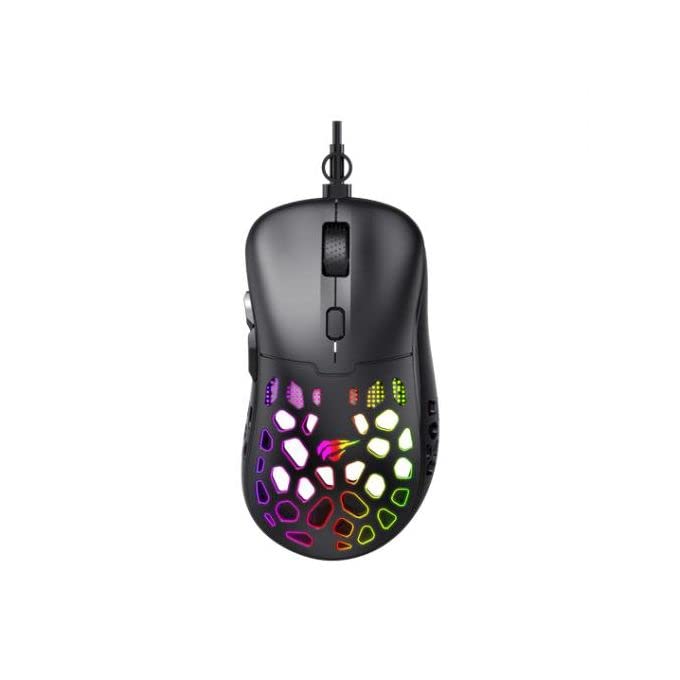
Imaxe: De arriba abaixo view of the Havit Gaming Mouse MS955, showcasing its ergonomic design and vibrant RGB lighting through the honeycomb shell.
Configuración
- Desembalar o rato: Carefully remove the Havit Gaming Mouse MS955 from its packaging.
- Conectar ao ordenador: Localiza un porto USB dispoñible no teu ordenador. Insire o conector USB do rato no porto USB.
- Instalación de controladores: The mouse is plug-and-play. Your operating system (Windows XP, Windows 7, Linux, etc.) will automatically detect and install the necessary drivers. No additional software installation is typically required for basic functionality.
- Funcionalidade de proba: Once connected, move the mouse and click the buttons to ensure it is working correctly.
Instrucións de funcionamento
The Havit Gaming Mouse MS955 features 6 programmable buttons and adjustable DPI settings for precise control.

Imaxe: Lateral view of the Havit Gaming Mouse MS955, highlighting the left-side buttons and scroll wheel.
- Botón esquerdo para premer: Primary button for selection and interaction.
- Botón dereito do rato: Secondary button for context menus and alternative actions.
- Roda de desprazamento: Úsase para percorrer documentos e web páxinas. Tamén funciona como un botón central no que se pode premer.
- Botón de axuste de DPI: Located behind the scroll wheel. Press this button to cycle through different DPI sensitivity levels (800-1200-2400-3200 DPI). Each press changes the sensitivity, allowing you to adapt to various gaming or work scenarios.
- Botóns laterais: Two buttons are located on the left side of the mouse. These are typically used for 'forward' and 'backward' navigation in web browsers or can be programmed for in-game actions.
Iluminación RGB
The Havit Gaming Mouse MS955 features an integrated RGB backlight system. The lighting effects are typically automatic and may change with DPI settings or cycle through various colors. There are no dedicated buttons for controlling the RGB lighting directly on the mouse.
Mantemento
- Limpeza: To clean the mouse, disconnect it from your computer. Use a soft, dry cloth to wipe the surface. For stubborn dirt, a slightly damp cloth can be used, ensuring no liquid enters the mouse. Do not use harsh chemicals or abrasive cleaners.
- Almacenamento: Garda o rato nun ambiente limpo e seco, lonxe de temperaturas extremas e da luz solar directa.
- Coidado do cable: Evite dobrar ou retorcer o cable USB excesivamente para evitar danalo.
Resolución de problemas
- O rato non responde:
- Asegúrate de que o cable USB estea conectado correctamente a un porto USB que funcione no teu ordenador.
- Tenta conectar o rato a un porto USB diferente.
- Reinicia o teu ordenador.
- DPI sen cambios:
- Press the DPI button firmly. Ensure you are pressing the correct button.
- The mouse cycles through fixed DPI settings; there is no visual indicator other than cursor speed change.
- As luces RGB non funcionan:
- Comprobe que o rato estea conectado correctamente ao seu ordenador.
- The RGB lighting is automatic; if the mouse is functioning otherwise, the lighting should also be active.
Especificacións
| Característica | Detalle |
|---|---|
| Marca | Havit |
| Modelo | MS955 |
| Tipo de interface | USB |
| Dimensións | 115.2 x 63 x 37.6 mm |
| Número de chaves | 6 |
| Chipset | NST5311 |
| Resolución DPI | 800-1200-2400-3200 DPI |
| Vol. Operativotage | 5V |
| Duración da vida útil da clave | 3,000,000 clics |
| Lonxitude do cable | 1.5 m |
| Detección de Movemento | Óptica |
| Orientación das mans | Certo |
| Uso recomendado | Xogos |
| Sistemas operativos | Linux, Windows 7, Windows XP |
| Cor | Negro |
Garantía e Soporte
For warranty information or technical support, please refer to the documentation included with your purchase or visit the official Havit websitio. Garda o comprobante de compra para reclamacións de garantía.


