1. Produto rematadoview
The SLuB Bluetooth 5.3 Ear-hook Headset F6 is designed for clear, hands-free communication and high-quality audio playback. Featuring the latest Bluetooth 5.3 technology, a comfortable ear-hook design, and long battery life, it is suitable for various activities including driving, work, and commuting.
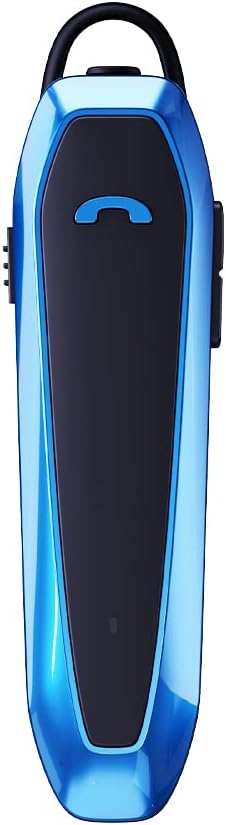
Image 1.1: SLuB Bluetooth 5.3 Ear-hook Headset F6 (Blue)
Características principais:
- Advanced Bluetooth 5.3 EDR: Ensures stable connection, minimal interruptions, and clear audio transmission up to 10 meters. Optimized for both iOS and Android devices.
- Comunicación mans libres: Integrated microphone and one-button control for managing calls and music playback effortlessly.
- Universal Fit & Comfort: 180° rotatable ear hook allows use on either ear. Lightweight design (13.2g) for extended comfortable wear.
- Duración prolongada da batería: Up to 33 hours of talk time and 280 hours of standby time on a single charge.
- Deseño resistente á auga: Drip-proof specifications protect against sweat and splashes, suitable for various environments.
2. Contido do paquete
Comprobe que todos os elementos estean presentes no paquete:
- SLuB Bluetooth Ear-hook Headset (F6)
- Earpieces (various sizes)
- Cable de carga tipo C
- Manual de usuario
3. Disposición e controis do dispositivo
Familiarize yourself with the physical components and controls of your headset.

Image 3.1: Headset Components and Controls. This diagram illustrates the location of the Type-C charging port, multi-function button, power button, volume up/down buttons, indicator lamp, microphone, and silicone earpiece.
Funcións de control:
| Función | Operación |
|---|---|
| Encendido/apagado | Push the power button up/down. |
| Apagado automático | Device powers off automatically if not connected for 5 minutes. |
| Responder a chamada entrante | Prema unha vez o botón multifunción. |
| Finalizar chamada | Prema unha vez o botón multifunción durante unha chamada. |
| Rexeitar a chamada entrante | Manteña premido o botón multifunción durante 2 segundos. |
| Reproducir/Pausa de música | Single press the multi-function button during music playback. |
| Subir volume | Preme o botón Subir volume. |
| Baixar o volume | Prema o botón para baixar o volume. |
| Próxima pista | Manteña premido o botón para subir o volume durante 2 segundos. |
| Pista anterior | Manteña premido o botón para baixar o volume durante 2 segundos. |
| Activar o asistente de voz (Siri) | Manteña premido o botón multifunción durante 2 segundos. |
| Volver a marcar o último número | Prema dúas veces o botón multifunción. |
4. Configuración e emparellamento
4.1 Carga dos auriculares
Before first use, fully charge the headset. Use the provided Type-C charging cable.
- Conecta o extremo tipo C do cable de carga ao porto de carga dos auriculares.
- Conecta o extremo USB-A a unha fonte de alimentación USB compatible (por exemplo, un ordenador ou un adaptador de parede).
- O indicador lamp will show charging status (refer to the device for specific light patterns).
- Unha carga completa leva aproximadamente 2.5 horas.

Image 4.1: Charging and Battery Life. The headset offers approximately 280 hours of standby time, 33 hours of talk time, and charges in about 2.5 hours.
4.2 Emparejamento Bluetooth
To connect your headset to a device:
- Asegúrese de que os auriculares estean cargados.
- Turn on the headset by pushing the power button. The indicator lamp will flash, indicating it is in pairing mode.
- No teu teléfono intelixente ou noutro dispositivo con Bluetooth, vai á configuración de Bluetooth.
- Busca available devices. Select "SLuB F6" (or similar name) from the list.
- Once connected, the indicator lamp will change (e.g., solid blue or slow flash), and you may hear a confirmation tone.
- Os auriculares admiten a conexión a dous dispositivos simultaneamente.

Image 4.2: Dual Device Connection. The headset can maintain a connection with two devices, such as a work phone and a personal tablet, allowing seamless switching.
4.3 Como usar os auriculares
The ear hook is designed for comfort and versatility:
- The ear hook can rotate 180 degrees, allowing you to wear the headset on either your left or right ear.
- Adjust the ear hook to find the most comfortable and secure fit.
- The lightweight design ensures comfort even during prolonged use.

Image 4.3: Comfortable Wearing. The ergonomic design and soft silicone earpiece ensure comfortable, long-term wear.
5. Instrucións de funcionamento
5.1 Facer e recibir chamadas
Use the multi-function button for call management:
- Resposta: Prema unha vez o botón multifunción.
- Fin: Prema unha vez o botón multifunción durante unha chamada.
- Rexeitar: Manteña premido o botón multifunción durante 2 segundos.
- Volver marcar: Double press the multi-function button to call the last dialed number.
5.2 Reprodución de música
Control your music directly from the headset:
- Reproducir/Pausa: Prema unha vez o botón multifunción.
- Subir volume: Preme o botón Subir volume.
- Baixar volume: Prema o botón para baixar o volume.
- Próxima pista: Manteña premido o botón para subir o volume durante 2 segundos.
- Pista anterior: Manteña premido o botón para baixar o volume durante 2 segundos.
5.3 Asistente de voz
Activate your device's voice assistant (e.g., Siri) by pressing and holding the multi-function button for 2 seconds.
6. Mantemento
To ensure the longevity and optimal performance of your SLuB F6 Headset, follow these maintenance guidelines:
- Limpeza: Limpe os auriculares cun pano suave e seco. Evite o uso de produtos químicos agresivos ou materiais abrasivos.
- Resistencia á auga: The headset is drip-proof and resistant to sweat and splashes. However, it is not designed for submersion in water. Avoid exposing it to heavy rain or direct water jets.
- Almacenamento: Garde os auriculares nun lugar fresco e seco, lonxe da luz solar directa e de temperaturas extremas.
- Cargando: Use only the provided Type-C charging cable. Do not attempt to charge with damaged cables or chargers.

Image 6.1: Water-Resistant Design. The sealed structure protects the headset from sweat and splashes during activities.
7 Solución de problemas
Se tes problemas cos auriculares, consulta as seguintes solucións habituais:
| Problema | Posible Solución |
|---|---|
| Os auriculares non se acende. | Ensure the headset is fully charged. Check the charging cable and power source. |
| Non se pode emparellar co dispositivo. | Ensure Bluetooth is enabled on your device. Make sure the headset is in pairing mode (indicator light flashing). Move the headset closer to your device (within 10m). Turn off and on both the headset and your device. |
| Sen son ou mala calidade de son. | Check the volume levels on both the headset and your connected device. Ensure the headset is properly paired. Try re-pairing the headset. |
| Calls are not clear (noise). | The headset features ENC noise cancellation. Ensure the microphone is not obstructed. Try moving to a quieter environment. |
| Os auriculares desconéctanse con frecuencia. | Ensure the headset is within the 10-meter Bluetooth range of your device. Avoid obstacles between the headset and your device. Check for interference from other wireless devices. |
8. Especificacións
Detailed technical specifications for the SLuB F6 Headset:

Image 8.1: Product Parameters. This image displays key specifications such as model number, Bluetooth version, weight, dimensions, speaker unit size, charging port type, charging time, charging voltage, talk time, standby time, and noise cancellation type.
| Característica | Detalle |
|---|---|
| Número de modelo | F6 |
| Tecnoloxía sen fíos | Bluetooth 5.3 EDR |
| Conectividade | Sen fíos |
| Tipo de auriculares | Ear-hook, In-ear |
| Control de ruído | Active Noise Cancellation (ENC) |
| Peso | 13.2 g |
| Dimensións | 69 x 18 x 29 mm |
| Unidade de altofalante | φ10 mm |
| Porto de carga | Tipo-C |
| Tempo de carga | Aprox. 2.5 horas |
| Vol. De cargatage | DC 5 V |
| Tempo de conversa | Ata 33 horas |
| Tempo de espera | Ata 280 horas |
| Dispositivos compatibles | iPhone, Android |
| Cor | Azul |
9. Garantía e soporte
9.1 Atención ao cliente
For any inquiries or issues regarding your SLuB F6 Headset, please contact our customer support team.
- Initial Defects or Incorrect Product: If you receive a product different from your order or experience initial defects, please contact us via email as soon as possible.
- Como contactar connosco: Navigate to 'Account Service' → 'Order History' → 'Seller' → 'Ask a question' to reach out to us.
9.2 Información da garantía
Os detalles específicos da garantía adoitan incluírse na documentación da compra. Conserva o comprobante de compra para as reclamacións de garantía.


