Introdución
Welcome to the user manual for your CANYON Sandy KW-44 Smartwatch. This guide provides essential information on setting up, operating, maintaining, and troubleshooting your device. Please read this manual carefully to ensure optimal performance and longevity of your smartwatch.
Configuración
1. Contido do paquete
Antes de comezar, asegúrate de que todos os elementos estean presentes no paquete:
- CANYON Sandy KW-44 Smartwatch
- Cable de carga
- Manual de usuario (este documento)

Figure 1: Product packaging showing the smartwatch and brand details.
2. Carga do reloxo intelixente
Antes do primeiro uso, carga completamente o teu reloxo intelixente.
- Connect the charging cable to the charging port on the smartwatch.
- Conecta o outro extremo do cable a un adaptador de corrente USB (non incluído) ou ao porto USB dun ordenador.
- O indicador de carga na pantalla mostrará o estado de carga.
- Unha carga completa adoita tardar aproximadamente 2 horas.
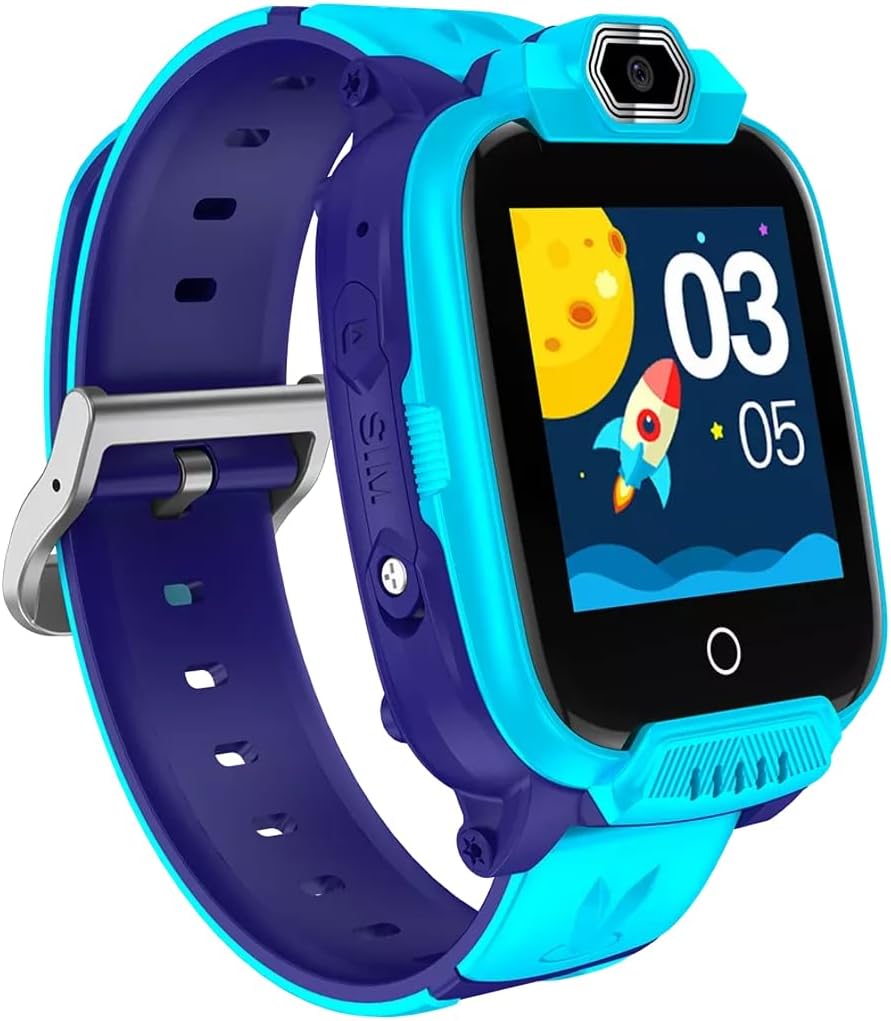
Figura 2: En ángulo view of the CANYON Sandy KW-44 Smartwatch, showing the side buttons and SIM card slot area.
3. Instalación da tarxeta SIM (opcional)
The smartwatch supports a SIM card for call functions.
- Apaga o reloxo intelixente.
- Locate the SIM card slot on the side of the device (refer to Figure 2).
- Carefully insert a nano-SIM card into the slot with the gold contacts facing up, ensuring it clicks into place.
- Peche a tapa da ranura da tarxeta SIM de forma segura.
- Power on the smartwatch.
4. Instalación e emparellamento da aplicación
To unlock full features and manage your smartwatch, download the companion app on your smartphone.
- Busca the "CANYON Life" app (or similar, check product documentation for exact app name) in your smartphone's app store (Google Play Store or Apple App Store).
- Descarga e instala a aplicación.
- Abre a aplicación e sigue as instrucións en pantalla para crear unha conta ou iniciar sesión.
- Activa o Bluetooth no teu smartphone.
- In the app, select "Add Device" and choose your CANYON Sandy KW-44 from the list of available devices.
- Confirma a solicitude de emparellamento tanto no teu teléfono intelixente como no teu reloxo intelixente.
Instrucións de funcionamento
1. Navegación básica

Figura 3: Fronte view of the CANYON Sandy KW-44 Smartwatch, showing the main display with time and a rocket graphic.
- Encendido/apagado: Press and hold the power button (usually on the side) to turn the device on or off.
- Pantalla táctil: Swipe left/right or up/down to navigate through menus and features. Tap to select an option.
- Botón Atrás: A dedicated button or a swipe gesture may be used to go back to the previous screen.
2. Realización e recepción de chamadas
With a properly installed and activated SIM card, you can make and receive calls directly from your smartwatch.
- Facendo unha chamada: Access the "Dialer" or "Contacts" app on the smartwatch, select a contact or dial a number, and tap the call icon.
- Recibindo unha chamada: When a call comes in, the smartwatch will ring and display the caller ID. Tap the green answer icon to accept or the red icon to decline.
3. Usando a cámara
The smartwatch is equipped with a built-in camera.
- Navigate to the "Camera" application on your smartwatch.
- Encadra a túa foto usando a pantalla como viewbuscador
- Tap the capture button on the screen to take a photo.
- Photos are saved to the smartwatch's internal memory.

Figura 4: En ángulo view of the CANYON Sandy KW-44 Smartwatch, highlighting the camera lens above the display.
4. Outras características
Explore other functionalities available on your smartwatch, which may include:
- Visualización do tempo: Customizable watch faces.
- Notificacións: Recibe alertas de chamadas, mensaxes e notificacións de aplicacións desde o teu teléfono intelixente emparellado.
- Seguimento da actividade: Monitor steps, distance, and calories (if supported by the model).
- Reprodutor de música: Play music stored on the device or control music on your paired phone.
Mantemento
1. Limpeza
- Wipe the smartwatch and strap with a soft, damp pano.
- Non empregue produtos químicos duros nin limpadores abrasivos.
- Asegúrate de que o dispositivo estea seco antes de cargalo.
2. Coidado da batería
- Evita temperaturas extremas, que poden afectar a duración da batería.
- Non deixe a batería completamente descargada durante períodos prolongados.
- Use só o cable de carga proporcionado.
3. Resistencia á auga (IP67)
The CANYON Sandy KW-44 Smartwatch is rated IP67, meaning it is protected from dust and can withstand immersion in water up to 1 meter for 30 minutes.
- Do not use the smartwatch for swimming or diving.
- Avoid exposure to hot water, steam, or high-pressure water jets.
- Ensure all ports and covers are securely closed to maintain water resistance.
Resolución de problemas
| Problema | Posible Solución |
|---|---|
| O reloxo intelixente non se acende. | Asegúrate de que a batería estea cargada. Conéctaa ao cargador durante polo menos 30 minutos. |
| Non se pode emparellar co teléfono intelixente. |
|
| Non se detectou a tarxeta SIM. |
|
| A pantalla non responde. | Restart the smartwatch by pressing and holding the power button. If unresponsive, allow the battery to drain completely and then recharge. |
Especificacións
| Característica | Detalle |
|---|---|
| Marca | CANÓN |
| Nome do modelo | Sandy KW-44 |
| Número de modelo | CNE-KW44BL |
| Tamaño da pantalla | 1.44 polgadas |
| Tecnoloxía de conectividade | Bluetooth |
| Estándar de comunicación sen fíos | Bluetooth |
| Capacidade de almacenamento da memoria | 512 MB |
| Tipo de batería | 1 Lithium-polymer (Rechargeable) |
| Compoñentes incluídos | Cable de carga |
| Ancho da correa | 20 milímetros |
| Clasificación de resistencia á auga | IP67 (Dust protected, immersion up to 1m for 30 min) |
Garantía e Soporte
For warranty information and technical support, please refer to the official CANYON website or contact their customer service. Details are typically provided on the product packaging or the manufacturer's official support page.
Fabricante: CANÓN


