1. Produto rematadoview
The Nexxt Wireless Security Camera offers a robust solution for both indoor and outdoor surveillance. Designed for ease of use and versatility, these cameras provide high-definition video, motion detection, two-way audio, and night vision capabilities, all powered by a built-in rechargeable battery for wire-free operation.
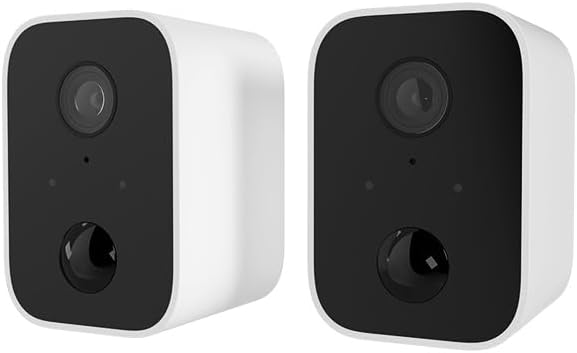
Image: Two Nexxt Wireless Security Cameras, showcasing their compact, white design with black camera faces.
Características principais:
- 1080P HD Live Video: Crystal clear real-time video and playback.
- Batería incorporada: Wire-free design for flexible placement and continued operation during power outages.
- Resistente ás inclemencias do tempo IP65: Durable construction suitable for outdoor use in various weather conditions.
- Detección de movemento: Sends instant notifications to your smartphone upon detecting movement up to 26ft away.
- Audio bidireccional: Communicate directly through the camera using the built-in speaker and microphone.
- Visión nocturna: Equipped with IR LEDs for clear vision in low-light or dark conditions.
- Almacenamento local e na nube: Supports micro-SD card (not included) for local storage and optional cloud storage (subscription required).
- Integración do fogar intelixente: Compatible con Amazon Alexa e Google Assistant para control por voz.

Image: A single Nexxt security camera surrounded by icons representing its features: Full 1080P HD, Motion detection, Two-way communication, Night vision, Voice activated, IP65 weatherproof, Micro-microSD™ slot, Wall mount bracket included, and Cloud ready.
2. Contido do paquete
Please verify that all items are present and in good condition upon opening the package. If any items are missing or damaged, please contact customer support.
- 2 x Nexxt Wireless Security Cameras
- 2 x soportes de montaxe
- 2 x cables de carga USB
- 1 x Guía de inicio rápido
- Tornillos de montaxe e ancoraxes de parede

Image: The retail packaging for the Nexxt Smart Wi-Fi battery camera 2-pack, showing the cameras and key features on the box.
3. Guía de configuración
3.1 Carga da cámara
Before initial use, fully charge both cameras. Connect the provided USB charging cable to the camera's charging port and a standard USB power adapter (not included). The charging indicator light will show the charging status.
3.2 Downloading the Nexxt App
Busca "Nexxt Home" in the Apple App Store or Google Play Store and download the application. Create an account or log in if you already have one.
3.3 Vincular a cámara
- Open the Nexxt Home app and tap the "+" icon to add a new device.
- Select "Security Camera" from the device list.
- Follow the on-screen instructions to put the camera into pairing mode (usually involves pressing a reset button until an indicator light flashes).
- Conecta o teu smartphone a unha rede wifi de 2.4 GHz. Nota: As redes de 5 GHz non son compatibles.
- The app will display a QR code. Hold your camera approximately 6-8 inches (15-20 cm) in front of your phone's screen until you hear a prompt from the camera.
- Once paired, the camera will connect to your Wi-Fi network, and you can name your device within the app.
3.4 Montaxe da cámara
The Nexxt Wireless Security Camera can be easily mounted indoors or outdoors. Choose a location that provides the desired viewángulo de inflexión e está dentro do alcance da túa rede Wi-Fi.

Image: A Nexxt security camera mounted on an exterior wall, demonstrating its weatherproof design and easy installation.
- Identify a suitable mounting surface.
- Use o soporte de montaxe fornecido como modelo para marcar os orificios de perforación.
- Perfore buratos guía e insira ancoraxes de parede se vai montar en cartón xeso ou albanelería.
- Fixe o soporte de montaxe á superficie cos parafusos proporcionados.
- Fixe a cámara ao soporte de montaxe e axuste o ángulo segundo sexa necesario.

Image: A Nexxt security camera detached from its mounting bracket, showing the connection point for easy installation and removal.
4. Funcionamento
4.1 En directo View
Open the Nexxt Home app and select your camera from the device list to access the live video feed. You can view foo en tempo realtage desde calquera lugar con conexión a Internet.
4.2 Detección de movemento
The camera's motion sensors detect movement up to 26 feet away. When motion is detected, the camera will record a short clip and send a notification to your smartphone. You can adjust motion sensitivity and set detection zones within the app settings.

Image: A dog and a child playing in a yard, with a 'Motion detection' icon overlay, illustrating the camera's ability to detect activity.
4.3 Audio bidireccional
To use two-way audio, tap the microphone icon in the live view interface of the app. You can then speak through your phone, and your voice will be projected through the camera's speaker. Release the icon to listen.
4.4 Visión nocturna
The camera automatically switches to night vision mode in low-light conditions, providing clear black-and-white video footage. This feature ensures continuous surveillance 24/7.
4.5 Opcións de almacenamento
- Tarxeta MicroSD: Insert a micro-SD card (up to 128GB, not included) into the camera's slot for local storage of recordings.
- Almacenamento na nube: Nexxt offers optional cloud storage plans for secure, off-site storage of your video recordings. Refer to the Nexxt Home app for subscription details.
4.6 Control por voz
Integrate your Nexxt camera with Amazon Alexa or Google Assistant for convenient voice control. Follow the instructions in the Nexxt Home app to link your account with your preferred smart home platform. You can then use voice commands to view transmisións en directo en pantallas intelixentes compatibles.
5. Mantemento
5.1 Xestión da batería
To maximize battery life, ensure the camera is fully charged before deployment. The Nexxt Home app will notify you when the battery level is low. Regular charging is recommended, especially for cameras in high-traffic areas with frequent motion detection.
5.2 Limpeza da cámara
Periodically clean the camera lens and housing with a soft, dry cloth to ensure clear image quality. Avoid using harsh chemicals or abrasive materials that could damage the camera.
5.3 Actualizacións de firmware
Nexxt Solutions may release firmware updates to improve performance, add new features, or address security vulnerabilities. The Nexxt Home app will notify you of available updates. It is recommended to keep your camera's firmware up to date for optimal performance and security.
6 Solución de problemas
| Problema | Causa posible | Solución |
|---|---|---|
| A cámara non se acende | Batería baixa; o botón de acendido non se premeu correctamente | Charge the camera fully; Press and hold the power button for a few seconds. |
| Non se pode conectar á wifi | Incorrect Wi-Fi password; Camera too far from router; Only 2.4GHz supported | Verify password; Move camera closer to router; Ensure you are connecting to a 2.4GHz network. |
| A detección de movemento non funciona | Sensitivity too low; Detection zone not set; App notifications disabled | Adjust sensitivity in app; Configure detection zones; Enable notifications for Nexxt Home app. |
| Two-way audio not clear | Poor network connection; Obstruction near microphone/speaker | Check Wi-Fi signal strength; Ensure no obstructions; Reduce background noise. |
| Night vision is blurry | Dirty lens; IR LEDs obstructed | Clean the camera lens; Ensure nothing is blocking the IR LEDs. |
7. Especificacións técnicas
| Característica | Especificación |
|---|---|
| Nome do modelo | Battery (Built-in Battery 2PK) |
| Resolución de captura de vídeo | 1080p HD |
| Uso interior/exterior | Exterior, Interior |
| Fonte de enerxía | Alimentado por batería |
| Protocolo de conectividade | Wi-Fi (só 2.4 GHz) |
| Tipo de controlador | Amazon Alexa, Asistente de Google |
| Tipo de montaxe | Soporte de parede |
| Clasificación de protección internacional | IP65 resistente ao lume |
| Tipo de alerta | Audio e movemento |
| Peso do elemento | 1.52 libras (para o par) |
| Dimensións do paquete | 11.69 x 6.5 x 2.56 polgadas |
| UPC | 798302057661 |
8. Garantía e soporte
8.1 Información da garantía
Nexxt Solutions products typically come with a 2-year warranty from the date of purchase, covering defects in materials and workmanship. Please retain your proof of purchase for warranty claims. The warranty does not cover damage caused by misuse, accidents, unauthorized modifications, or natural disasters.
8.2 Atención ao cliente
For technical assistance, troubleshooting, or warranty inquiries, please visit the official Nexxt Solutions website or contact their customer support team. You can often find FAQs, video tutorials, and contact information on their support pages.
Soporte en liña: www.nexxtsolutions.com/support
Please have your product model number (Built-in Battery 2PK) and purchase date ready when contacting support.


