1. Introdución
This user manual provides comprehensive instructions for the installation, operation, and maintenance of your SimPure DC5P Spin-Down Sediment Filter and DB10C Whole House Carbon Filter System. This system is designed to provide cleaner water for your entire home by reducing sediment, chlorine, and other impurities.
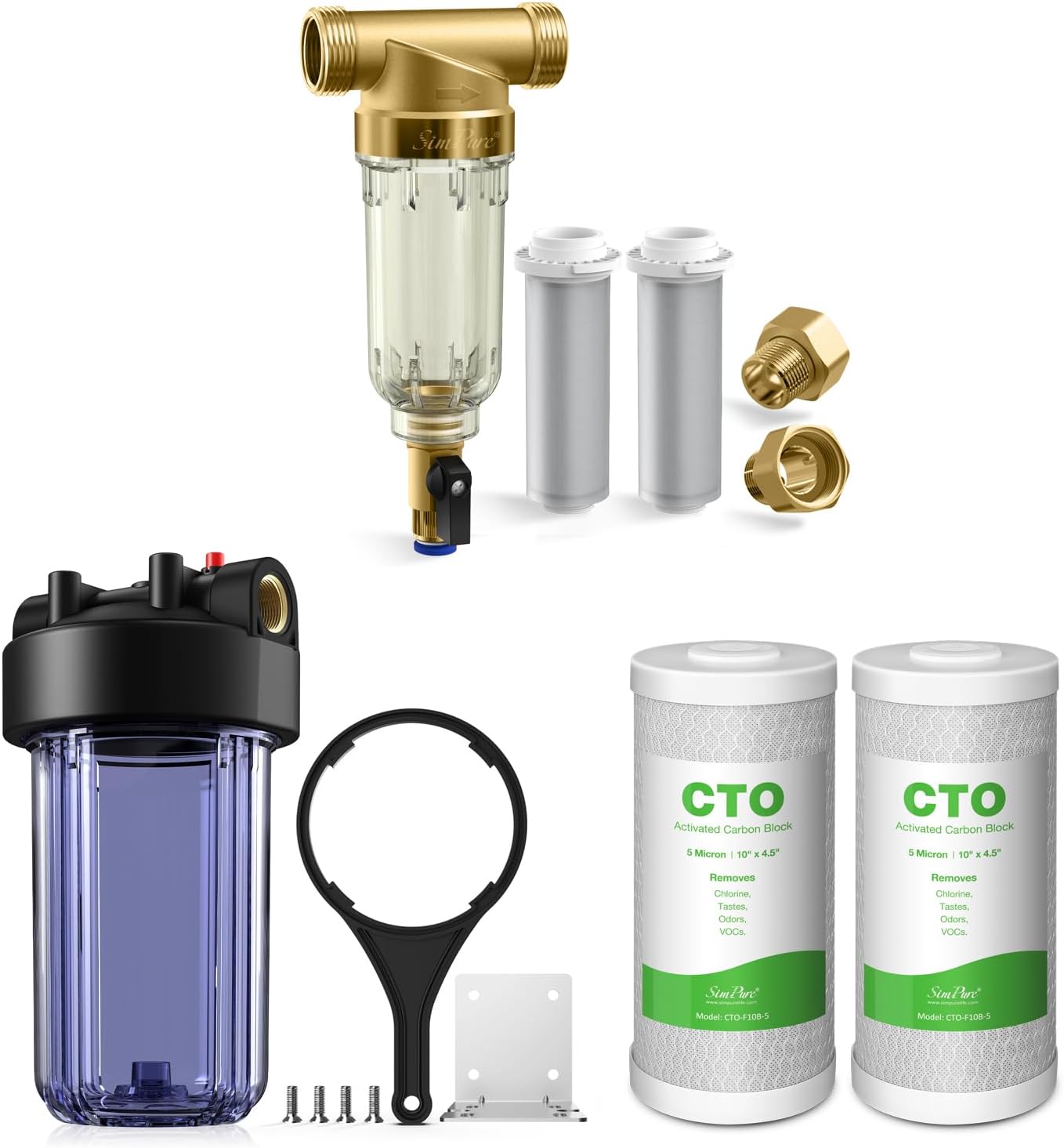
Imaxe 1.1: Acabadoview of the SimPure DC5P and DB10C Water Filter System components, including the spin-down filter, clear housing, and carbon filters.
2. Produto rematadoview
The SimPure DC5P and DB10C combo pack offers a multi-stage filtration solution for your home's water supply. It acts as a first defense pre-filter, protecting your plumbing and appliances from damaging particles.
Características principais:
- First Defense Pre-filter: The DC5P spin-down sediment filter prevents contaminants like sediment, debris, rust, calcium, and sand from entering your home's water system.
- Appliance Protection: Safeguards plumbing, kitchen, and bathroom fixtures, as well as water appliances (water heaters, washing machines, etc.) from particle damage.
- Fácil instalación: Comes with necessary tools for setup, including a wrench, mounting bracket, and screws.
- Pure Water for Home: The DB10C carbon block filter cartridges are made of pure coconut shell charcoal, designed to reduce chlorine, chloramine, lead, VOCs, chemicals, and cysts, improving water taste and purity.
- Flushable and Reusable: The DC5P filter allows for easy backwash and sediment purging without disassembly, extending filter element life.
Imaxe 2.1: Detallada view of the individual components included in the SimPure DC5P and DB10C water filter system package.
3. Compoñentes incluídos
Your SimPure DC5P and DB10C Water Filter System package includes the following:
- SimPure DC5P Spin-Down Sediment Filter Housing
- 100 Micron Filter Element (pre-installed in DC5P)
- 500 Micron Filter Element (spare for DC5P)
- SimPure DB10C Clear Blue Big Water Filter Canister
- Two (2) 10" x 4.5" 5-Micron CTO Carbon Block Filter Cartridges
- Wrench for DB10C housing
- Heavy-duty steel mounting bracket for DB10C
- Four (4) screws for mounting bracket

Image 3.1: Key features of the SimPure Big Blue Filter Housing (DB10C), highlighting the 1" NPT thread, O-ring for sealing, and red pressure relief valve.
4. Guía de instalación
Proper installation is crucial for the optimal performance of your water filter system. It is recommended to install the system on the main water line entering your home, after the main shut-off valve.
4.1 Consideracións previas á instalación:
- Ensure you have adequate space for installation. The DB10C housing requires at least 2 inches of clearance from the ground and measures approximately 13.3 inches in height.
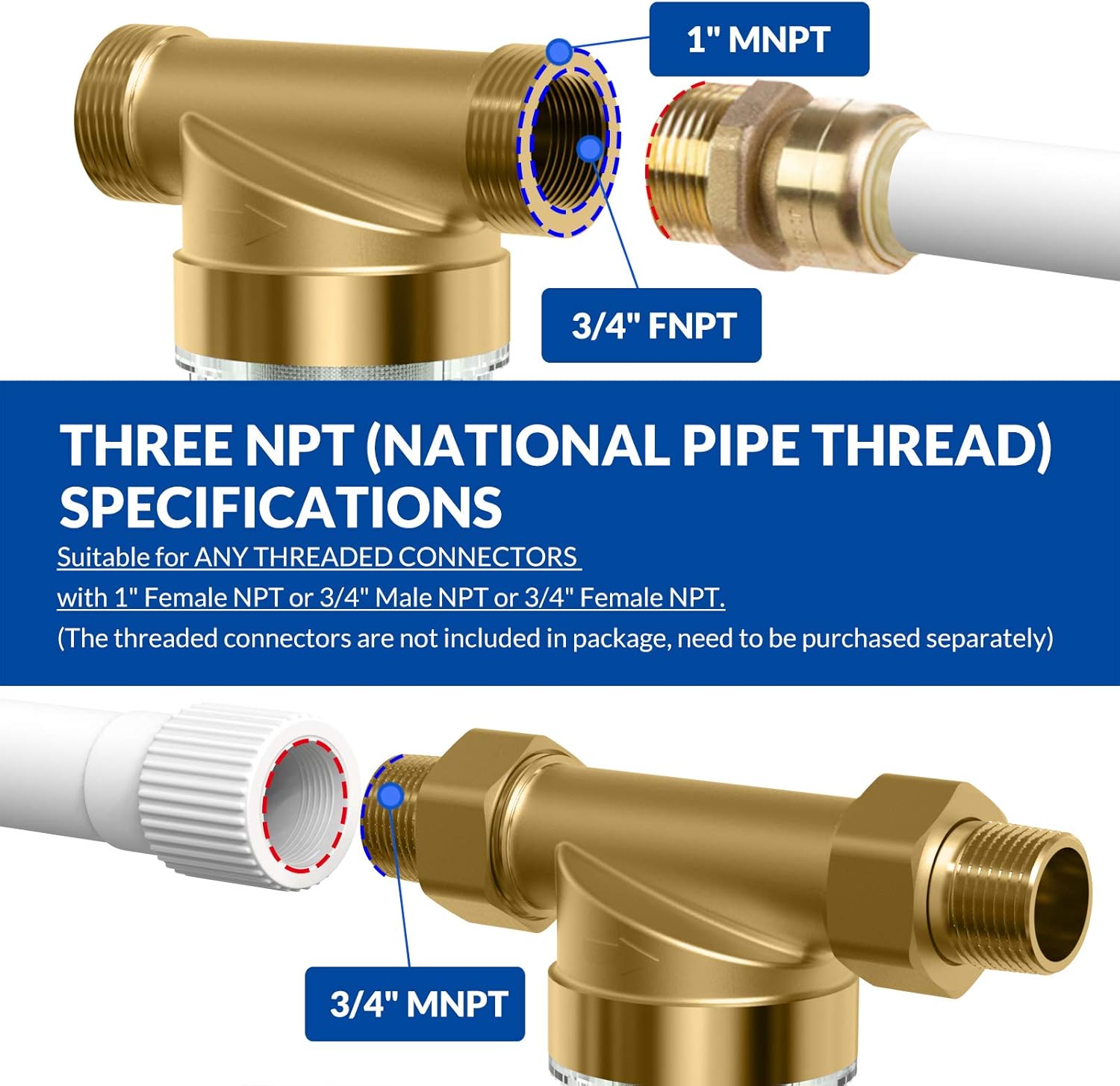
- The DC5P spin-down filter supports 1" MNPT, 3/4" FNPT, or 3/4" MNPT connections. Ensure you have the correct threaded connectors (not included).
- Desconecte o abastecemento principal de auga antes de comezar a instalación.
- Drain water from the pipes by opening a faucet at the lowest point in your home.

Image 4.1: Recommended installation size and ground clearance for the SimPure water filter system.
4.2 Pasos da instalación:
- Mount the DC5P Spin-Down Filter: Install the DC5P filter first, ensuring it is securely mounted and level. The brass valve head is lead-free and designed for durability.
- Connect Plumbing to DC5P: Use appropriate NPT connectors to plumb the DC5P into your main water line. Ensure all connections are tight to prevent leaks.
- Mount the DB10C Housing: Choose a suitable location for the DB10C housing, ensuring adequate clearance for filter replacement. Use the provided mounting bracket and screws to secure it to a sturdy surface.
- Insert Carbon Filters: Unwrap the two 10" x 4.5" CTO carbon block filter cartridges and carefully insert them into the DB10C housing. Ensure they are seated correctly.
- Vivenda segura: Screw the clear housing onto the black cap, ensuring the O-ring is properly seated for a leak-proof seal. Use the provided wrench to tighten if necessary, but do not overtighten.
- Connect Plumbing to DB10C: Connect the DB10C housing to the water line downstream from the DC5P filter.
- Restaurar o subministro de auga: Slowly turn on the main water supply. Check for any leaks.
- Limpar o sistema: Open a nearby cold water faucet and allow water to run for at least 5-10 minutes to flush out any carbon fines and air from the system. The water may appear cloudy initially; this is normal.

Image 4.2: Details of the three NPT (National Pipe Thread) specifications suitable for the SimPure filter connections.
5. Funcionamento
Once installed, the SimPure DC5P and DB10C system operates continuously to filter your home's water. The DC5P acts as a pre-filter, capturing larger sediment, while the DB10C with its carbon block filters further purifies the water.
5.1 Filtration Process:
- Water first enters the DC5P spin-down filter, where sediment and larger particles are trapped by the stainless steel mesh filter element.
- The pre-filtered water then flows into the DB10C housing, passing through the 5-micron CTO carbon block cartridges.
- These carbon filters effectively reduce chlorine, chloramine, lead, VOCs, chemicals, and cysts, providing cleaner, better-tasting water.

Image 5.1: Illustration of various contaminants such as Chlorine, Chloramine, Lead, VOCs, Chemicals, and Cysts that are safely reduced by the SimPure carbon filter.

Image 5.2: Diagram showing how the 100% pure coconut shell activated carbon filter works to improve water taste and purity, reducing chlorine by 98%.
6. Mantemento
Regular maintenance ensures the longevity and efficiency of your SimPure water filter system.
6.1 DC5P Spin-Down Filter Cleaning:
The DC5P filter is designed for easy flushing without disassembly. This process helps to purge accumulated sediment and extend the life of the filter element.
- Locate the drain valve at the bottom of the DC5P filter.
- Slowly open the drain valve. You will see water and trapped sediment being flushed out.
- Allow the water to run for at least 30 seconds, or until the water runs clear.
- Pecha a chave de drenaxe.
- Perform this flushing process regularly, especially if you notice a decrease in water pressure or increased sediment in the clear housing.

Image 6.1: Diagram illustrating the flushable and reusable filter system, showing how to easily backwash and purge sediment to extend filter element life.
7. Substitución do filtro
The CTO carbon block filter cartridges in the DB10C housing need to be replaced periodically to maintain optimal water quality. The frequency depends on water usage and water quality, typically every 6-12 months.
7.1 DB10C Carbon Filter Replacement:
- Desactivar o subministro de auga: Shut off the main water supply to your home.
- Depress Pressure Relief Button: Press the red pressure-relief button on top of the DB10C housing to release any built-up pressure.
- Desaparafusar a carcasa: Place a bucket underneath the housing to catch any residual water. Use the provided wrench to unscrew the clear housing from the black cap.
- Eliminar filtros antigos: Carefully remove the old carbon filter cartridges and dispose of them properly.
- Vivenda limpa: Rinse the inside of the clear housing with clean water. Inspect the O-ring for any damage and ensure it is clean and properly seated. A thin layer of food-grade silicone grease can be applied to the O-ring to aid sealing.
- Inserir novos filtros: Unwrap new 10" x 4.5" CTO carbon block filter cartridges and insert them into the housing, ensuring they are centered.
- Volver montar a carcasa: Screw the clear housing back onto the black cap. Hand-tighten, then use the wrench for a final snug turn. Do not overtighten.
- Restaurar o subministro de auga: Slowly turn on the main water supply. Check for leaks.
- Flush New Filters: Open a nearby cold water faucet and allow water to run for 5-10 minutes to flush out any carbon fines and air.
8 Solución de problemas
This section addresses common issues you might encounter with your SimPure water filter system.
8.1 Low Water Pressure:
- Clogged Sediment Filter (DC5P): Perform a flush of the DC5P spin-down filter (refer to Section 6.1). If pressure does not improve, the filter element may need manual cleaning or replacement.
- Clogged Carbon Filters (DB10C): The carbon filters may be exhausted and require replacement (refer to Section 7.1).
- Aire no sistema: Ensure all air has been purged from the system after installation or filter replacement by running water from a faucet.
8.2 Leaks:
- Conexións soltas: Comprobe que todas as conexións de fontanería estean ben apertadas.
- Improperly Seated O-ring: For the DB10C housing, ensure the large O-ring is clean, free of debris, and properly seated in its groove. Apply food-grade silicone grease if necessary.
- Cracked Housing: Inspect the clear housing for any cracks. If cracked, the housing must be replaced.
8.3 Water Tastes/Smells Bad:
- Exhausted Carbon Filters: The carbon filters have reached their capacity and need replacement (refer to Section 7.1).
- Insufficient Flushing: Ensure the system was adequately flushed after installation or filter replacement to remove carbon fines.
9. Especificacións
| Característica | Especificación |
|---|---|
| Números de modelo | SimPure DC5P, SimPure DB10C |
| Filter Type (DC5P) | Spin-Down Sediment Filter (100 micron & 500 micron elements) |
| Filter Type (DB10C) | CTO Carbon Block Filter (5 micron) |
| Carbon Filter Material | Pure Coconut Shell Activated Carbon |
| Housing Material (DC5P) | Lead-Free Brass Valve Head, BPA-Free Clear Housing |
| Housing Material (DB10C) | Clear Blue Canister |
| Connection Size (DC5P) | 1" MNPT, 3/4" FNPT, 3/4" MNPT (connectors not included) |
| Connection Size (DB10C) | 1" NPT Thread Standard Size |
| Método de purificación | Activated Carbon, Sedimentation |
| Característica especial | Multi Stage Filtración |
| Certificacións | NSF 42 Standards (for material safety of carbon filter) |

Image 9.1: Certifications for the SimPure CTO-F10B-5 filter, including NSF, RoHS, REACH, and ISO 9001, ensuring material safety and quality.
10. Garantía e soporte
SimPure products are manufactured with quality and reliability in mind. For specific warranty information, please refer to the product packaging or contact SimPure customer support directly. For technical assistance, troubleshooting, or replacement parts, please visit the official SimPure websitio ou póñase en contacto co seu equipo de atención ao cliente.
SimPure Customer Service: Please refer to the contact information provided on the product packaging or the official SimPure websitio para obter os detalles de soporte máis actualizados.


