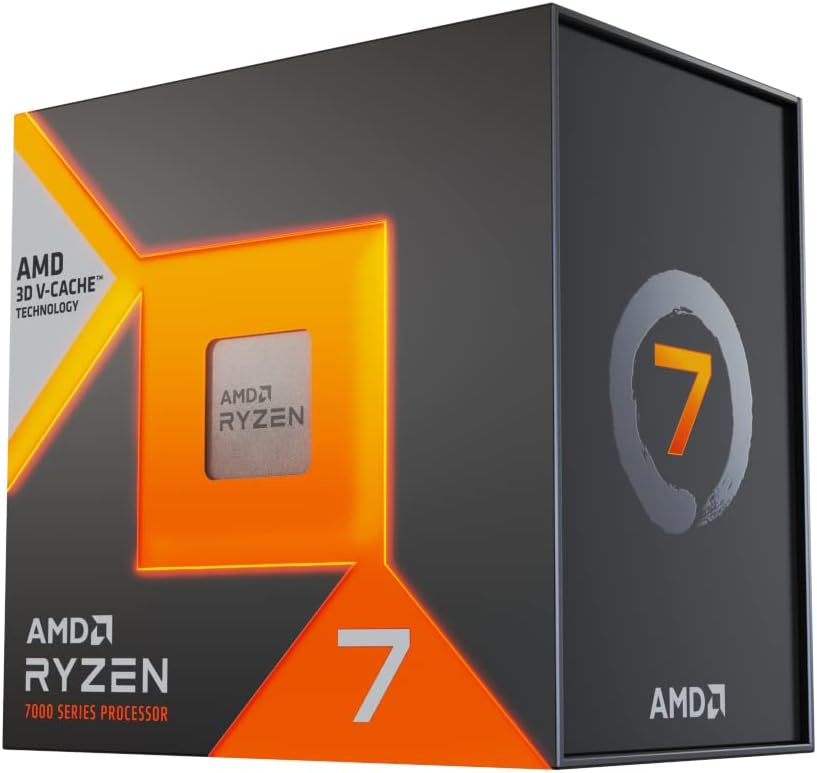
Imaxe: Fronte view of the AMD Ryzen 7 7800X3D processor retail box.
1. Introdución
Welcome to the new era of performance with the AMD Ryzen 7 7800X3D Desktop Processor. This processor ushers in the speed of "Zen 4" architecture, designed for gamers and creators, featuring massive built-in memory for ultimate game performance. It provides dependable and fast execution of tasks with maximum efficiency, thanks to its 8-core, 16-thread design and 5 nm process technology. The integrated AMD Radeon Graphics controller also ensures amazing graphics output.
2. Información de seguridade
Please read and understand all safety precautions before handling or installing your processor. Improper handling can lead to damage to the component or personal injury.
Prevención de descargas electrostáticas (ESD): Always handle the processor by its edges. Wear an anti-static wrist strap connected to a grounded surface when working inside your computer. Avoid touching the gold contacts or pins on the processor.
Apagado: Asegúrate de que o sistema informático estea completamente apagado e desconectado da toma de corrente antes de comezar a instalación.
Pasta térmica: Use thermal paste as directed. Avoid excessive application, which can lead to poor thermal transfer or short circuits if it's electrically conductive.
Bordes afiados: Be aware of sharp edges inside the computer case and on other components.
Ventilación: Ensure adequate ventilation for your system. Overheating can damage components and reduce system stability.
3. Contido do paquete
Verify that all items are present in your AMD Ryzen 7 7800X3D processor package:
Note: This processor model does not include a stock CPU cooler. A compatible aftermarket CPU cooler (air or liquid) is required for operation.
4. Configuración e instalación
Follow these steps carefully to install your AMD Ryzen 7 7800X3D processor:
Prepara a túa placa base:
Ensure your motherboard has an AM5 socket and is compatible with Ryzen 7000 series processors. Refer to your motherboard's manual for specific compatibility.
Update your motherboard's BIOS to the latest version if necessary, as older BIOS versions may not support the Ryzen 7 7800X3D.
Open the CPU retention lever on the motherboard's AM5 socket.
Instalar o procesador:
Carefully align the triangular arrow on the processor with the corresponding arrow on the motherboard's CPU socket.
Gently lower the processor straight down into the socket. Do not force it. If it doesn't seat easily, re-check alignment.
Close the CPU retention lever to secure the processor in place.
Aplicar pasta térmica:
Apply a small amount (pea-sized or a thin line) of high-quality thermal paste to the center of the processor's Integrated Heat Spreader (IHS).
Do not spread the paste manually; the pressure from the cooler will spread it evenly.
Instalar o refrixerador da CPU:
Mount your chosen aftermarket CPU cooler (air or liquid AIO) according to its manufacturer's instructions. Ensure firm and even pressure for optimal thermal contact.
Connect the CPU cooler's fan and pump (if AIO) cables to the appropriate headers on your motherboard (e.g., CPU_FAN, AIO_PUMP).
Install RAM and Other Components:
Install DDR5 RAM modules into the motherboard's DIMM slots, ensuring they are fully seated.
Install your graphics card and any other necessary expansion cards.
Connect all power supply cables to the motherboard (24-pin ATX, 8-pin CPU) and other components.
Initial Boot and Driver Installation:
Connect your monitor, keyboard, and mouse. Power on the system.
Access the BIOS/UEFI to verify the CPU is recognized and to configure basic settings.
Instala o teu sistema operativo.
Download and install the latest AMD Chipset Drivers from the official AMD websitio (www.amd.com/en/support).
Install the latest graphics drivers for your GPU.
5. Funcionamento do procesador
Once installed, your AMD Ryzen 7 7800X3D processor will automatically manage its performance based on workload. For optimal experience, consider the following:
Actualizacións de software: Regularly update your operating system, motherboard BIOS, and AMD chipset drivers to ensure stability, performance, and security.
Seguimento do rendemento: Use AMD's Ryzen Master utility or other third-party software to monitor CPU temperatures, clock speeds, and utilization. This helps ensure your system is running efficiently and within safe thermal limits.
Gaming & Productivity: The Ryzen 7 7800X3D excels in gaming due to its 3D V-Cache technology, providing high frame rates and smooth gameplay. It also offers strong performance for content creation and multitasking.
6. Mantemento
Proper maintenance helps prolong the life and performance of your processor:
Limpeza do po: Periodically clean dust from your CPU cooler and computer case fans using compressed air. Dust buildup can impede airflow and lead to higher temperatures.
Reaplicación de pasta térmica: If you replace your CPU cooler or notice consistently high temperatures, consider reapplying thermal paste. Carefully clean off old thermal paste from both the CPU IHS and the cooler's cold plate before applying new paste.
Monitorización de temperatura: Continuously monitor CPU temperatures, especially under heavy load, to ensure they remain within safe operating limits (Tjmax: 89°C).
7 Solución de problemas
If you encounter issues with your AMD Ryzen 7 7800X3D processor, try the following common troubleshooting steps:
No Display/No Boot:
Asegúrate de que todos os cables de alimentación (ATX de 24 pines, CPU de 8 pines) estean conectados correctamente.
Verify the CPU is correctly seated in the socket and the retention lever is locked.
Check RAM modules are properly seated in the correct slots according to your motherboard manual.
Confirm your monitor is connected to the graphics card (or motherboard if using integrated graphics for initial setup).
Clear CMOS (Complementary Metal-Oxide-Semiconductor) on your motherboard.
Problemas de sobrequecemento:
Ensure the CPU cooler is properly installed and making good contact with the CPU IHS.
Verify thermal paste was applied correctly and is not too old or dried out.
Check that CPU cooler fans are spinning and connected to the correct headers.
Asegúrate de que haxa un fluxo de aire axeitado dentro da carcasa do teu PC.
Inestabilidade/fallos do sistema:
Update motherboard BIOS and chipset drivers to the latest versions.
Executa ferramentas de diagnóstico de memoria para comprobar se hai problemas coa RAM.
Asegúrate de que a túa fonte de alimentación (PSU) teña suficiente augatage para todos os compoñentes.
8. Especificacións
Key technical specifications for the AMD Ryzen 7 7800X3D Desktop Processor:
Característica
Especificación
Modelo de procesador
AMD Ryzen 7 7800X3D
CPU Cores / Threads
8 núcleos / 16 fíos
Velocidade de reloxo base
4.2 GHz
Reloxo Max Boost
Ata 5.0 GHz
Caché L2
8 MB
Caché L3
96 MB (with 3D V-Cache)
TDP predeterminado
120 W
Tecnoloxía de procesador
5 nm "Zen 4"
Socket CPU
AM5
Gráficos Integrados
Gráficos AMD Radeon
Max Operating Temperature (Tjmax)
89°C
Imaxe: Costas view of the AMD Ryzen 7 7800X3D processor retail box, showing key features and specifications.
9. Garantía e soporte
Your AMD Ryzen 7 7800X3D processor is covered by AMD's standard limited warranty. Please refer to the warranty information included in your product packaging for full terms and conditions.
For technical support, driver downloads, and additional resources, please visit the official AMD Support websitio:
How to Install a CPU Processor on a Motherboard Step-by-step guide on how to properly install a CPU processor onto a computer motherboard, including socket preparation, alignment, and securing the processor. Covers identifying alignment marks for correct installation.