Introdución
Thank you for choosing the Aune X7s Pro Class-A Headphone Amplificador. Este de alto rendemento amplifier is designed to deliver exceptional audio quality with its Class-A biasing design, offering both single-ended and balanced outputs. With three selectable gain levels, it provides versatile compatibility for a wide range of headphones, earphones, IEMs, active speakers, and power amplifiers. Its compact size allows for flexible placement in various listening environments.
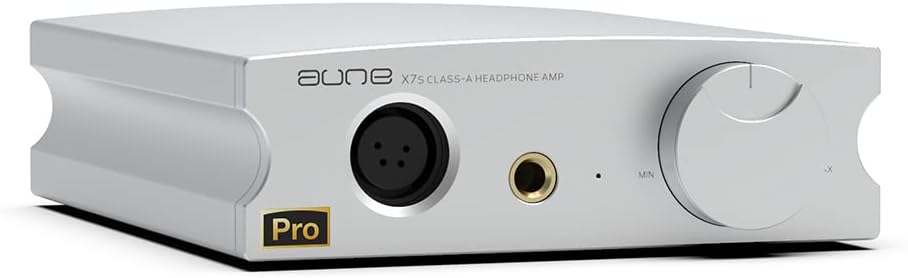
Fronte view of the Aune X7s Pro Class-A Headphone Ampmáis vivo.
Produto rematadoview e Compoñentes
Familiarize yourself with the various ports and controls of your Aune X7s Pro ampmáis vivo.

Detailed diagram of the Aune X7s Pro's front and rear panels, indicating all ports and controls.
Panel frontal:
- 4-pin XLR Balanced Headphone Port: For connecting headphones with a balanced XLR connector.
- 6.35mm Single-Ended Headphone Port: For connecting headphones with a standard 6.35mm (1/4 inch) stereo plug.
- Luz indicadora: Displays the operational status of the ampmáis vivo.
- Botón de volume: Axusta o nivel de volume de saída.
Panel traseiro:
- Interruptor de alimentación: Vira o ampmáis vivo encendido ou apagado.
- Entrada de enerxía: Conéctase ao adaptador de corrente externo.
- Entrada de liña (RCA): For connecting audio sources (e.g., DAC, CD player) via RCA cables.
- pre-amp Saída (RCA): For connecting to active speakers or a power ampmáis vivo.
- Gain Switch (at the bottom): A physical switch located on the underside of the unit to select between three gain levels.
Configuración
Follow these steps for initial setup of your Aune X7s Pro:
- Conexión de alimentación: Connect the provided power adapter to the Power Input port on the rear panel of the X7s Pro, then plug the adapter into a suitable power outlet. Ensure the device operates on 110V as indicated by the manufacturer.
- Conexión de fonte de audio: Connect your audio source (e.g., DAC, music player) to the Line Input (RCA) ports on the rear panel using high-quality RCA cables. Ensure left and right channels are correctly matched.
- Conexión de auriculares: Connect your headphones to either the 4-pin XLR Balanced Headphone Port or the 6.35mm Single-Ended Headphone Port on the front panel. Choose the appropriate connection type for your headphones.
- Optional Pre-amp Conexión: If using the X7s Pro as a pre-amplifier, connect the Pre-amp Output (RCA) ports on the rear panel to your active speakers or power ampmáis vivo.
- Set Gain Level: Before powering on, locate the gain switch on the bottom of the unit. Select the appropriate gain level (0dB, 12dB, or 20dB) based on the sensitivity of your headphones. Start with a lower gain setting for sensitive headphones/IEMs and increase if more power is needed.

Visual representation of key features including RCA Line Out, Balanced XLR, 6.35mm Headphone Out, 3 Gain Levels, Class-A, Dual Voltage, RCA Line-In, and Analog Potentiometer.

Important caution: This device operates on 110V. Please verify local voltage compatibilidade antes do uso.
Instrucións de funcionamento
Once set up, operating the Aune X7s Pro is straightforward:
- Encendido: Flip the Power Switch on the rear panel to the 'On' position. The indicator light on the front panel will illuminate.
- Axustar o volume: Slowly turn the Volume Knob clockwise to increase the volume to a comfortable listening level. Always start with the volume at its minimum before playing audio to prevent sudden loud sounds.
- Gain Level Selection: The X7s Pro features three gain levels (0dB, 12dB, 20dB) to match various headphone sensitivities. Adjust the gain switch on the bottom of the unit as needed. Lower gain is suitable for highly sensitive IEMs and headphones, while higher gain provides more power for demanding headphones.
- Balanced vs. Single-Ended Output: Use the 4-pin XLR output for balanced headphones to take advantage do amplifier's balanced architecture, which can offer improved noise rejection and power delivery. The 6.35mm output is for standard single-ended headphones.
- Using as a Pre-ampmáis vivo: When connected to active speakers or a power amplifier via the RCA Pre-amp Output, the X7s Pro acts as a volume control and signal buffer for your audio system.

The X7s Pro offers both single-ended 6.35mm and balanced XLR headphone outputs for different audio preferences.

Despite its powerful performance, the X7s Pro maintains a compact size, making it suitable for various listening environments.
Vídeo de presentación oficial do produtoasing the Aune X7s Pro Headphone Amplifier's features and design. This video highlights the Class-A amplification, compact size, and balanced/single-ended outputs, demonstrating its capability to bring out the full potential of headphones.
Mantemento
To ensure the longevity and optimal performance of your Aune X7s Pro, follow these maintenance guidelines:
- Limpeza: Use a soft, dry cloth to wipe the exterior of the unit. Avoid using liquid cleaners or abrasive materials, as they may damage the finish.
- Ventilación: Asegurar o amplifier is placed in a well-ventilated area. Do not block the ventilation holes, as proper airflow is crucial for heat dissipation, especially for a Class-A ampmáis vivo.
- Ambiente: Keep the unit away from direct sunlight, heat sources, excessive dust, and moisture.
- Apague cando non estea en uso: Se o amplifier will not be used for an extended period, it is advisable to power it off and unplug it from the wall outlet.
Resolución de problemas
If you encounter any issues with your Aune X7s Pro, please refer to the following common problems and solutions:
- Sen son:
- Comprobe se o adaptador de corrente está conectado correctamente e se a unidade está acendida.
- Verify that the audio source is properly connected to the Line Input (RCA) and is playing.
- Ensure your headphones are fully plugged into the correct output port (XLR or 6.35mm).
- Increase the volume slowly using the Volume Knob.
- Check the gain switch setting; a very low gain might result in inaudible sound with certain headphones.
- Son distorsionado:
- Reduce o nivel de volume.
- Ensure the gain setting is appropriate for your headphones; too high a gain for sensitive headphones can cause distortion.
- Comprobe se os cables de son están dañados ou conexións soltas.
- Test with a different audio source or headphones to isolate the issue.
- A unidade non se acende:
- Confirm the power adapter is correctly plugged into both the unit and a working wall outlet.
- Ensure the power switch on the rear panel is in the 'On' position.
If the problem persists after trying these solutions, please contact Aune customer support for further assistance.
Especificacións
Key technical specifications for the Aune X7s Pro Class-A Headphone Ampmáis vivo:
| Característica | Especificación |
|---|---|
| Resposta en frecuencia | 20~80 kHz (±0.3 dB) |
| THD+N | 0.0002 % |
| Saídas de auriculares | 4-pin XLR Balanced, 6.35mm Single-Ended |
| Gain Levels | 3 (0dB, 12dB, 20dB) |
| pre-amp Saída | RCA |
| Entrada de liña | RCA |
| Dimensións do paquete | 9.72 x 7.24 x 4.33 polgadas |
| Peso do elemento | 3.94 libras |
| Requisito de enerxía | 110V (Please check local voltage) |

Measurement results demonstrating the high specifications of the Aune X7s Pro, including frequency response and THD+N.

The tuning of the Aune X7s Pro is based on real instrument sounds and music pieces, aiming for a natural and musical sound signature.
Garantía e Soporte
Aune is committed to providing excellent customer service and product support.
- Garantía: All Aune products come with a 2-year after-sales service. This covers manufacturing defects and ensures your product performs as expected.
- Atención ao cliente: If you encounter any issues with your product during use, or if you receive a product with traces of use (which may be due to logistics), please contact the seller directly. They will assist you promptly to resolve the problem.
- Autenticidade: All items are new and delicately packaged.
For more information or to explore other Aune products, please visit the Aune Store on Amazon.


