This manual provides comprehensive instructions for the installation, operation, and maintenance of the Axis F9114 Main Unit. Please read this manual carefully before using the product to ensure proper functionality and safety.
Produto rematadoview
The AXIS F9114 is a main unit designed for the F-Series surveillance system. It supports up to four F21 or F7 sensor units, providing a flexible and discreet surveillance solution. This unit acts as the central processing hub for connected camera sensors.
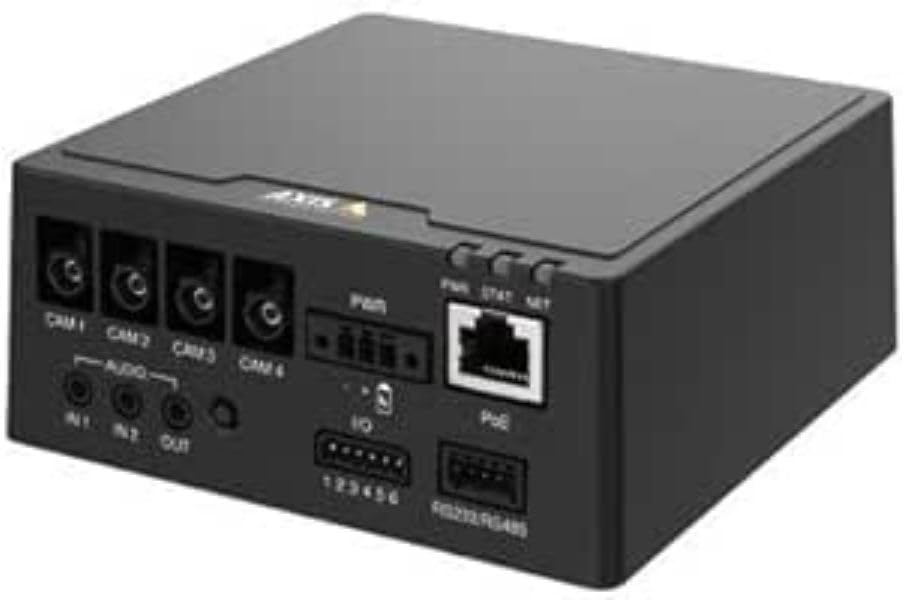
Figura 1: Fronte view of the AXIS F9114 Main Unit, showing camera input ports (CAM 1-4), audio input/output, power input, I/O ports, and an Ethernet port with PoE support.
Características principais:
Supports up to 4 Axis F-Series sensor units (e.g., F21, F7).
Central processing unit for video and audio streams.
Compact design for flexible installation.
Integrated Power over Ethernet (PoE) for simplified power and data connectivity.
Multiple I/O ports for external device integration.
Audio input/output capabilities.
Configuración e instalación
Contido do paquete:
AXIS F9114 Main Unit
Guía de instalación
(Power supply and sensor units sold separately, unless specified)
Connecting Sensor Units:
Ensure the main unit is powered off before connecting any sensor units.
Connect the cables from your AXIS F-Series sensor units (e.g., F21, F7) to the designated "CAM 1", "CAM 2", "CAM 3", and "CAM 4" ports on the rear of the F9114 Main Unit. Ensure a secure connection.
Each sensor unit requires a dedicated port.
Alimentación da unidade:
Alimentación por Ethernet (PoE): Connect an Ethernet cable from a PoE-enabled switch or injector to the "PoE" port on the F9114. This will provide both power and network connectivity.
Fonte de alimentación externa: If PoE is not used, connect a compatible DC power adapter (not included) to the "PWR" input terminal. Refer to specifications for voltage requisitos.
Conexión de rede:
Connect an Ethernet cable from your network to the "PoE" port on the F9114. This provides network access for configuration and video streaming.
Conexións de audio e E/S:
Audio: Connect external microphones to "IN 1" or "IN 2" and speakers to "OUT" if audio functionality is required.
E/S: Use the "IO" terminal block for connecting external devices such as alarm sensors or relays. Refer to the detailed wiring diagram in the full technical documentation for specific connections.
Operación
Encendido inicial:
Once all connections are secure and power is supplied, the unit will begin its startup sequence. Observe the LED indicators for status.
Indicadores LED:
PWR (potencia): Indicates power status. (e.g., Solid green for normal operation).
STAT (Status): Indicates operational status. (e.g., Flashing for network activity, solid for ready).
NET (Rede): Indicates network connection and activity.
Acceso ao dispositivo:
Use the AXIS IP Utility or a network scanner to discover the IP address of the F9114 on your network.
Abrir a web browser and enter the IP address to access the device's web interface.
Log in using the default credentials (refer to the installation guide or Axis website for current defaults).
Follow the on-screen instructions to configure network settings, video streams, and other system parameters.
Xestión de vídeos:
The F9114 integrates with various video management software (VMS) solutions. Refer to your VMS documentation for adding and managing the device.
Mantemento
Limpeza: Usa un pano suave e seco para limpar o exterior da unidade. Non empregues produtos químicos agresivos nin produtos de limpeza abrasivos.
Actualizacións de firmware: Regularly check the Axis Communications websitio para actualizacións de firmware. Manter o firmware actualizado garante un rendemento óptimo, seguridade e acceso a novas funcións.
Condicións ambientais: Ensure the unit is operated within its specified temperature and humidity ranges to prevent damage.
Resolución de problemas
Problemas comúns e solucións:
Sen enerxía:
Verify power cable connection (if using external power).
Ensure PoE switch/injector is active and providing power (if using PoE).
Comprobe a fonte de enerxía.
Sen conexión de rede:
Comprobe a conexión do cable Ethernet.
Verificar a funcionalidade do conmutador/router de rede.
Confirm IP address settings are correct or DHCP is functioning.
No Video from Sensor Unit:
Ensure sensor unit cables are securely connected to the F9114.
Verify the sensor unit is compatible with the F9114.
Check the sensor unit's status indicators (if available).
Access the F9114 web interface to confirm sensor unit detection and configuration.
Esqueciches o contrasinal:
Refer to the Axis Communications support documentation for password reset procedures, which typically involve a factory reset button or specific software tools.
For more detailed troubleshooting, refer to the comprehensive support resources available on the Axis Communications websitio.
Especificacións
Característica
Detalle
Marca
Comunicacións do Eixo
Número de modelo
01991-001
Peso do elemento
1.87 libras
Dimensións do produto (LxWxH)
19.69 x 19.69 x 11.02 polgadas
Fabricante
AXIS - CAMERA
ASIN
B0BWNS49VS
Data de primeira dispoñibilidade
23 de febreiro de 2023
Note: Specifications are subject to change without notice. For the most current information, please refer to the official Axis Communications websitio.
Garantía e Soporte
Información da garantía:
For detailed warranty information, please refer to the warranty statement provided with your product or visit the official Axis Communications websitio. Garda o comprobante de compra para reclamacións de garantía.
Soporte técnico:
If you encounter issues that cannot be resolved using this manual or the troubleshooting section, please contact Axis Communications technical support. Support resources, including FAQs, documentation, and contact information, are available on their official websitio.
AXIS Product Comparison Tables Q3 2025: Network Video, Audio, Access Control, and Intercoms This Q3 2025 document from Axis Communications provides comprehensive product comparison tables for their extensive range of network video, audio, access control, and intercom solutions. It details specifications, features, and model information across various product lines, including cameras, recorders, software, and intercom systems.
AXIS FA51 Main Unit Benutzerhandbuch | Installation und Konfiguration Das offizielle Benutzerhandbuch für die AXIS FA51 Main Unit von AXIS Communications. Enthält Anleitungen zur Installation, Konfiguration, Video-Streaming, Aufnahme und Systemverwaltung für Überwachungslösungen.
AXIS M43 Panoramic Camera Series Installation Guide This installation guide provides essential information for setting up the AXIS M43 Panoramic Camera Series, including models AXIS M4327-P and AXIS M4328-P. It covers installation procedures, safety, and regulatory compliance.
Guía de instalación de midspan e divisores AXIS High PoE Guía de instalación para os divisores AXIS T8123 High PoE Midspan e AXIS T8126/T8128 High PoE, que abrangue a configuración, as especificacións e a resolución de problemas para solucións Power over Ethernet.
Guía de instalación do dispositivo AXIS Camera Station serie S20 Esta guía de instalación proporciona instrucións esenciais para configurar e instalar o dispositivo AXIS Camera Station da serie S20, incluídos os modelos S2008, S2016 e S2024. Abarca o hardware en máis deview, cable connections, software setup, and network configuration for professional video surveillance systems.