Introdución
The Widex Moment 110 hearing aid ranks as the lowest technology level offered by Widex within the Moment family. The Moment 110 technology level delivers Mid-level performance by FitHearing standards.
Basic hearing aids will provide a few filters and programs, making these devices ideal for those with a mostly quiet lifestyle. If you primarily wish to improve your hearing in small groups, one-on-one conversation, and during routine activity within a home setting, the Widex Moment 110 may be the hearing aid for you.
Moment 110 hearing aids feature traditional Receiver-in-canal (RIC) form factor, whereby the hearing aids sit comfortably and discreetly behind your ear. These hearing aids are made-for-smartphones so you can stream calls, music, and other audio directly through your hearing aids.
Produto rematadoview
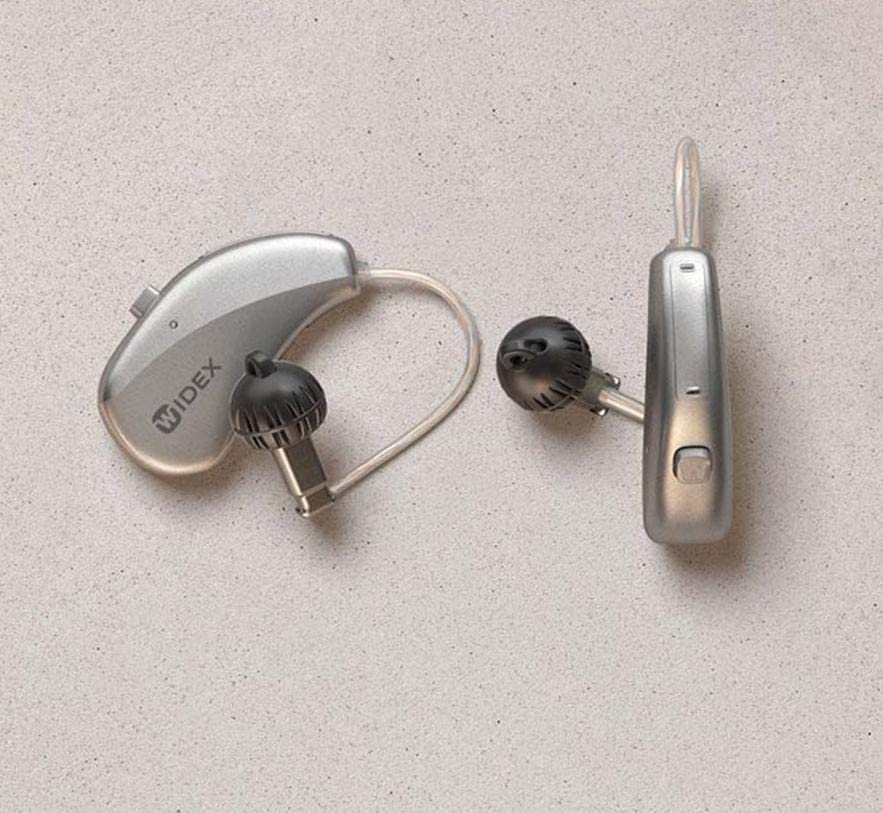
This image displays the Widex Moment Sheer 110 hearing aid, featuring its Receiver-in-canal (RIC) design. The device consists of a small, silver-colored unit that rests behind the ear, connected by a thin tube to an in-ear component with a black dome. The "WIDEX" logo is visible on the main unit. Another similar component is shown separately, indicating a pair of hearing aids.
O que hai na caixa
- Widex Moment Sheer 110 Hearing Aid (Pair)
- Estuche de carga sen fíos
Guía de configuración
1. Carga inicial
Before first use, place your Widex Moment Sheer 110 hearing aids into the provided Wireless Charging Case. Ensure the case is connected to a power source. The indicator lights on the case and hearing aids will show charging status. A full charge typically takes 3-4 hours.
2. Emparellamento cun teléfono intelixente
- Asegúrate de que o Bluetooth do teu teléfono intelixente estea activado.
- Open the battery doors of your hearing aids (if applicable) or place them in and out of the charging case to put them in pairing mode.
- On your smartphone, go to Bluetooth settings and select your Widex Moment Sheer 110 from the list of available devices.
- Siga as indicacións en pantalla para completar o proceso de vinculación.
3. First Fit
Gently place the hearing aid unit behind your ear. Guide the thin tube and the in-ear component into your ear canal. Ensure it sits comfortably and securely. Consult with your audiologist for proper fitting and initial programming.
Instrucións de funcionamento
1. Acendido/apagado
- Para acender: Retire os audífonos da caixa de carga. Acenderanse automaticamente.
- Para apagar: Volva colocar os audífonos na caixa de carga. Apagaranse automaticamente e comezarán a cargarse.
2. Control de volume
Volume adjustments can typically be made via the connected smartphone app or through a small button/rocker switch on the hearing aid itself (refer to specific model details for button functionality).
3. Selección do programa
Your hearing aids may have multiple listening programs for different environments (e.g., quiet, noisy, music). These programs can be switched using the smartphone app or the control button on the hearing aid.
4. Streaming Audio
Once paired, you can stream audio (calls, music, podcasts) directly from your smartphone to your hearing aids. Initiate audio playback on your phone, and it will automatically route to the hearing aids.
Mantemento e coidados
1. Limpeza diaria
Wipe your hearing aids daily with a soft, dry cloth to remove earwax and debris. Use the provided cleaning tools (if any) to clear the sound outlet and microphone ports. Do not use water or cleaning solvents.
2. Coidado da caixa de carga
Keep the charging case clean and dry. Periodically wipe the charging contacts with a dry cotton swab. Ensure no debris obstructs the charging ports.
3. Almacenamento
When not in use, store your hearing aids in their charging case or a dry, cool place away from direct sunlight and extreme temperatures. Keep them out of reach of children and pets.
Resolución de problemas
| Problema | Causa posible | Solución |
|---|---|---|
| Sen son | Battery depleted; Earwax blockage; Hearing aid off. | Charge the hearing aids; Clean the sound outlet; Ensure hearing aids are powered on. |
| Mala calidade de son | Low battery; Earwax buildup; Incorrect program. | Recharge; Clean hearing aid; Switch to appropriate listening program. |
| Connectivity Issues (Smartphone) | Bluetooth off; Hearing aids out of range; Pairing lost. | Ensure Bluetooth is on; Move closer to phone; Re-pair the devices. |
| A batería non se carga | Charging case not powered; Poor contact with charging pins. | Check power connection to case; Clean charging contacts on both hearing aids and case. |
If problems persist, please contact customer support or your hearing care professional.
Especificacións técnicas
| Nome do modelo | Widex Moment Sheer 110 (Internal Model: signia) |
| Tecnoloxía de conectividade | Sen fíos |
| Tecnoloxía de comunicación sen fíos | Sen fíos |
| Compoñentes incluídos | Estuche de carga sen fíos |
| Franxa de idade (descrición) | Adulto |
| Usos específicos do produto | Uso diario |
| Dispositivos compatibles | Smartphones, Wireless Charging Cases |
| Método de control | Remote (via smartphone app) |
| Número de elementos | 1 (referring to the product unit, typically sold as a pair) |
| Tipo de controlador de audio | Driver dinámico |
| Forma do auricular | Gancho para as orellas |
| Fabricante | Hearing for life pvt.Ltd. |
| Dimensións do produto | 10 x 4 x 8 cm |
| Plataforma de hardware | Teléfono intelixente |
| Características especiais | Carga rápida |
| Data de primeira dispoñibilidade | 10 de marzo de 2023 |
| Cor | marrón |
| Colocación do oído | Sobre orella |
| Factor de forma | Sobre orella |
| Jack para auriculares | 3.5 mm Jack (Note: This specification seems unusual for a modern RIC hearing aid, typically they are wireless. User should rely on wireless connectivity for this model.) |
Garantía e Soporte
Este produto está fabricado por Hearing for life pvt.Ltd. For specific warranty details, please refer to the warranty policy provided at the time of purchase or contact the manufacturer directly. General warranty information may be available via the retailer's websitio.
For technical support, troubleshooting assistance beyond this manual, or service inquiries, please contact your authorized Widex dealer or the manufacturer's customer service department.
Política de devolucións: Please refer to the retailer's returns policy for information on product returns.


