Introdución
Thank you for choosing the Baseus Super Energy Pro 1600A Car Jump Starter. This device is designed to provide a reliable and powerful solution for starting vehicles with dead batteries, and also functions as a portable power bank. Please read this manual thoroughly before use to ensure safe and proper operation. Keep this manual for future reference.
Información de seguridade
- Always read the vehicle's owner's manual before attempting to jump start it.
- Non intente arrancar unha batería conxelada.
- Asegúrese de que haxa unha ventilación axeitada ao usar o dispositivo.
- Manteña o dispositivo lonxe de nenos e animais.
- Do not expose the device to rain or extreme temperatures.
- Avoid short-circuiting the jumper clamps. Do not connect the red and black clamps xuntos.
- If the device or cables are damaged, do not use them. Contact support.
- Always connect the clamps to the correct battery terminals (red to positive, black to negative).
- Remove the jump starter immediately after the vehicle starts.
Contido do paquete
Verifica que todos os elementos estean presentes no teu paquete:
- Baseus Super Energy Pro Car Jump Starter Unit
- Cables de arranque intelixentes con Clamps
- Cable de carga USB-C
- Manual de usuario (este documento)
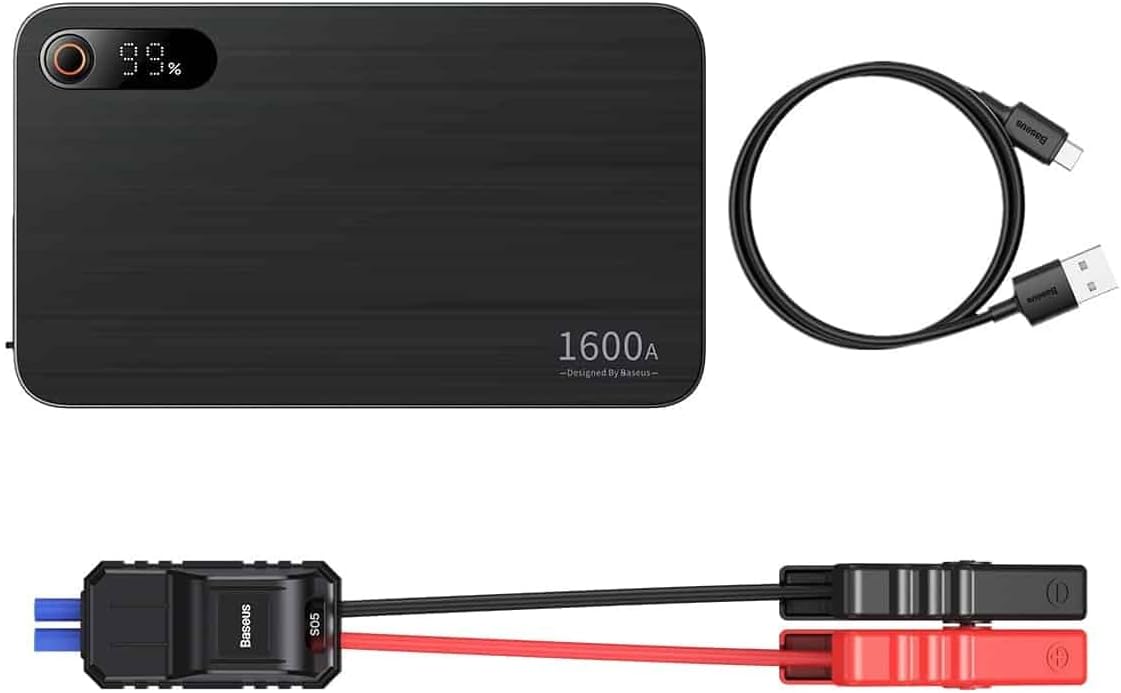
Image: Contents of the Baseus Super Energy Pro Car Jump Starter package, showing the main unit, smart jumper cables, and a USB-C charging cable.
Produto rematadoview
Familiarize yourself with the components of your Baseus Super Energy Pro Car Jump Starter:
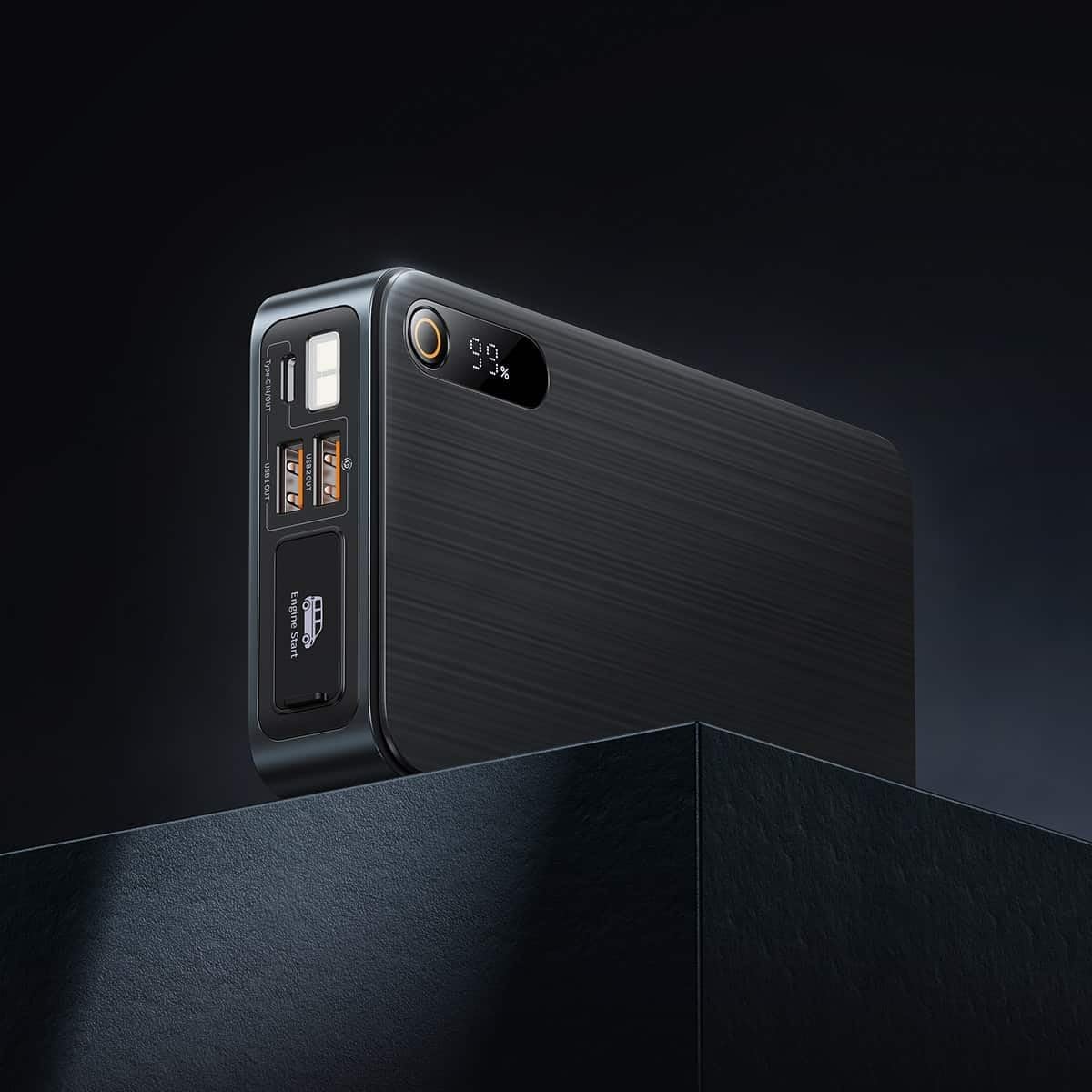
Image: Close-up of the jump starter's side panel, highlighting the various ports and the digital display.
- Pantalla dixital: Mostra o porcentaxe de batería restantetage.
- Botón de encendido: Activates the device and turns on the LED light.
- Portos de saída USB-A: For charging external devices like smartphones or tablets.
- Porto de entrada/saída tipo C: Used for charging the jump starter itself or charging other devices.
- Engine Start Port: Dedicated port for connecting the smart jumper cables.
- Linterna LED: Proporciona iluminación en ambientes escuros.

Image: The Baseus Super Energy Pro Car Jump Starter unit, displaying its digital battery indicator.
Cargando o dispositivo
Before first use, fully charge the Baseus Super Energy Pro Car Jump Starter. It is recommended to keep the device charged above 50% for optimal performance and longevity.
- Connect the provided USB-C charging cable to the Type-C port on the jump starter.
- Connect the other end of the USB-C cable to a suitable USB power adapter (not included).
- The digital display will show the charging progress. The device is fully charged when the display shows 100%.
Setup for Jump Starting
Ensure your vehicle is in Park (P) or Neutral (N) and the parking brake is engaged. Turn off all vehicle accessories (headlights, radio, air conditioning).
- Ensure the jump starter has sufficient charge (at least 50%).
- Connect the blue end of the smart jumper cables into the Engine Start port on the jump starter. Ensure it is firmly seated.
Instrucións de funcionamento (arranque auxiliar)
Siga estes pasos atentamente para arrancar o seu vehículo con axuda de cables:
- Conectar Red Clamp: Adxunta o cl vermello (+).amp of the jumper cables to the positive (+) terminal of your vehicle's dead battery.
- Conectar Negro Clamp: Coloque o negro (-) clamp of the jumper cables to the negative (-) terminal of your vehicle's dead battery.
- Indicador de verificación: Observe the indicator light on the smart jumper cable. A solid green light indicates a correct connection and that the device is ready to start. If it's red or flashing, check connections or refer to troubleshooting.
- Arrancar o vehículo: Once the indicator is green, start your vehicle's engine.
- Remove Jumper Cables: As soon as the engine starts, immediately remove the blue plug of the jumper cables from the jump starter.
- Desconectar Clamps: Despois, desconecte o cl negro (-)amp da batería do vehículo, seguido do indicador vermello (+)amp.
Allow your vehicle's engine to run for at least 20-30 minutes to recharge its battery.
Mantemento
- Almacenamento: Store the jump starter in a cool, dry place, away from direct sunlight and moisture.
- Cargando: For optimal battery life, recharge the device every 3-6 months, even if not in use.
- Limpeza: Limpa o dispositivo cun pano suave e seco. Non empregues produtos químicos agresivos nin materiais abrasivos.
- Eliminación da batería: Do not dispose of the device in household waste. Follow local regulations for proper disposal of lithium-ion batteries.
Resolución de problemas
| Problema | Causa posible | Solución |
|---|---|---|
| O vehículo non arranca | A batería do arrancador de baterías está baixa. Conexión incorrecta do cable. A batería do vehículo está gravemente danada. | Recarga o arrancador de salto. Comprobe clamp connections to battery terminals. Consulta cun mecánico profesional. |
| Jump starter not charging | Cable ou adaptador de carga avariado. Type-C port damaged. | Proba cun cable USB-C e un adaptador de corrente diferentes. Póñase en contacto co servizo de atención ao cliente. |
| Smart cable indicator is red/flashing | Conexión de polaridade inversa. Short circuit detected. Sobrecorriente/sobrevoltage. | Desconectar e volver a conectar clamps correctamente (vermello a +, negro a -). Asegurar clamps are not touching each other. Disconnect and try again after a few minutes. If problem persists, contact support. |
Especificacións
| Característica | Detalle |
|---|---|
| Marca | Baseus |
| Número de modelo | CGNL070001 |
| Corrente máxima | 1600 A |
| Composición da batería | Ion de litio |
| Tipo de servizo do vehículo | Coche |
| Dimensións do produto (L x W x H) | 10 x 5 x 1.27 cm |
| Peso do elemento | 920 g |
| Entrada/Saída | USB-A Output, Type-C Input/Output |
Garantía e Soporte
For warranty information or technical support, please refer to the warranty card included with your product or contact the retailer where you purchased the device. You may also visit the official Baseus websitio web para obter máis axuda e datos de contacto.