1. Introdución e finalview
This manual provides detailed instructions for the installation, operation, and maintenance of your Yansoo 3-Channel Dash Cam. Please read this manual thoroughly before using the device to ensure proper functionality and safety.
Características do produto:
- Gravación de 3 canles: Simultaneously captures video from the front (170° wide-angle), rear (165°), and inside (140°) of your vehicle.
- Vídeo de alta definición: Supports 1080P Front video + AHD-720P Rear video + AHD-720P Inside video.
- Visión nocturna mellorada: Features 4 unique infrared LED fill lights, F1.8 aperture, and WDR technology for optimal performance in low light.
- Emergency Lock (G-Sensor): Automatically detects sudden shocks or collisions and locks the current video footage para evitar a sobreescritura.
- Gravación en bucle: Continuously records and automatically overwrites the oldest unlocked video files cando a tarxeta de memoria estea chea.
- Monitor de estacionamento: Activates recording when motion or shocking is detected while parked (requires separate hardwire kit for 24/7 monitoring).
- Adjustable Interior Camera: The interior lens can be rotated 60° for flexible positioning.
Contido do paquete:
- Yansoo 3-Channel Dash Cam Unit
- Cámara traseira con cable
- Montaxe para ventosa
- Car Charger (Type-C)
- Cable de datos USB
- Manual de usuario
- Mounting Hardware for Rear Camera
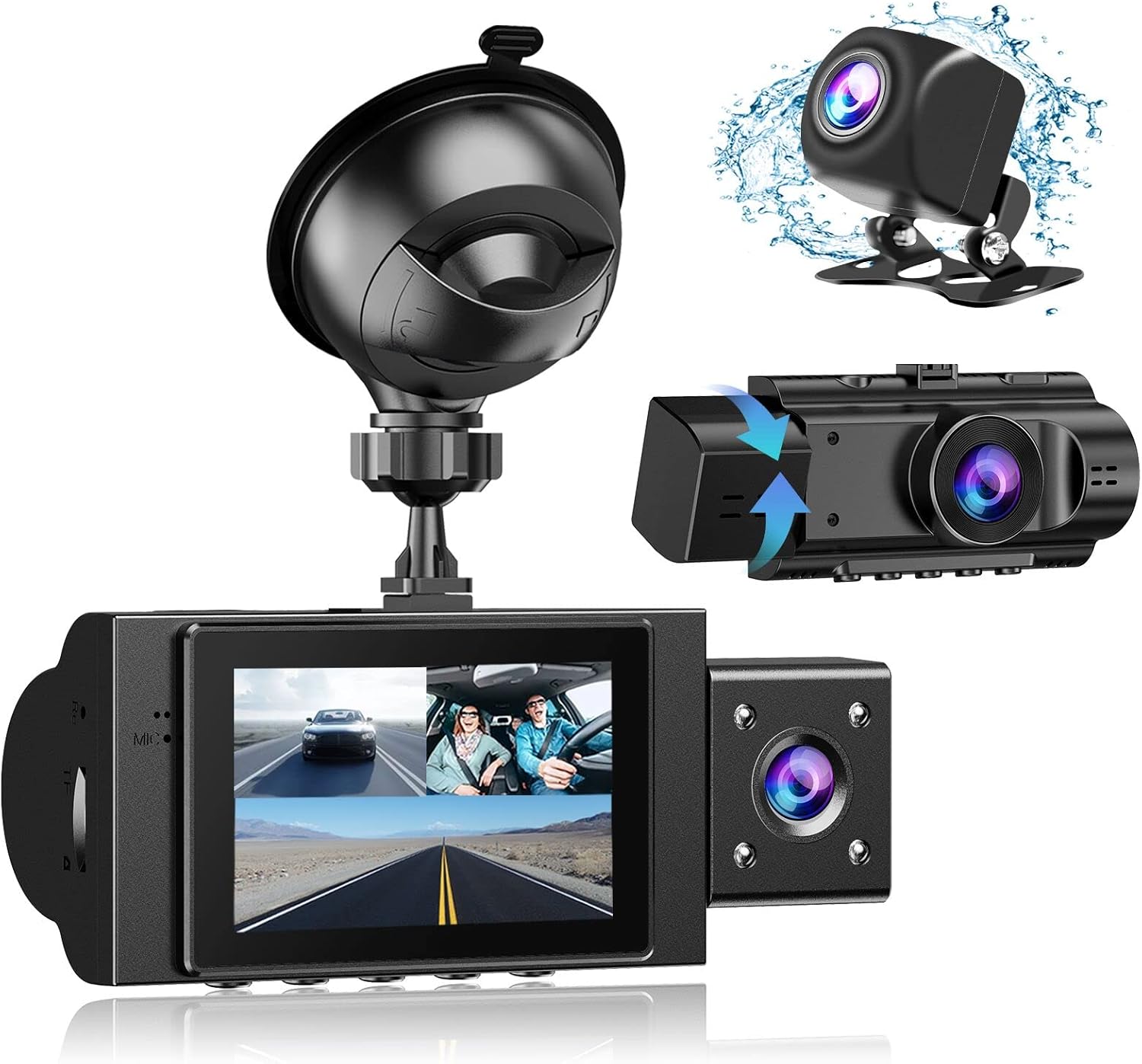
Image: The Yansoo 3-Channel Dash Cam unit with its suction cup mount and the separate rear camera, illustrating the complete package.
2. Configuración
2.1 Inserción da tarxeta de memoria
The dash cam supports Micro Memory cards up to 64GB (Class 10 or above recommended, not included). Please format the card in the camera menu before first use.
- Locate the memory card slot on the side of the dash cam.
- Insert the Micro Memory card into the slot until it clicks into place.
- To remove, gently push the card until it pops out.

Image: A four-panel illustration showing the steps to insert a Micro SD card into the dash cam's slot.
2.2 Montaxe da cámara para o salpicadero
Mount the main dash cam unit to your windshield using the provided suction cup mount. Choose a location that does not obstruct your view mentres conduce.
- Limpa ben a zona escollida do parabrisas.
- Fixe o soporte da ventosa á unidade da cámara do salpicadero.
- Prema a ventosa firmemente contra o parabrisas e xire a palanca para suxeitala.
- Axusta o ángulo da cámara para garantir unha imaxe clara view do camiño por diante.

Image: The Yansoo 3-Channel Dash Cam mounted on a car's windshield, showing its position relative to the driver's view.
2.3 Instalación da cámara traseira
The rear camera provides a view of the vehicle's rear. It can be installed inside the rear window or externally above the license plate.
- Conecta o cable da cámara traseira á unidade principal da cámara do salpicadero.
- Route the cable neatly along the vehicle's interior trim to the rear.
- Mount the rear camera in the desired location, ensuring a clear view.

Image: A diagram illustrating the recommended cable routing path for the dash cam and rear camera within a car's interior.
2.4 Conexión de alimentación
Connect the dash cam to your vehicle's cigarette lighter socket using the provided car charger. The camera will automatically power on and begin recording when the vehicle starts.

Image: The Yansoo 3-Channel Dash Cam connected to a power source, indicating its readiness for operation.
3. Instrucións de funcionamento
3.1 Funcionamento básico
- Encendido/apagado: The camera powers on/off automatically with your vehicle's ignition. You can also manually power on/off by pressing and holding the power button.
- Iniciar/Deter a gravación: Recording starts automatically when the camera powers on. Press the "OK" button to manually stop or start recording.
- Cambiar de pantalla Views: Press the "Up" button to cycle through different display modes (Front, Inside, Rear, Picture-in-Picture combinations).
Video: Demonstration of the Yansoo X88 Dash Cam's recording capabilities, showcasing its ability to capture clear video footage.
Vídeo: Footage from the Yansoo X88 Dash Cam demonstrating its clear day and night recording capabilities.
Video: A demonstration of the Yansoo X88 Dash Cam's 1080P Full HD recording quality.
3.2 Configuración do menú
To access the menu settings, stop recording (if active) by pressing the "OK" button, then press the "M" button twice.
- Resolución: Adjust video resolution for front, inside, and rear cameras.
- Gravación en bucle: Set the duration of video segments (e.g., 1, 3, 5 minutes).
- Sensibilidade do sensor G: Adjust the sensitivity of the emergency lock feature.
- Monitor de estacionamento: Enable or disable the parking monitoring function.
- Data/Hora: Establece a data e a hora correctas para a hora exactaamps nas gravacións.
- Idioma: Select your preferred language for the menu.
Video: A step-by-step guide on how to set the date and time on the Yansoo Dash Cam.
4. Mantemento
- Formato regular: Format the memory card regularly (e.g., once a month) to prevent data corruption and ensure optimal recording performance.
- Limpeza de lentes: Keep the camera lenses clean using a soft, lint-free cloth. Avoid abrasive materials that could scratch the lens.
- Actualizacións de firmware: Check the official Yansoo websitio para ver se hai actualizacións de firmware dispoñibles para mellorar o rendemento e engadir novas funcións.
- Consideracións de temperatura: Avoid exposing the dash cam to extreme temperatures for prolonged periods.
5 Solución de problemas
| Problema | Causa posible | Solución |
|---|---|---|
| A cámara non se acende. | No power from cigarette lighter; loose connection. | Check car charger connection; ensure vehicle ignition is on. |
| A gravación detense inesperadamente. | Memory card full or corrupted; G-Sensor triggered. | Format memory card; adjust G-Sensor sensitivity. |
| Vídeo footage está borroso. | Película protectora na lente; lente sucia. | Remove protective film; clean lenses with a soft cloth. |
| A data/hora é incorrecta. | Date/Time not set or battery low. | Set Date/Time in menu; ensure continuous power supply. |
| A cámara conxélase ou funciona mal. | Fallo de software. | Use a needle to press the "RE" (Reset) button. |
6. Especificacións
| Característica | Detalle |
|---|---|
| Dimensións do produto | 4.13 x 1.57 x 1.77 polgadas |
| Peso do elemento | 1.23 libras |
| Resolución de captura de vídeo | 1080p (Front), 720p (Inside & Rear) |
| Campo de View | 170° (Front), 140° (Inside), 165° (Rear) |
| Tecnoloxía de conectividade | USB |
| Característica especial | G-Sensor, Loop Recording, Parking Monitor, Night Vision |
| Tipo de montaxe | Montaxe de succión |
| Fabricante | Yansoo |
7. Garantía e soporte
Yansoo offers comprehensive after-sales support for your dash cam.
- Garantía: 1-YEAR warranty from the date of purchase.
- Servizo técnico: 7*24 hours technical service is available.
- Contacto: For any questions or issues, please contact our customer service team via Amazon or the after-sales email provided in the original product packaging.
- Manual do usuario (PDF): A digital version of the user manual is available for download aquí.


