1. Introdución
Thank you for choosing the HIKMICRO HEIMDAL H4D Digital Night Vision Monocular. This device is designed for observation in low light and complete darkness, featuring a high-resolution sensor and AMOLED display for clear imaging.
Características principais:
- 1.39" AMOLED display with 454 x 454 resolution
- High-resolution 2560 x 1440 sensor
- Integrated 850 nm infrared illuminator with smart IR function
- Day/Night/Auto/Defog modes
- Estabilización electrónica de imaxe (EIS)
- Alcance de detección de ata 200 metros
- Replaceable and rechargeable battery with over 4 hours of use
- Compact and portable design, waterproof and dustproof (IP67)
- Integrated 32 GB EMMC for storing recorded videos and photos
- Wireless connection via HIKMICRO Sight app, local album function
Contido do paquete:
- HIKMICRO HEIMDAL H4D Digital Night Vision Monocular
- Batería
- Pano para polvo
- Bolsa protectora
- Correa de pulso
- Cable USB-C
- Guía rápida
2. Produto rematadoview
Familiarize yourself with the components and controls of your HIKMICRO HEIMDAL H4D monocular.
Disposición do dispositivo
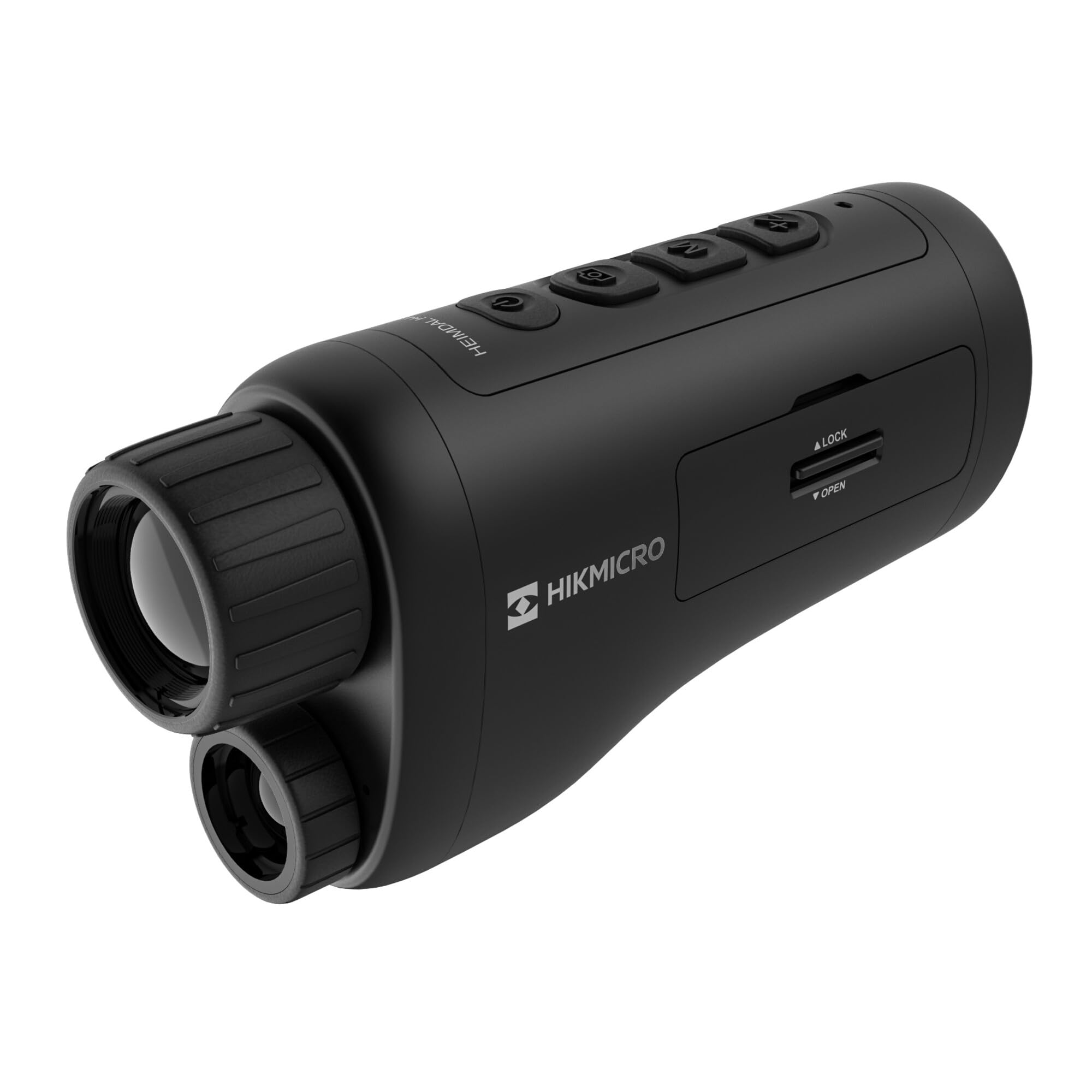
Un ángulo view of the HIKMICRO HEIMDAL H4D monocular, showing its compact, ergonomic design and the main lens.
Controis e botóns

Arriba view of the monocular showing the power button, photo/video record button, mode button, and zoom/IR adjustment buttons.
Lenses and Focus

Fronte view displaying the objective lens and the integrated infrared illuminator.
Compartimento de batería

Lado view showing the battery compartment with 'LOCK' and 'OPEN' indicators.
3. Configuración
Instalación de baterías
- Localiza o compartimento da batería no lateral do dispositivo.
- Slide the lock mechanism to the 'OPEN' position.
- Introduza a batería recargable, asegurándose de manter a polaridade correcta.
- Close the compartment and slide the lock mechanism to the 'LOCK' position.
Cargando a batería
Connect the device to a power source using the provided USB-C cable. The charging indicator will show the charging status.
Encendido inicial
Manteña premido o botón de acendido (normalmente marcado con Ⓘ) until the HIKMICRO logo appears on the display.
4. Instrucións de funcionamento
Encendido/apagado
- Encendido: Manteña premido o botón de acendido durante aproximadamente 3 segundos.
- Apagado: Manteña premido o botón de acendido durante aproximadamente 3 segundos ata que o dispositivo se apague.
Axuste do foco
Rotate the focus ring on the objective lens to achieve a clear image of your target.
Selección de modo
Press the 'M' (Mode) button to cycle through observation modes: Day, Night, Auto, and Defog.
Zoom and IR Adjustment
Use the '+' and '-' buttons to adjust the digital zoom level. These buttons also control the intensity of the infrared illuminator in night mode.
Photo and Video Recording
- Sacar a foto: Press the photo/video button (usually marked with 📷) once to capture an image.
- Gravar vídeo: Press and hold the photo/video button to start recording. Press again to stop.
Connecting to HIKMICRO Sight App
Download the HIKMICRO Sight app from your device's app store. Follow the in-app instructions to connect your monocular for live view, remote control, and media management.
5. Mantemento
Limpeza
- Use the provided dust cloth or a soft, lint-free cloth to clean the lenses.
- For stubborn dirt, use a lens cleaning solution specifically designed for optics.
- Limpe o corpo do dispositivo cun pano suave eamp pano. Non use produtos de limpeza ou disolventes abrasivos.
Almacenamento
- Store the monocular in its protective bag in a cool, dry place when not in use.
- Retire a batería se o dispositivo non se utiliza durante un período prolongado.
Coidado da batería
- Cargue a batería regularmente, mesmo se non a usa con frecuencia, para manter a súa vida útil.
- Evite temperaturas extremas durante a carga e o almacenamento.
6 Solución de problemas
Problemas comúns e solucións
| Problema | Causa posible | Solución |
|---|---|---|
| O dispositivo non se acende. | A batería está esgotada ou instalada incorrectamente. | Cargue a batería. Asegúrese de que a batería estea inserida coa polaridade correcta. |
| A imaxe está borrosa. | Focus is not adjusted. | Rotate the focus ring on the objective lens until the image is clear. |
| Poor image quality in darkness. | IR illuminator is off or set to low intensity. | Activate the IR illuminator or increase its intensity using the '+' button. Ensure you are in Night mode. |
| Cannot connect to HIKMICRO Sight app. | Bluetooth/Wi-Fi is off on device or phone, or app is not updated. | Ensure Bluetooth/Wi-Fi is enabled on both devices. Restart the app and monocular. Check for app updates. |
| O dispositivo conxélase ou deixa de responder. | Fallo temporal do software. | Realiza un reinicio suave mantendo premido o botón de acendido ata que o dispositivo se reinicie. Se o problema persiste, ponte en contacto co servizo de asistencia. |
7. Especificacións
| Característica | Detalle |
|---|---|
| Resolución de sensores | 2560 x 1440 |
| Tipo de visualización | AMOLED |
| Resolución de visualización | 454 x 454 |
| Tamaño de visualización | 1.39 polgadas (3.5 cm) |
| Iluminador infravermello | Integrated 850 nm |
| Rango de detección | Ata 200 metros |
| Almacenamento | 32 GB EMMC (internal) |
| Duración da batería | More than 4 hours (replaceable, rechargeable) |
| Clasificación impermeable | IP67 |
| Dimensións | 153 mm x 50 mm x 80 mm (6.02" x 1.97" x 3.15") |
| Peso | 375 gramos (0.83 libras) |
| Material | Plástico |
| Dispositivos compatibles | Rifle, Compound Bow |
| Tipo de montaxe | Monte Picatinny |
| Uso deportivo | Camping, Sendeirismo |
| Cor | Branco |
8. Garantía e soporte
HIKMICRO products are covered by a limited warranty. For detailed warranty information, please refer to the official HIKMICRO websitio ou póñase en contacto co seu distribuidor local.
For technical support, troubleshooting assistance, or service inquiries, please visit the official HIKMICRO support page or contact their customer service department.
Oficial Websitio: www.hikmicrotech.com


