1. Introdución
This manual provides comprehensive instructions for the Maxcom Fit FW55 Aurum Pro Smartwatch. It covers essential information regarding product setup, operation, maintenance, and troubleshooting to ensure optimal performance and user experience. Please read this manual carefully before using your device.
2. Contido do paquete
Verifique que todos os elementos que se indican a continuación estean presentes no paquete do produto:
- Maxcom Fit FW55 Aurum Pro Smartwatch
- Cable de carga
- Manual de usuario (este documento)
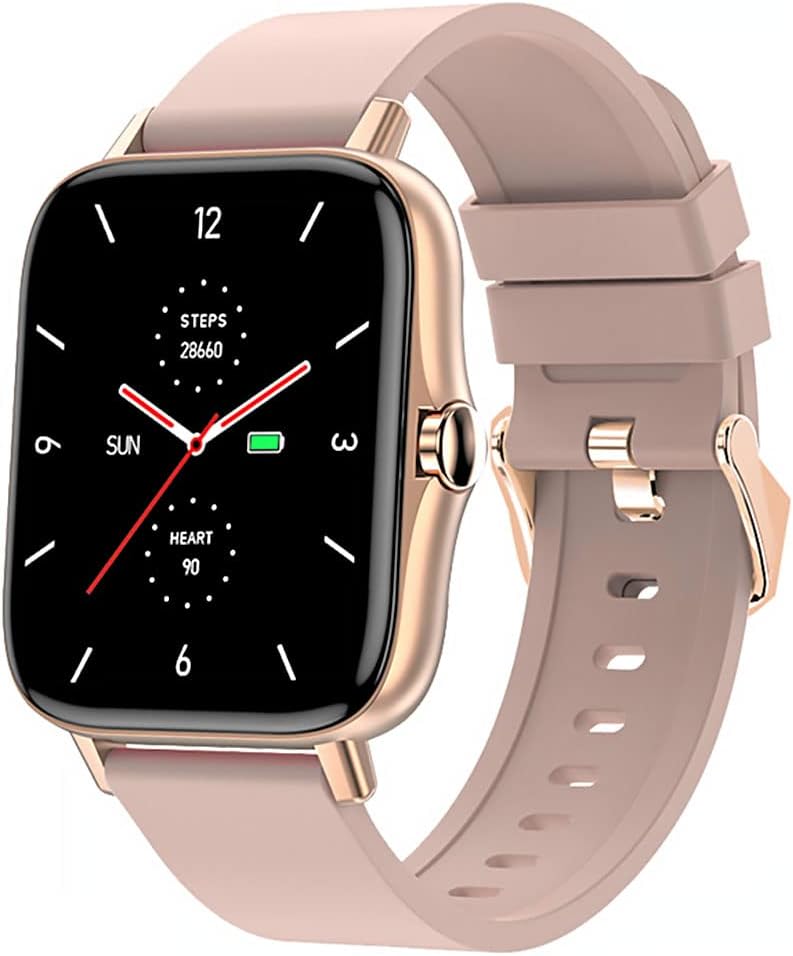
Image 1: Maxcom Fit FW55 Aurum Pro Smartwatch with a pink silicone band. The watch face displays steps, heart rate, and time.
3. Configuración
3.1. Carga do reloxo intelixente
Before initial use, fully charge your Maxcom Fit FW55 Aurum Pro Smartwatch. Connect the provided charging cable to the charging port on the back of the smartwatch and plug the other end into a standard USB power adapter (not included) or a computer's USB port. The watch display will indicate charging status.
- Ensure the charging pins are clean and properly aligned with the watch's charging contacts.
- Unha carga completa adoita tardar aproximadamente 2 horas.
3.2. Emparellamento co teu teléfono intelixente
To unlock the full functionality of your smartwatch, you need to pair it with your smartphone via Bluetooth.
- Descarga a aplicación: Busca the official Maxcom Fit application in your smartphone's app store (iOS App Store or Google Play Store) and install it.
- Activar Bluetooth: Asegúrate de que o Bluetooth estea activado no teu smartphone.
- Abre a aplicación: Launch the Maxcom Fit application on your smartphone.
- Engadir dispositivo: Follow the in-app instructions to add a new device. Select "FW55 Aurum Pro" from the list of available devices.
- Confirmar emparellamento: A pairing request may appear on both your smartphone and the smartwatch. Confirm the pairing on both devices.
Once successfully paired, the smartwatch will synchronize data with your phone, and you can customize settings through the app.
4. Funcionamento do reloxo intelixente
4.1. Acendido/apagado
- Encendido: Press and hold the side button for a few seconds until the Maxcom logo appears.
- Apagado: From the watch face, swipe down to access quick settings, or navigate to the 'Settings' menu. Select 'Power Off' and confirm. Alternatively, press and hold the side button and select 'Power Off'.
4.2. Navegación básica
- Pantalla táctil: The FW55 Aurum Pro features a 1.7-inch touch screen for intuitive interaction.
- Pase o dedo cara arriba/abaixo: Scroll through notifications, menus, or quick settings.
- Pase o dedo cara á esquerda/dereita: Access different widgets or main functions (e.g., heart rate, activity data).
- Toca: Selecciona un elemento ou confirma unha acción.
- Botón lateral: Press to return to the watch face or wake the screen. A long press may access power options.
4.3. Características clave
The Maxcom Fit FW55 Aurum Pro Smartwatch offers a range of features to support your daily activities and health monitoring:
- Seguimento da actividade: Monitoriza os pasos dados, a distancia percorrida e as calorías queimadas.
- Monitorización da frecuencia cardíaca: Ofrece datos de frecuencia cardíaca en tempo real.
- Monitorización do sono: Rexistra os patróns e a calidade do sono.
- Notificacións: Receives alerts for calls, messages, and app notifications from your paired smartphone.
- GPS: GPS integrado para un seguimento preciso das actividades ao aire libre.
- Esferas de reloxo personalizables: Personalize your watch face through the companion app.

Image 2: Maxcom Fit FW55 Aurum Pro Smartwatch featuring a gold metal mesh band. The watch face displays digital time, steps, and heart rate.
5. Mantemento
Proper care and maintenance will extend the lifespan of your smartwatch.
- Limpeza: Regularly wipe the watch screen and body with a soft, dry, lint-free cloth. For stubborn dirt, slightly dampEnxágüe o pano con auga. Evite o uso de produtos químicos agresivos ou materiais abrasivos.
- Coidado da correa: Clean the watch strap according to its material. Silicone straps can be washed with mild soap and water. Metal straps may require specific cleaning agents.
- Evita condicións extremas: Do not expose the smartwatch to extreme temperatures, direct sunlight for prolonged periods, or corrosive liquids.
- Resistencia á auga: While the watch may have some water resistance, it is not suitable for diving or high-pressure water activities. Refer to the product specifications for detailed water resistance ratings.
6 Solución de problemas
If you encounter issues with your Maxcom Fit FW55 Aurum Pro Smartwatch, try the following solutions:
- O reloxo non se acende: Asegúrate de que o reloxo estea completamente cargado. Conéctao ao cargador durante polo menos 30 minutos.
- Non se pode emparellar co teléfono intelixente:
- Asegúrate de que o Bluetooth estea activado no teléfono e no reloxo.
- Asegúrate de que o reloxo estea dentro do alcance Bluetooth do teu teléfono.
- Reinicia tanto o teléfono como o reloxo intelixente.
- Tenta desvincular e volver vincular o dispositivo a través da aplicación.
- Datos inexactos (pasos, frecuencia cardíaca):
- Asegúrate de levar o reloxo ben axustado no pulso, aproximadamente a un dedo por riba do óso do pulso.
- Limpa o sensor que está na parte traseira do reloxo.
- Update the companion app to the latest version.
- Notificacións non recibidas:
- Check notification settings in the Maxcom Fit app.
- Ensure your phone's notification permissions are granted to the app.
- Verify that the watch is successfully paired and connected to your phone.
If problems persist, consult the Maxcom support websitio ou póñase en contacto co servizo de atención ao cliente.
7. Especificacións
Below are the technical specifications for the Maxcom Fit FW55 Aurum Pro Smartwatch:
| Característica | Detalle |
|---|---|
| Marca | Maxcom |
| Número de modelo | FW55 Aurum Pro |
| Tamaño da pantalla | 1.7 polgadas |
| Tecnoloxía de conectividade | Bluetooth |
| Estándar de comunicación sen fíos | Bluetooth |
| Dispositivos compatibles | Teléfono intelixente |
| GPS | GPS integrado |
| Forma | Praza |
| Público obxectivo | Adult Unisex |
| Compoñentes incluídos | Cargador |

Imaxe 3: Fronte view of the Maxcom Fit FW55 Aurum Pro Smartwatch with a pink silicone band, highlighting the square display.
8. Garantía e soporte
Para obter información sobre a garantía e a atención ao cliente, consulte a documentación incluída coa súa compra ou visite o sitio web oficial de Maxcom. websitio. Garda o comprobante de compra para reclamacións de garantía.
For technical assistance or further inquiries, please contact Maxcom customer service through their official channels.


